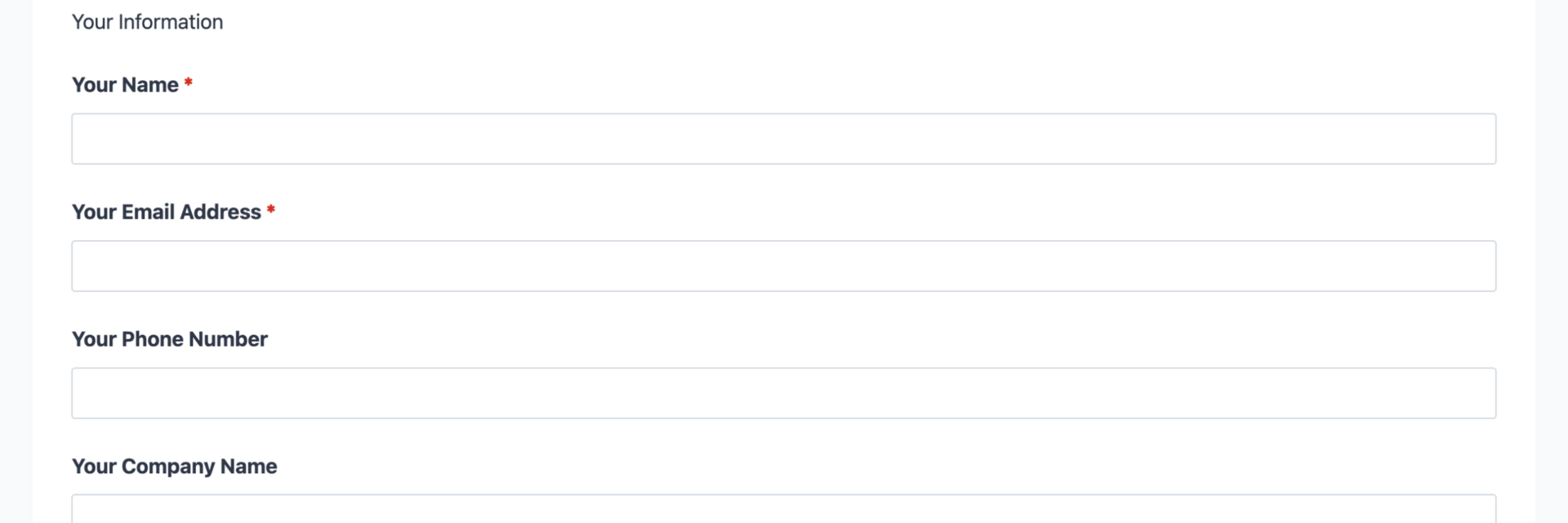
What’s Included
This referral form template is thoughtfully organized to capture all essential information while maintaining a user-friendly experience that encourages completion. The structure guides referrers through providing their own contact details, sharing prospect information, explaining the relationship context, and submitting with confidence knowing their privacy is protected.
Referrer Information Section:
- Your Name (Single Line Text): Captures the full name of the person making the referral. Required.
- Your Email Address (Email): Collects the referrer’s email for sending confirmation messages and referral program updates. Required.
- Your Phone Number (Phone): Optional contact number for the referring customer, useful for high-value referral programs where personal follow-up adds value. Optional.
- Your Company Name (Single Line Text): Identifies the referrer’s organization, particularly valuable for B2B referral programs. Optional.
Referred Prospect Information Section:
- Referred Person’s Name (Single Line Text): Full name of the individual being referred to your business. Required.
- Referred Person’s Email (Email): Primary contact method for reaching the referred prospect. Required.
- Referred Person’s Phone (Phone): Phone number for the referred individual, enabling direct outreach. Optional.
- Referred Company Name (Single Line Text): The prospect’s organization, essential for B2B referrals and contact context. Optional.
Referral Context Section:
- How do you know this person? (Select): Dropdown menu with relationship options (Family Member, Close Friend, Colleague, Business Associate, Acquaintance, Other) to help assess referral quality and personalize outreach approach. Required.
- Why are you referring this person? (Paragraph Text): Open-text field allowing referrers to explain the prospect’s needs, challenges, or why they’d benefit from your services. This context dramatically improves conversion rates by providing sales teams with conversation starters. Optional.
- Additional Comments or Special Instructions (Paragraph Text): Flexible notes field for any other relevant information, special circumstances, or handling preferences. Optional.
Privacy and Submission Section:
- Referral Consent (Single Checkbox): Confirmation that the referrer has permission to share the prospect’s contact information, addressing privacy concerns and GDPR compliance. Required.
- Spam Protection (hCaptcha): Privacy-focused CAPTCHA verification that prevents automated bot submissions while protecting user data better than traditional reCAPTCHA.
- Submit Referral (Submit): Clear submission button to complete the referral process.
Automated Responses and Smart Integrations
This referral form is designed to do more than just collect contact information—it works behind the scenes to automate confirmations, trigger personalized thank-you messages, sync with CRM platforms for seamless lead management, and connect with email marketing tools to nurture both referrers and referred prospects through targeted campaigns.
Core Actions (Always Included):
- Email Notification: Sends an immediate confirmation to the referrer thanking them for the submission, confirms next steps, and optionally includes referral program rewards information. Simultaneously sends your team a notification with complete referral details including relationship context for informed, personalized outreach.
- Success Message: Displays a clear thank-you message confirming successful submission, setting expectations for follow-up timing, and optionally promoting additional engagement opportunities like social sharing or referring more prospects.
- Redirect: Optionally redirects to a custom thank-you page featuring referral program information, testimonials from other successful referrers, or educational resources that help referrers understand your services better for future recommendations.
- Anti-spam Protection: Uses hCaptcha to prevent bot entries while maintaining a user-friendly experience and protecting referrer privacy better than traditional CAPTCHA solutions.
Enhanced Functionality (Optional):
- CRM Integration (Optional): Sync referral contacts and track submission sources to measure referral program ROI over time. Connect with OnePageCRM to automatically create new leads with referral source attribution and set follow-up reminders based on relationship strength. Other supported CRMs include HubSpot, Salesforce, Zoho, and Insightly.
- Email Marketing Integration (Optional): Add both referrers and referred prospects automatically to segmented email lists for targeted nurture campaigns. Connect with Mailchimp to create separate audience segments for referrers (thank-you sequences and program updates) and prospects (introductory sequences and value demonstrations). Other supported platforms include ActiveCampaign, Constant Contact, and AWeber.
- Conditional Logic (Optional): Create dynamic forms that adapt based on user input, such as showing different fields based on referral type or relationship strength, displaying tailored thank-you messages for high-value referrers, or requiring additional information for specific industries. Available through Conditional Logic.
- Zapier and Webhooks (Optional): Trigger automations in project management tools, send referral data to custom databases, create tasks in workflow systems, or integrate with referral reward platforms. Use Zapier to connect with over 4,000 apps or Webhooks to send data to custom applications and services.
- PDF Form Submission (Optional): Generate professional PDF records of each referral for compliance documentation, easy team sharing, or offline processing. Available through PDF Form Submission.
- Layout and Styles (Optional): Customize form appearance to match your brand perfectly with multi-column layouts, custom colors, typography adjustments, and advanced styling controls. Available through Layout and Styles.
How Can the Referral Form Be Used?
Word-of-mouth marketing remains one of the most powerful growth channels for businesses of all sizes, yet many organizations struggle to systematically capture and convert referrals. Without a structured process, potential leads slip through the cracks, referring customers don’t receive proper acknowledgment, and tracking ROI becomes impossible. This referral form template solves these challenges by creating a frictionless submission experience, automating follow-up workflows, and providing the data foundation needed to measure and optimize your referral program performance.
The form’s thoughtful design reduces completion barriers while collecting the context your team needs to personalize outreach. By capturing relationship information and referral reasoning, you gain valuable insights that dramatically improve conversion rates compared to cold outreach. The automated confirmation system ensures referrers feel appreciated immediately, increasing the likelihood they’ll refer again in the future. Integration capabilities with CRM and email marketing platforms transform one-time submissions into systematic relationship-building opportunities.
Explore the most common ways this template empowers different users:
Real Estate Agents: Build a Self-Sustaining Lead Pipeline
Real estate professionals know that referred clients close faster, negotiate less, and provide higher lifetime value than leads from other sources. Use this referral form on your website, in post-closing email campaigns, and during client appreciation events to make referring friends and neighbors effortless. The relationship context fields help you understand connection strength, allowing you to prioritize high-quality referrals from close friends and family over casual acquaintances. Integrate with your CRM platform to automatically tag referral sources, track conversion rates by referrer, and identify your most valuable brand ambassadors. Send automated thank-you emails that acknowledge the referral and optionally offer incentives like gift cards or charitable donations, strengthening customer relationships and encouraging future referrals.
Professional Services Firms: Scale Client Acquisition Through Advocacy
Consultants, attorneys, accountants, financial advisors, and marketing agencies rely heavily on reputation and referrals for business development. Deploy this form as a dedicated referral page promoted in email signatures, client portals, and quarterly business reviews. The company name fields accommodate B2B referrals, while the “why are you referring” field provides critical context about prospect needs and challenges. This information enables your business development team to craft highly personalized initial outreach that references the referrer and addresses specific pain points. Connect to Salesforce or OnePageCRM to track referral source attribution throughout the entire sales cycle, measure conversion rates, and calculate true referral program ROI.
Healthcare Providers: Grow Patient Networks Compliantly
Medical practices, dental offices, specialty clinics, and wellness centers benefit enormously from patient referrals while navigating privacy regulations. This form includes the consent checkbox required for GDPR and HIPAA-adjacent considerations, documenting that referrers have permission to share prospect contact information. Use it in patient portals, post-appointment email sequences, and printed materials in waiting rooms. The relationship field helps staff understand connection type, enabling appropriate conversation approaches when contacting referred prospects. Integrate with email marketing platforms to send educational content to both referrers (reinforcing their decision to recommend you) and referred prospects (warming them up before initial contact).
E-commerce and Subscription Businesses: Incentivize Customer Sharing
Online retailers, subscription box services, SaaS companies, and membership sites can dramatically reduce customer acquisition costs through structured referral programs. Embed this form in customer account dashboards, post-purchase email flows, and customer success touchpoints. Connect to Zapier to trigger reward fulfillment workflows, update referral tracking spreadsheets, or create coupon codes automatically. Use Conditional Logic to show different success messages based on referrer tier status or number of previous referrals, gamifying the experience and encouraging repeat advocacy.
Service Providers and Contractors: Convert Satisfied Customers into Lead Generators
Home service contractors, landscapers, cleaning companies, repair technicians, and other local service businesses thrive on neighborhood referrals. Feature this form prominently on your website’s “Refer a Friend” page and include the direct link in post-service follow-up emails alongside satisfaction surveys. The mobile-responsive design ensures customers can submit referrals immediately when friends mention needing your services, capturing leads at peak intent moments. Use the relationship and reasoning fields to understand context, then reference these details in your initial contact to establish immediate credibility and trust.
Frequently Asked Questions About the Referral Form
Is the referral form template free?
Yes, this referral form template is completely free to download and use. It works with the free version of Ninja Forms, which includes all core features needed to collect referrals, send email notifications, and manage submissions. You only pay for premium add-ons if you want enhanced functionality like CRM integration, conditional logic, or advanced styling options. There are no hidden costs, subscription fees, or usage limits on the template itself.
Do I need coding skills to customize this template?
Absolutely not. Ninja Forms’ drag-and-drop builder makes customization accessible to anyone, regardless of technical experience. You can modify field labels, adjust email notification text, change success messages, add or remove fields, and configure all settings through an intuitive visual interface. If you can use a word processor, you can customize this referral form to perfectly match your business needs.
Will this referral form work on mobile devices?
Yes, the referral form template is fully mobile-responsive and automatically adapts to any screen size. Whether your customers submit referrals from smartphones, tablets, or desktop computers, the form displays perfectly and functions flawlessly. This is crucial since many referrals happen spontaneously when customers are discussing your services with friends on their mobile devices.
Can I integrate the referral form with my CRM or email marketing tool?
Absolutely. Ninja Forms offers dedicated integrations with major CRM platforms including OnePageCRM, HubSpot, Salesforce, and Zoho. Email marketing integrations are available for Mailchimp, ActiveCampaign, Constant Contact, and many others. These integrations automatically sync referral submissions to your existing systems, eliminating manual data entry and ensuring no leads fall through the cracks.
How do I track which customers are sending the most referrals?
The form captures referrer email addresses with each submission, creating a natural tracking mechanism. Export submissions to Excel or CSV to analyze referral frequency by customer, or integrate with a CRM to maintain comprehensive referral attribution throughout your sales cycle. For advanced analytics, connect to User Analytics to track submission sources and campaign attribution, or use Zapier to send data to dedicated referral tracking platforms.
Can I add additional fields to collect more information?
Yes, you can easily add any field type available in Ninja Forms to collect additional information relevant to your referral program. Common additions include prospect industry or job title for B2B programs, estimated budget or timeline information for sales qualification, referral incentive preference (charity donation vs. personal reward), or custom fields specific to your industry or service offering. Simply drag and drop new fields into the form builder wherever you need them.
What happens to the data users enter in the referral form?
All referral submission data is stored securely in your WordPress database, giving you complete control and ownership. Unlike third-party form services that store data on external servers, Ninja Forms keeps everything on your own hosting environment. You can view, edit, export, or delete submissions at any time through the WordPress dashboard. This local storage approach enhances privacy compliance and gives you unlimited submission capacity without per-submission fees.
Does this template work with page builders like Elementor or Divi?
Yes, Ninja Forms integrates seamlessly with all major WordPress page builders including Elementor, Divi, Beaver Builder, and WPBakery. You can embed the referral form using shortcodes, dedicated page builder widgets, or direct integrations depending on your builder. This flexibility allows you to design beautiful landing pages around your referral form while maintaining full functionality.
Can I use this template on multiple websites?
Absolutely. Once you download the referral form template, you can import and use it on as many WordPress sites as you manage. There are no licensing restrictions or per-site fees. This makes it perfect for agencies managing multiple client websites, franchises maintaining consistent referral processes across locations, or anyone operating several WordPress properties.
How do I get support if I have issues with the referral form?
Ninja Forms provides extensive documentation, video tutorials, and support resources to help you succeed. Visit the documentation library for step-by-step guides covering every aspect of form building and customization. If you need personalized assistance, the support team is available to help troubleshoot issues, answer questions, and provide guidance. Premium support with faster response times is included with any paid add-on purchase.
Make it your template
Every template is ready to go live and fully customizable. Tweak a few things or renovate from the ground up. Ninja Forms gives you the tools either way.