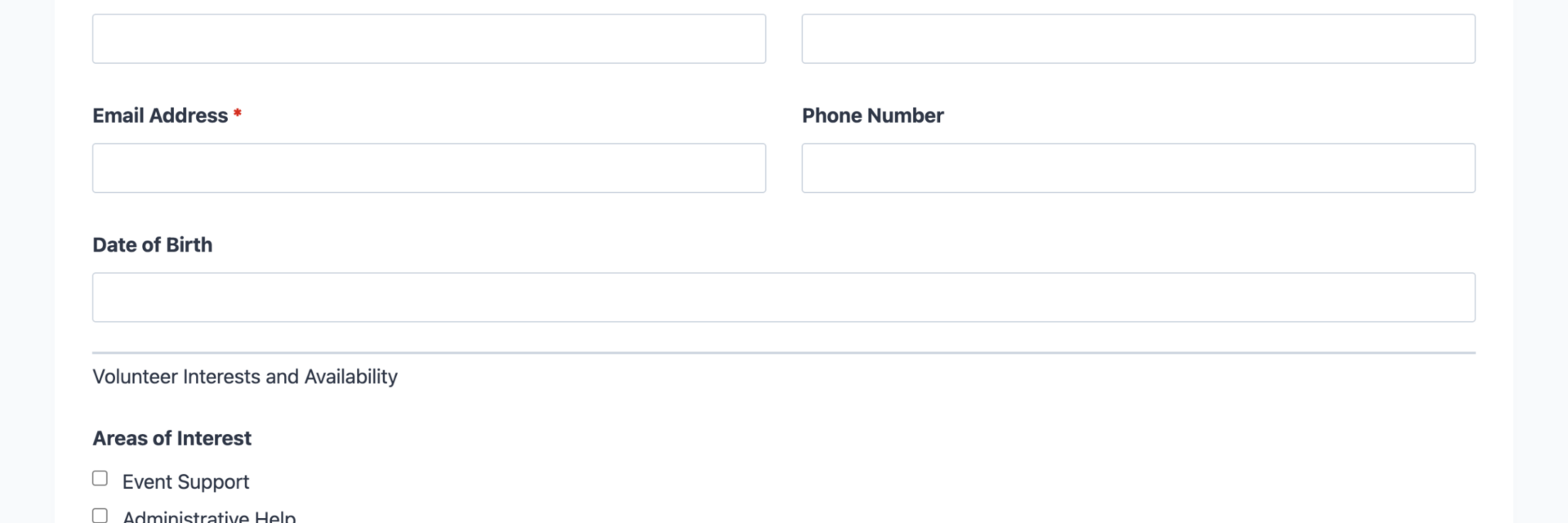
What’s Included
This volunteer application form template includes all the essential fields nonprofits and community organizations need to evaluate potential volunteers effectively. The form is structured to collect comprehensive information while maintaining a user-friendly experience that encourages completion. Each section flows logically from personal contact details through availability, skills, and background information.
Personal Information Fields
- First Name (First Name): Applicant’s given name. Required.
- Last Name (Last Name): Applicant’s family name. Required.
- Email Address (Email): Primary contact email for application updates and volunteer coordination. Required.
- Phone Number (Phone): Contact number for time-sensitive volunteer opportunities or follow-up questions. Optional.
- Date of Birth (Date): Used to verify age requirements for certain volunteer positions or youth programs. Optional.
Volunteer Interests and Availability
- Areas of Interest (Checkbox List): Select all volunteer opportunities that interest the applicant (e.g., Event Support, Administrative Help, Fundraising, Outreach, Education Programs). Allows multiple selections to match volunteers with appropriate roles.
- Availability (Checkbox List): Days and times available to volunteer (Weekday Mornings, Weekday Afternoons, Weekday Evenings, Weekends). Helps with scheduling and matching volunteers to programs that fit their schedule.
- Preferred Start Date (Date): When the applicant is available to begin volunteering. Optional.
Skills and Experience
- Relevant Skills (Paragraph Text): Open field for applicants to describe special skills, professional experience, languages spoken, or technical abilities that could benefit your organization. Optional.
- Previous Volunteer Experience (Paragraph Text): Space to describe past volunteer work, what they learned, and what they enjoyed. Helps assess commitment and experience level. Optional.
Additional Information and Consent
- How Did You Hear About Us? (Select): Dropdown to track recruitment effectiveness (Social Media, Website, Friend Referral, Community Event, Search Engine, Other). Valuable for improving volunteer outreach.
- Additional Comments or Questions (Paragraph Text): Optional field for applicants to share anything not covered in the form or ask questions about volunteer opportunities.
- Background Check Consent (Single Checkbox): Agreement to background check if required for volunteer position. Only shown for roles working with vulnerable populations. Optional.
- Privacy Policy Agreement (Single Checkbox): Confirmation that applicant has read and agrees to your organization’s privacy policy and data handling practices. Required.
Spam Protection and Submission
- Anti-Spam Verification (hCaptcha): Protects your form from automated bot submissions while maintaining accessibility and user privacy. Ninja Forms partners with hCaptcha for reliable, privacy-focused spam prevention.
- Submit Application (Submit): Button to submit the completed volunteer application.
Automated Responses and Smart Integrations
This volunteer application form template automates the entire post-submission workflow, saving your team countless hours of manual follow-up while providing a professional experience for applicants. From the moment someone submits their application, your organization can respond instantly with confirmations, route applications to the right team members, and begin building relationships with potential volunteers.
Baseline Actions Included:
- Email Notification: Sends two automated emails: a confirmation to the applicant thanking them for their interest and outlining next steps, and a detailed notification to your volunteer coordinator with the complete application for immediate review and follow-up.
- Success Message: Displays a warm thank-you message confirming their application was received and explaining what happens next, such as “Thank you for your interest in volunteering with us. We’ve received your application and will review it within 3-5 business days. Check your email for confirmation and next steps.”
- Redirect: Optionally redirects applicants to a custom page featuring your current volunteer opportunities, volunteer testimonials, or a virtual tour of your organization to keep them engaged while you process applications.
- Anti-spam Protection: Uses hCaptcha to prevent bot submissions while protecting applicant privacy and maintaining an accessible, user-friendly experience for legitimate volunteers.
Enhanced Functionality (Optional):
- File Upload Capability (Optional): Add File Uploads to allow applicants to submit resumes, certifications, letters of recommendation, or background check documents directly with their application. Set allowed file types and size limits to control what applicants can upload.
- Conditional Logic (Optional): Use Conditional Logic to show or hide specific questions based on applicant responses. For example, display background check consent only when applicants select volunteer roles involving children, or show specialized skill questions only for event support volunteers.
- Professional Styling (Optional): Enhance your form’s appearance with Layout and Styles to create multi-column layouts, match your organization’s branding, and ensure the form looks polished and professional without requiring a designer.
- CRM Integration (Optional): Connect with OnePageCRM to automatically create new volunteer contacts and set follow-up reminders for your recruitment team. Other supported CRMs include HubSpot, Salesforce, Zoho, and Insightly.
- Email Marketing Integration (Optional): Add applicants automatically to your volunteer newsletter or updates list. Connect with Mailchimp to segment volunteers by interest area or availability. Other supported platforms include ActiveCampaign, Constant Contact, and Kit.
- Zapier and Webhooks (Optional): Trigger automations in project management tools, send applications to volunteer management platforms, or create tasks in your team’s workflow system. Use Zapier to connect with over 4,000 apps or Webhooks to send data to custom applications.
How Can the Volunteer Application Form Be Used?
Every nonprofit, charity, and community organization faces the challenge of attracting committed volunteers while efficiently managing the application process. Traditional paper applications create filing nightmares, email-based inquiries scatter information across inboxes, and spreadsheet signups lack the structure needed for effective volunteer coordination. This volunteer signup form template solves these problems by centralizing applications, automating communications, and providing immediate access to applicant information in an organized, searchable format.
The form’s flexible design accommodates various volunteer recruitment scenarios while maintaining data consistency that makes comparing and evaluating candidates straightforward. Whether you’re managing ongoing volunteer programs or recruiting for specific events, the structured application process helps you identify the right volunteers faster and maintain professional communication throughout the recruitment journey. Explore the most common ways this template empowers different organizations:
Nonprofit Organizations: Build Your Volunteer Community
Nonprofit organizations rely on volunteers to extend their mission beyond paid staff capacity. This volunteer registration form template helps nonprofits systematically recruit, screen, and match volunteers to appropriate roles based on skills, interests, and availability. Use the Areas of Interest checkbox field to let applicants select from your various programs such as food bank operations, mentoring, administrative support, or fundraising events. The availability tracking ensures you match volunteers to opportunities that fit their schedules, reducing no-shows and improving volunteer retention.
Connect the form to your email marketing platform to automatically segment volunteers by interest area, sending targeted communications about relevant opportunities. Integrate with your CRM to track volunteer engagement over time, identify your most active contributors, and recognize milestones. Add the optional File Uploads add-on to collect background check documents for volunteers working with vulnerable populations, keeping all necessary documentation in one centralized location.
Community Organizations: Recruit Event Volunteers
Community centers, libraries, festivals, and local events need reliable volunteers for setup, registration, activities, and cleanup. This volunteer application form template streamlines event volunteer recruitment by capturing applicant information once, then matching volunteers to specific event roles based on their indicated interests and availability. The Previous Volunteer Experience field helps identify experienced volunteers who can take on leadership roles or train newcomers, while the Skills field reveals hidden talents like bilingual abilities, technical knowledge, or professional expertise that could enhance event execution.
Use the Preferred Start Date field to align volunteer onboarding with your event timeline, and leverage automated email confirmations to keep volunteers engaged between application and event day. The Conditional Logic add-on can show event-specific questions based on selected interest areas, gathering targeted information without overwhelming applicants with irrelevant questions. Integrate with Trello to automatically create volunteer assignment cards organized by event role or time slot.
Animal Shelters and Rescues: Find Compassionate Caregivers
Animal welfare organizations need volunteers who are passionate, reliable, and capable of handling the physical and emotional demands of animal care. This template helps shelters screen for specific animal handling experience, availability for regular shifts, and comfort levels with various tasks from dog walking to administrative work. Customize the Areas of Interest field to include shelter-specific roles like Animal Socialization, Adoption Events, Foster Care Coordination, Facility Maintenance, or Transport Services.
The Background Check Consent checkbox ensures compliance with shelter policies for volunteers working directly with animals or accessing sensitive areas. Add the File Uploads add-on to collect vaccination records, veterinary references, or certifications in animal handling. Connect to Zapier to trigger automated workflows in your volunteer management system, creating shift assignments and sending reminder notifications about scheduled volunteer sessions.
Religious Organizations: Engage Your Congregation
Churches, synagogues, mosques, and other faith communities depend on member volunteers for worship services, religious education, community outreach, and facility management. This volunteer signup form helps religious organizations systematically identify member talents and availability, matching congregants to service opportunities that align with their passions and schedules. Customize interest areas to reflect your specific ministry needs such as Worship Team, Children’s Ministry, Hospitality, Outreach Programs, or Building Maintenance.
The form’s professional structure demonstrates respect for volunteers’ time while the automated confirmation email reinforces that their willingness to serve is valued and appreciated. Use the How Did You Hear About Us field to track which recruitment approaches resonate most with your congregation, whether announcement bulletins, personal invitations, or website promotion. Integrate with your email platform to send ministry-specific updates and volunteer appreciation messages that strengthen community bonds.
Educational Institutions: Support Student Success
Schools, universities, and educational programs benefit enormously from parent volunteers, community mentors, and alumni who contribute time and expertise. This template helps educational institutions recruit volunteers for classroom assistance, tutoring, event chaperoning, career mentoring, or administrative support while capturing the specific skills and background checks required for school environments. The Skills and Experience fields identify professionals who can speak to classes, provide career guidance, or offer specialized instruction in areas like music, art, or technology.
Customize the background check consent field to comply with school district requirements for volunteers working with students. Add Conditional Logic to display grade-level or subject-specific questions only when relevant to the volunteer’s selected interest areas. Connect to your school’s CRM platform to maintain a searchable database of volunteer expertise, making it easy to identify the perfect guest speaker or field trip chaperone when needs arise.
Frequently Asked Questions About the Volunteer Application Form
Is the volunteer application form template free?
Yes, this volunteer application form template is completely free to download and use. It works with the free core version of Ninja Forms, which includes all essential features for collecting and managing volunteer applications including unlimited form fields, email notifications, submission storage, and mobile responsiveness. The template provides full volunteer recruitment functionality without requiring any paid add-ons, though optional extensions like File Uploads for resume submission or Conditional Logic for dynamic field display can enhance the experience if your organization needs advanced capabilities.
Do I need coding skills to customize this volunteer signup form?
No coding knowledge is required. Ninja Forms features an intuitive drag-and-drop builder that lets you modify field labels, add or remove questions, change the order of fields, adjust required/optional status, and customize email notifications through a visual interface. Simply click on any form element to edit its properties, drag fields to reorder them, or add new fields from the field library. All changes happen in real-time preview, so you can see exactly how your form will appear to applicants before publishing.
Will this volunteer application form work on mobile devices?
Absolutely. The volunteer application form template is fully mobile-responsive and automatically adapts to any screen size, ensuring a seamless experience whether applicants submit from smartphones, tablets, or desktop computers. The form fields resize appropriately, checkboxes and date pickers are optimized for touch interaction, and all text remains readable without zooming. This mobile optimization is critical since many volunteers browse nonprofit websites and submit applications during commutes or breaks when they’re away from desktop computers.
Can I integrate the volunteer form with my CRM or email marketing tool?
Yes. Ninja Forms offers extensive integration options to connect your volunteer application form with popular CRM platforms and email marketing services. Use OnePageCRM to automatically create volunteer contact records and set follow-up reminders, or connect to HubSpot, Salesforce, or Zoho for enterprise-level volunteer management. Email marketing integrations with Mailchimp, Constant Contact, and other platforms let you automatically add applicants to volunteer newsletters or segment them by interest areas for targeted communications.
Can I add additional fields to collect more information?
Yes, you can easily add unlimited custom fields to match your organization’s specific screening requirements. The Ninja Forms builder provides access to over 28 field types including text fields for open-ended responses, dropdown menus for predefined options, checkbox lists for multiple selections, file upload fields for documents, and even calculation fields for complex data processing. Simply drag any field type from the field library into your form, position it where needed, and configure its settings. Common additions include emergency contact information, t-shirt sizes for volunteer events, specific skill certifications, or language proficiency questions.
What happens to the data applicants enter?
All volunteer application data is stored securely in your WordPress database, giving you complete control over sensitive applicant information. Unlike third-party form services that store data on external servers, Ninja Forms keeps everything on your own hosting environment, ensuring compliance with data privacy regulations and organizational policies. You can view all submissions in the WordPress dashboard, export them to CSV for analysis, set up automated email notifications to route applications to appropriate reviewers, and configure GDPR-compliant data handling including the ability for applicants to request data deletion. The template includes hCaptcha spam protection to ensure you only store legitimate applications from real volunteers.
Does this template work with page builders like Elementor or Divi?
Yes, the volunteer application form integrates seamlessly with all major WordPress page builders including Elementor, Divi, Beaver Builder, WPBakery, and others. Each page builder typically includes a dedicated Ninja Forms widget or module that lets you select and embed your form directly within the builder interface, maintaining full control over surrounding design elements, layout, and styling. The form inherits your page builder’s responsive settings and can be combined with other design elements like volunteer testimonials, mission statements, photo galleries, or calls to action to create compelling volunteer recruitment pages.
Can I use this volunteer application form template on multiple websites?
Yes, you can use this template on as many websites as you need without restrictions. The .nff template file can be imported into any WordPress site running Ninja Forms, making it ideal for nonprofit networks, franchise organizations managing multiple locations, or web developers who build sites for multiple nonprofit clients. Each installation can be customized independently to reflect the specific needs and branding of different organizations while maintaining the proven structure and workflow that makes volunteer recruitment efficient.
How do I get support if I have issues with the volunteer form?
Ninja Forms provides comprehensive support resources including detailed documentation, video tutorials, and an active support team. Access the Ninja Forms documentation for step-by-step guides on form building, field configuration, email setup, and troubleshooting common issues. Free plugin users can get help through the WordPress.org support forum, while users with premium add-ons receive priority support through the Ninja Forms support team. The documentation includes specific guides for nonprofit use cases, volunteer management workflows, and integration with popular nonprofit tools.
Can I require background checks or other screening documents?
Yes. The template includes an optional Background Check Consent checkbox field that you can enable for positions requiring screening. To collect actual background check documents, certificates, or other files, add the File Uploads add-on which allows you to specify accepted file types (PDF, DOC, JPG, etc.), maximum file sizes, and upload destinations. You can require file uploads for certain volunteer roles while making them optional for others, and use Conditional Logic to show document upload fields only when applicants select roles that require screening, streamlining the application process for everyone.
Make it your template
Every template is ready to go live and fully customizable. Tweak a few things or renovate from the ground up. Ninja Forms gives you the tools either way.