Your Email List, Working Harder
Connect your WordPress forms to Kit (formerly ConvertKit) and turn every submission into a segmented subscriber automatically.
Risk-Free 14 Day Guarantee
You'll love it or we'll refund you fully. No questions asked.
If you’re already using Kit (formerly ConvertKit) to run your email marketing, the Kit add-on for Ninja Forms closes the gap between your WordPress forms and your Kit account. Every submission goes straight into Kit as a new subscriber, complete with the data you need to segment, tag, and trigger the right sequences automatically.
This is different from Kit’s own WordPress plugin, which embeds Kit-hosted forms into your site. Ninja Forms builds WordPress-native forms you design yourself, then pushes the submission data into Kit. You get full control over form layout, field types, and conditional logic while Kit handles the email side.
With the Kit add-on for Ninja Forms, you can:
Key Features of the Kit Add-On
Subscriber email mapping
Kit requires an email address to save a new subscriber. The add-on connects your form’s email field directly to that Kit requirement so every submission creates a real subscriber record. No extra configuration needed once the field is mapped.
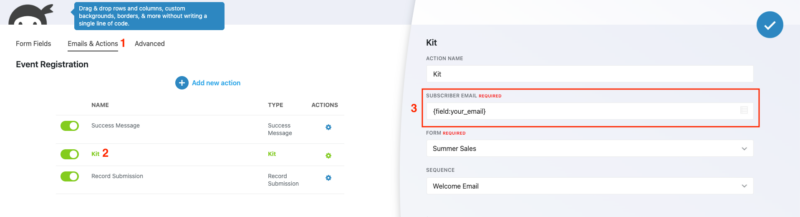
Kit form selection
Each submission is associated with a specific Kit form or landing page in your account. You choose which Kit form new subscribers are added to, keeping your Kit account organized the way you intend rather than lumping all form submissions into one place.
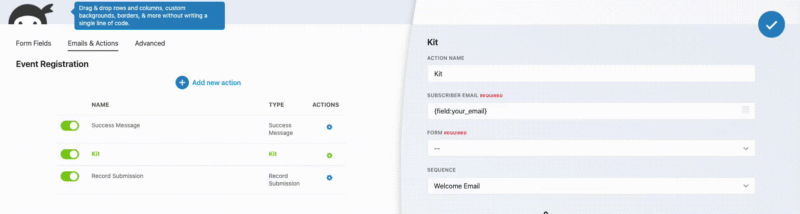
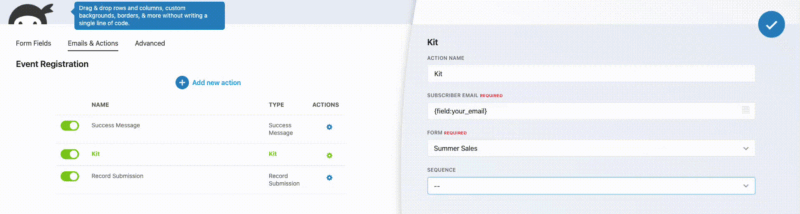
Sequence enrollment
The moment someone submits your form, they can be enrolled into a Kit email sequence automatically. Point the add-on at any sequence in your account, and new subscribers start receiving your onboarding flow, welcome series, or drip campaign without any manual steps. This is one of the most powerful things the integration does and it takes about ten seconds to configure.
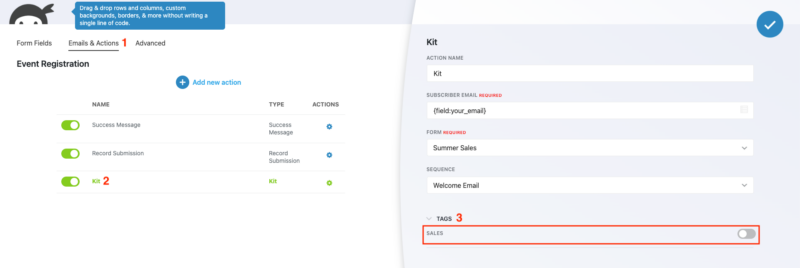
Tag assignment
Apply Kit tags to new subscribers at the moment of submission. Use tags to record where a subscriber came from, what they expressed interest in, or which audience segment they belong to. Combined with Kit’s tag-based automations, this turns every form submission into a segmentation event.
Custom field mapping
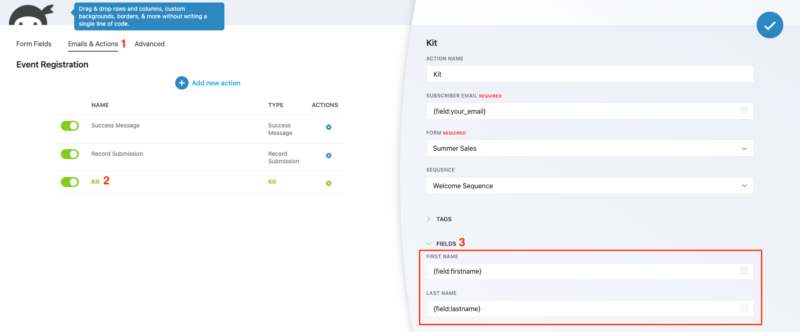
Beyond email, you can map any form field to a Kit subscriber custom field. First name, phone number, company, or any custom field you’ve set up in your Kit account can all be populated at submission time. Your subscriber records in Kit stay complete from the first touch.
Multi-account support
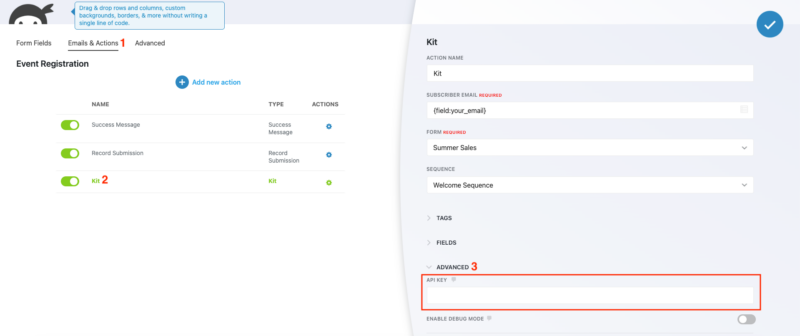
Running multiple Kit accounts or routing different leads to different accounts? You can add multiple Kit actions to a single Ninja Forms form and use Ninja Forms’ Conditional Logic add-on to control which action fires based on the subscriber’s answers. Different audience segments go to different Kit accounts without any manual sorting.
Start Growing Your Kit List From WordPress
The Kit add-on is included with any Ninja Forms membership, or available as a standalone purchase. Pick your plan above and start sending form submissions directly into Kit.
Priority email support and 14-day money-back guarantee included.
Ninja Forms vs. Kit’s Own WordPress Plugin
Kit offers its own official WordPress plugin, and it’s worth being clear about what each one does. Kit’s plugin embeds Kit-hosted forms directly into your WordPress pages. Those forms are designed and managed inside Kit, not WordPress.
The Ninja Forms Kit add-on works differently. You build the form in WordPress using Ninja Forms’ drag-and-drop builder. You control every field, label, style, and layout. When someone submits the form, Ninja Forms sends the data to Kit as a new subscriber. The form lives on your site; Kit gets the subscriber data.
If you need a single opt-in box and Kit’s hosted form is fine, Kit’s plugin handles that well. If you need a multi-step form, conditional fields, file uploads, payment collection, or any combination of those on a single page, Ninja Forms builds the form and the Kit add-on moves the data where it needs to go.
How the Kit WordPress Integration Works
Setup takes a few minutes. Connect your Kit account by entering your V3 API key in the Ninja Forms settings panel. Once connected, your Kit forms, sequences, and tags all become available inside the Ninja Forms form builder.
From there, add a Kit action to any form, map the email field, choose a Kit form, and optionally select a sequence or tags. Save the form and it’s live. Every submission routes to Kit automatically, and Kit handles everything downstream from there.
Common Use Cases
- Trigger onboarding sequences from a lead magnet form: Someone downloads a guide, submits the form, and lands in your welcome sequence immediately. No delay, no manual import. Start with a pre-built lead generation template or build your own.
- Segment leads by interest at the point of signup: Use a dropdown or radio field to ask what a subscriber is interested in, then map that answer to a Kit tag so each subscriber enters the right nurture path.
- Route leads to the right Kit account for multi-brand operations: Use Conditional Logic to send form submissions to different Kit accounts based on which product or brand the subscriber selected.
- Collect richer subscriber data from a gated content form: Map name, company, and any custom fields to Kit subscriber records so your email personalization has more to work with from day one.
- Build a contact page that also grows your list: Add an opt-in checkbox to a standard contact form. When checked, the submission triggers the Kit action and adds the subscriber; when unchecked, it skips Kit entirely. Conditional Logic handles the branching.
- Run event registrations that populate a Kit sequence: Collect RSVP submissions and automatically enroll registrants into a pre-event drip sequence with reminders and follow-ups.
Connect Your WordPress Forms to Kit Today
The Kit add-on is included with any Ninja Forms membership, or available as a standalone purchase. Pick your plan above and every new form submission can become a Kit subscriber enrolled in the right sequence from the start.
Priority email support and 14-day money-back guarantee included.
Frequently Asked Questions
-
Install the Kit add-on for Ninja Forms, then enter your Kit V3 API key in the Ninja Forms settings panel. Once connected, add a Kit action to any form, map the email field, and choose a Kit form from your account. Every submission after that creates a Kit subscriber automatically.
-
Yes. The Kit add-on connects Ninja Forms to your Kit account and supports subscriber email mapping, Kit form selection, sequence enrollment, tag assignment, and custom field mapping. It works with both the current Kit branding and legacy ConvertKit accounts.
-
Kit's official WordPress plugin embeds Kit-hosted forms into your WordPress pages. Those forms are created and managed inside Kit. The Ninja Forms Kit add-on works differently: you build a fully custom form in WordPress using Ninja Forms, and when it's submitted, the data is sent to Kit as a new subscriber. Different tools, different jobs.
-
Yes. The Kit add-on lets you select any sequence from your Kit account inside the Ninja Forms action settings. When someone submits the form, they're enrolled in that sequence immediately, so your onboarding or drip campaign starts without any manual steps.
-
Yes. Beyond the required email field, you can map any Ninja Forms field to a Kit subscriber custom field. Name, phone number, company, or any custom field you've created in Kit can be populated at the time of form submission.
-
Yes. You can add multiple Kit actions to a single form, each with a different Kit API key. Use Ninja Forms' Conditional Logic add-on to control which Kit account receives a submission based on the subscriber's form answers.
-
The Kit add-on is included with any Ninja Forms membership, starting with the Plus plan. It's also available as a standalone purchase if you only need the Kit integration without a full membership.
-
Licenses are subscription based and will auto-renew each year unless cancelled. If cancelled, you may still use your extensions but will no longer receive important updates or support once the license expires.