What’s Included
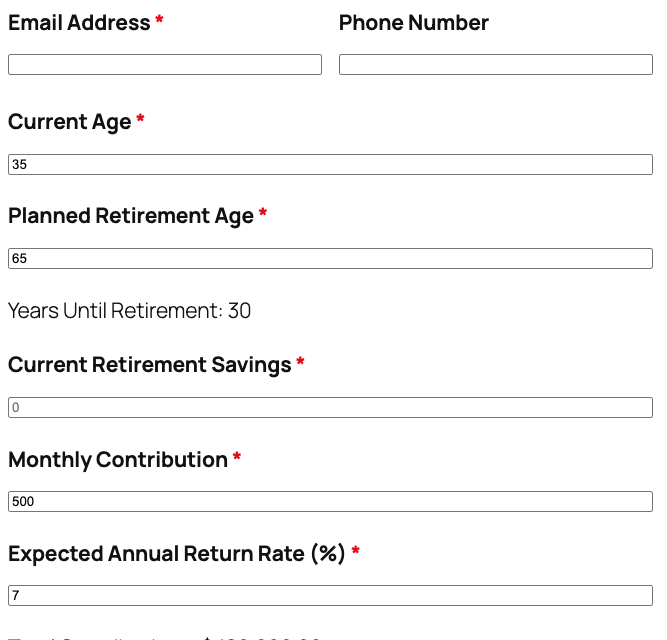
This retirement calculator template includes everything you need to help users estimate their retirement savings potential and capture qualified leads. The form combines essential user information fields with powerful calculation fields that project retirement savings using proven financial formulas. Each field is carefully designed to gather the right data while maintaining a clean, professional appearance that encourages completion.
User Information Fields:
- First Name (Single Line Text): Captures the user’s first name for personalized email results and follow-up communications. Required.
- Last Name (Single Line Text): Captures the user’s last name to complete contact information. Required.
- Email Address (Email): Collects the user’s email address to send detailed retirement projection results and enable future nurture campaigns. Includes automatic validation to ensure proper email format. Required.
- Phone Number (Phone): Optional field for users who prefer phone consultations or want to receive follow-up calls about their retirement planning needs. Optional.
Retirement Calculation Input Fields:
- Current Age (Number): User’s current age in years, used to calculate years until retirement and projection timeline. Minimum value: 18, Maximum value: 100. Required.
- Planned Retirement Age (Number): The age at which the user plans to retire, used to determine the investment time horizon. Minimum value: 50, Maximum value: 100. Required.
- Current Retirement Savings (Number): Total amount currently saved for retirement across all accounts (401k, IRA, savings, etc.). Users enter whole dollar amounts. Minimum value: 0. Required.
- Monthly Contribution (Number): Amount the user plans to contribute to retirement savings each month. Helps project future account growth. Minimum value: 0. Required.
- Expected Annual Return Rate (%) (Number): Estimated average annual return rate as a percentage (e.g., 7 for 7%). Based on historical market performance and risk tolerance. Typical range: 4-10%. Default value: 7. Required.
Results Display Fields:
- Years Until Retirement (HTML): Displays the calculated number of years between current age and planned retirement age using the merge tag {calc:years_until_retirement}. Updates automatically as users change their ages.
- Total Contributions (HTML): Shows the total amount the user will contribute over their working years (monthly contribution × 12 × years until retirement) using the merge tag {calc:total_contributions}. Formatted as currency.
- Projected Retirement Savings (HTML): Displays the estimated total retirement savings at retirement age, calculated using the compound interest formula that factors in current savings, monthly contributions, expected return rate, and years until retirement. Uses the merge tag {calc:projected_savings}. This is the primary result users want to see.
- Results Summary (HTML): Provides context and next steps, such as “Based on your inputs, you’re projected to have [projected savings] at age [retirement age]. Schedule a consultation to create a personalized retirement strategy.”
Spam Protection & Submission:
- Spam Protection (hCaptcha): Prevents automated bot submissions while respecting user privacy. Displays only when suspicious activity is detected, maintaining a smooth user experience for legitimate visitors. Not required.
- Calculate My Retirement (Submit): Submit button that triggers the calculation and displays results. Custom label makes the action clear and compelling.
Note on Calculations: This template uses Ninja Forms’ free built-in Calculations feature to perform all retirement projections automatically. The calculations use the future value of a series formula: FV = PV(1+r)^n + PMT × [((1+r)^n – 1) / r], where PV is present value (current savings), PMT is monthly payment (contribution), r is the monthly interest rate (annual rate / 12 / 100), and n is the number of months until retirement. This provides accurate retirement savings projections without requiring any paid add-ons or external services.
Automated Responses and Smart Integrations
This form is designed to do more than just collect information -it works behind the scenes to automate confirmations, deliver personalized retirement projection results, and sync with external tools like email marketing platforms and CRMs for seamless follow-up and relationship building.
Core Actions (included in every form):
- Email Notification: Sends a confirmation email to the submitter with their complete retirement projection results, including projected savings at retirement age, total years until retirement, and total contributions. A separate notification goes to your team with all submission details for personalized follow-up and consultation scheduling.
- Success Message: Displays a clear thank-you message with next steps, such as checking email for the detailed retirement analysis, scheduling a complimentary financial planning consultation, or exploring additional retirement planning resources on your site.
- Redirect: Optionally redirects users to a custom thank-you page with downloadable retirement planning guides, links to schedule a consultation, or related articles about maximizing retirement contributions and investment strategies.
- Anti-spam Protection: Uses hCaptcha to prevent bot entries while maintaining a user-friendly experience and protecting user privacy. hCaptcha is Ninja Forms’ preferred CAPTCHA partner for reliable spam prevention.
Enhanced Functionality (Optional):
Take your retirement calculator to the next level with these optional add-ons that enhance functionality without being required for the template to work:
- CRM Integration (Optional): Sync contacts and submissions to track client progress over time. Connect with OnePageCRM to automatically create new leads and set follow-up reminders for retirement planning consultations. Other supported CRMs include HubSpot, Salesforce, Zoho, and Insightly.
- Email Marketing Integration (Optional): Add subscribers automatically and trigger targeted retirement planning campaigns. Connect with Mailchimp, ActiveCampaign, or Constant Contact to segment users based on retirement timeline (near retirement vs. decades away) and send personalized content.
- PDF Form Submission (Optional): Generate professional PDF reports of retirement projections that users can save, print, or share with family members. Use PDF Form Submission to create branded retirement analysis documents that enhance your professional credibility.
- Conditional Logic (Optional): Show or hide fields based on user responses. For example, display additional questions about pension income for users over age 60, or show 401(k) rollover guidance for users planning to retire within 5 years. Enable with Conditional Logic for a more personalized experience.
- Layout & Styles (Optional): Create a polished, professional calculator with custom colors, fonts, and multi-column layouts that match your brand. The Layout and Styles add-on lets you design beautiful forms without hiring a developer.
- Zapier and Webhooks (Optional): Trigger automations in calendars, task management tools, or custom data pipelines. Use Zapier to connect with over 4,000 apps or Webhooks to send retirement projection data to custom applications and financial planning software.
How Can the Retirement Calculator Be Used?
Retirement planning is one of the most important -and most intimidating -financial decisions people face. Whether someone is just starting their career or approaching retirement age, understanding whether they’re saving enough can mean the difference between a comfortable retirement and financial stress. This retirement calculator template addresses that universal need by providing instant, personalized projections that help users visualize their financial future and take action today.
The calculator transforms complex retirement planning math into simple, understandable results. Instead of manually crunching numbers in spreadsheets or paying for expensive financial planning software, users get immediate answers to their most pressing question: “Will I have enough money to retire?” By combining user inputs like current savings, monthly contributions, and expected returns with proven compound interest formulas, the calculator delivers accurate projections that help users make informed decisions about their retirement strategy.
Beyond the immediate value of retirement projections, this template serves as a powerful lead generation tool. Users willingly share their contact information in exchange for personalized results, giving you qualified prospects who are actively thinking about their financial future. The calculator positions you as a helpful resource first, creating natural opportunities for consultation bookings, financial planning services, and ongoing client relationships built on trust and value.
Explore the most common ways this template empowers different users:
Financial Advisors: Qualify and Convert Prospects Automatically
Financial advisors constantly need qualified leads who are serious about retirement planning. This calculator serves as a 24/7 lead qualification tool on your website, capturing contact information from visitors who are actively researching their retirement needs. When someone takes the time to input their financial details and calculate their retirement savings, they’re demonstrating genuine interest -making them far more qualified than generic website visitors. The calculator automatically sends their results via email along with your contact information and a clear call-to-action to schedule a complimentary consultation. You can integrate the form with OnePageCRM or Salesforce to automatically create lead records with custom fields showing retirement timeline, current savings levels, and monthly contribution capacity -giving you valuable context before your first conversation. Add the PDF Form Submission add-on to generate professional retirement analysis reports that enhance your credibility and provide prospects with a tangible reminder of your expertise.
Wealth Management Firms: Educate Clients and Demonstrate Value
Wealth management firms can use this retirement calculator as an educational resource that demonstrates expertise while capturing new client inquiries. By featuring the calculator prominently on your “Retirement Planning” service page, you provide immediate value to visitors while positioning your firm as the go-to retirement planning experts. The calculator helps prospects understand complex retirement planning concepts through hands-on interaction, making abstract ideas like compound interest and long-term savings growth tangible and real. When results show someone may fall short of their retirement goals, it creates a natural opening for your services -not through high-pressure sales tactics, but through helpful guidance. Connect the form to Mailchimp or ActiveCampaign to automatically segment users based on their retirement timeline and send targeted nurture campaigns: near-retirees receive content about Social Security optimization and withdrawal strategies, while younger users get information about maximizing employer 401(k) matches and Roth IRA conversions.
Retirement Planners: Streamline Initial Consultations
Retirement planning specialists can use this calculator to gather essential client information before initial consultations, making meetings more productive and focused. Instead of spending the first 30 minutes of every discovery call collecting basic financial data, you receive detailed inputs -current savings, contribution rates, retirement goals -before the prospect ever picks up the phone. This allows you to prepare personalized recommendations in advance and dive straight into strategy during your consultation. The automated email confirmation can include links to your calendar for easy scheduling, pre-meeting questionnaires to gather additional context, and educational resources that prepare clients for more sophisticated retirement planning conversations. Use Zapier to automatically create calendar events, task reminders, or entries in your financial planning software when someone submits the calculator, ensuring no lead falls through the cracks.
Personal Finance Bloggers: Increase Engagement and Build Your Email List
Personal finance bloggers and content creators can use this retirement calculator as a high-value lead magnet that grows their email list while providing genuine utility to readers. Interactive calculators generate significantly more engagement than static blog posts -visitors spend more time on your site, return more frequently, and are more likely to share the tool with friends and family planning their retirement. Position the calculator as a free resource in exchange for email subscription, then use that list to promote affiliate products (investment platforms, financial planning services, retirement planning books), drive traffic to monetized content, or offer premium courses and coaching services. The calculator serves as evergreen content that continues attracting search traffic and building your list long after publication. Embed the calculator on a dedicated page optimized for SEO keywords like “retirement savings calculator” and “retirement planning calculator,” then promote it through Pinterest, social media, and email campaigns to maximize visibility and subscriber growth.
HR Departments: Help Employees Plan for Retirement Benefits
Human resources departments can add this calculator to employee benefit portals or company intranets to help employees understand and maximize their retirement benefits. Many employees struggle to determine how much to contribute to their 401(k) or whether they’re on track to meet retirement goals -leading to underutilization of valuable employer benefits like matching contributions. By providing an easy-to-use calculator, HR teams empower employees to make informed decisions about retirement contributions, see the long-term impact of employer matches, and feel more confident about their financial future. This increases employee satisfaction with benefits packages and may improve retention by demonstrating your company’s investment in employee financial wellness. Customize the calculator to include your company’s specific matching formulas or vesting schedules, and use the data (in aggregate, anonymized form) to identify trends in employee retirement readiness and inform future benefits decisions.
Frequently Asked Questions About the Retirement Calculator
Is the retirement calculator template free?
Yes, the retirement calculator template is completely free to download and use on your WordPress website. You’ll need the free version of Ninja Forms installed (also completely free), but all the calculator functionality -including the complex retirement projection calculations -works without any paid add-ons or premium features. Optional add-ons like Conditional Logic, PDF Form Submission, and OnePageCRM integration can enhance functionality, but they’re not required for the calculator to work perfectly.
Do I need coding skills to customize this template?
No coding skills required whatsoever. Ninja Forms uses an intuitive drag-and-drop interface that lets you modify fields, adjust calculations, change labels, and customize email notifications through simple point-and-click editing. You can see changes in real-time as you build, and everything is visual -no need to write HTML, CSS, JavaScript, or PHP. Even the calculation formulas are built using a user-friendly formula builder that doesn’t require programming knowledge. If you want advanced styling customization, the Layout and Styles add-on provides visual controls for colors, spacing, and layouts without touching any code.
Will this retirement calculator work on mobile devices?
Absolutely. Every Ninja Forms template is built to be fully responsive and mobile-friendly from the ground up. The retirement calculator automatically adapts to any screen size -smartphones, tablets, laptops, and desktop computers -ensuring users get a seamless experience regardless of how they access your site. The form fields resize appropriately, buttons remain easily tappable, and calculation results display clearly even on small screens. This mobile optimization is crucial since many users research retirement planning during their commute or in spare moments on their phones.
Can I integrate the retirement calculator with my CRM or email marketing tool?
Yes, Ninja Forms offers extensive integration options. For CRM connections, you can use add-ons for OnePageCRM, HubSpot, Salesforce, Zoho, Insightly, and Capsule to automatically create new contacts or leads when someone submits the calculator. For email marketing, connect with Mailchimp, ActiveCampaign, Constant Contact, AWeber, or Kit (ConvertKit) to add subscribers to specific lists and trigger automated nurture campaigns. You can also use Zapier to connect with over 4,000 additional services or Webhooks for custom integrations.
How accurate are the retirement savings calculations?
The calculator uses the standard future value of a series formula used by financial professionals worldwide: FV = PV(1+r)^n + PMT × [((1+r)^n – 1) / r]. This proven formula accounts for current savings, monthly contributions, compound interest, and time horizon to project retirement savings accurately. However, it’s important to understand that all retirement calculators make assumptions about future returns, which cannot be guaranteed -actual investment performance will vary based on market conditions, asset allocation, fees, and other factors. The calculator should be used as a planning tool and starting point for retirement conversations, not as a guarantee of future results. For comprehensive retirement planning, we recommend consulting with a qualified financial advisor who can account for additional factors like Social Security benefits, pension income, inflation, healthcare costs, and tax implications.
Can I add additional fields to the retirement calculator?
Yes, the template is completely customizable. You can easily add new fields using Ninja Forms’ drag-and-drop builder, such as fields for pension income, Social Security estimates, expected inheritance, healthcare cost estimates, or spouse retirement information. If you add new numeric fields that should factor into the retirement projection, you can modify the calculation formulas to incorporate those values. More advanced customizations might include using Conditional Logic to show different fields based on age ranges (for example, only showing Social Security fields for users over 60) or creating multi-step versions of the calculator with the Multi Step Forms add-on to break the questions into digestible sections.
What happens to the data users enter into the retirement calculator?
All form submission data is stored securely on your WordPress server -not on external third-party services. This means you maintain complete control over user information and can ensure compliance with privacy regulations like GDPR. By default, Ninja Forms stores all submissions in your WordPress database where you can view, export, or delete them from your admin dashboard. You can configure exactly which fields get stored using Ninja Forms’ submission storage settings if you want to exclude certain data for privacy reasons. Email notifications send results to users and your team, but the data doesn’t leave your control unless you specifically configure integrations with CRMs, email marketing platforms, or other external services. For enhanced privacy compliance, you can enable GDPR features that let users request data export or deletion, and mark sensitive fields as Personally Identifiable Information (PII).
Does this template work with page builders like Elementor or Divi?
Yes, Ninja Forms integrates seamlessly with all major WordPress page builders including Elementor, Divi, Beaver Builder, WPBakery, and others. Most page builders have dedicated Ninja Forms widgets or modules that let you insert the retirement calculator directly into your page layouts without using shortcodes. For Elementor, search for the Ninja Forms widget and drag it into your design. For Divi, use the Ninja Forms module in the Divi Builder. This integration allows you to combine the calculator with attractive surrounding content, custom styling, and professional layouts that match your brand perfectly. The form itself remains fully functional regardless of which page builder you use.
Can I use this retirement calculator template on multiple websites?
Yes, there are no restrictions on using this free template across multiple WordPress sites. Whether you manage several client websites as an agency, run multiple financial planning businesses, or want to feature the calculator on both your main site and a subdomain, you’re welcome to install and use the template as many times as needed. The same applies to Ninja Forms itself -the free core plugin can be used on unlimited websites. If you purchase optional premium add-ons, those licenses have specific site limits (typically 1, 5, or unlimited sites depending on the pricing tier you choose), but the free template and free Ninja Forms core have no such restrictions.
How do I get support if I have issues with the retirement calculator?
Ninja Forms offers comprehensive support resources to help you succeed. Start with the extensive Ninja Forms documentation, which includes step-by-step guides for installation, form building, calculations, email configuration, and troubleshooting common issues. The documentation covers everything from basic setup to advanced customizations. You can also access community support through the Ninja Forms WordPress.org support forum, where community members and Ninja Forms staff answer questions. For priority email support with faster response times and advanced troubleshooting, consider purchasing any premium add-on or support license. The Ninja Forms blog also features tutorials, use case examples, and tips for getting the most from your forms.
Make it your template
Every template is ready to go live and fully customizable. Tweak a few things or renovate from the ground up. Ninja Forms gives you the tools either way.