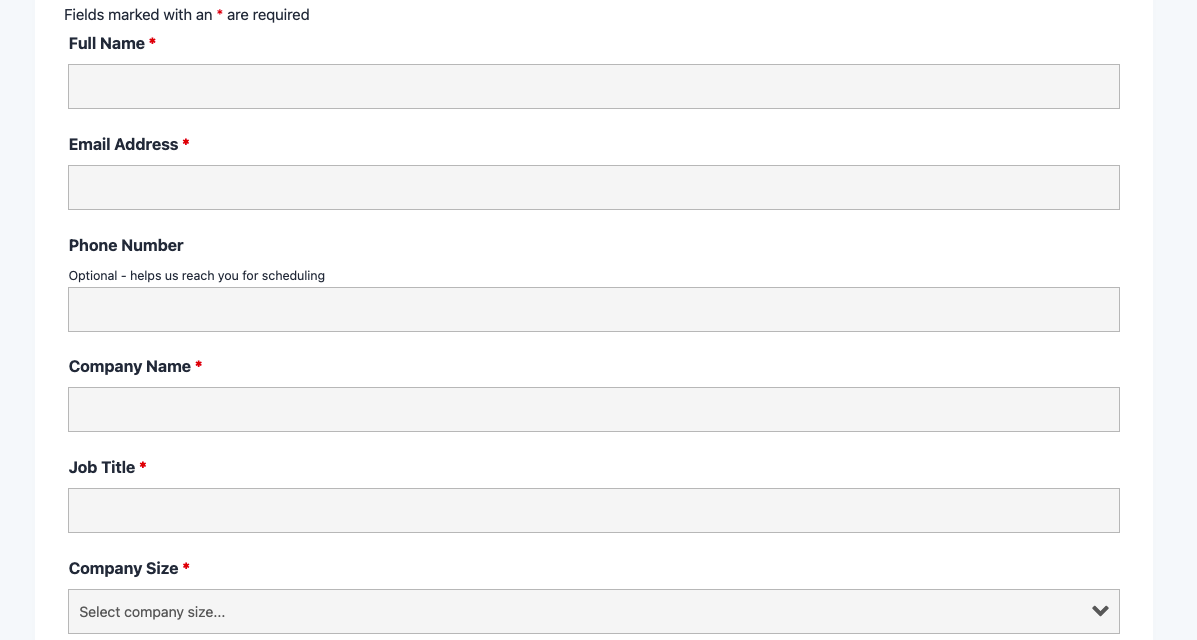
What’s Included
This demo request form template is designed to capture qualified leads efficiently while providing a professional, welcoming experience for potential customers. The form includes essential contact fields, company information, and product interest details that help your sales team prepare personalized demonstrations. Every field serves a specific purpose in qualifying prospects and enabling effective follow-up conversations.
Contact Information Fields:
- Full Name (Single Line Text): Collects the prospect’s complete name for personalized communication and CRM records. Required.
- Email Address (Email): Captures the primary contact email for demo confirmations, calendar invitations, and follow-up communications. Includes validation to ensure proper email format. Required.
- Phone Number (Phone): Gathers a direct contact number for scheduling confirmation calls or last-minute demo changes. Optional.
- Company Name (Single Line Text): Identifies the organization for context and CRM categorization. Required.
- Job Title (Single Line Text): Helps sales teams understand the prospect’s role and decision-making authority. Required.
Qualification and Interest Fields:
- Company Size (Select): Dropdown menu with ranges (1-10, 11-50, 51-200, 201-500, 501+) to help segment leads and tailor demo content. Required.
- Product Interest (Select): Allows prospects to indicate which product, service, or plan they want to see demonstrated, helping sales teams prepare relevant materials. Required.
- Additional Comments or Questions (Paragraph Text): Provides space for prospects to share specific needs, use cases, or questions they’d like addressed during the demo. Optional.
Spam Protection and Submission:
- hCaptcha (hCaptcha): Prevents automated bot submissions while maintaining accessibility and user privacy. This field is never marked as required but validates automatically upon submission.
- Submit Button (Submit): Clearly labeled button (e.g., “Request Demo” or “Schedule My Demo”) to complete and send the form.
The template keeps the form concise with 10 total fields, ensuring high completion rates while gathering the essential information sales teams need. With only 5 required fields (40% of total), prospects can complete requests quickly without feeling overwhelmed by lengthy forms—a critical factor in maximizing conversion rates for demo requests.
Automated Responses and Smart Integrations
This form is designed to do more than just collect information—it works behind the scenes to automate confirmations, deliver personalized responses, and sync with external tools like email marketing platforms and CRMs for seamless follow-up and relationship building.
Built-in Actions (Included with Free Ninja Forms):
- Email Notification: Sends an instant confirmation email to the prospect acknowledging their demo request with next steps, plus alerts your sales team with complete submission details including company information, role, and specific product interests for immediate follow-up preparation.
- Success Message: Displays a clear thank-you message confirming the demo request was received and outlining what happens next (e.g., “Thank you! A member of our sales team will contact you within 24 hours to schedule your personalized demo.”).
- Redirect: Optionally redirects to a custom thank-you page with additional resources, case studies, or a calendar scheduling widget for immediate demo booking.
- Anti-spam Protection: Uses hCaptcha to prevent bot entries while maintaining a user-friendly experience and protecting user privacy better than alternatives.
Enhanced Functionality (Optional Add-ons):
- CRM Integration (Optional): Sync contacts and submissions to track prospect progress through your sales funnel. Connect with OnePageCRM to automatically create new leads with follow-up reminders, or integrate with HubSpot, Salesforce, Zoho CRM, or Insightly to route qualified leads directly into your existing sales workflow.
- Conditional Logic (Optional): Create dynamic forms that adapt based on user input with Conditional Logic. Show additional product-specific questions only when relevant, display budget fields for enterprise inquiries, or reveal timeline questions based on company size.
- Layout and Styles (Optional): Customize the visual appearance to match your brand with Layout and Styles. Create professional multi-column layouts, adjust spacing and colors, and ensure the form design aligns perfectly with your website aesthetic.
- Zapier and Webhooks (Optional): Trigger automations in calendars, task management tools, or custom applications. Use Zapier to connect with over 4,000 apps like Google Calendar, Calendly, or Asana, or Webhooks to send data to custom applications and internal systems.
How Can the Demo Request Form Be Used?
Scheduling product demonstrations is one of the most critical conversion points in B2B sales, yet many businesses rely on generic contact forms that fail to gather the context sales teams need to deliver valuable demos. A well-designed demo request form bridges the gap between initial interest and qualified sales conversations by capturing essential prospect information upfront—company size, role, specific product interests, and use case details—so your team can prepare personalized demonstrations instead of conducting discovery calls.
This template transforms your demo request process from a simple contact capture into an intelligent lead qualification system. Prospects receive immediate confirmation that their request was received and understand exactly what happens next, while your sales team gets structured, CRM-ready lead data that enables them to prioritize high-value opportunities and prepare relevant demonstration content. By reducing friction in the scheduling process and providing sales teams with better context, you’ll see higher demo completion rates and faster movement through your sales funnel.
Explore the most common ways this template empowers different users:
SaaS Companies: Qualify Leads Before Sales Engagement
Software-as-a-Service companies often receive demo requests from prospects ranging from individual freelancers to enterprise teams, making it essential to qualify leads before allocating valuable sales resources. This demo request form template captures company size, job title, and specific product interests automatically, enabling sales teams to route enterprise prospects to senior account executives while handling smaller inquiries through automated demo videos or junior sales reps. The CRM integration ensures every qualified lead appears instantly in your sales pipeline with complete context about their needs, current tools, and buying timeline. Related resource: Conditional Logic to show enterprise-specific questions when company size exceeds 200 employees.
B2B Service Providers: Gather Project Scope Details
Consulting firms, agencies, and professional service providers benefit from understanding project scope before scheduling demos or discovery calls. By customizing this template to include fields about budget range, project timeline, and specific services of interest, you can ensure every demo conversation focuses on relevant capabilities rather than wasting time on misaligned prospects. The optional comments field allows prospects to describe their challenges in their own words, giving your team valuable context to prepare case studies or examples from similar clients. Connect the form with OnePageCRM or HubSpot to automatically trigger follow-up sequences based on service interest.
Enterprise Software Vendors: Route to Specialized Sales Teams
Large software companies with multiple products or specialized sales teams need intelligent routing to ensure demo requests reach the right experts. This form template makes it easy to capture product interest through a dropdown field, then use Conditional Logic to route different products to different email addresses or CRM pipelines automatically. A prospect interested in your analytics platform gets routed to the analytics sales specialist, while security product inquiries go to the security-focused team—all without manual sorting or delayed responses. The form can also integrate with Zapier to trigger different automated workflows based on product selection.
Startups: Build Your First Sales Pipeline
Early-stage companies building their first sales processes need simple, effective systems that capture leads without complex sales software investments. This free demo request form template provides enterprise-grade lead capture that integrates with free CRM tiers or stores submissions directly in WordPress until you’re ready to invest in paid tools. The automated confirmation emails reassure prospects that their request was received (building trust with potential early adopters), while email notifications alert founders or sales team members instantly so they can respond quickly to early-stage opportunities. As you grow, upgrade to Conditional Logic or CRM integrations without rebuilding your entire form.
Marketing Teams: Integrate with Campaign Tracking
Marketing professionals running multi-channel campaigns need to track which traffic sources generate the most qualified demo requests. This template works seamlessly with User Analytics to automatically capture UTM parameters, referral sources, and campaign data with every submission—giving you clear visibility into which channels drive sales-ready leads versus tire-kickers. Connect with email marketing platforms like Mailchimp or ActiveCampaign to automatically add prospects to nurture sequences while your sales team works on scheduling, ensuring no lead goes cold while waiting for a demo slot.
Frequently Asked Questions About the Demo Request Form
Is the demo request form template free?
Yes, this demo request form template is completely free to download and use with the free version of Ninja Forms. The template includes all core functionality—contact fields, email notifications, spam protection, and success messages—at no cost. You only pay for premium add-ons if you want enhanced features like CRM integrations (OnePageCRM, HubSpot), conditional logic to show/hide fields dynamically, or advanced styling options. Many businesses use this template successfully with just the free Ninja Forms plugin, adding premium features only as their needs grow.
Do I need coding skills to customize this template?
No coding knowledge is required. Ninja Forms’ drag-and-drop interface makes customization as simple as clicking fields to edit labels, dragging fields to reorder them, or adding new fields from the field library on the left side of the editor. You can change the Product Interest dropdown options, modify company size ranges, add new fields for budget or timeline, and adjust email templates entirely through visual editors with no HTML, CSS, or PHP required. If you do want to add custom styling, the Layout and Styles add-on provides visual design controls without code.
Will this demo request form work on mobile devices?
Yes, the demo request form template is fully responsive and mobile-optimized. The form automatically adapts to any screen size—desktop monitors, tablets, and smartphones—ensuring prospects can easily request demos from any device. All form fields resize appropriately, buttons remain easy to tap on touchscreens, and the hCaptcha spam protection maintains usability on mobile browsers. With over 60% of B2B website traffic now coming from mobile devices, this mobile-friendly design helps you capture demo requests from prospects researching solutions on their phones or tablets.
Can I integrate the demo request form with my CRM or email marketing tool?
Absolutely. Ninja Forms offers direct integrations with major CRMs including OnePageCRM (our partner with action-based sales focus), HubSpot, Salesforce, Zoho CRM, and Insightly. For email marketing, connect with Mailchimp, ActiveCampaign, Constant Contact, or any of our supported platforms. These integrations automatically send form submissions to your preferred tools, creating new contacts, triggering follow-up sequences, and keeping your sales and marketing teams in sync without manual data entry.
How do I prevent spam demo requests from bots?
The template includes hCaptcha as the default spam protection mechanism—Ninja Forms’ preferred CAPTCHA partner that balances strong bot prevention with user privacy and accessibility. hCaptcha is less intrusive than alternatives and doesn’t track users across the web like some other solutions. The CAPTCHA field validates automatically when users submit the form without requiring a separate “I’m not a robot” checkbox. If you prefer alternative spam protection, you can switch to reCAPTCHA v2 or v3 (both supported in the free Ninja Forms core plugin) or add the Honeypot anti-spam field—an invisible trap that bots fall into while human users never see it.
Can I add additional fields to this demo request form?
Yes, you can add unlimited custom fields to match your specific lead qualification needs. Common additions include: budget range (Select or Radio List to segment prospects by purchasing power), preferred demo date/time (Date field or integration with scheduling tools via Zapier), current solution or tools (Single Line Text or Select to understand switching costs), implementation timeline (Select with options like “Immediate,” “Within 3 months,” “Exploring options”), team size or number of users (Number field to estimate license requirements), or specific features of interest (Checkbox List for multi-select). Add fields by dragging them from the field library into your form, then customize labels and options to match your sales qualification criteria.
What happens to the data users enter in the demo request form?
By default, all form submissions are stored securely in your WordPress database on your own server—you maintain complete ownership and control of prospect data. You can view submissions anytime in the Ninja Forms dashboard under Ninja Forms > Submissions, export data to CSV for analysis or importing into other tools, or integrate directly with CRM systems so data flows automatically into your sales pipeline. Ninja Forms includes built-in GDPR compliance tools that allow users to request data exports or deletion through automated actions, and you can flag specific fields as Personally Identifiable Information (PII) to handle sensitive data appropriately. Learn more about GDPR compliance features.
Does this template work with page builders like Elementor or Divi?
Yes, the demo request form template works seamlessly with all major WordPress page builders including Elementor, Divi, Beaver Builder, WPBakery, and others. Most page builders have dedicated Ninja Forms modules or widgets that let you insert forms by selecting them from a dropdown menu—no shortcodes required. For example, Elementor users can drag the Ninja Forms widget onto the page and select the imported demo request form, while Divi users can add a Ninja Forms module to any section or row. The form inherits styling from your page builder theme automatically, or you can use the Layout and Styles add-on for granular design control.
Can I use this template on multiple websites?
Yes, you can use this demo request form template on unlimited websites at no additional cost. Once you download the .nff file, you own it forever and can import it into as many WordPress sites as you want—whether you’re managing forms for multiple clients as an agency, running several business properties, or building forms across a multi-site WordPress network. The only licensing consideration applies if you use premium Ninja Forms add-ons: some add-ons are licensed per site while others (like agency licenses) allow installation on unlimited sites. Check the Ninja Forms pricing page for add-on licensing details.
How do I get support if I have issues with the demo request form?
Ninja Forms provides comprehensive support resources for all users. Free plugin users can access the extensive documentation library with step-by-step guides, video tutorials, and troubleshooting articles. You can also get community support through the WordPress.org support forums where experienced users and Ninja Forms staff answer questions. If you purchase any premium add-ons, you gain access to direct priority support via email where the Ninja Forms team provides personalized assistance with your specific setup, customization questions, or technical issues. The support team typically responds within 24 hours on business days.
Make it your template
Every template is ready to go live and fully customizable. Tweak a few things or renovate from the ground up. Ninja Forms gives you the tools either way.