What’s Included
Poll Question & Answer Fields
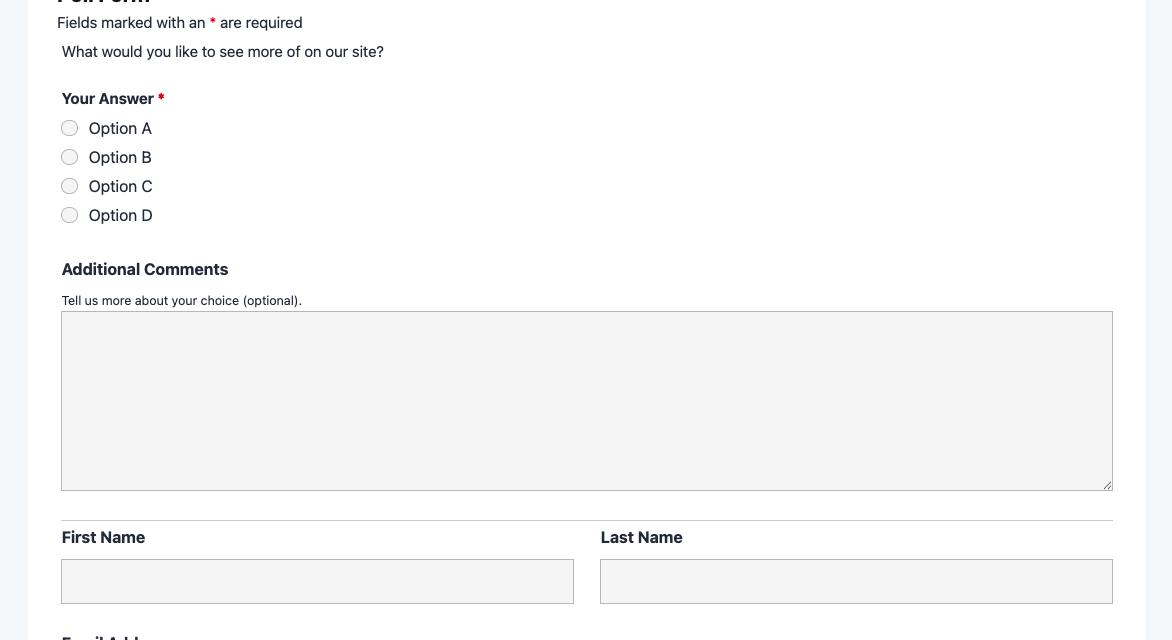
- Poll Question (HTML): Displays the poll question text as a styled heading above the answer choices. Customizable to any question you want to ask. Optional.
- Your Answer (Radio List): The core voting field. Pre-loaded with four sample answer options that you can replace with your own. Respondents choose one option. Required.
- Additional Comments (Paragraph Text): An open-ended field where respondents can explain their choice or share nuance beyond the vote itself. Optional.
Respondent Information Fields
- First Name (First Name): Captures the respondent’s first name for personalized confirmation emails. Optional.
- Last Name (Last Name): Captures the respondent’s last name. Optional.
- Email Address (Email): Used to send a confirmation to the respondent and to identify unique submissions. Optional but recommended if you want to follow up.
Form Structure & Submission Fields
- Section Divider (Divider): Visually separates the poll question from the respondent information section, improving form readability. Optional.
- Privacy Notice (HTML): A brief, plain-language note explaining how submission data is used. Helps build trust and supports GDPR best practices. Optional.
- Spam Protection (hCaptcha): Invisible challenge that stops bots from submitting fake votes without adding friction for real respondents. Not required (never mark spam protection as required).
- Submit Vote (Submit): The form submission button. Label customized to “Submit Vote” to match the poll context. Required.
Automated Responses and Smart Integrations
This poll form is designed to do more than just collect votes – it works in the background to confirm submissions, store responses, and connect with the tools your team already uses for analysis and outreach. Each submission triggers a set of automated actions so nothing slips through the cracks.
- Email Notification: Sends an automatic confirmation to the respondent (if an email address is provided) acknowledging their vote, along with a notification to your team that includes all submission details – name, answer choice, and any comments.
- Success Message: Displays a clear thank-you message immediately after the vote is submitted. You can customize this to reinforce your brand, share preliminary results, or invite the respondent to take a next step like joining your mailing list.
- Redirect: Optionally redirects respondents to a dedicated results page, a related article, or a promotional page after they vote – a simple way to keep engagement going beyond the poll itself.
- Anti-spam Protection: hCaptcha screens out automated bot submissions without disrupting real users, keeping your poll data accurate and your results trustworthy.
Enhanced Functionality (Optional)
- Conditional Logic (Optional): Use Conditional Logic to show the “Additional Comments” field only when a specific answer option is selected – for example, revealing a text field only when the respondent chooses “Other.” This keeps the form clean for most users while capturing deeper context when needed.
- Layout and Styles (Optional): Apply Layout and Styles to match the poll’s visual design to your site theme – adjust colors, font sizes, button styles, and column layouts without writing any CSS.
- User Analytics (Optional): Add User Analytics fields to capture UTM source, medium, and campaign data with every submission. This tells you which marketing channels are driving the most poll responses.
- Email Marketing Integration (Optional): Connect with Mailchimp to automatically add respondents to a mailing list based on their participation. Other supported platforms include ActiveCampaign, Constant Contact, and Kit.
- Zapier and Webhooks (Optional): Use Zapier to push poll results to Google Sheets, trigger a Slack notification for every vote, or connect to over 4,000 other apps. Prefer custom integrations? Webhooks let you send submission data to any external endpoint.
How Can the Poll Form Be Used?
Gathering audience opinions is one of the most direct ways to make better decisions – whether you’re refining a product, planning content, or simply building a stronger connection with your community. The challenge is that most polling tools either require a separate subscription, add third-party scripts to your site, or produce clunky embedded widgets that break your layout on mobile. A native WordPress poll form solves all of that. The poll form template puts the entire experience on your site, under your brand, with your data stored where you control it. Explore the most common ways this template empowers different users:
Bloggers and Content Creators: Understand What Your Audience Actually Wants
Content creators often make editorial decisions based on intuition rather than data. Embedding a poll form in a blog post or sidebar widget flips that dynamic. Ask readers which topic they want covered next, which format they prefer (video vs. written guides), or how they found your site. The Radio List field captures a clean single-choice vote, while the optional comment field gives highly engaged readers room to elaborate. Results stored in Ninja Forms let you spot trends across multiple polls over time – helping you prioritize the content your audience is most excited about without guessing. You can even use a Ninja Forms Gutenberg block to drop the poll directly inside any post.
Small Business Owners: Validate Product and Service Decisions Before You Commit
Before investing in a new product feature, service offering, or pricing change, small business owners can use a poll form to test the idea with real customers. Embed the form on a product page, in a post-purchase thank-you page, or in a customer email. Ask a focused question – “Which new feature would you most like to see?” or “Would you use a monthly subscription option?” – and let the Radio List collect the votes. Because the form stores every submission in WordPress, you can export results to CSV at any time for quick analysis. This is a lean, no-cost alternative to expensive market research tools. Pair it with User Analytics to see which traffic sources are sending the most engaged respondents.
Educators and Course Creators: Check Student Understanding Between Lessons
Educators can use the poll form as a lightweight knowledge-check or discussion prompt between lessons. Post a multiple-choice question at the end of a module and ask students to vote on the correct answer, or run an opinion poll to spark conversation (“Which historical figure had the greater impact on the Industrial Revolution?”). The open comments field doubles as a short-response area where students can explain their reasoning. Because the form is embedded directly in your course page or learning management system, students don’t need to leave the site to participate. Results can be reviewed in the Ninja Forms dashboard and exported for grading or discussion planning.
Marketing Teams: Run Campaign Preference Polls to Personalize Outreach
Marketing teams can deploy poll forms as a segmentation tool. Embed a short poll on a landing page or in an email campaign asking visitors to identify their biggest challenge, their role, or their preferred communication style. The answer they choose informs how you follow up. Use the optional Mailchimp integration to automatically tag subscribers in your email platform based on their poll response, enabling targeted follow-up sequences. Add Zapier to pipe results into a CRM or Google Sheet for your team to action. A well-placed poll can dramatically improve lead qualification without requiring a long-form questionnaire.
Nonprofit Organizations: Gauge Member Priorities and Gather Community Feedback
Nonprofits regularly need to demonstrate that their programs reflect member priorities – for grant applications, board reports, and donor communications. A poll form embedded on a member portal or community page is an efficient way to collect that evidence. Ask members which programs they value most, how they prefer to be communicated with, or which events they plan to attend. The privacy notice HTML field keeps the form GDPR-compliant, and because all data is stored locally on your server, there are no third-party data-sharing concerns to navigate. Results can be exported to CSV and incorporated directly into reports. For broader outreach, use Ninja Forms’ public link sharing to send the poll via email without embedding it on a page.
Frequently Asked Questions About the Poll Form
Is the poll form template free?
Yes, the poll form template is completely free to download and use. It runs on the free version of Ninja Forms with no premium add-ons required. You can download the .nff file, import it to any WordPress site with Ninja Forms installed, and start collecting votes right away. Optional add-ons like Conditional Logic or Layout and Styles are available if you want enhanced functionality, but they are never required to run the core poll.
Do I need coding skills to customize this template?
No coding is required. The Ninja Forms drag-and-drop builder lets you update poll questions, swap out answer options, change the button label, adjust field order, and modify the success message entirely through a visual interface. If you want to go further – custom CSS, conditional logic rules, or multi-column layouts – those capabilities are available through add-ons, but even those are configured through point-and-click settings, not code.
Will the poll form work on mobile devices?
Yes. All Ninja Forms templates are fully mobile responsive out of the box. The poll form adapts to any screen size – phone, tablet, or desktop – without any additional configuration. Radio buttons, text fields, and the submit button all render correctly on small screens, and the hCaptcha spam protection is designed to be lightweight and non-intrusive on mobile browsers.
Can I add more answer options to the Radio List field?
Absolutely. Open the form in the Ninja Forms builder, click on the “Your Answer” Radio List field, and you’ll see the list of current answer choices. Add, remove, or reorder options as needed. There is no hard limit on the number of choices you can include, though polls with 3-5 clear options typically generate the highest completion rates.
How do I view the poll results?
All submissions are stored in the Ninja Forms dashboard under Ninja Forms > Submissions. You can browse individual responses, filter by date, and export all submissions to CSV for analysis in a spreadsheet tool. For teams that want results pushed to a shared workspace automatically, the Zapier add-on can send each new vote to Google Sheets, Slack, or any other connected app in real time.
Can I integrate the poll form with my email marketing platform?
Yes. Optional email marketing integrations are available for Mailchimp, ActiveCampaign, Constant Contact, Kit, AWeber, and many others. When a respondent provides their email address and submits the poll, Ninja Forms can automatically add them to a list in your email platform – making the poll an effective list-building tool as well as a feedback mechanism.
What happens to the data respondents enter?
All submission data is stored locally on your WordPress server – it never passes through Ninja Forms’ servers. This gives you complete control over your poll data and makes GDPR compliance straightforward. The template includes a customizable Privacy Notice HTML field where you can explain your data practices to respondents. Ninja Forms also includes built-in GDPR compliance tools including data export and deletion request actions.
Does this template work with page builders like Elementor or Divi?
Yes. Ninja Forms is compatible with all major WordPress page builders including Elementor, Divi, Beaver Builder, and Oxygen. You can embed the poll form using the Ninja Forms widget or shortcode within any page builder layout. The form inherits your theme’s base styles and can be further customized with the optional Layout and Styles add-on to match your design precisely.
Can I use this template on multiple websites?
Yes. Once you download the .nff template file, you can import it to as many WordPress sites as you need. There are no per-site restrictions on the template file itself. If you’re using optional premium add-ons, those are licensed separately per site – check the individual add-on pages for licensing details.
How do I get support if I have issues?
The Ninja Forms documentation covers installation, configuration, and troubleshooting for all templates and features. If you need personalized help, the Ninja Forms support team is available to assist. You can also explore the full template library for additional form ideas and pre-built starting points.
Make it your template
Every template is ready to go live and fully customizable. Tweak a few things or renovate from the ground up. Ninja Forms gives you the tools either way.