What’s Included
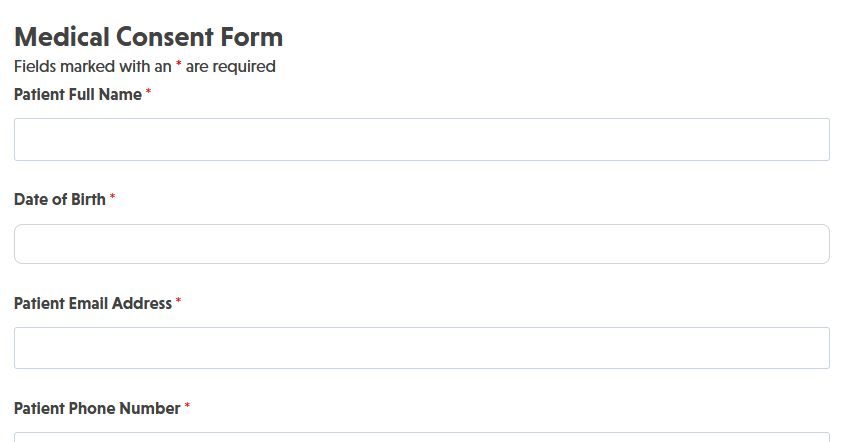
This template provides a comprehensive structure for collecting patient consent with all necessary fields for standard medical procedures. The form is organized into logical sections that guide patients through the consent process while capturing required information for legal compliance and medical record-keeping. All fields use official Ninja Forms field types and can be easily customized to match your practice’s specific consent requirements.
Patient Information Section:
- Patient Full Name (Single Line Text): Captures the patient’s complete legal name as it appears on identification and insurance documents. Required.
- Date of Birth (Date): Records patient’s date of birth for identity verification and age-related consent requirements. Required.
- Patient Email Address (Email): Collects patient’s email for sending consent confirmation and appointment reminders. Required.
- Patient Phone Number (Phone): Captures primary contact number for follow-up communication and appointment coordination. Required.
- Patient Address (Address): Records patient’s current residential address for correspondence and medical records. Optional.
- Emergency Contact Name (Single Line Text): Identifies who should be contacted in case of medical emergency during or after the procedure. Required.
- Emergency Contact Phone (Phone): Provides phone number for emergency contact person. Required.
Procedure Information Section:
- Procedure or Treatment Name (Single Line Text): Specifies the exact medical procedure, treatment, or service for which consent is being provided. Required.
- Scheduled Procedure Date (Date): Records the date when the procedure is scheduled to occur. Optional.
- Healthcare Provider Name (Single Line Text): Identifies the physician, surgeon, or healthcare professional performing the procedure. Required.
- Facility or Practice Name (Single Line Text): Records the name of the medical facility, clinic, or practice where treatment will occur. Optional.
Consent and Acknowledgment Section:
- Informed Consent Statement (HTML): Displays a detailed consent statement explaining the procedure, potential risks, benefits, alternatives, and patient rights. This field presents legally required language in clear, readable format. Not a fillable field.
- I Have Read and Understand the Consent Information (Single Checkbox): Patient confirms they have read, understood, and had opportunity to ask questions about the consent information provided. Required.
- I Consent to the Procedure Described Above (Single Checkbox): Patient provides explicit consent for the medical procedure or treatment described in the form. Required.
- Patient Signature (Single Line Text): Captures patient’s typed signature acknowledging consent. For enhanced security, consider using a digital signature add-on. Required.
- Date of Signature (Date): Automatically populated or manually entered date when patient signs the consent form. Required.
Additional Information Section:
- Medical History Notes (Paragraph Text): Allows patients to provide relevant medical history, allergies, current medications, or other information the healthcare provider should know. Optional.
- Special Requests or Questions (Paragraph Text): Gives patients space to note specific concerns, accommodation needs, or questions for the healthcare provider. Optional.
Spam Protection and Submission:
- Anti-Spam Verification (hCaptcha): Prevents automated bot submissions while maintaining user privacy and accessibility. hCaptcha is Ninja Forms’ preferred partner for CAPTCHA protection. Never required.
- Submit Consent Form (Submit): Submits the completed consent form for processing and record-keeping.
Automated Responses and Smart Integrations
This medical consent form template works behind the scenes to automate patient communication, generate documentation, and integrate with your practice management systems. Every submission triggers a series of actions that ensure both patients and healthcare staff have the information they need while maintaining secure, compliant records of patient consent.
Core Actions (Always Included):
- Email Notification: Sends a confirmation email to the patient acknowledging receipt of their consent form with a copy of their submission details. Simultaneously sends a notification to your medical office staff with complete consent information for review and filing in the patient’s medical record.
- Success Message: Displays a clear confirmation message to the patient explaining that their consent has been received and what to expect next, such as receiving a confirmation email or contacting the office with questions.
- Redirect: Optionally redirects patients to a custom thank-you page with pre-procedure instructions, office location details, or links to patient resources and educational materials about their upcoming procedure.
- Anti-spam Protection: Uses hCaptcha to prevent fraudulent or automated form submissions while maintaining patient privacy and providing an accessible verification experience for legitimate patients.
Enhanced Functionality (Optional Add-ons):
- PDF Form Submission (Optional): Generate professional, formatted PDFs of signed consent forms automatically upon submission. These PDF records can be saved to your server, attached to confirmation emails, or stored in your document management system for compliance and medical record-keeping. Perfect for creating print-ready consent documentation that meets regulatory requirements. Add the PDF Form Submission add-on to enable this feature.
- Conditional Logic (Optional): Show or hide specific consent sections, risk disclosures, or acknowledgment fields based on the type of procedure selected or patient responses. For example, display additional anesthesia consent fields only when surgical procedures are selected, or show minor consent guardian fields when the patient’s age indicates they’re under 18. This keeps forms concise and relevant while ensuring all necessary information is collected. Enable this with the Conditional Logic add-on.
- File Uploads (Optional): Allow patients to upload supporting documentation such as insurance cards, photo identification, previous medical records, or referral documents directly with their consent form. Set file type restrictions and size limits to ensure appropriate uploads. Add the File Uploads add-on to enable document submission.
- Layout and Styles (Optional): Customize your consent form’s appearance to match your medical practice’s branding and create a professional, trustworthy patient experience. Design multi-column layouts for efficient space usage on tablets, adjust colors to align with your brand identity, and ensure your form conveys the professionalism patients expect from healthcare providers. Customize easily with the Layout and Styles add-on.
- CRM Integration (Optional): Automatically sync patient consent records with your practice management or CRM system. Connect with OnePageCRM to automatically create patient records and set follow-up reminders for pre-procedure calls or post-procedure check-ins. Other supported CRMs include HubSpot, Salesforce, and Zoho CRM for comprehensive patient relationship management.
- Zapier and Webhooks (Optional): Connect consent form submissions to your practice management software, electronic health records (EHR) systems, appointment scheduling tools, or patient communication platforms. Use Zapier to integrate with over 4,000 healthcare and business applications or Webhooks to send data to custom healthcare applications and APIs.
Ready to streamline your patient consent process? Follow these steps:
- Download and import the template: Import the .nff file and open it in Ninja Forms.
- Confirm fields: Review Form Fields and settings to ensure they match your practice’s consent requirements and regulatory obligations.
- Confirm actions: Verify email notifications, success message, and any redirect, GDPR, or additional actions are configured correctly.
- Customize consent language: Update the Informed Consent Statement HTML field with your practice’s specific legal language, risk disclosures, and procedure information.
- Enable optional add-ons: Consider activating PDF Form Submission, Conditional Logic, File Uploads, or Layout and Styles for enhanced functionality.
- Publish and share: Embed the form on your practice’s website, share a direct link via email, or display it on a tablet in your waiting room for in-office completion.
A smart medical consent form like this one helps you maintain compliance, reduce paperwork, automate record-keeping, and provide patients with a modern, convenient consent experience.
How Can the Medical Consent Form Be Used?
Healthcare providers face constant pressure to maintain compliance, reduce administrative burden, and deliver excellent patient experiences. Paper consent forms create bottlenecks at check-in, require physical storage space, and risk being lost or damaged. Digital consent forms solve these challenges while providing better data accuracy, automated record-keeping, and seamless integration with modern practice management systems.
The medical consent form template adapts to numerous healthcare scenarios, from routine office visits to complex surgical procedures. This flexible template can be customized with your practice’s specific consent language, adjusted to match different procedure types, and configured to collect exactly the information your practice requires. By implementing a digital consent process, you reduce patient wait times, eliminate manual data entry errors, and create searchable, secure records that are instantly accessible when needed.
Explore the most common ways healthcare providers use this medical consent form template to improve patient care and practice efficiency:
Surgical Centers: Obtain Pre-Operative Consent Remotely
Surgical centers and hospital departments can send consent forms to patients days before their scheduled procedures, allowing patients to review detailed information about their surgery, anesthesia risks, and post-operative care from the comfort of home. This reduces pre-surgery stress by giving patients time to read consent language carefully, discuss concerns with family members, and contact the surgeon’s office with questions before arrival. The form automatically generates PDF copies for the medical record and patient chart, ensuring complete documentation is ready when the patient arrives for surgery. Use Conditional Logic to display different risk disclosure sections based on surgical procedure type, and integrate with Twilio SMS to send appointment reminders after consent is received.
Dental Practices: Streamline Treatment Plan Acceptance
Dental offices managing multiple treatment plans can use customized consent forms for different procedures ranging from routine cleanings to complex periodontal surgery or cosmetic dentistry. Create separate forms for different treatment categories or use conditional logic to show relevant consent sections based on the selected procedure. Patients can review treatment options, financial responsibilities, and potential complications before their appointment, resulting in better informed decisions and fewer last-minute consent delays. Integrate with PDF Form Submission to automatically generate signed consent documentation that attaches to patient charts, and connect to your practice management software using Zapier for seamless record synchronization.
Physical Therapy Clinics: Document Treatment Consent and Liability Waivers
Physical therapy practices can combine treatment consent with liability waivers for therapeutic procedures, exercise programs, and manual therapy techniques. The form captures patient acknowledgment of potential soreness, activity restrictions, and home exercise responsibilities while documenting emergency contact information needed during therapy sessions. Include fields for injury history, current pain levels, and specific treatment goals to provide therapists with comprehensive patient information before the first session. Use File Uploads to allow patients to submit physician referrals or insurance authorization documents directly with their consent form, reducing administrative follow-up.
Mental Health Professionals: Secure Informed Consent for Counseling Services
Therapists, counselors, and psychiatrists can use this template to obtain informed consent for mental health services, clearly explaining confidentiality policies, limits to confidentiality, fees, cancellation policies, and emergency procedures. The secure digital format provides patients with a private way to acknowledge their understanding of treatment policies and consent to services without discussing sensitive details at the front desk. Customize the consent language to address your specific therapeutic approach, professional credentials, and practice policies. Consider adding Conditional Logic to show different consent sections for individual therapy, couples counseling, or group therapy services.
Medical Research Coordinators: Manage Clinical Trial Consent Documentation
Research coordinators managing clinical trials can adapt this template to meet institutional review board (IRB) requirements for informed consent in research studies. Include detailed information about study protocols, potential risks and benefits, participant rights, compensation, and withdrawal procedures. The form’s timestamp and submission records provide audit trails required for regulatory compliance, while PDF generation creates documentation ready for participant files and regulatory submissions. Use the GDPR compliance features to manage participant data requests and deletion requirements, and integrate with Webhooks to send consent records to research databases or clinical trial management systems.
Frequently Asked Questions About the Medical Consent Form
Is the medical consent form template free?
Yes, the medical consent form template is completely free to download and use. The template works with the free version of Ninja Forms, which provides all the core functionality needed to collect patient consent, send email notifications, and store submissions securely. You only need to purchase optional add-ons if you want enhanced features like PDF generation, conditional logic, file uploads, or integrations with CRM and practice management systems. Unlike many healthcare form solutions that charge monthly fees per form or per submission, this template is yours to keep and use unlimited times with no recurring costs.
Do I need coding skills to customize this template?
No coding skills are required to customize or use this medical consent form template. Ninja Forms provides a visual drag-and-drop builder that allows you to add, remove, or rearrange fields by simply clicking and dragging. You can modify field labels, edit the consent statement HTML using a familiar text editor interface, adjust email notification content, and configure all settings through user-friendly menus and options panels. If you can use Microsoft Word or Google Docs, you can customize this form. For practices requiring advanced customizations like custom calculations or complex conditional logic, Ninja Forms offers extensive documentation and support to guide you through the process without needing a developer.
Will this medical consent form work on mobile devices?
Yes, the medical consent form is fully responsive and optimized for all mobile devices including smartphones and tablets. The form automatically adjusts its layout to provide an excellent user experience whether patients are completing it on a desktop computer in your office, a tablet in your waiting room, or their smartphone from home. All field types, including date pickers and checkboxes, are touch-friendly and easy to interact with on mobile screens. This mobile optimization is crucial for modern healthcare practices, as many patients prefer to complete intake paperwork on their phones before arriving for appointments.
Can I integrate the medical consent form with my CRM or practice management system?
Yes, the medical consent form can integrate with popular CRM systems and practice management software through Ninja Forms’ extensive integration options. Connect directly with OnePageCRM, HubSpot, Salesforce, Zoho CRM, and Insightly using dedicated add-ons that map form fields to your CRM’s patient or contact records. For practice management systems and electronic health records (EHR) platforms, use Zapier to connect with thousands of healthcare applications or Webhooks to send consent data to custom APIs and databases. These integrations eliminate manual data entry and ensure patient consent records automatically sync with your existing healthcare workflows.
Is this form HIPAA compliant?
This medical consent form template is designed with HIPAA-aware field configuration and security best practices in mind. The form stores all patient data on your WordPress server rather than third-party services, giving you direct control over protected health information (PHI). Ninja Forms includes features for marking fields as personally identifiable information (PII), implementing GDPR data export and deletion requests, and configuring submission storage policies. However, HIPAA compliance requires more than just a secure form. You must also ensure your web hosting environment meets HIPAA technical safeguard requirements including SSL/TLS encryption for data transmission, secure server configurations, regular security audits, business associate agreements (BAAs) with hosting providers, and comprehensive administrative policies. Consider consulting with healthcare compliance specialists to ensure your complete WordPress environment meets all HIPAA requirements for your specific use case.
Can I add additional fields to the medical consent form?
Yes, you can easily add, remove, or modify fields to match your practice’s specific consent requirements. Ninja Forms provides over 28 field types including insurance information fields, multi-select options for procedure types, radio buttons for yes/no acknowledgments, paragraph text areas for medical history, file upload fields for insurance cards or ID documents (requires File Uploads add-on), and hidden fields for tracking form versions or consent types. Simply drag any field type from the field palette into your form, configure its settings, and adjust the order as needed. You can also create conditional sections that appear only when relevant, such as showing guardian consent fields when the patient indicates they’re under 18 years old.
What happens to the data patients enter in the consent form?
Patient consent data is securely stored in your WordPress database on your own web server, ensuring you maintain complete control over all protected health information. You can access, review, edit, or delete any submission directly from your WordPress dashboard under Ninja Forms > Submissions. The form also sends email notifications to both patients (confirmation of consent received) and your staff (copy of complete consent details), creating automatic documentation for your records. If you enable the PDF Form Submission add-on, each consent form submission automatically generates a formatted PDF document that can be saved to your server, attached to emails, or stored in your document management system. You can export submissions to CSV format for analysis, reporting, or importing into other systems, and configure data retention policies to automatically delete old submissions if desired.
Does this template work with page builders like Elementor or Divi?
Yes, the medical consent form template works seamlessly with popular WordPress page builders including Elementor, Divi, Beaver Builder, WPBakery, Oxygen Builder, and others. Ninja Forms provides dedicated widgets and modules for most major page builders, allowing you to add your consent form with just a few clicks without needing to use shortcodes. You can customize the form’s container styling, adjust spacing and alignment, and integrate it with your page builder’s design system while maintaining full form functionality. For page builders without dedicated Ninja Forms widgets, you can always use the form’s shortcode in any text or code module to embed the form exactly where you want it.
Can I use this template on multiple websites?
Yes, you can use this medical consent form template on as many websites as you need without any restrictions or additional fees. Once you download the .nff template file, you own it and can import it into any WordPress site where Ninja Forms is installed. This is particularly useful for healthcare organizations with multiple clinic locations, practices with separate websites for different specialties, or web developers building sites for multiple healthcare clients. Each site can customize the template independently to match specific practice needs, consent requirements, and branding while benefiting from the same professional structure and field configuration.
How do I get support if I have issues with the template?
Ninja Forms offers multiple support resources to help you successfully implement and customize your medical consent form. Access the comprehensive Ninja Forms documentation for step-by-step guides covering form building, field configuration, email setup, and troubleshooting common issues. Visit the WordPress.org support forum for community assistance from experienced Ninja Forms users and developers. For users with active add-on licenses, priority support is available directly from the Ninja Forms team through the official support portal. The support team can help with template customization, integration setup, and resolving technical issues specific to your healthcare practice’s needs.
Make it your template
Every template is ready to go live and fully customizable. Tweak a few things or renovate from the ground up. Ninja Forms gives you the tools either way.