What’s Included
This online donation form template gives nonprofit administrators, church giving coordinators, and charitable campaign managers a straightforward way to accept gifts online without adopting a specialized fundraising platform. It pairs a short, donor-friendly field set with PayPal Checkout for secure payment processing, so supporters can complete a gift in under a minute. Below is the complete field list for this nonprofit donation form, organized the way a development team would review it.
Donor Information
- First Name (First Name): Captures the donor’s first name for personalized thank-you emails and receipts. Required.
- Last Name (Last Name): Captures the donor’s last name for donor records and tax acknowledgment letters. Required.
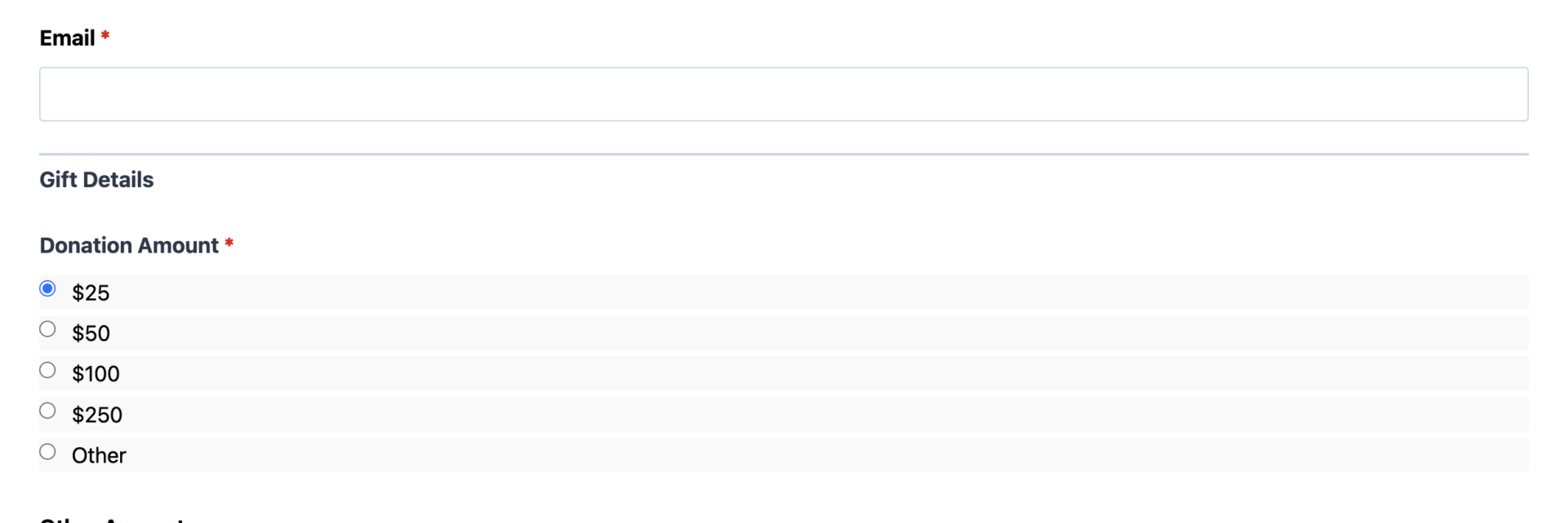
- Email (Email): Collects the donor’s email address so confirmation and receipt messages reach the right inbox. Required.
Gift Details
- Donation Amount (Radio List): Preset giving tiers ($25, $50, $100, $250, and Other) so donors can give quickly without typing a figure. Required.
- Other Amount (Number): Lets a donor enter a custom gift amount when Other is selected in Donation Amount. Optional; pairs with the optional Conditional Logic add-on to hide this field until needed.
- Fund or Campaign Designation (Select): Lets donors direct their gift toward a specific fund, such as the annual fund, building fund, missions, youth programs, or an emergency appeal. Optional.
Optional Donor Details
- Give in Honor or Memory of Someone (Single Line Text): Captures a tribute name for memorial or honorary gifts. Optional.
- Mailing Address (Address): Collects a mailing address for organizations that send printed tax receipts or annual giving statements. Optional.
- Personal Message (Paragraph Text): Gives donors space to leave a note of encouragement or a prayer request alongside their gift. Optional.
Spam Protection and Submission
- hCaptcha (hCaptcha): Blocks automated and bot submissions without adding friction for real donors. Optional, never required.
- Submit (Submit): Completes the donation form and triggers PayPal Checkout for payment.
This template uses Ninja Forms’ free built-in Calculations feature to total the correct gift amount whether a donor picks a preset tier or enters a custom figure in Other Amount, so the exact number carries through to PayPal Checkout automatically. Calculations are included in the core plugin at no cost, unlike the payment and automation add-ons described below.
Automated Responses and Smart Integrations
This nonprofit donation form is designed to do more than just collect a gift. It works behind the scenes to confirm every contribution, deliver a proper thank-you, and sync donor details with the tools your organization already uses for stewardship and follow-up.
- Email Notification: Sends the donor a confirmation with their gift amount and designation, and sends your team a complete submission record for reconciliation and follow-up.
- Success Message: Shows an immediate thank-you message after the gift is processed, reassuring the donor their contribution went through.
- Redirect: Optionally sends donors to a custom thank-you page with impact stories, upcoming events, or ways to stay involved.
- Anti-spam Protection: Uses hCaptcha to prevent bot submissions while keeping the giving experience simple and fast for real donors.
Enhanced Functionality (Optional)
- Payment Processing (Optional): This is a donation form with PayPal Checkout, Ninja Forms’ preferred payment partner, configured out of the box, giving donors a trusted, familiar way to give by card, bank debit, Venmo, or PayPal balance. Organizations that also want Stripe as a second gateway option can add it alongside PayPal Checkout.
- CRM Integration (Optional): Sync new donors into your donor management workflow automatically. Connect with OnePageCRM to create a new contact and set a stewardship follow-up reminder the moment a gift comes in. Other supported CRMs include HubSpot, Salesforce, and Zoho.
- PDF Form Submission (Optional): Automatically generate a donation receipt PDF for every gift using PDF Form Submission, useful for organizations that provide tax documentation to donors.
- Conditional Logic (Optional): Use Conditional Logic to show the Other Amount field only when it is needed, or to reveal the Mailing Address field only for donors who want a printed receipt.
- Zapier and Webhooks (Optional): Trigger automations in your task tools, spreadsheets, or donor database. Use Zapier to connect with over 4,000 apps or Webhooks to send gift data to a custom donor management system.
- Layout and Styles (Optional): Use Layout and Styles to match the donation form to your organization’s branding without touching code.
Requires Ninja Forms (free) · Import, customize, publish in minutes
How Can the Donation Form Be Used?
Collecting gifts through email requests, printed pledge cards, or a generic contact form makes it hard to know who gave, how much, and where they wanted the money to go. A dedicated online donation form template solves this by capturing the donor’s information, gift amount, and fund designation in one clean submission, then routing payment straight through PayPal Checkout. Because the whole process happens on your own site, donors never feel redirected to an unfamiliar page, and your team gets clean, organized records instead of scattered emails. Explore the most common ways organizations put this donation form to work.
Nonprofit Development Teams: Power the Annual Fund
Development staff running an annual giving campaign can drop this nonprofit donation form directly onto a giving page and start collecting unrestricted gifts within minutes. The preset giving tiers make it easy for donors to choose an amount quickly, while the Fund or Campaign Designation field lets major donors flag a gift for a specific initiative. Teams that also run a formal ask letter or grant cycle often pair this template with the more detailed Donation Request Form, which is built for structured, campaign-specific appeals rather than general online giving.
Church Giving Coordinators: Collect Offerings and Tithes Online
Giving coordinators can use this donation form as a simple, general-purpose online offering form for a church website, letting members give from home or between services. For congregations that want giving language, fund categories, and recurring tithe options built specifically for church use, the dedicated Church Donation Form template covers that workflow in more depth.
Campaign Managers: Capture One-Time Gifts Toward a Goal
Charitable campaign managers running a capital project or matching-gift push can use this donation form to capture immediate, single gifts toward a fundraising goal. The Fund or Campaign Designation field keeps contributions organized by initiative from day one. Organizations that need donors to commit to a future, multi-installment pledge rather than a single gift should look at the Fundraising Pledge Form, which is purpose-built for pledge scheduling.
Event Fundraiser Organizers: Add a Giving Option to Any Event Page
Galas, walk-a-thons, and community fundraisers all need a fast way to accept gifts from attendees who cannot make it in person. Embedding this donation form on an event landing page gives remote supporters the same PayPal Checkout experience as in-person donors, and the Personal Message field lets them leave an encouraging note for the honoree or team they are supporting.
Emergency Appeal Coordinators: Launch a Giving Page in Minutes
When disaster strikes or an urgent need arises, coordinators do not have time to build a giving workflow from scratch. This donation form with PayPal Checkout already configured can be imported, customized with appeal-specific language, and published the same day, giving supporters a trustworthy, professional way to respond immediately instead of waiting on a slower fundraising platform to be configured.
Frequently Asked Questions About the Donation Form
Is the donation form template free?
Yes. The template itself is free to download, and it runs on the free core version of Ninja Forms. The only requirement is the PayPal Checkout add-on, which is needed to process payments. Everything else, including the Calculations feature that totals each gift, is included at no cost.
Do I need coding skills to customize this donation form?
No coding is required. Every field, label, and email message can be edited through the Ninja Forms drag-and-drop builder. Organizations that want more visual control over layout can add the optional Layout and Styles add-on, also without writing any code.
Will this donation form work on mobile devices?
Yes. The form is fully responsive and adapts to phones, tablets, and desktops, which matters since a large share of online gifts come from donors giving on their phones after seeing a social post or email appeal.
Can I connect this donation form to my CRM or donor database?
Yes. The optional CRM integration connects new donor records to OnePageCRM automatically, and HubSpot, Salesforce, and Zoho are supported as well. For donor management platforms not listed, the Zapier and Webhooks add-ons described above can send gift data to almost any system your organization already uses.
How does the gift amount calculation work?
The form uses Ninja Forms’ free built-in Calculations feature to determine the final gift total, whether a donor selects a preset tier like $100 or types a custom figure into Other Amount. That total is passed directly to PayPal Checkout, so there is no manual math and no risk of a mismatched charge.
Can I add additional fields to this donation form?
Yes. Fields can be added, removed, or reordered freely in the Ninja Forms builder. Many organizations add a dedicated field for a specific campaign name or an opt-in checkbox for a newsletter list once they connect an email marketing add-on.
What happens to the donor data submitted through this donation form?
Submissions are stored securely in your WordPress dashboard, where your team can review, export, or search past gifts. Payment details themselves are handled by PayPal Checkout’s secure, hosted payment flow, so card and bank information never passes through or is stored on your own server.
Does this donation form work with page builders like Elementor or Divi?
Yes. Ninja Forms embeds cleanly into Elementor, Divi, the WordPress block editor, and most other page builders using a simple shortcode or block, so the donation form fits naturally into whatever giving page design your organization already uses.
Can I use this donation form on multiple websites?
Yes. Once downloaded, the template file can be imported into Ninja Forms on any number of WordPress sites your organization manages, which is useful for groups running separate microsites for individual campaigns or chapters.
How is this different from the Donation Request, Church Donation, and Fundraising Pledge templates?
This donation form is the general-purpose starting point for any organization that wants a fast, PayPal-backed giving form. The Donation Request Form, Church Donation Form, and Fundraising Pledge Form are more specialized versions built for structured appeals, church-specific giving, and multi-installment pledges. Browse the full template library to compare all of them side by side.
Make it your template
Every template is ready to go live and fully customizable. Tweak a few things or renovate from the ground up. Ninja Forms gives you the tools either way.