What’s Included
This contract form template provides a comprehensive structure for documenting agreements between two or more parties. The form captures essential information about contracting parties, defines project scope and deliverables, establishes payment terms, and documents legal protections. Each field is strategically organized to guide users through the contract creation process while ensuring no critical details are overlooked.
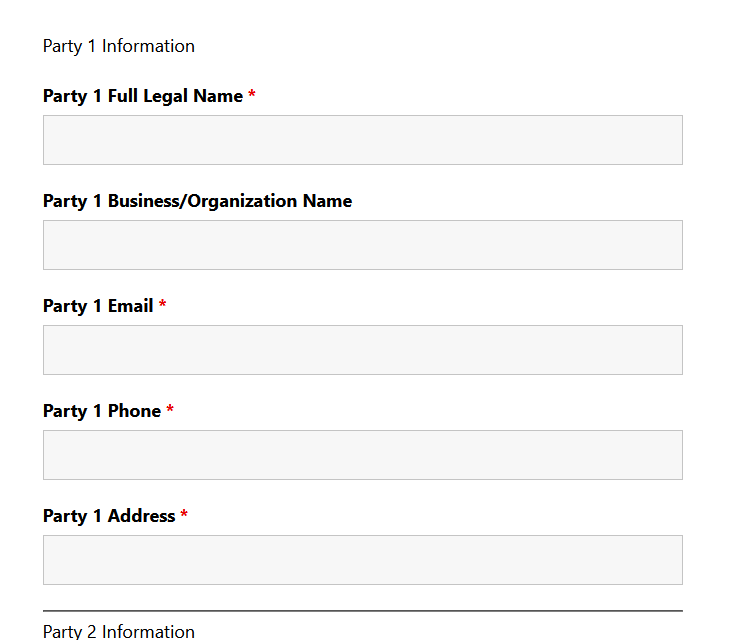
Party Information Section:
- Party 1 Full Legal Name (Single Line Text): Captures the complete legal name of the first contracting party for proper legal identification. Required.
- Party 1 Business/Organization Name (Single Line Text): Records the official business entity name if the first party is representing a company or organization. Optional.
- Party 1 Email (Email): Collects email address with validation for correspondence and contract delivery. Required.
- Party 1 Phone (Phone): Provides contact number for communication and verification purposes. Required.
- Party 1 Address (Address): Documents full physical address for legal jurisdiction and mailing purposes. Required.
- Party 2 Full Legal Name (Single Line Text): Captures the complete legal name of the second contracting party. Required.
- Party 2 Email (Email): Collects verified email address for the second party’s correspondence. Required.
- Party 2 Phone (Phone): Records contact information for the second contracting party. Optional.
Contract Details Section:
- Contract Type (Select): Allows selection of agreement category such as Service Agreement, Employment Contract, Vendor Agreement, Partnership Agreement, or Other. Helps categorize submissions. Required.
- Project/Service Description (Paragraph Text): Provides space to detail the scope of work, services to be provided, or nature of the contractual relationship. This description forms the foundation of what both parties are agreeing to. Required.
- Start Date (Date): Documents when the contract terms become effective and obligations begin. Required.
- End Date/Term (Date): Records the contract completion date or duration, with option to specify “Ongoing” or “Until Completion” in description. Optional.
Financial Terms Section:
- Compensation Amount (Number): Captures the total contract value or payment amount in numerical format. Required.
- Payment Terms (Select): Defines payment structure with options including: Lump Sum, Hourly Rate, Monthly Retainer, Milestone-Based, Deposit + Final Payment. Required.
- Payment Schedule Details (Paragraph Text): Provides space to outline specific payment dates, milestone descriptions, deposit percentages, or invoicing procedures. Optional.
Legal Agreement Section:
- Terms and Conditions Agreement (Single Checkbox): Presents essential contract terms including deliverables, intellectual property rights, confidentiality obligations, liability limitations, and termination conditions. User must check to acknowledge acceptance. Required.
- Additional Notes or Special Terms (Paragraph Text): Allows parties to document unique conditions, exceptions, or clarifications specific to this agreement. Optional.
- Signature Acknowledgment (Single Checkbox): Confirms the submitting party has authority to enter into this agreement and agrees to be bound by the stated terms. Electronic signature acknowledgment. Required.
Form Completion Section:
- Spam Protection (hCaptcha): Privacy-focused verification to prevent automated bot submissions while ensuring legitimate contract submissions are processed. This field appears automatically and does not require manual user interaction in most cases.
- Submit Button (Submit): Finalizes the contract form submission and triggers automated email confirmations to all parties.
Automated Responses and Smart Integrations
This contract form does more than collect information—it creates a complete documentation and communication system that automates confirmations, delivers contract summaries to all parties, and maintains secure records for compliance and reference. Every submission triggers a series of professional actions that streamline your contract management workflow.
Core Automated Actions:
- Email Notification: Sends a detailed confirmation email to Party 1 (the submitter) with their complete contract details, submission timestamp, and next steps. Simultaneously sends a comprehensive notification to your admin team with all submission data including party information, contract terms, financial details, and agreement acknowledgments for review and processing.
- Success Message: Displays a professional confirmation message thanking the user for submitting their contract information, confirming receipt of their details, and outlining next steps such as checking email for the full contract summary or awaiting formal document preparation.
- Redirect: Optionally redirects submitters to a dedicated thank-you page featuring additional resources like contract FAQs, service information, estimated processing timelines, or scheduling links for contract review meetings.
- Anti-spam Protection: Uses hCaptcha to prevent bot submissions while maintaining user privacy and providing an accessible verification experience that protects your contract forms from fraudulent entries.
Enhanced Functionality (Optional):
Expand your contract form capabilities with these optional add-ons that enhance automation, documentation, and integration:
- PDF Form Submission (Optional): Generate professionally formatted PDF documents of every contract submission with PDF Form Submission. Create branded contract documents that can be attached to emails, stored for records, or sent to parties for formal signatures, eliminating manual document creation.
- Conditional Logic (Optional): Create dynamic contract forms that adapt based on user selections with Conditional Logic. Show different payment fields based on contract type, display specific terms for employment versus service agreements, or reveal additional sections only when relevant, streamlining the user experience.
- File Uploads (Optional): Allow parties to attach supporting documents, licenses, certifications, insurance certificates, or reference materials with File Uploads. Set allowed file types and size limits while maintaining organized contract documentation in one location.
- CRM Integration (Optional): Automatically create client records and track contract status through your customer relationship management system. Connect with OnePageCRM to create new leads, set follow-up reminders for contract renewals, and maintain a complete history of client agreements. Other supported CRMs include HubSpot, Salesforce, Zoho, and Insightly.
- Multi-Step Forms (Optional): Break longer contract forms into manageable sections with Multi-Step Forms. Organize party information, contract details, financial terms, and legal agreements across separate pages with progress indicators, reducing form abandonment and improving completion rates.
- Layout and Styles (Optional): Customize your contract form’s appearance to match your brand with Layout and Styles. Create multi-column layouts for party comparison, adjust typography, apply custom colors, and ensure your contract forms look professional and trustworthy.
- Zapier and Webhooks (Optional): Trigger automations when contracts are submitted. Use Zapier to connect with over 4,000 apps including document signing platforms like DocuSign, project management tools like Asana, or accounting software like QuickBooks. Alternatively, use Webhooks to send contract data to custom applications and services.
How Can the Contract Form Be Used?
Contract forms represent one of the most critical business tools for establishing clear expectations, protecting both parties, and documenting legally enforceable agreements. Whether you’re a solo entrepreneur, small business owner, service provider, or established organization, having a streamlined contract creation process eliminates the bottleneck of manual document drafting while ensuring consistency across all your agreements. The traditional approach of emailing Word documents back and forth or paying for expensive contract management software creates unnecessary friction and delays.
This WordPress-based contract form template solves those challenges by providing an accessible, web-based solution that collects all necessary agreement details in a standardized format. Users can submit contract information from any device, your team receives organized data instantly, and you maintain complete control over the information with local database storage. The automated email confirmations ensure both parties have immediate documentation of the submitted terms, while your admin team can review, prepare formal documents, and process agreements efficiently.
Beyond simple data collection, this contract form improves the user experience by guiding parties through essential contract elements they might otherwise overlook—payment terms, start dates, specific deliverables, and legal acknowledgments. The clear structure reduces ambiguity, minimizes back-and-forth revisions, and accelerates the path from initial agreement to executed contract. Explore the most common ways this template empowers different users:
Freelancers and Consultants: Protect Your Work with Professional Agreements
Independent professionals need to establish clear terms before starting projects, but creating custom contracts for every client is time-consuming and often delayed until after work has already begun. This contract form template enables freelancers, consultants, designers, developers, and writers to collect client agreement details immediately during the onboarding process. Embed the form on your services page or send a direct link when a client accepts your proposal, capturing project scope, deliverables, compensation structure, and payment schedule in minutes.
The automated email confirmation provides both parties with an immediate record of the agreed-upon terms, creating accountability before work commences. You can use the submission data to generate formal contract documents using the optional PDF Form Submission add-on, or simply reference the detailed email summary. For consultants managing multiple clients, integrating with OnePageCRM automatically creates client records and tracks contract status, ensuring no agreements fall through the cracks. This professional approach positions you as organized and trustworthy while protecting your interests with documented terms.
Small Business Owners: Standardize Vendor and Partner Agreements
Small businesses frequently enter into relationships with vendors, suppliers, contractors, and partners, each requiring some form of written agreement. Rather than recreating contracts from scratch or relying on inconsistent templates, this contract form establishes a standardized process for documenting business relationships. Whether you’re contracting with a cleaning service, hiring a marketing agency, or establishing a distribution partnership, the form ensures you capture essential details consistently.
The dropdown field for contract type helps you categorize different agreement styles while the flexible service description and payment terms sections accommodate various business arrangements. Store all contract submissions in your WordPress dashboard for easy reference during audits, renewals, or dispute resolution. Business owners using the Conditional Logic add-on can create dynamic forms that display different fields based on contract type—showing payment milestone fields for project-based work or monthly billing fields for retainer relationships. Learn more about creating effective vendor agreements and explore service contract templates for specialized needs.
Service Providers: Streamline Client Onboarding with Clear Terms
Agencies, professional services firms, and service providers benefit from embedding contract forms directly in their client onboarding workflows. When a new client decides to move forward, they can immediately complete the contract form as part of the intake process, eliminating the delay between verbal agreement and documented terms. This accelerates project kickoff while ensuring critical details like scope, timeline, and payment structure are captured before work begins.
For service providers offering different tiers or packages, the form’s flexibility allows you to document various service levels and pricing structures. The additional notes field enables clients to specify unique requirements or special conditions, giving you a complete picture of their expectations from the start. Service firms using Multi-Step Forms can create a more guided experience, walking clients through party information, service selection, timeline preferences, and legal agreements across separate pages with progress tracking. This professional onboarding experience sets clear expectations and reduces scope creep by establishing documented boundaries from day one.
HR Departments: Manage Employment Contracts and Agreements
Human resources teams can adapt this contract form template for employment agreements, independent contractor relationships, non-disclosure agreements, and other HR documentation. While employment contracts often require more extensive legal review, this form serves as the initial data collection tool to gather new hire information, position details, compensation structure, and agreement acknowledgments. HR can then use the submitted information to populate formal employment contract documents, reducing manual data entry and ensuring consistency.
The form’s email notification system automatically sends confirmation to both the new employee and the HR team, creating a timestamp and record of when terms were submitted. For organizations managing confidential information, the terms and conditions checkbox can include non-disclosure language, with the signature acknowledgment serving as electronic acceptance. HR departments leveraging File Uploads can request supporting documents like identification, certifications, or background check authorizations alongside the contract form, centralizing the onboarding documentation process. Connect with HubSpot or other CRM systems to maintain employee relationship records and track contract renewals or review dates.
Organizations Managing Recurring Agreements: Track Renewals and Terms
Nonprofits, membership organizations, and businesses with recurring client relationships need to track contract renewals, term expirations, and evolving agreement details over time. This contract form template serves as the submission point for initial agreements and renewals, creating a searchable database of contract terms within your WordPress dashboard. Filter submissions by contract type, search by party name or organization, and export data to CSV for reporting and analysis.
Organizations using the Zapier add-on can automate contract lifecycle management by connecting form submissions to calendar tools, setting expiration reminders, or triggering renewal workflows in project management systems. For example, when a contract with an end date is submitted, Zapier can automatically create a task 30 days before expiration to initiate renewal discussions. This proactive approach prevents service interruptions and ensures timely contract updates. Explore additional business form templates for comprehensive workflow automation.
Frequently Asked Questions About the Contract Form
Is the Contract Form template free?
Yes, the Contract Form template is completely free to download and use. It works with the free core version of Ninja Forms, which is available at no cost from the WordPress plugin directory. You can collect unlimited contract submissions, store data in your WordPress database, and send automated email confirmations without any subscription or per-submission fees. Optional premium add-ons like PDF Form Submission, Conditional Logic, or File Uploads require separate licenses but are not necessary for the core contract form functionality to work perfectly.
Do I need coding skills to customize this contract form?
Not at all. Ninja Forms provides a complete drag-and-drop visual editor that allows you to customize every aspect of your contract form without touching a single line of code. You can add or remove fields by dragging them from the field menu, edit field labels and descriptions by clicking on any field, reorder fields by dragging them up or down, modify email templates using the visual editor with merge tags to dynamically insert submitted data, and adjust form settings through simple configuration panels. Even advanced features like conditional logic use a visual rule builder where you simply select “if this field equals this value, then show/hide that field.” Thousands of non-technical business owners successfully customize and deploy Ninja Forms daily.
Will this contract form work on mobile devices?
Absolutely. The contract form template is fully responsive and automatically adapts to any screen size, ensuring a seamless experience on smartphones, tablets, and desktop computers. All fields, dropdowns, checkboxes, and buttons adjust to mobile layouts for easy thumb navigation. The form loads quickly even on mobile connections and maintains full functionality including spam protection and email notifications. Many users actually prefer completing contract forms on mobile devices for the convenience, and your form will deliver a professional experience regardless of how parties access it. The responsive design is built into Ninja Forms’ core, so there’s nothing extra you need to configure.
Can I integrate the contract form with my CRM or project management tools?
Yes, Ninja Forms offers extensive integration capabilities. For CRM connections, you can use add-ons like OnePageCRM, HubSpot, Salesforce, Zoho, or Insightly to automatically create contacts or leads when contract forms are submitted. For broader integration options, the Zapier add-on connects your contract forms to over 4,000 applications including Asana, Monday.com, Trello, Basecamp, QuickBooks, and DocuSign. You can trigger automated workflows like creating projects when contracts are submitted, adding contract details to spreadsheets, or sending notifications to team collaboration tools like Slack. For custom integrations with proprietary systems, use the Webhooks add-on to send form data to any external URL.
Is this contract form legally binding?
The contract form template collects information and documents agreement terms, but legal enforceability depends on how you use the collected data and the specific contract language you implement. In many jurisdictions, electronic signatures and online agreements can be legally binding if they meet certain criteria like clear identification of parties, explicit agreement to terms through checkboxes or signature fields, and documented acceptance timestamps. This form includes signature acknowledgment checkboxes and captures submission timestamps automatically.
However, contract law varies by jurisdiction, industry, and contract type. We strongly recommend consulting with a qualified attorney to ensure your specific contract language, terms and conditions, and implementation meet legal requirements for your situation. Many businesses use this form as the initial data collection step, then generate formal contract documents based on the submitted information for parties to sign using dedicated e-signature platforms. The form excels at gathering consistent, organized contract details—your legal counsel should validate the enforceability for your use case.
Can I add additional fields to the contract form?
Yes, you have complete flexibility to add, remove, or modify fields to match your specific contract requirements. Ninja Forms provides 28+ field types including text fields, dropdowns, checkboxes, file uploads, dates, and more. Simply open your imported contract form in the Ninja Forms editor and drag new fields from the field panel into your form. Common additions include project budget or contract value ranges, industry or service category selectors, insurance or licensing information fields, file upload fields for supporting documents (requires File Uploads add-on), additional party information for multi-party contracts, or custom fields specific to your industry or legal requirements. Every field you add integrates automatically with the email notifications, success messages, and database storage—no additional configuration needed.
What happens to the contract data users enter?
All contract form data is stored securely in your WordPress database on your own server, giving you complete control and ownership of the information. Unlike third-party contract management platforms that store your data on external servers, Ninja Forms keeps everything local. When someone submits a contract form, the data is saved to the Submissions database table, email notifications are sent to configured recipients, and the user sees the success message or redirect you’ve configured.
You can view, search, export, edit, or delete submissions anytime from the WordPress admin panel. Export options include CSV format for use in spreadsheets or data analysis tools. For GDPR compliance, Ninja Forms includes built-in data export and deletion capabilities, and you can mark sensitive fields as Personally Identifiable Information (PII) for proper handling. The submission storage is configurable per field, so if you prefer not to store certain sensitive information in your database, you can disable storage for specific fields while still including that data in email notifications.
Does this contract form work with page builders like Elementor or Divi?
Yes, Ninja Forms integrates seamlessly with all major WordPress page builders including Elementor, Divi, Beaver Builder, WPBakery, and others. Each page builder typically provides a dedicated Ninja Forms widget or module that you can drag onto your page, then select which form to display from a dropdown menu. For Elementor users, search for “Ninja Forms” in the widget panel and drag it to your desired location. Divi users can add a Ninja Forms module from the module library. The forms maintain full functionality regardless of which page builder you use, including mobile responsiveness, email notifications, spam protection, and all other features. You can also use the standard WordPress shortcode in any page builder’s text or code module if you prefer that method.
Can I use this contract form template on multiple websites?
Absolutely. The contract form template file can be imported to as many WordPress sites as you need at no additional cost. If you manage multiple client sites, operate several businesses, or run a multi-site WordPress network, simply download the template once and import it to each installation. The free Ninja Forms plugin follows the same licensing—install on unlimited sites without restrictions. Note that if you choose to use premium add-ons, those typically require separate licenses for each site, though Ninja Forms offers multi-site license options. Check the specific pricing and licensing terms for add-ons if you plan to use them across multiple domains.
How do I get support if I have issues with the contract form?
Ninja Forms provides several support channels depending on your needs. For free plugin users, access the comprehensive documentation library covering everything from basic form building to advanced features, form display options, and troubleshooting guides. The WordPress.org support forum for Ninja Forms has an active community where users help each other with questions and issues. If you purchase any premium add-ons, you gain access to priority email support from the Ninja Forms team with typically same-business-day response times. The support team can help with template customization questions, integration issues, or technical troubleshooting. Additionally, the Ninja Forms blog features tutorials and use case examples that may address your specific questions. For contract-specific legal questions, consult with a qualified attorney as Ninja Forms support focuses on the technical and functional aspects of form building.
Make it your template
Every template is ready to go live and fully customizable. Tweak a few things or renovate from the ground up. Ninja Forms gives you the tools either way.