What’s Included
This template provides a comprehensive yet straightforward structure designed to collect all necessary tenant screening information without overwhelming applicants. The form balances thoroughness with simplicity, ensuring you get complete information while maintaining a professional, accessible application experience. Each field has been carefully selected based on common landlord and property management needs, making this template ready to use immediately or easy to customize for your specific rental requirements.
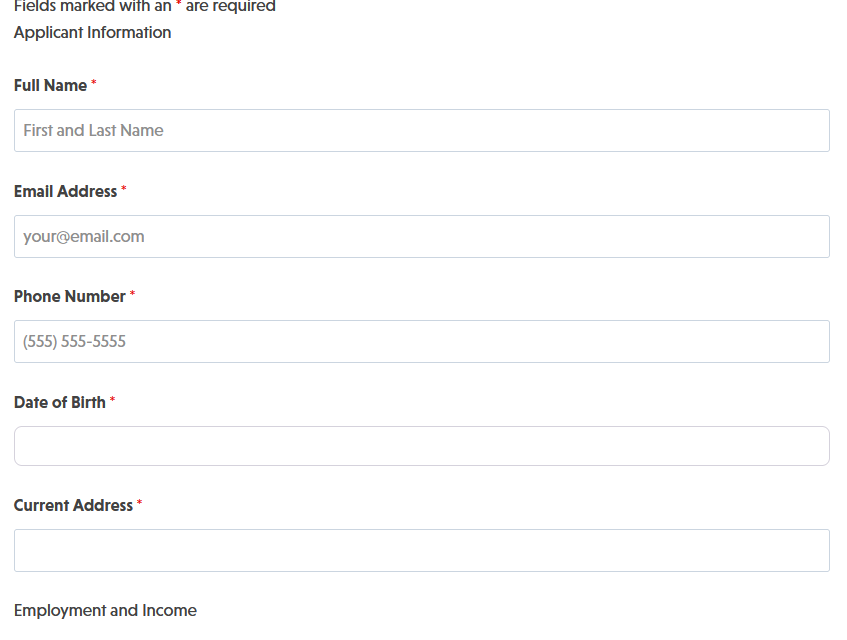
Applicant Information Fields:
- Full Name (Single Line Text): Captures the applicant’s complete legal name for lease agreements and background checks. Required.
- Email Address (Email): Collects a valid email address for communication and application confirmation. Required.
- Phone Number (Phone): Records the applicant’s primary contact number for follow-up questions or interview scheduling. Required.
- Date of Birth (Date): Gathers birth date for age verification and background screening purposes. Required.
- Current Address (Address): Documents where the applicant currently resides, including street, city, state, and ZIP code. Required.
Employment and Income Fields:
- Current Employer (Single Line Text): Identifies the applicant’s place of employment for income verification. Required.
- Job Title (Single Line Text): Records the applicant’s position for employment stability assessment. Required.
- Monthly Income (Number): Captures gross monthly income to evaluate affordability and debt-to-income ratios. Required.
- Employment Duration (Single Line Text): Documents how long the applicant has been with their current employer. Optional.
Rental History Fields:
- Previous Landlord Name (Single Line Text): Collects the name of the applicant’s most recent landlord for reference checks. Optional.
- Previous Landlord Phone (Phone): Provides contact information for rental history verification. Optional.
- Previous Rental Address (Single Line Text): Documents the address of the applicant’s previous residence. Optional.
- Reason for Leaving (Paragraph Text): Allows applicants to explain why they’re moving from their current residence. Optional.
Emergency Contact and Additional Information:
- Emergency Contact Name (Single Line Text): Identifies a person to contact in case of emergencies during tenancy. Required.
- Emergency Contact Phone (Phone): Provides emergency contact’s phone number. Required.
- Number of Occupants (Number): Documents how many people will live in the rental unit. Required.
- Pets (Radio List): Yes/No question to determine if applicants have pets that require deposits or permissions. Optional.
- Additional Comments (Paragraph Text): Gives applicants space to share relevant information not covered in standard fields. Optional.
Spam Protection and Submission:
- Anti-Spam Verification (hCaptcha): Protects your form from automated spam submissions while maintaining user privacy and accessibility.
- Submit Application (Submit): Completes and sends the application for landlord review.
Automated Responses and Smart Integrations
This rental application form works behind the scenes to streamline your tenant screening workflow. When an applicant submits their information, the form automatically triggers confirmation emails, organizes data for easy review, and can integrate with property management tools to keep your entire leasing process running smoothly.
Built-in Actions (included with every form):
- Email Notification: Sends a confirmation email to the applicant acknowledging receipt of their application, along with a separate notification to you with complete application details for immediate review.
- Success Message: Displays a professional thank-you message confirming successful submission and outlining next steps, such as timeline for review or scheduling a property viewing.
- Redirect: Optionally redirects applicants to a custom page with rental policies, property details, or scheduling tools for property tours.
- Anti-spam Protection: Uses hCaptcha to prevent bot entries while maintaining a smooth application experience and protecting applicant privacy.
Enhanced Functionality (Optional):
Take your rental application process to the next level with these optional add-ons that naturally complement tenant screening workflows:
- File Uploads (Optional): Allow applicants to submit supporting documents directly with their application. Collect photo ID, pay stubs, employment letters, previous lease agreements, and reference letters all in one place. Use File Uploads to specify allowed file types and sizes, and automatically organize documents by submission.
- Conditional Logic (Optional): Create dynamic application experiences based on applicant responses. Show additional pet-related fields only when applicants select “Yes” for pets, or display co-signer information fields for applicants with income below your threshold. Use Conditional Logic to streamline applications while gathering all necessary details.
- PDF Form Submission (Optional): Generate professional PDF records of each application automatically for your files, making it easy to review, compare, and archive tenant applications. Use PDF Form Submission to create standardized application documents that comply with fair housing requirements.
- CRM Integration (Optional): Automatically sync applicant information to your property management system for seamless tracking. Connect with OnePageCRM to create leads and set follow-up reminders for promising applicants. Other supported CRMs include HubSpot, Salesforce, Zoho, and Insightly.
- Layout and Styles (Optional): Customize your form’s appearance to match your property management website or branding. Use Layout and Styles to create multi-column layouts, adjust colors and fonts, and ensure your application form presents a professional image.
How Can the Rental Application Form Be Used?
Property managers, landlords, and real estate professionals face constant challenges balancing thorough tenant screening with efficient application processing. Manual paper applications lead to incomplete information, lost documents, and hours spent on data entry. Digital forms without proper structure result in inconsistent data that makes comparison difficult. This rental application form solves these problems by standardizing the application process while remaining flexible enough to accommodate different property types and rental situations.
By digitizing your tenant screening, you create a faster, more organized workflow that benefits both you and your applicants. Prospective tenants appreciate the convenience of applying from their phone or computer, while you gain instant access to complete, searchable applications that integrate with your property management tools. The form’s professional appearance and mobile-responsive design also reflect positively on your properties and management standards. Explore the most common ways this template empowers different users:
Independent Landlords: Streamline Single-Property Rentals
If you own one or two rental properties, you need an efficient screening process without investing in expensive property management software. This tenant application form gives you a professional application system you own and control. Collect complete applicant information including employment verification, rental history, and references all in one submission. The automated email notifications mean you’re alerted immediately when qualified applicants submit their information, letting you move quickly in competitive rental markets. Store applications securely in your WordPress database, compare candidates side-by-side by exporting to spreadsheets, and maintain organized records for fair housing compliance—all without monthly software fees.
Property Management Companies: Scale Tenant Screening Across Multiple Properties
Managing dozens or hundreds of units requires standardized processes that maintain quality while handling volume. Use this template as your base rental application form across your entire portfolio, customizing fields for different property types (residential, commercial, short-term) using Conditional Logic. Embed the form on individual property listing pages, your tenant portal, or share unique application links through your showing coordinator. Connect applications to your CRM with OnePageCRM or HubSpot integration to track applicants through your screening pipeline, from initial application to lease signing. The consistency ensures your team evaluates all applicants using the same criteria, reducing fair housing risks while speeding up your leasing cycle.
Real Estate Agents: Provide Value-Added Services for Landlord Clients
When you represent property owners in leasing transactions, offering professional tenant screening tools sets you apart from competitors. Deploy this rental application form template for each client property, demonstrating your tech-savvy approach to property management. The form’s automated notifications keep both you and your client informed when applications arrive, while the clean data format makes it easy to present qualified candidates professionally. Add PDF Form Submission to generate standardized application summaries that you can review with clients during screening meetings. This systematic approach shows landlord clients you’re organized and thorough, potentially leading to property management contract opportunities beyond basic leasing services.
Student Housing Coordinators: Simplify Campus and Off-Campus Housing Applications
University housing offices and off-campus housing coordinators deal with application waves during enrollment periods. This template handles high volume efficiently while collecting the specific information student housing requires. Customize fields to include academic information, emergency contacts, roommate preferences, and move-in date flexibility. Use Multi Step Forms to break the application into logical sections (Personal Information, Academic Information, Financial Information, Preferences) that reduce abandonment rates for your student applicants. The mobile-responsive design is essential since most students apply from their phones, and the automated confirmations reduce the “Did you get my application?” inquiries that flood housing offices during peak periods.
Commercial Property Brokers: Qualify Business Tenants Professionally
Leasing commercial space requires gathering different information than residential rentals, but the core screening process remains similar. Adapt this property rental application template for commercial use by adjusting fields to collect business entity information, DUNS numbers, business bank references, and commercial lease history. The professional, polished form experience reflects the quality of your commercial properties and your attention to detail. Connect submissions to Salesforce or another commercial real estate CRM to track prospects through your longer commercial leasing cycle, from initial inquiry to lease execution and occupancy.
Frequently Asked Questions About the Rental Application Form
Is the rental application form template free?
Yes, this rental application form template is completely free to download and use. It works with the free version of Ninja Forms, which includes all the core functionality needed to collect tenant applications—unlimited submissions, email notifications, spam protection with hCaptcha, and submission storage. You own the template and your data with no recurring fees or limitations on the number of applications you can collect. Optional add-ons like File Uploads for document collection or PDF Form Submission for automated record creation are available if you need enhanced functionality, but they’re not required for the form to work.
Do I need coding skills to customize this rental application template?
No coding skills are necessary. The Ninja Forms drag-and-drop builder lets you add, remove, or rearrange fields visually. You can modify field labels, change required versus optional settings, adjust validation rules, customize email notifications, and update success messages all through an intuitive interface. If you want advanced customizations like showing pet-related fields only when applicants select “Yes” for pets, the Conditional Logic add-on provides point-and-click conditional rules without any coding required.
Will this rental application form work on mobile devices?
Absolutely. The form is fully responsive and automatically adapts to any screen size. Since many prospective tenants search for rentals and submit applications from their smartphones, mobile optimization is built into every Ninja Forms template. Fields resize appropriately, buttons are touch-friendly, and the form loads quickly even on slower mobile connections. You can test the mobile experience yourself by viewing your application page on your phone after installation.
Can I collect documents like ID copies or pay stubs with the application?
Yes, with the File Uploads add-on. This optional extension lets you add file upload fields to collect supporting documents directly with each application. You can specify allowed file types (PDFs, JPEGs, etc.), set maximum file sizes, and automatically organize uploaded documents by applicant. Files can be stored on your WordPress server or sent directly to cloud storage services like Google Drive or Dropbox. This eliminates the back-and-forth of requesting documents via email and keeps everything organized in one place.
How secure is the applicant data collected through this form?
Very secure. All form data is stored locally in your WordPress database on your own server—it’s never sent to third-party services unless you explicitly configure integrations. Ninja Forms uses WordPress’s built-in security features including data sanitization, SQL injection prevention, and CSRF protection. The form also includes hCaptcha spam protection to prevent automated submissions. For additional security, follow WordPress security best practices like keeping your WordPress core, themes, and plugins updated, using strong passwords and two-factor authentication for admin accounts, and implementing SSL/HTTPS on your site. You can also mark sensitive fields as personally identifiable information (PII) for GDPR compliance using Ninja Forms’ built-in GDPR tools.
Can I integrate the rental application with my property management software?
Yes, through several methods. Many property management systems integrate with popular CRMs, so connecting your form to OnePageCRM, HubSpot, Salesforce, or Zoho can bridge the gap. Alternatively, use Zapier to connect Ninja Forms to over 4,000 apps including many property management platforms, or use Webhooks to send application data directly to your system’s API. You can also export submissions to CSV format for importing into your property management software manually or on a scheduled basis using Scheduled Submissions Export.
Can I use different versions of the form for different properties?
Yes, you can duplicate the template and customize each version for different property types. For example, create one version for single-family homes that includes questions about lawn maintenance, another for apartments that asks about floor preferences, and a commercial version with business-specific fields. You can manage multiple forms from one WordPress site and embed each on its corresponding property listing page. Use Conditional Logic if you prefer maintaining a single form that dynamically adjusts questions based on the property type selected by the applicant.
What happens if an applicant starts the form but doesn’t finish it?
By default, Ninja Forms only stores completed submissions, so partially completed forms aren’t saved. However, the Save Progress add-on allows applicants to save their work and return later to complete the application. This is particularly valuable for lengthy rental applications that ask for extensive employment history or require applicants to gather information like previous landlord contact details. The add-on sends applicants a unique link to resume their application from any device.
Does this template comply with fair housing laws?
The template collects standard rental application information, but compliance with fair housing laws depends on how you use the information collected. Ninja Forms doesn’t include questions that would violate fair housing regulations (such as race, religion, national origin, familial status, or disability status), but you’re responsible for ensuring your screening process and any customizations you make comply with federal, state, and local fair housing requirements. Consult with a real estate attorney familiar with your jurisdiction’s landlord-tenant laws to ensure your complete screening process—including application, background checks, and selection criteria—meets all legal requirements.
Can I use this rental application form on multiple websites?
Yes, the template can be used on as many websites as you manage. There are no licensing restrictions on the template itself. Your Ninja Forms license (for the free core plugin) allows use on unlimited sites. If you purchase optional add-ons, check the Ninja Forms pricing page for licensing details—most add-on licenses cover multiple sites depending on the plan level you choose.
Make it your template
Every template is ready to go live and fully customizable. Tweak a few things or renovate from the ground up. Ninja Forms gives you the tools either way.