Form Exports on Autopilot
Send CSV exports of your form submissions to any inbox automatically, on an hourly, daily, or weekly schedule, no manual exporting required.
Risk-Free 14 Day Guarantee
You'll love it or we'll refund you fully. No questions asked.
Logging into WordPress every week to export form submissions is a manual step that adds up fast, especially when you manage multiple sites or need to keep a team informed. The Scheduled Submissions Export add-on for Ninja Forms automates that process: it sends CSV files of your form submissions directly to any email address you choose, on a schedule you define.
Each export contains only the submissions received during that period. Hourly exports cover the past hour. Daily exports cover the past 24 hours. Weekly exports cover the past seven days. Recipients get a true digest of new entries, not a full-history dump on every send.
With Scheduled Submissions Export, you can:
Key Features
Automated Scheduling
Set exports to run hourly, daily, or weekly without any manual login.
CSV Email Delivery
Exports arrive as CSV attachments in email. No WordPress login required to receive data.
New Entries Only
Each export contains only submissions from that period, so recipients always get a clean digest.
Multiple Recipients
Send to multiple email addresses at once using a simple comma-separated list.
Custom Subject Line
Control exactly what recipients see in their inbox so exports are easy to identify and act on.
Time & Day Control
Pick the exact hour for daily sends. Pick the day and hour for weekly sends.
Centralized Dashboard
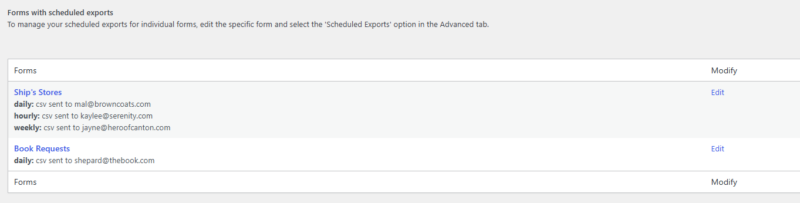
One admin page shows all active export schedules site-wide with direct edit links.
Per-Form Configuration
Each form runs its own independent schedule. Multiple schedules per form are supported.
Key Features of Scheduled Submissions Export
Scheduled delivery on your timeline
Choose how often submissions go out: hourly, daily, or weekly. Once the schedule is set, exports run automatically without any manual login. The add-on uses WordPress cron to trigger delivery, so exports fire when a page is loaded on your site at or around the scheduled time. For high-traffic sites this is seamless; for low-traffic sites, delivery may occur shortly after the scheduled time on the next page load.
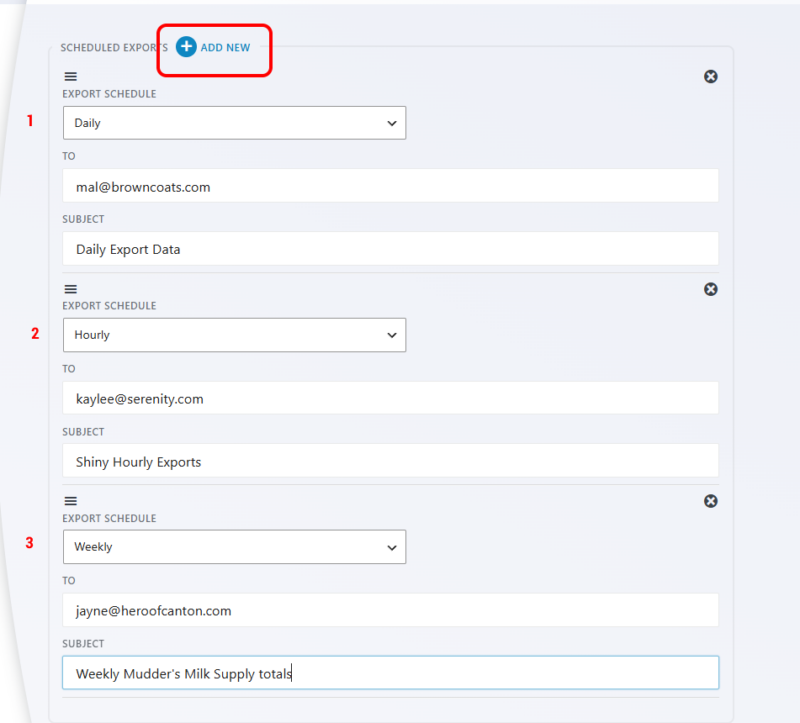
Email delivery with CSV attachment
Exports arrive as a CSV file attached to an email. No one on the receiving end needs a WordPress login or dashboard access. Send the data directly to the people who use it: your client, your ops team, or your own inbox. The CSV format works with Excel, Google Sheets, and any standard data tool.
Period-bounded delivery: new entries only
This is what separates a scheduled export from a manual download. Each export contains only the submissions received during that schedule’s period: the past hour, the past day, or the past seven days. Recipients always get a clean digest of new entries. There is no need to compare against a previous export or strip out rows you already processed.
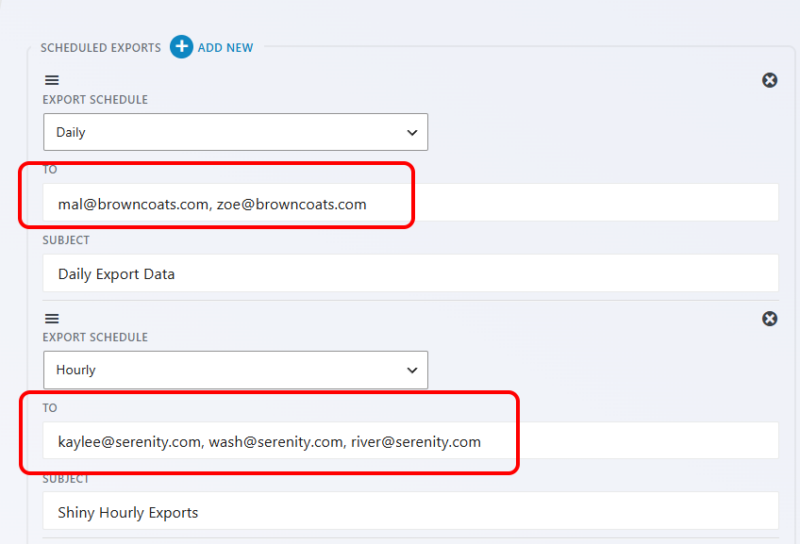
Multiple recipients
Send the same export to as many email addresses as you need. Recipients are entered as a comma-separated list in the To field. Add your client, your account manager, and your data team in one step.
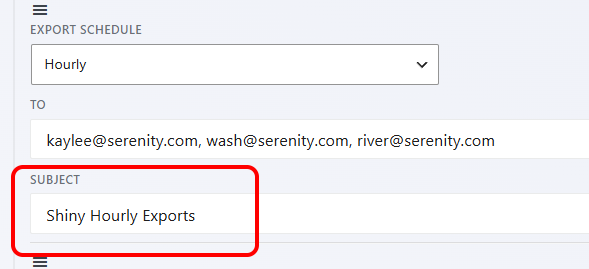
Custom subject line
Control what appears in the recipient’s inbox. Set a subject line that makes the export immediately recognizable: the form name, the site, the reporting period, or whatever convention your team uses. A clear subject line means the right people open and act on the data.
Time and day control
Daily exports can be scheduled to fire at a specific hour. Weekly exports can be pinned to a specific day and hour. Configure these in your site’s global Scheduled Exports settings so all forms on the site respect the same delivery windows, or adjust per form as needed.
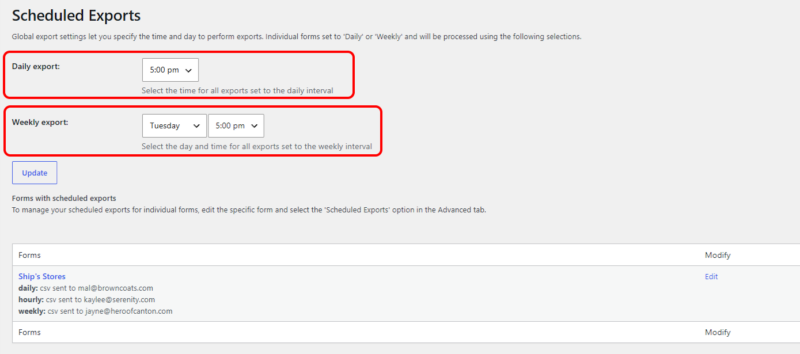
Centralized Scheduled Exports dashboard
A single admin page lists every active export schedule across your entire site. Each entry shows the form name, its schedule, and a direct link to edit the form’s configuration. You never have to open individual forms to remember what is scheduled or when.
Per-form configuration with multiple schedules
Each form has its own independent export settings. If one form needs a weekly summary and another needs an hourly digest, configure them separately. You can also create multiple schedules for the same form, for example sending one export to your team and a separate one to a client, each with its own recipients, subject line, and timing.
Form exports on autopilot
Schedule a CSV of your submissions to land in any inbox, hourly, daily, or weekly, so whoever needs the data gets it without logging into WordPress. Add it to your cart and put your exports on a schedule today.
Backed by priority email support and a 14-day money-back guarantee.
Why Scheduled Export Beats Manual Downloads
The standard workflow for getting form submission data out of WordPress is: log in, navigate to the form, export submissions, download the file, send it to whoever needs it. That works once. It becomes a chore when you repeat it weekly for a handful of forms across multiple sites.
Scheduled export removes every manual step. The exports run on autopilot. The recipients get the data in their inbox. And because each export covers only the current period’s submissions, the file they receive is already scoped to new entries. No filtering, no deduplication, no “did we already process this row” questions.
For anyone who currently treats form submission exports as a recurring task on their to-do list, this add-on removes it entirely.
Common Use Cases
- Weekly team reporting: Send a Monday-morning digest of last week’s leads, applications, or contact requests to your team without touching WordPress.
- Client data delivery: Give clients a regular CSV of their form submissions without granting them WordPress access. Set the schedule once; they receive it automatically.
- Multi-site agency workflows: Manage export schedules for all your client sites from a single dashboard. Each site’s Centralized Scheduled Exports view shows every active schedule at a glance, with direct edit links. No digging through individual forms.
- Ops and fulfillment handoffs: Route order forms, booking requests, or intake submissions directly to the team that processes them, on the cadence that matches their workflow.
- High-volume monitoring: Use hourly exports on forms that receive time-sensitive submissions. Your team gets a fresh CSV every hour without anyone polling the dashboard.
- Compliance and record-keeping: Maintain a scheduled archive of form submissions delivered to a designated inbox, creating a consistent paper trail without manual effort.
The report your board expects, sent on schedule
If someone on your team ends each week exporting form data and emailing it to a board or a funder, this runs the export on a schedule and sends it automatically. Add it to your cart and take that task off your plate for good.
Priority email support and a 14-day money-back guarantee included.
Frequently Asked Questions
-
Install the Scheduled Submissions Export add-on for Ninja Forms, then open your form's settings and choose an export schedule: hourly, daily, or weekly. Enter the recipient email addresses and a subject line. From that point, exports run automatically and arrive as CSV attachments in email. No manual login required.
-
Yes. The Scheduled Submissions Export add-on delivers your Ninja Forms submissions as a CSV file attached to an email, on whichever schedule you set. Each export covers only the submissions received during that period, so recipients get a clean digest of new entries rather than the full submission history on every send.
-
Set up a weekly export schedule in your form's settings, enter your team members' email addresses in the To field (comma-separated for multiple recipients), and choose the day and hour for delivery. Each Monday morning, or whichever day you pick, your team receives a CSV of that week's submissions automatically.
-
Yes. This is the core design of the Scheduled Submissions Export add-on. Each export contains only the submissions received during that schedule's period: the past hour, past 24 hours, or past seven days. You never receive a full-history dump. Every export is a true digest of new entries only.
-
Yes. Enter as many recipient addresses as you need in the To field, separated by commas. All listed recipients receive the same CSV attachment on the same schedule. You can also create separate schedules for the same form if different recipients need different timing or subject lines.
-
Yes. Each form supports multiple independent export schedules. For example, you might send an hourly export to an operations inbox and a weekly summary to a client, each with its own recipients, subject line, and delivery window. Configure as many schedules per form as your workflow requires.
-
The Scheduled Exports dashboard in your WordPress admin provides a single page listing every active export schedule across your site. Each entry includes the form name, schedule details, and a direct link to edit the form. You can review and manage all your scheduled exports from one place without opening individual forms.
-
Licenses are subscription based and will auto-renew each year unless cancelled. If cancelled, you may still use your extensions but will no longer receive important updates or support once the license expires.