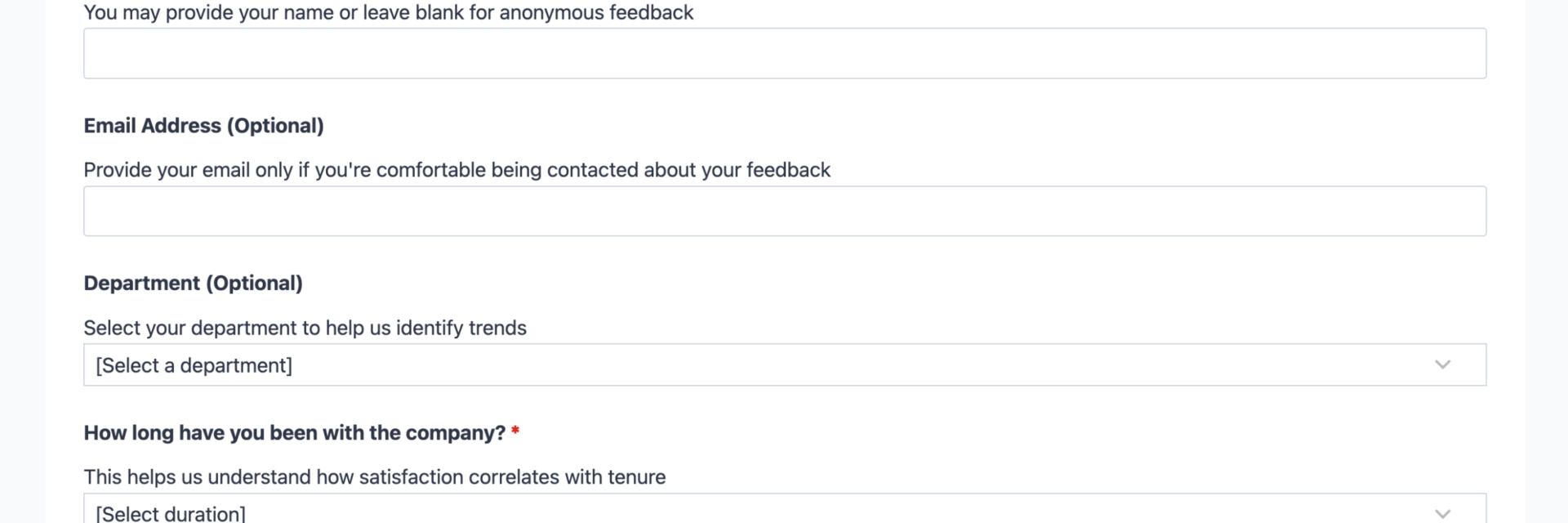
What’s Included
This employee satisfaction survey template includes a thoughtfully structured set of fields designed to capture meaningful feedback while respecting your employees’ time. The form balances quantitative data (through rating scales and multiple choice) with qualitative insights (through optional comment fields), giving you both measurable metrics and detailed context. Each field has been carefully selected to address key dimensions of workplace satisfaction without overwhelming respondents.
Employee Information Fields:
- Employee Name (Single Line Text): Optional field for identifying respondents. Can be made optional to allow anonymous feedback if preferred. Optional.
- Email Address (Email): Contact information for follow-up if needed, or can be left blank for anonymous responses. Optional.
- Department (Select): Dropdown menu listing company departments to segment feedback by team or division. Optional.
- Length of Employment (Select): Multiple choice field with options like “Less than 6 months,” “6 months – 1 year,” “1-3 years,” “3-5 years,” “5+ years” to correlate satisfaction with tenure. Required.
Satisfaction Rating Fields:
- Overall Job Satisfaction (Radio List): 5-point scale from “Very Dissatisfied” to “Very Satisfied” measuring general workplace happiness. Required.
- Work-Life Balance (Radio List): 5-point scale assessing whether employees feel they can balance professional and personal responsibilities. Required.
- Relationship with Manager (Radio List): 5-point scale evaluating supervisor support, communication, and leadership quality. Required.
- Compensation and Benefits (Radio List): 5-point scale measuring satisfaction with salary, benefits package, and total rewards. Required.
- Career Development Opportunities (Radio List): 5-point scale assessing access to growth, training, and advancement opportunities. Required.
- Workplace Environment (Radio List): 5-point scale evaluating physical workspace, tools, resources, and overall working conditions. Required.
Open Feedback Fields:
- What do you like most about working here? (Paragraph Text): Free-text field for employees to share positive experiences and what’s working well. Optional.
- What could we improve? (Paragraph Text): Free-text field for constructive feedback and specific suggestions for organizational improvement. Optional.
- Additional Comments (Paragraph Text): Open-ended space for any other thoughts, concerns, or feedback not covered by previous questions. Optional.
Spam Protection and Submission:
- Spam Protection (hCaptcha): Prevents automated bot submissions while maintaining accessibility and user privacy. The form uses hCaptcha, Ninja Forms’ preferred partner solution for spam protection.
- Submit Survey (Submit): Button to complete and submit the satisfaction survey.
Automated Responses and Smart Integrations
This employee satisfaction survey template is designed to do more than just collect information—it works behind the scenes to automate confirmations, protect employee privacy, and sync with external tools like CRM systems and HR platforms for seamless data management and follow-up planning.
Core Actions (Included with Free Version):
- Email Notification: Sends an instant notification to HR or management with the complete survey response details for immediate review. A confirmation email can optionally be sent to the employee thanking them for their participation.
- Success Message: Displays a clear thank-you message after submission, acknowledging the employee’s feedback and explaining next steps such as “Your feedback matters. Thank you for completing this survey. Your responses will be reviewed by leadership, and we’ll share aggregate results and action plans with the team within 30 days.”
- Redirect: Optionally redirects to a custom page with information about how the company uses survey feedback, timeline for results sharing, or related employee resources.
- Anti-spam Protection: Uses hCaptcha to prevent bot entries while maintaining a user-friendly experience and protecting employee privacy with a CAPTCHA solution that doesn’t track users across the web.
Enhanced Functionality (Optional):
While this template works perfectly with the free version of Ninja Forms, you may want to enhance functionality with optional add-ons:
- Conditional Logic (Optional): Show follow-up questions based on responses. For example, if an employee rates “Work-Life Balance” as “Dissatisfied,” automatically display a follow-up question asking “What specific changes would improve your work-life balance?” Connect with Conditional Logic to create dynamic, intelligent surveys that adapt to employee responses.
- Multi Step Forms (Optional): Break longer surveys into multiple pages with progress indicators to improve completion rates and reduce survey fatigue. Use Multi Step Forms to create a more engaging survey experience with breadcrumb navigation showing employees their progress.
- Layout and Styles (Optional): Customize the survey appearance to match your company branding, create multi-column layouts for better use of screen space, and design professional-looking forms without needing a designer. Enhance visual presentation with Layout and Styles.
- PDF Form Submission (Optional): Automatically generate PDF versions of each survey response for easy archiving, printing, or sharing with leadership during review meetings. Generate professional reports with PDF Form Submission.
- CRM Integration (Optional): Sync employee feedback and satisfaction scores to track employee experience over time. Connect with OnePageCRM to automatically create engagement records and set follow-up reminders for managers. Other supported CRMs include HubSpot, Salesforce, Zoho, and Insightly.
- Zapier and Webhooks (Optional): Trigger automations in HR software, project management tools, or data analytics platforms. Use Zapier to connect with over 4,000 apps or Webhooks to send data to custom applications and HR information systems.
How Can the Employee Satisfaction Survey Be Used?
Employee satisfaction surveys have become essential tools for modern organizations that recognize their people are their most valuable asset. According to recent research, 91% of workers who believe their organization effectively addresses workplace needs report job satisfaction, compared to just 44% among those who view their organization as ineffective. However, there’s a critical gap: only 25% of workers believe their company actually takes action based on the feedback they give via surveys. This template helps you bridge that gap by making it easier to collect, analyze, and act on employee feedback consistently.
The challenge many organizations face isn’t just collecting feedback—it’s doing so in a way that encourages honest responses, respects employee time, and actually leads to meaningful change. This employee satisfaction survey template addresses these challenges by providing a professional, accessible, and action-oriented feedback mechanism. The form takes less than five minutes to complete, works on any device, and can be configured for anonymous responses to encourage candor. Explore the most common ways this template empowers different organizations and roles:
HR Departments: Measure Culture and Track Trends Over Time
Human resources teams use this template to conduct regular pulse checks on employee morale, engagement, and satisfaction. By distributing the same survey quarterly or bi-annually, HR can track satisfaction trends over time, measure the impact of policy changes or new initiatives, and identify departments or areas that need additional support or intervention. The structured format with consistent rating scales makes it easy to create dashboards, generate reports for leadership, and benchmark satisfaction scores across different time periods or employee segments. HR professionals appreciate the ability to customize questions to address specific organizational initiatives while maintaining core metrics that allow for longitudinal comparisons. Integration with CRM systems means satisfaction data can live alongside other employee records, creating a comprehensive view of the employee lifecycle and experience.
Small Business Owners: Build Culture and Improve Retention
Small business owners and startup founders use this survey template to stay connected with their growing teams and maintain the positive culture that attracted employees in the first place. As companies scale, the informal “open door policy” becomes harder to maintain, and formal feedback mechanisms become necessary. This template provides a professional, non-threatening way for employees to share concerns, suggest improvements, and express what they value about the workplace. Small businesses particularly benefit from the open-ended feedback questions, which often reveal specific, actionable insights that rating scales alone might miss. When employees see their feedback leading to real changes—whether that’s adjusting meeting schedules, adding benefits, or improving workspace conditions—it builds trust and demonstrates that leadership genuinely cares about team wellbeing. For companies competing with larger organizations for talent, showing that you actively listen and respond to feedback becomes a powerful retention and recruitment tool.
Remote Team Managers: Check In on Distributed Workforce Wellbeing
Managers of remote or hybrid teams face unique challenges in gauging how their distributed employees are really doing. The casual hallway conversations and visual cues that signal satisfaction or stress in traditional offices don’t exist in remote environments. This survey template helps remote team leaders proactively check in on work-life balance, communication effectiveness, feelings of isolation or connection, and satisfaction with remote work tools and support. By adding custom questions about remote work experiences—such as “Do you have adequate home office equipment?” or “How effective is our team communication?”—managers can identify remote-specific issues before they lead to burnout or turnover. The mobile-responsive design means employees can complete the survey during their workday without needing to be at their desk, and the optional anonymity encourages honest feedback about management practices that might be harder to share in video calls.
Organizational Development Teams: Identify Training and Growth Opportunities
Organizational development specialists and learning and development professionals use satisfaction surveys to uncover gaps in training, professional development, and career advancement opportunities. The “Career Development Opportunities” rating field combined with open-ended questions often reveals specific training needs, desires for mentorship programs, or frustrations with advancement paths that can inform learning strategy and succession planning. When survey data shows that certain departments or demographic groups consistently rate career development lower, it signals the need for targeted interventions. This template can be customized to include additional questions about learning preferences, skills employees want to develop, or barriers they face in accessing growth opportunities. By connecting survey insights with learning management systems via integrations, OD teams can create data-driven development programs that directly respond to employee needs and desires.
Executive Leadership: Make Data-Driven Culture Decisions
CEOs, COOs, and leadership teams use aggregated satisfaction survey data to make strategic decisions about culture initiatives, benefits investments, and organizational priorities. Rather than relying on anecdotal feedback or the loudest voices, this template provides systematic, representative data about what employees actually need and value. Executive dashboards showing satisfaction trends across different metrics help leadership understand whether company initiatives are working, identify which managers are building strong teams, and spot early warning signs of cultural issues or retention risks. The survey data becomes particularly valuable during strategic planning, helping leaders prioritize investments in areas that will have the greatest impact on employee satisfaction and organizational performance. When leadership regularly communicates back to employees about survey results and actions taken in response, it demonstrates transparency and builds organizational trust.
Frequently Asked Questions About the Employee Satisfaction Survey
Is the employee satisfaction survey template free?
Yes, this template is completely free to download and use. It works with the free version of Ninja Forms, which includes all the core functionality needed to collect, manage, and export survey responses. You can distribute the survey to unlimited employees and collect unlimited responses without any cost. The only time you’d pay for anything is if you choose to add premium features through optional add-ons like Conditional Logic, Multi Step Forms, or integrations with specific third-party platforms. But for most organizations, the free template with the free Ninja Forms plugin provides everything needed to run professional employee satisfaction surveys.
Do I need coding skills to customize this template?
No coding skills are required whatsoever. The template can be customized entirely through Ninja Forms’ drag-and-drop visual builder. You simply click on any field to edit its label, help text, or settings. Want to add a question? Drag a new field from the field list. Need to change the order of questions? Click and drag fields to rearrange them. Modifying the department dropdown options, adjusting email notifications, or changing the success message all happen through simple form interfaces. If you can edit a document in Microsoft Word, you can customize this survey template. That said, if you do have coding or design skills, Ninja Forms also provides advanced customization options through CSS classes and custom code hooks.
Will this employee satisfaction survey work on mobile devices?
Absolutely. This template is fully responsive and works seamlessly on smartphones, tablets, laptops, and desktop computers. Employees can complete the survey on their mobile device during breaks, from home, or anywhere they have internet access. The form automatically adjusts its layout to provide an optimal experience on any screen size, with appropriately sized buttons, readable text, and touch-friendly interface elements. This mobile compatibility is crucial for organizations with frontline workers, retail employees, or distributed teams who may not spend their work hours at a desk with a computer.
Can I integrate the employee satisfaction survey with my CRM or HR software?
Yes, Ninja Forms offers integrations with major CRM systems including OnePageCRM, HubSpot, Salesforce, Zoho, and Insightly. These integrations automatically send survey responses to your CRM, creating a record of employee engagement and satisfaction over time. If your HR software isn’t directly supported, you can use the Zapier integration to connect with over 4,000 applications, or the Webhooks add-on to send data to any custom HR platform or database. Many organizations also use the built-in CSV export feature to import survey data into their HRIS or data analytics tools.
Can I make the survey anonymous to encourage honest feedback?
Yes, this template is designed with flexibility for both identified and anonymous responses. By default, the Employee Name and Email Address fields are set to optional, which allows employees to skip them if they prefer to provide anonymous feedback. You can customize the form instructions to clearly communicate whether responses will be anonymous, identified, or confidential (meaning HR knows who submitted but won’t share that information). For truly anonymous surveys, simply make all identifying fields optional and communicate clearly that employees can leave them blank. Keep in mind that for anonymous surveys, you won’t be able to follow up with specific employees about their feedback, but you may get more honest responses about sensitive topics.
Can I add additional questions to the template?
Absolutely. This template provides a foundation of core satisfaction questions, but it’s completely customizable to your organization’s specific needs. You can easily add questions about specific initiatives your company is rolling out, recent changes you want feedback on, or unique aspects of your workplace culture. Common additions include questions about diversity and inclusion, specific benefits programs, COVID-19 workplace policies, or cross-functional collaboration. Just remember that longer surveys tend to have lower completion rates, so be strategic about which additional questions truly need to be included. A best practice is to keep the core questions consistent over time (so you can track trends) and rotate in a few timely questions that address current priorities.
What happens to the data employees submit?
By default, all survey responses are stored securely in your WordPress database, giving you complete control over the data. Only administrators and users with appropriate permissions can access submitted responses through the Ninja Forms dashboard. You can configure email notifications so that HR or management receives responses immediately, and you can export all submissions to CSV format for analysis in Excel, Google Sheets, or data visualization tools. Because the data stays on your own server (not with a third-party survey platform), you have full control over data security, retention, and compliance with privacy regulations. For GDPR compliance, Ninja Forms includes features to mark certain fields as personally identifiable information (PII) and provides tools for data export and deletion requests.
Does this template work with page builders like Elementor or Divi?
Yes, Ninja Forms is compatible with all major WordPress page builders including Elementor, Divi, Beaver Builder, WPBakery, and others. These page builders typically have dedicated Ninja Forms widgets or modules that let you easily add your survey to any page layout. You can embed the form within complex page designs, add it to tabbed interfaces, place it in modal popups, or integrate it into any custom layout your page builder supports. The form inherits the styling from your theme or page builder while maintaining its functionality. If you want even more control over form styling to match your page builder designs perfectly, the optional Layout and Styles add-on provides additional visual customization options.
Can I use this template on multiple websites?
Yes, you can use this template on as many WordPress websites as you like. There are no licensing restrictions or limits on how many times you can import and use the template file. This makes it ideal for organizations with multiple business units, franchise operations, agencies managing employee surveys for multiple clients, or companies with separate staging and production sites. Once you’ve customized the template for your organization, you can also export it and share it across your various WordPress installations to maintain consistency in your employee feedback processes.
How do I get support if I have issues?
If you need help with this template or Ninja Forms in general, several support resources are available. The Ninja Forms documentation provides detailed guides on form building, customization, and troubleshooting. The WordPress.org support forum for Ninja Forms has an active community of users and developers who can help with common questions. If you have a Ninja Forms license for any premium add-ons, you’ll have access to priority email support from the Ninja Forms team. You can also reach out through the Ninja Forms contact page for general inquiries or assistance in getting started.
Make it your template
Every template is ready to go live and fully customizable. Tweak a few things or renovate from the ground up. Ninja Forms gives you the tools either way.