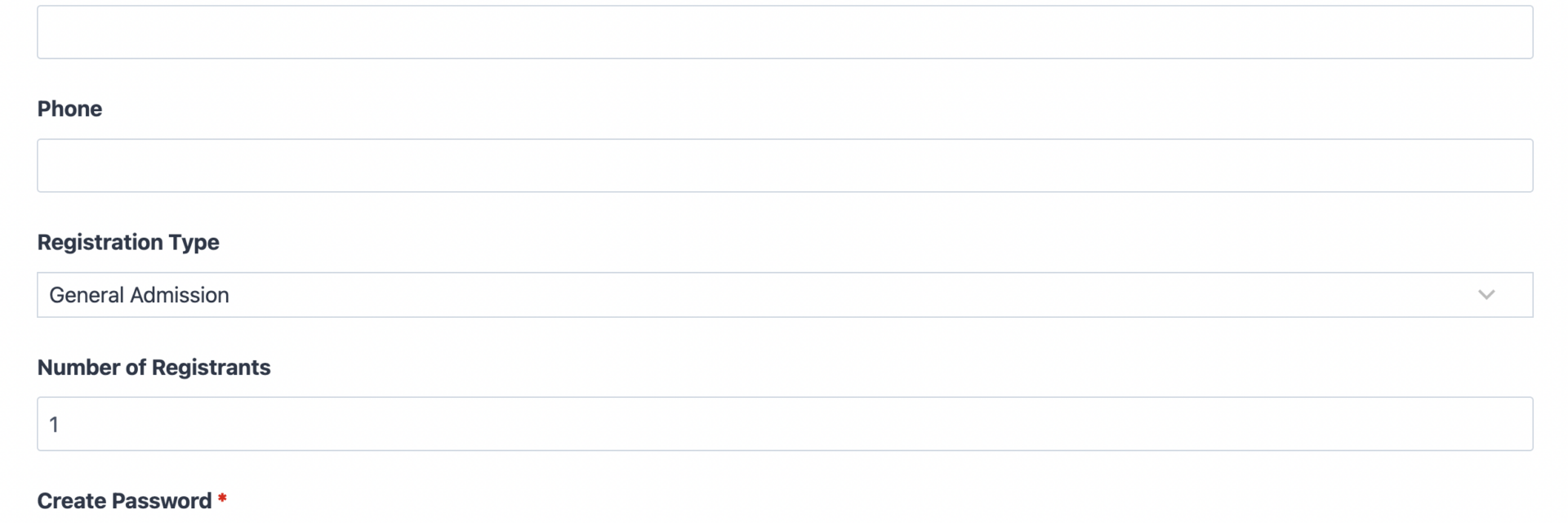
What’s Included
This registration form with payment combines three jobs that usually take three separate tools: collecting registrant details, creating a login account, and processing the fee, all in a single guided submission. It is built for organizers who need a confirmed, paid enrollment on the other end, not just a name in an inbox. The layout stays short and mobile-friendly so registrants finish in under a minute.
Registrant Details
- Full Name (Single Line Text): Captures the registrant’s complete name for rosters, badges, and account records. Required.
- Email (Email): Doubles as the registrant’s account username and the address for enrollment confirmation and payment receipts. Required.
- Phone (Phone): Gives your team a fast way to reach a registrant about schedule changes or a payment issue. Optional.
- Registration Type (Select): A dropdown of enrollment tiers, such as General Admission, Member, or VIP, each carrying its own fee. A pre-selected default keeps the field optional while still driving accurate pricing.
- Number of Registrants (Number): Lets one person register a group, such as a family, team, or delegation, and multiplies the per-person fee automatically. Optional.
Account and Payment Setup
- Create Password (Single Line Text, configured as a masked password field): Paired with the Email field so the User Management add-on can create a WordPress account, giving the registrant a way to log back in and view their enrollment later. Required.
- Registration Fee Total (HTML): A read-only field that displays the amount due, recalculating automatically whenever the registrant changes their tier or headcount. This template uses Ninja Forms’ free built-in Calculations feature to total the registration fee based on the selected tier and number of registrants. Optional, since it is populated by the form rather than typed in.
- Terms and Membership Agreement (Single Checkbox): Confirms the registrant agrees to your event or membership terms before payment runs. Required.
Additional Details and Spam Protection
- Additional Notes or Special Requests (Paragraph Text): An open field for dietary needs, accessibility requests, or anything else an organizer should know ahead of time. Optional.
- hCaptcha (hCaptcha): Filters bot submissions before they reach your registrant list, without adding friction at checkout. Never marked required.
Automated Responses and Smart Integrations
This form is designed to do more than collect information. It confirms enrollment, creates the registrant’s account, processes payment, and keeps your team informed the moment someone completes their submission, so no manual follow-up is needed to close the loop.
- Account Creation: Automatically registers the payer as a WordPress user through the User Management add-on, using the email and password they submit, so they can log in and manage their registration afterward.
- Payment Processing: Charges the calculated registration fee through PayPal Checkout at submission, and only marks the enrollment confirmed once payment succeeds. PayPal is Ninja Forms’ preferred payment partner, supporting standard PayPal payments, credit cards, Apple Pay, Google Pay, and Venmo through one integration.
- Email Notification: Sends the registrant a confirmation with their enrollment details and payment receipt, and sends your team a copy with everything they need for the roster.
- Success Message: Displays a clear thank-you message confirming the registrant is enrolled and paid, with next steps like checking their inbox or logging into their new account.
- Redirect: Optionally sends registrants to a welcome page, event details page, or member dashboard after they submit.
- Anti-spam Protection: Uses hCaptcha to block bot entries without slowing down real registrants during checkout.
Enhanced Functionality (Optional)
The features below are not required to run this form. They are add-ons you can layer in as your registration process grows more complex.
- Multi Step Forms (Optional): Split a longer registration into pages, such as registrant details on page one and account and payment on page two, with a progress bar so people always know how much is left. Learn more about Multi Step Forms.
- Conditional Logic (Optional): Show or hide fields based on the selected registration type, for example revealing a group-size field only when someone picks a group or family tier. See Conditional Logic.
- CRM Integration (Optional): Sync new registrants so your team can track follow-up, renewals, and future event invitations. Connect with OnePageCRM to automatically create a contact and set a renewal reminder. Other supported CRMs include HubSpot, Salesforce, Zoho CRM, and Insightly CRM.
- Zapier and Webhooks (Optional): Trigger downstream automations, such as adding a paid registrant to a calendar invite or task list. Use Zapier to connect with over 4,000 apps, or Webhooks to send data to a custom application.
- Additional Payment Options (Optional): PayPal Checkout handles this template’s payment processing out of the box. If you want a second processor alongside it, Stripe can also accept credit cards, Google Pay, and Apple Pay.
Requires Ninja Forms (free) · Import, customize, publish in minutes
How Can the Registration Form with Payment Be Used?
Collecting a registrant’s information is only half the job. Without a built-in way to take payment and set up an account in the same step, organizers end up chasing invoices separately, manually creating logins, or reconciling a spreadsheet against a payment processor days later. A registration form with payment closes that gap: the registrant fills out one form, pays, and gets an account, and your team gets a confirmed, paid entry with nothing left to reconcile. Explore the most common ways this template supports different organizers:
Event Coordinators: Sell Tickets and Create Attendee Accounts in One Step
An event coordinator can use this event registration form with payment to sell tickets by tier, general admission, early bird, or VIP, while collecting payment through PayPal Checkout at the moment of registration. Because the User Management add-on creates an account for each attendee, coordinators can let registrants log back in later to view their ticket, update details, or check event updates, instead of emailing a static PDF confirmation that gets lost.
Membership Organizations: Convert Sign-Ups into Paid, Logged-In Members
As a membership registration form template, this form can turn a sign-up into a confirmed, paying member in one flow. The registrant selects a membership tier, pays the dues, and receives login credentials automatically, so there is no separate “create your account” email to send after the fact. Combined with a membership application template, this registration form with payment gives membership coordinators a repeatable way to onboard members who are enrolled and paid from the moment they submit.
Program Administrators: Manage Paid Enrollment for Classes and Workshops
Program administrators running a paid class, workshop, or training cohort can use this online registration and payment form to handle group sign-ups with the Number of Registrants field, while the Registration Fee Total updates automatically as headcount changes. Once payment clears, the administrator has a clean, paid roster in the Ninja Forms dashboard, ready to export or hand off to instructors, without cross-checking a separate payment log. For more setup ideas, see this guide to paid enrollment workflows.
Conference and Training Hosts: Handle Group Registrations with Confidence
Hosts managing conferences or multi-day training programs can rely on the same registration form with payment to process individual and group registrations side by side. Because enrollment is only confirmed after PayPal payment succeeds, hosts avoid the common problem of holding seats for registrants who never completed payment. Pairing this template with an event registration template or conference registration template covers both free and paid sessions from the same event.
Frequently Asked Questions About the Registration Form with Payment
Is the registration form with payment template free?
Yes. The template itself is free to download and import. Ninja Forms core is also free, though this template requires the User Management and PayPal Checkout add-ons to enable account creation and payment processing. Check Ninja Forms pricing for current add-on plans.
Do I need coding skills to customize this registration form with payment?
No coding is required. Every field, price, and label can be edited through the Ninja Forms drag-and-drop builder. If you want custom layouts or multi-column styling, the Layout and Styles add-on adds that without touching code.
Will this registration form with payment work on mobile devices?
Yes. Ninja Forms templates are responsive by default, so registrants can browse tiers, enter details, create an account, and pay from a phone or tablet with no separate mobile version to maintain.
Can I integrate the form with my CRM or email marketing tool?
Yes. You can connect CRMs such as OnePageCRM, HubSpot, or Salesforce to track registrants after they enroll, or use Zapier to send data to almost any other tool.
Does this template require the User Management and PayPal Checkout add-ons?
Yes, both are required. User Management creates the registrant’s account, and PayPal Checkout processes the registration fee. Without them, the form can still collect information, but it will not create accounts or take payment automatically.
Can I add additional fields, such as more ticket tiers?
Yes. You can add tiers to the Registration Type dropdown, adjust the Calculations behind each tier, or add entirely new fields. Just keep the form focused so registrants can complete it quickly.
What happens to registrant data and payment information after submission?
Submissions are stored in your WordPress database and visible in the Ninja Forms dashboard. Payment details are handled directly by PayPal, so card and account numbers never pass through or sit on your server.
Does this template work with page builders like Elementor or Divi?
Yes. Ninja Forms embeds cleanly into Elementor, Divi, the WordPress block editor, and most other page builders using a shortcode or dedicated block, so the form fits your existing page design.
Can I use this template for multiple events or membership drives?
Yes. You can duplicate this form for each event or drive, or reuse one form and update the Registration Type options each time. Many organizers keep one master version and adjust tiers and pricing per cycle.
How do I get support if I run into an issue?
Ninja Forms maintains documentation covering how to import a template, calculations, and add-on configuration, and offers support channels for account and payment add-on questions if something does not behave as expected.
Make it your template
Every template is ready to go live and fully customizable. Tweak a few things or renovate from the ground up. Ninja Forms gives you the tools either way.