What’s Included
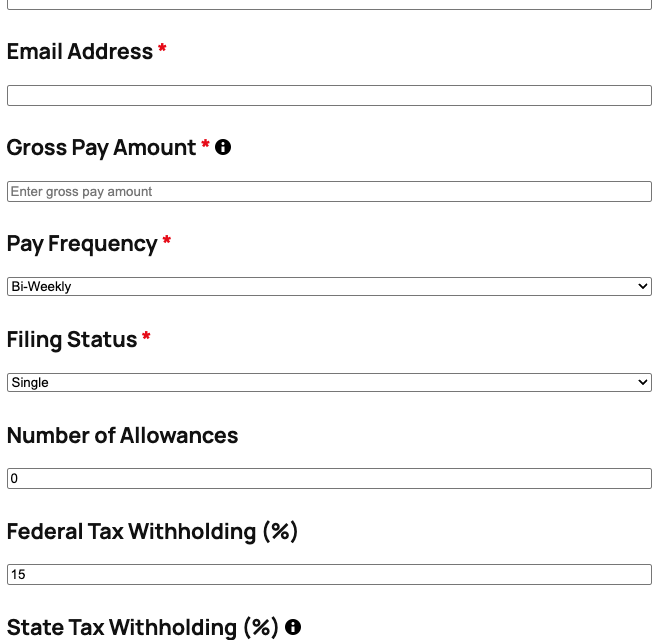
The Paycheck Calculator template includes all the essential fields to accurately estimate net pay based on user-provided income and deduction information. The form is structured to collect gross pay details, tax filing information, and common deductions, then automatically calculates the estimated take-home pay. Each field is carefully designed to guide users through the calculation process with clear labels and helpful instructions.
Income and Personal Information Fields:
- Name (Single Line Text): Collects the user’s full name for personalized email results. Required.
- Email Address (Email): Captures the user’s email to send a detailed paycheck breakdown. Required for receiving calculation results.
- Gross Pay Amount (Number): The total earnings before any deductions or taxes. Users enter their salary or hourly wages multiplied by hours worked. Required.
- Pay Frequency (Select): Dropdown menu to select how often paychecks are issued (Weekly, Bi-Weekly, Semi-Monthly, Monthly). This adjusts annual calculations accordingly. Required.
- Filing Status (Select): Tax filing status selection (Single, Married Filing Jointly, Married Filing Separately, Head of Household) to determine appropriate tax brackets. Required.
- Number of Allowances (Number): Federal tax allowances claimed on W-4, which affects withholding amounts. Defaults to 0. Optional.
Deduction Fields:
- Federal Tax Withholding (%) (Number): Estimated federal income tax percentage based on filing status and income bracket. Users can customize if they know their exact rate. Optional.
- State Tax Withholding (%) (Number): State income tax percentage (varies by state). Users enter 0 if their state has no income tax. Optional.
- Pre-Tax Deductions (Number): Total pre-tax deductions such as 401(k) contributions, health insurance premiums, HSA, FSA, etc. Reduces taxable income. Optional.
- Post-Tax Deductions (Number): Deductions taken after taxes, such as Roth IRA contributions, union dues, or garnishments. Optional.
Results and Submission Fields:
- Estimated Take-Home Pay (HTML): Dynamic results field displaying the calculated net pay after all deductions and taxes. Uses Ninja Forms’ built-in Calculations feature with merge tags to show: Gross Pay – Federal Tax – State Tax – Social Security (6.2%) – Medicare (1.45%) – Pre-Tax Deductions – Post-Tax Deductions = Net Pay.
- hCaptcha (hCaptcha): Spam protection to prevent bot submissions while maintaining a user-friendly experience. Not required.
- Submit Button (Submit): Triggers the calculation and sends results via email.
This template uses Ninja Forms’ free built-in Calculations feature to perform real-time paycheck calculations without requiring any additional add-ons. The calculation automatically factors in FICA taxes (Social Security and Medicare), federal and state tax withholdings, and both pre-tax and post-tax deductions to deliver an accurate net pay estimate that users can rely on for budgeting and financial planning.
Automated Responses and Smart Integrations
This form is designed to do more than just collect information—it works behind the scenes to automate confirmations, deliver personalized paycheck breakdowns, and optionally sync with external tools like CRM platforms for seamless lead management and relationship building.
Core Actions Included:
- Email Notification: Sends a confirmation to the submitter with their complete paycheck breakdown including gross pay, all deductions, and estimated net income. A copy is also sent to your team with all submission details for follow-up if desired.
- Success Message: Shows a clear thank-you message with next steps, such as checking email for the detailed paycheck calculation or contacting your HR team with questions.
- Redirect: Optionally redirects to a custom page with additional resources, such as tax planning guides, benefits enrollment information, or financial wellness tools.
- Anti-spam Protection: Uses hCaptcha to prevent bot entries while maintaining a user-friendly experience and protecting user privacy.
Enhanced Functionality (Optional):
While this template works perfectly with the free version of Ninja Forms, you can enhance its functionality with optional add-ons:
- CRM Integration (Optional): Sync paycheck calculator submissions to track employee or client engagement over time. Connect with OnePageCRM to automatically create new leads and set follow-up reminders for financial advisory services or employee benefits consultations. Other supported CRMs include HubSpot, Salesforce, Zoho, and Insightly. Visit our add-ons page to explore all CRM integration options.
- PDF Form Submission (Optional): Generate a professional PDF of the paycheck calculation for users to download and save for their records using PDF Form Submission.
- Layout and Styles (Optional): Create a more polished, branded calculator experience with custom styling and multi-column layouts using Layout and Styles.
- Zapier and Webhooks (Optional): Trigger automations in payroll systems, HRIS platforms, or financial planning tools. Use Zapier to connect with over 4,000 apps or Webhooks to send data to custom applications and services.
How Can the Paycheck Calculator Be Used?
Accurate paycheck estimation is essential for financial planning, employee transparency, and HR efficiency. The Paycheck Calculator template solves a common pain point: employees and freelancers often struggle to understand their actual take-home pay due to complex tax calculations and multiple deduction types. This template eliminates confusion by providing instant, accurate net pay estimates that account for federal taxes, state taxes, FICA withholdings, and customizable pre-tax and post-tax deductions. By giving users immediate clarity on their earnings, you improve financial literacy, build trust, and empower better budgeting decisions. The form enhances user experience with instant results, eliminates back-and-forth questions about paycheck calculations, and provides a professional self-service tool that saves time for both employees and HR teams. Explore the most common ways this template empowers different users:
HR Departments: Employee Self-Service Portal
Human resources teams can embed the Paycheck Calculator on an employee intranet or benefits portal to provide instant paycheck estimates during benefits enrollment, salary negotiations, or life events that affect deductions. When employees are evaluating health insurance plan options or deciding how much to contribute to their 401(k), they can use the calculator to see exactly how each choice impacts their take-home pay. This reduces the volume of repetitive questions HR receives, empowers employees to make informed decisions independently, and demonstrates transparency and commitment to employee financial wellness. The calculator can be customized to reflect your company’s specific benefit costs, state tax rates, and deduction options, ensuring employees receive accurate estimates tailored to your organization. Learn more about user management features to create secure employee-only access to this tool.
Financial Advisors: Budget Planning and Client Onboarding
Financial planners and advisors use the Paycheck Calculator as a value-added tool for client onboarding and budget planning sessions. When new clients come in uncertain about their actual disposable income, the calculator provides immediate clarity by showing exactly how much money they take home after all deductions. Advisors can walk clients through different scenarios—such as increasing retirement contributions, adjusting tax withholdings, or evaluating the impact of a raise—and instantly show the effect on net pay. This positions the advisor as a trusted partner who provides practical, actionable insights. The form can capture client contact information, and when paired with OnePageCRM, automatically creates a new lead record with detailed notes about the client’s current financial situation for seamless follow-up and relationship building.
Accounting Firms: Client Payroll Services
Accounting and bookkeeping firms offering payroll services can provide the Paycheck Calculator on their website as a lead generation tool and client service enhancement. Prospective clients researching payroll options can use the calculator to understand their payroll tax obligations and net pay expectations, which builds trust and positions your firm as a knowledgeable resource. For existing clients, the calculator serves as a convenient self-service tool between payroll runs, allowing employees to estimate paychecks when changes occur. The template can be customized to include your firm’s branding and links to additional services like tax planning, benefits administration, or year-end tax preparation. Connect the form to Mailchimp to automatically add users to a newsletter focused on payroll tips and tax updates, nurturing leads into paying clients.
Freelancers and Self-Employed: Tax Planning Tool
Freelancers, independent contractors, and self-employed professionals face unique challenges in estimating their take-home income because they must account for self-employment taxes, estimated quarterly tax payments, and retirement contributions without employer matching. The Paycheck Calculator can be adapted to help freelancers estimate net income from contracts by factoring in self-employment tax (15.3% for Social Security and Medicare), estimated federal and state tax rates, and self-funded retirement contributions. This helps freelancers price their services appropriately, plan for quarterly tax payments, and avoid cash flow surprises. A freelancer can use the calculator before accepting a new contract to determine if the offered rate will meet their financial needs after taxes and expenses, empowering confident business decisions and better financial management.
Employers: Salary Offer Transparency
Employers and recruiters can use the Paycheck Calculator during the hiring process to provide salary offer transparency and help candidates understand the true value of their compensation package. When extending a job offer, include a link to the calculator so candidates can input the proposed salary, benefits deductions (health insurance premiums, 401k contributions), and their personal tax situation to see their actual take-home pay. This transparency builds trust, helps candidates make informed decisions, and can differentiate your organization in competitive hiring markets. The calculator demonstrates your commitment to employee financial wellness from day one and reduces confusion or disappointment after the first paycheck. Pair this with PDF Form Submission so candidates can save a detailed breakdown of their estimated compensation for personal review and comparison with other offers.
Frequently Asked Questions About the Paycheck Calculator
Is the Paycheck Calculator template free?
Yes, the Paycheck Calculator template is completely free to download and use. It works perfectly with the free version of Ninja Forms, which includes all the core features you need: the drag-and-drop form builder, calculation functionality, email notifications, and submission storage. You don’t need to purchase any add-ons to use the basic paycheck calculator. Optional add-ons like CRM integrations, PDF generation, or advanced styling are available if you want enhanced functionality, but they’re not required for the calculator to work effectively.
Do I need coding skills to customize this template?
No coding skills are required whatsoever. Ninja Forms uses a visual drag-and-drop builder that makes customization as simple as clicking and typing. You can adjust tax rates, add or remove deduction fields, change labels, modify email notifications, and customize the success message all through an intuitive interface. The calculation formulas are pre-configured but can be adjusted through a user-friendly calculation editor if you need to change the tax percentages or add custom deduction logic. Everything is designed for non-technical users, so you can create a professional paycheck calculator without ever touching a line of code.
Will this paycheck calculator work on mobile devices?
Absolutely. All Ninja Forms templates, including the Paycheck Calculator, are fully responsive and mobile-optimized. The form automatically adapts to any screen size—smartphones, tablets, laptops, and desktops—ensuring employees and clients can calculate their paychecks on the go. The calculation happens instantly on the user’s device, so there’s no waiting for page reloads or server processing. Whether someone accesses the calculator from their phone during a lunch break or from their computer at home, the experience is seamless and fast.
Can I integrate the paycheck calculator with my CRM or email marketing tool?
Yes, Ninja Forms offers robust integration capabilities. If you want to capture leads from calculator users, you can connect the form to popular CRMs like OnePageCRM, HubSpot, Salesforce, or Zoho. For email marketing, you can automatically add calculator users to platforms like Mailchimp, ActiveCampaign, or Constant Contact. These integrations allow you to build targeted email campaigns, nurture leads, and track user engagement over time. All integrations are optional and require the corresponding add-on, but they seamlessly extend the calculator’s functionality for marketing and lead management purposes.
How accurate are the paycheck calculations?
The Paycheck Calculator template uses industry-standard formulas to estimate federal income tax withholding, FICA taxes (Social Security at 6.2% and Medicare at 1.45%), and user-specified state taxes and deductions. While the calculator provides reliable estimates for budgeting and planning purposes, it’s important to note that actual paychecks may vary slightly based on factors like specific employer payroll configurations, additional local taxes, garnishments, or unique deduction arrangements. The template should be used as an estimation tool, not as a substitute for official payroll calculations or professional tax advice. You can customize the tax percentages and formulas to match current tax rates and ensure the most accurate estimates possible for your users.
Can I add additional deduction fields to the calculator?
Yes, you can easily add as many custom deduction fields as you need. Common additions include union dues, parking fees, uniform costs, charitable contributions, student loan repayments, garnishments, or employer-specific benefits. Using the Ninja Forms drag-and-drop builder, simply add a new Number field, label it appropriately, and then update the calculation formula to include the new deduction. The calculation editor makes it straightforward to modify the net pay formula to subtract or add any values you specify. This flexibility ensures the calculator can be tailored to match your organization’s unique payroll structure and deduction types.
What happens to the data users enter into the calculator?
All data entered into the Paycheck Calculator is stored securely on your WordPress server—you maintain complete control over user information with no third-party data sharing. By default, Ninja Forms stores all submissions in your WordPress database, where you can review, export, or delete them at any time. You can configure per-field storage settings if you want to exclude certain sensitive information from being saved (for example, Social Security numbers or exact salary amounts if you’re concerned about privacy). The form also supports GDPR compliance features, including data export and deletion requests, ensuring you can handle user data responsibly and in accordance with privacy regulations. Learn more about GDPR compliance features in Ninja Forms.
Does this template work with page builders like Elementor or Divi?
Yes, Ninja Forms is fully compatible with all major WordPress page builders, including Elementor, Divi, Beaver Builder, WPBakery, and others. You can embed the Paycheck Calculator using the page builder’s form widget or by simply inserting the shortcode in a text or code module. The form will render correctly and maintain full functionality regardless of which page builder you use. This flexibility allows you to create beautifully designed calculator pages that match your site’s branding and layout preferences without any compatibility issues or technical workarounds.
Can I use this template on multiple websites?
Yes, the Paycheck Calculator template can be used on as many WordPress sites as you like. Once you download the .nff file, you can import it to any site where you have Ninja Forms installed. This is particularly useful for agencies managing multiple client sites, franchises with multiple location websites, or organizations with separate sites for different departments or brands. There are no licensing restrictions on how many times you can use the template—it’s yours to deploy wherever you need a paycheck calculation tool.
How do I get support if I have issues with the template?
Ninja Forms offers comprehensive support resources to help you succeed. Start with our extensive documentation library, which includes step-by-step guides on importing templates, customizing forms, setting up calculations, and configuring email notifications. If you need personalized assistance, our support team is available to help troubleshoot issues, answer questions, and provide guidance. Premium users with active add-on licenses receive priority support with faster response times. Additionally, the Ninja Forms community forums are a great place to connect with other users, share tips, and find solutions to common challenges.
Make it your template
Every template is ready to go live and fully customizable. Tweak a few things or renovate from the ground up. Ninja Forms gives you the tools either way.