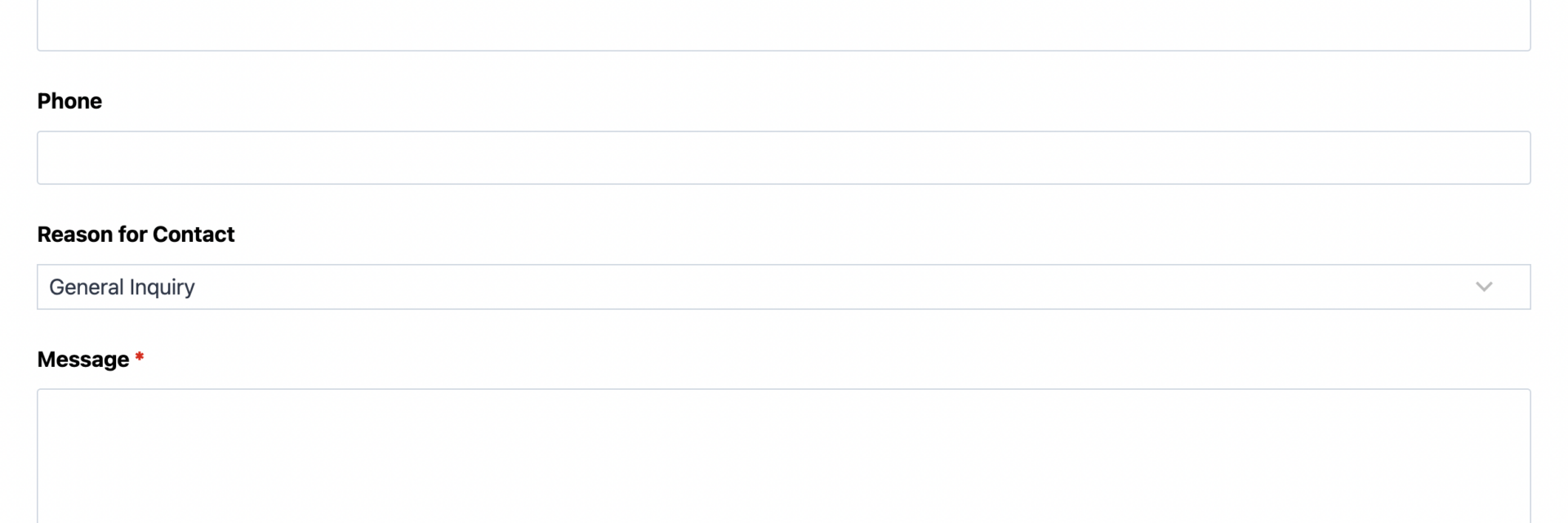
What’s Included
This simple contact form template gives visitors an easy way to reach you, and gives you everything you need to follow up quickly. It pairs the essentials, name, email, and message, with a few practical extras: a reason-for-contact dropdown for routing, an optional file attachment, and a preferred contact method field. The result is a contact form that feels effortless for visitors to fill out, yet gives your team the context needed to respond well the first time.
Contact Details
- Name (Single Line Text): Captures the visitor’s full name so you know who you’re talking to. Required.
- Email (Email): Collects a validated email address used for replies and the automated confirmation message. Required.
- Phone (Phone): Optional number for visitors who would rather be reached by call or text.
- Reason for Contact (Select): A dropdown of General Inquiry, Sales Question, Support Request, Partnership, and Other, so submissions can be routed or prioritized at a glance. Optional.
Message and Attachments
- Message (Paragraph Text): An open text field for the visitor’s question, comment, or request. Required.
- Attachment (File Upload): Lets visitors attach a screenshot, document, or reference file (PDF, DOC, DOCX, JPG, JPEG, or PNG up to 5MB) alongside their message. This field uses the File Uploads add-on, which is required for this template to work as configured. Optional.
- Preferred Contact Method (Radio List): Lets the visitor flag whether they would rather hear back by email or phone. Optional.
Spam Protection and Submission
- Verify You’re Human (hCaptcha): Blocks automated bot submissions without forcing real visitors through a frustrating puzzle. See the hCaptcha documentation for setup details.
- Send Message (Submit): Submits the contact form and triggers the confirmation and notification actions below.
At nine fields total, with only three marked required, this contact form template stays quick to complete on any device while still capturing enough detail for a useful first response.
Automated Responses and Smart Integrations
This contact form is designed to do more than collect a name and a message. It works behind the scenes to confirm receipt, route the right details to your team, and keep the door open to sync with the marketing and support tools you already use.
- Email Notification: Sends your team a copy of every submission, including the reason for contact and any attached file, so nothing gets lost in a shared inbox.
- Success Message: Displays an on-screen thank-you message immediately after the visitor submits the contact form, confirming their message was received.
- Email Confirmation: Sends the visitor a personalized copy of their submission by email, referencing the reason for contact they selected so they know it reached the right place.
- Redirect (Optional): Can be enabled to send visitors to a custom thank-you page with related resources, a scheduling link, or your knowledge base.
- Anti-spam Protection: Uses hCaptcha to prevent bot entries while keeping the contact form quick and frustration-free for real people.
Beyond the required File Uploads add-on, several optional add-ons pair naturally with a contact form template like this one:
- Conditional Logic (Optional): Show or hide fields, such as revealing a company name field only when Reason for Contact is set to Sales Question or Partnership. Learn more in the Conditional Logic documentation or on the Conditional Logic add-on page.
- CRM Integration (Optional): Sync every submission to your sales or support pipeline. Connect with OnePageCRM to automatically create a new contact and set a follow-up reminder the moment someone reaches out. Other supported CRMs include HubSpot, Salesforce, and Zoho CRM.
- Zapier and Webhooks (Optional): Trigger automations the moment a contact form is submitted. Use Zapier to connect with over 4,000 apps, or Webhooks to send submissions straight to a custom application.
- Layout and Styles (Optional): Arrange fields into a two-column layout and match the contact form’s appearance to your site’s branding with the Layout and Styles add-on.
Requires Ninja Forms (free) · Import, customize, publish in minutes
How Can the Contact Form Be Used?
Most websites need a contact form, but a bare-bones name, email, and message layout often leaves visitors without a way to explain what they need or share supporting files, and leaves your team guessing at priority. This contact form template solves both problems: it adds just enough structure, a reason for contact, an optional attachment, a preferred contact method, without turning a quick message into a chore. Because it runs on Ninja Forms’ free core plugin, there is no extra cost to get a fully functional contact form live on your site. Explore a few of the most common ways teams put this template to work:
Small Business Owners: Handle General Inquiries Without the Back and Forth
A small business often fields a mix of questions through one inbox: pricing, hours, availability, and general curiosity. With the Reason for Contact dropdown, this contact form sorts incoming messages before they even hit your inbox, so a support question does not get treated like a sales lead. The Preferred Contact Method field tells you whether to call or reply by email, cutting down the guesswork on the first response and helping small teams look more organized than a plain general contact form ever could.
Freelancers and Consultants: Qualify Project Inquiries
Freelancers and consultants use this contact form template to collect enough context to know whether a lead is worth a call. The Attachment field lets a prospective client upload a brief, mood board, or reference document right alongside their message, saving a full round of back-and-forth email. Paired with an optional OnePageCRM connection, every new inquiry becomes a tracked lead with a built-in follow-up reminder.
Support Teams: Triage Requests by Reason for Contact
Support teams can route this contact form to different inboxes or a help desk queue depending on the Reason for Contact value, cutting the time spent manually forwarding messages. Since the Message field captures full detail up front and the Attachment field allows a screenshot or error log, agents often have what they need to respond on the first reply instead of requesting more information. See the Customer Support Form template for a more ticket-focused alternative.
Marketing and Sales Teams: Capture and Qualify Leads
When Reason for Contact is set to Sales Question or Partnership, this contact form template functions as a lightweight lead capture form. Connect it to a CRM add-on so every submission becomes a tracked contact automatically, and pair it with a dedicated lead generation form for campaigns that need more qualifying fields. The optional Conditional Logic add-on can reveal a company name field only when a business-related reason is selected, keeping the form short for everyone else.
Frequently Asked Questions About the Contact Form
Is the Simple Contact Form template free?
Yes. The template and Ninja Forms’ core plugin are both free. This contact form template only requires the free File Uploads add-on to enable the Attachment field; everything else runs on Ninja Forms’ free features.
Do I need coding skills to customize this contact form template?
No coding is required. Every field, label, and email notification can be edited through the Ninja Forms drag-and-drop builder inside your WordPress dashboard after you import the template.
Will this contact form work on mobile devices?
Yes. Ninja Forms fields are responsive by default, so the contact form automatically resizes for phones and tablets without any extra configuration.
Can I connect this contact form to my CRM or email marketing tool?
Yes. This template supports CRM add-ons including OnePageCRM, HubSpot, and Salesforce, plus automation tools like Zapier for connecting to thousands of other apps.
Can visitors attach files to the contact form?
Yes. The Attachment field accepts PDF, DOC, DOCX, JPG, JPEG, and PNG files up to 5MB using the File Uploads add-on, which comes required with this template.
Can I add additional fields to the contact form?
Yes. You can add, remove, or reorder fields at any time in the Ninja Forms builder. Many teams add a Company field or a preferred date field depending on their workflow.
What happens to the data visitors submit through the form?
Submissions are stored securely in your WordPress database and are only visible to logged-in administrators, unless you connect an external tool such as a CRM or spreadsheet export add-on.
Does this template work with page builders like Elementor or Divi?
Yes. Ninja Forms includes native blocks and widgets for the WordPress block editor, Elementor, Divi, and most other popular page builders, so you can drop the contact form into any layout.
Can I use this contact form template on more than one website?
Yes. Once downloaded, the .nff file can be imported into Ninja Forms on any number of WordPress sites you manage.
Make it your template
Every template is ready to go live and fully customizable. Tweak a few things or renovate from the ground up. Ninja Forms gives you the tools either way.