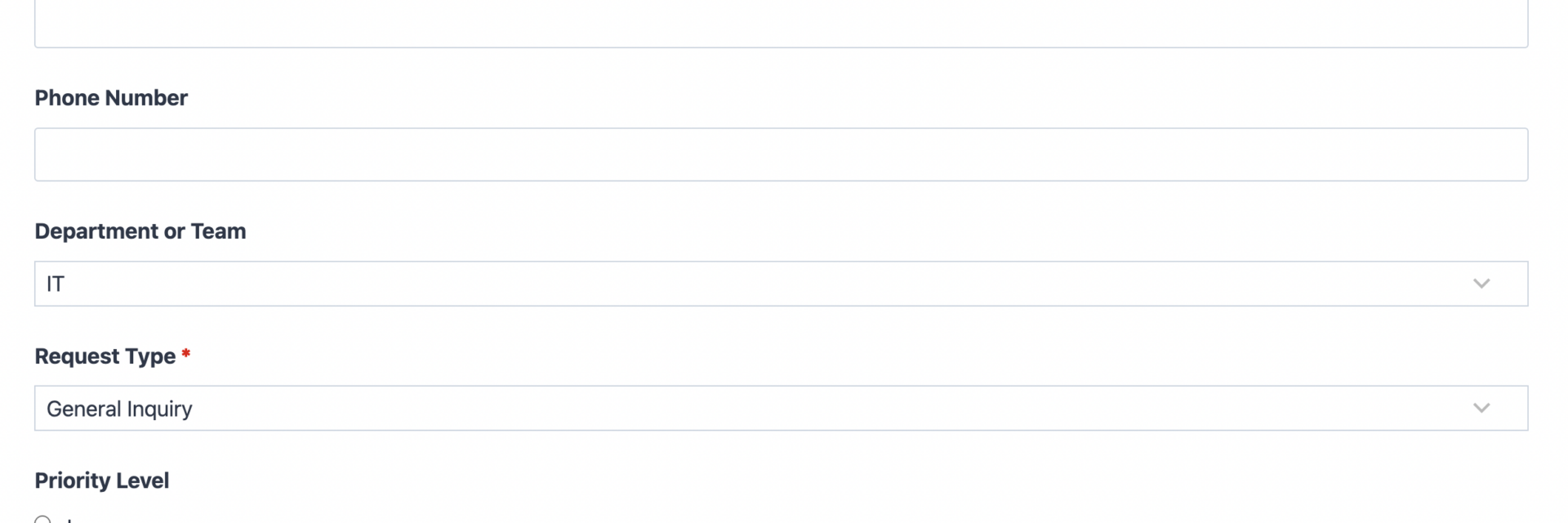
What’s Included
The request form template gives any team a single, structured way to take in requests instead of relying on scattered emails, phone calls, or hallway conversations. It works as a general-purpose intake form: requesters identify themselves, choose a request type and priority, then describe what they need in their own words. Because the field set stays broad, this request form template adapts to IT tickets, vendor questions, internal approvals, or any other business request without changing the underlying structure.
User Information Fields
- Full Name (Single Line Text): Captures the requester’s name so the receiving team knows who to follow up with. Required.
- Email Address (Email): Collects a validated email address for confirmations and status updates on the request. Required.
- Phone Number (Phone): Optional callback number for requests that need a faster, verbal follow-up. Optional.
- Department or Team (Select): Dropdown of internal teams (IT, HR, Facilities, Marketing, Finance, Other) that helps route each request form submission to the right owner. Optional.
Request Details Fields
- Request Type (Select): Categorizes the submission (General Inquiry, Access Request, Resource Request, Information Request, Approval Request, Other) so incoming requests can be triaged at a glance. Required.
- Priority Level (Radio List): Lets requesters flag urgency (Low, Medium, High, Urgent) to help the receiving team order their queue. Optional.
- Request Details (Paragraph Text): Open text area where the requester explains exactly what they need, including context and any relevant deadline. Required.
- Needed By Date (Date): Captures when the requester needs a response or resolution, useful for scheduling and internal SLA tracking. Optional.
- Supporting Documents (File Upload): Lets requesters attach files, screenshots, or documents that clarify the request. Optional.
- Preferred Contact Method (Radio List): Lets the requester choose how they want to be contacted about the request, by Email or Phone. Optional.
Spam Protection and Submission
- Spam Check (hCaptcha): Blocks automated bot submissions while keeping the form fast to complete for real requesters. Never marked required, per Ninja Forms best practice.
- Submit (Submit): Sends the completed request form to your team.
Automated Responses and Smart Integrations
This request form template does more than collect information. It confirms submissions, notifies the right people, and can sync new requests with the tools your team already uses for tracking and follow-up.
- Email Notification: Sends a confirmation to the requester and a copy to your team with the full request details.
- Success Message: Displays a clear thank-you message with next steps, such as an expected response window.
- Redirect: Optionally redirects to a resources page or scheduling tool after submission.
- Anti-spam Protection: Uses hCaptcha to prevent bot entries while keeping the form quick for real requesters.
Enhanced Functionality (Optional)
- Conditional Logic (Optional): Show or hide fields based on the selected Request Type, for example revealing Supporting Documents only for resource requests. Conditional Logic keeps the form short while still collecting detail when it matters.
- Layout and Styles (Optional): Arrange fields into a multi-column layout so the form feels compact and matches your site’s design, using Layout and Styles.
- PDF Form Submission (Optional): Automatically generate a PDF copy of every submitted request for recordkeeping or compliance with PDF Form Submission.
- CRM Integration (Optional): Sync each request to your CRM to track it through to resolution. Connect with OnePageCRM to automatically create a contact and set a follow-up reminder, or use HubSpot, Salesforce, Zoho, or Insightly.
- Zapier and Webhooks (Optional): Route new requests into a ticketing system, Slack channel, or project board. Use Zapier to connect with over 4,000 apps or Webhooks to send data into custom systems.
None of these integrations are required to launch. The request form template works out of the box with the free version of Ninja Forms, and each add-on above is optional.
Requires Ninja Forms (free) · Import, customize, publish in minutes
How Can the Request Form Be Used?
Every organization eventually needs a way to receive structured requests without relying on email threads that get lost or verbal asks that never reach a queue. A generic request form solves this by giving requesters one consistent place to submit what they need, while giving the receiving team consistent fields to triage and respond. Because this template is intentionally broad, it works as a starting point for almost any internal or external request. Explore some of the most common ways teams put this request form template to work, plus links to more specialized versions if your request type fits a narrower use case.
Facilities and Operations Teams: Route Building and Equipment Requests
Facilities teams often field requests for repairs, equipment, or building access from employees, tenants, or clients who otherwise resort to phone calls or in-person asks. Using this request form template, the Department or Team field routes submissions straight to facilities, while Priority Level flags anything urgent, like a broken door lock, so it does not sit in a shared inbox. The Supporting Documents field lets requesters attach a photo of the issue for more context. Teams handling recurring repair and upkeep requests may prefer the dedicated Maintenance Request Form template, built for that exact workflow.
Internal Support and IT Desks: Standardize Ticket Intake
IT and internal support desks need a predictable intake channel so tickets do not arrive scattered across email, chat, and hallway conversations. This request form template’s Request Type and Priority Level fields let requesters self-classify their issue, while Request Details captures enough context for a first response without back and forth. Pair it with Conditional Logic to reveal extra fields, like an asset tag, only when relevant. Teams whose intake is specifically service related may prefer the purpose-built Service Request Form template, tuned for helpdesk workflows.
HR Teams: Centralize Employee Requests Beyond Time Off
HR departments field far more than time off requests: policy questions, equipment needs, workplace accommodations, and general employee inquiries all need a home. This request form template gives HR one flexible intake point for anything that does not fit a more specific process, with the Department field distinguishing an HR request from one meant for IT or facilities. For the specific, high-volume case of leave requests, the dedicated Time Off Request Form template is purpose built with date-range and accrual-friendly fields, so most HR teams run both templates side by side.
Business and Sales Teams: Capture Vendor and Client Requests
Sales, procurement, and account teams regularly receive requests from vendors and clients: a quote, a demo, a contract change, or general information. This request form template’s Request Type field lets submitters self-select the kind of ask, while the optional CRM integration syncs each one directly into your pipeline for follow-up. It also works well as a catch-all on a contact or resources page for anything that does not warrant its own dedicated form. Once employee travel approvals become frequent enough to need cost fields, teams typically graduate to the specialized Travel Request Form template.
Frequently Asked Questions About the Request Form
Is the request form template free?
Yes. The request form template is free to download and works with the free core version of Ninja Forms. No paid add-ons are required to launch it: notifications, the success message, and hCaptcha spam protection all run on the free plugin. Optional add-ons like Conditional Logic or a CRM integration can extend the form later, but they are enhancements, not requirements.
Do I need coding skills to customize this template?
No coding is required. Ninja Forms uses a drag-and-drop builder, so you can add, remove, or reorder fields, change labels, and adjust notification emails entirely through the WordPress dashboard. If you want a polished multi-column layout, the Layout and Styles add-on adds styling controls without touching any code.
Will this request form work on mobile devices?
Yes. Every Ninja Forms template, including this one, is built to be fully responsive, so fields resize and stack correctly on phones and tablets. Requesters submitting from a mobile device get the same validation, spam protection, and confirmation experience as desktop users, which matters since many requests come in outside of normal office hours.
Can I integrate this request form with my CRM or email marketing tool?
Yes. This template supports CRM integrations such as OnePageCRM, HubSpot, and Salesforce, syncing each request as a new contact automatically. It also connects to Zapier and Webhooks for routing requests into a ticketing tool or Slack channel.
Can I add additional fields to this request form template?
Yes. The field list is kept broad and lean so it works for the widest range of requests, but you can add, remove, or edit any field in the Ninja Forms builder. If your requests fall into a narrower category, like maintenance, time off, or travel, consider one of our dedicated templates instead, since they already include the fields those workflows need.
What happens to the data users enter in the request form?
All submission data is stored on your own WordPress database by default, giving you full control over storage and retention. You can view, export, or delete submissions from the Ninja Forms dashboard, and mark fields as personally identifiable information for GDPR requests. Data goes to a third party, such as a CRM, only if you configure that integration.
Does this template work with page builders like Elementor or Divi?
Yes. Because Ninja Forms embeds through a standard shortcode or block, the request form template works inside Elementor, Divi, the WordPress block editor, and most other page builders without special configuration. You simply insert the form widget or shortcode wherever you want the request form to appear on the page.
Can I use this request form template on multiple websites?
Yes, the free version of Ninja Forms installs on unlimited sites, so you can import and reuse this request form template as many times as you need. Optional paid add-ons, like a CRM integration, may be limited by the number of sites in your plan; check the pricing page for details.
How is this different from the Service, Maintenance, Time Off, or Travel request templates?
This request form template is the general-purpose version: broad enough to handle almost any business request without modification. The Service Request Form, Maintenance Request Form, Time Off Request Form, and Travel Request Form templates are purpose built for those workflows instead. Start here if your request type does not fit a dedicated template, or if you want one catch-all intake form.
How do I get support if I have issues with this template?
Ninja Forms maintains full documentation covering installation, field configuration, and add-ons at the Ninja Forms docs site. If you run into a specific issue after importing the request form template, the support team is reachable through the contact page, and premium plan holders get priority email support.
Make it your template
Every template is ready to go live and fully customizable. Tweak a few things or renovate from the ground up. Ninja Forms gives you the tools either way.