What’s Included
This reservation form template gives any business that books rooms, tables, or spaces a simple way to collect requests online, no separate booking software required. It captures the date, party size, and preferences guests care about, then routes every request to your inbox for a quick confirmation. The layout below works as-is for a wide range of businesses, and every field can be renamed or removed in the Ninja Forms builder in a few clicks.
Guest and Contact Information
- Full Name (Single Line Text): Captures the guest’s name so your team can address the reservation correctly and greet them by name on arrival. Required.
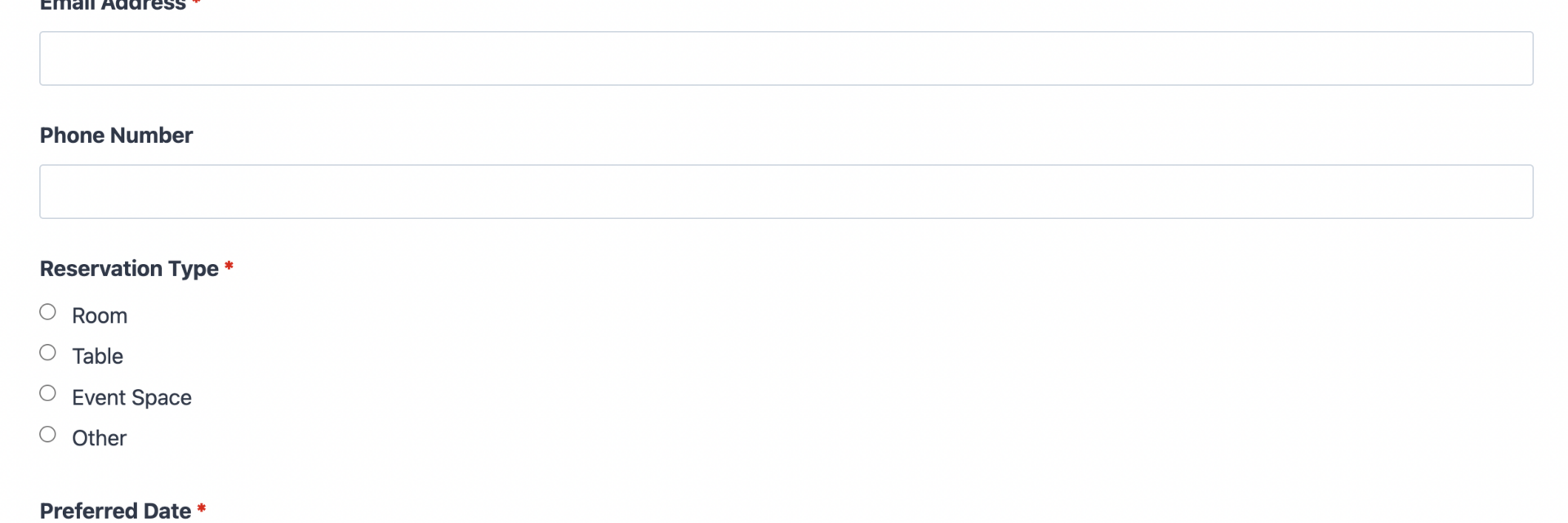
- Email Address (Email): Used to send an automatic confirmation and follow up on the reservation form request if any details need clarifying. Required.
- Phone Number (Phone): Optional, but useful when staff need to call about same-day requests or last-minute changes.
Reservation Details
- Reservation Type (Radio List): Lets the guest specify what they are reserving, such as a room, a table, an event space, or another resource. Required. Pairs well with Conditional Logic if you want to reveal type-specific fields.
- Preferred Date (Date): The date the guest wants to reserve. Required. Works with the Advanced Datepicker add-on if you want to block out unavailable dates.
- Preferred Time (Select): A dropdown of time slots or general periods, such as morning, afternoon, or evening, so guests can indicate when they would like to arrive. Optional.
- Party Size (Number): The number of guests included in the reservation, helping your team prepare the right space or seating in advance. Optional.
- Occasion (Select): An optional dropdown, such as birthday, anniversary, business meeting, or casual visit, so guests can flag something your team may want to acknowledge.
Notes and Submission
- Special Requests (Paragraph Text): An open field for accessibility needs, seating preferences, or anything else the guest wants staff to know ahead of time. Optional.
- hCaptcha: Blocks automated spam submissions without adding friction for real guests. Anti-spam fields are never required.
- Submit: Sends the completed reservation form request to your team.
This template does not use Ninja Forms Calculations, since a reservation request does not need to price anything out at submission time. If your business later wants to quote pricing before a reservation is confirmed, Calculations is a free, built-in feature you can add to any field set.
Automated Responses and Smart Integrations
This form is designed to do more than collect a name and a date. It works behind the scenes to confirm reservation requests automatically, notify your team the moment one comes in, and, if you want, sync guest details with the marketing or CRM tools you already use.
- Email Notification: Sends the guest a confirmation with their requested date, party size, and reservation type, plus a copy to your team with everything needed to follow up. Configured through Ninja Forms email actions.
- Success Message: Shows a clear thank-you message on the page after submission, such as “Your reservation request has been received. We will confirm by email within 24 hours.”
- Redirect: Optionally sends guests to a page with directions, a menu, or a phone number for urgent requests.
- Anti-spam Protection: Uses hCaptcha to prevent bot entries while keeping the reservation form quick and friendly for real guests.
Enhanced Functionality (Optional)
- Prevent Double Bookings (Optional): The Advanced Datepicker add-on lets you disable dates that are already full and cap how many reservation requests can come in per date or time slot, so you never overbook a room or a table.
- Show Fields by Reservation Type (Optional): The Conditional Logic add-on can reveal or hide fields based on the Reservation Type selection, for example showing a room preference field only when a guest selects “Room.”
- CRM Integration (Optional): Sync every reservation request into your customer database automatically. Connect with OnePageCRM to create a new contact and set a follow-up reminder for each request. Other supported CRMs include HubSpot, Salesforce, Zoho, and Insightly.
- Automations (Optional): Use Zapier to add confirmed reservations to a calendar or spreadsheet automatically, or use Webhooks to send reservation data to a custom booking system.
- Layout and Styles (Optional): The Layout and Styles add-on can arrange fields into a two-column layout and match the form to your site’s branding.
None of these add-ons are required to use the reservation form. The template works out of the box with the free version of Ninja Forms, and each one above is an optional way to save your team time as reservation volume grows.
Requires Ninja Forms (free) · Import, customize, publish in minutes
How Can the Reservation Form Be Used?
Most small businesses that take reservations start out managing them by phone, email, or a paper logbook, which makes it easy to lose track of requests or double book a busy Friday night. A reservation form on your website gives guests a clear, always-available way to ask for a room, table, or space, while giving your team one place to see every request and confirm it without extra software. Because the template is built entirely on Ninja Forms fields, you can rename labels, add a field, or change the reservation type list to match your business in minutes. Explore the most common ways this template is put to work below.
Hotels and Inns: Confirm Room Requests Without Booking Software
A hotel or bed and breakfast can use this reservation form as a simple front door for guests who want to check availability before committing to an online travel agency. Guests submit their preferred dates, party size, and any special requests, such as a crib or a ground-floor room, and your front desk confirms by email or phone. If room bookings are your primary use case, the Room Reservation Form template builds on this same structure with room-type fields already configured.
Restaurants and Cafes: Manage Table Requests With Ease
Restaurants, cafes, and bistros use the reservation form to capture party size, preferred seating time, and occasions like anniversaries so servers can set the table accordingly. Pairing the form with the Advanced Datepicker add-on lets a restaurant cap how many parties can book each seating, preventing an overbooked dining room. For a template tuned specifically to table service, see the Table Reservation Form template.
Event Venues and Meeting Spaces: Capture Space Reservations
Event venues, coworking spaces, and meeting rooms can use the reservation form to collect the date, expected headcount, and purpose of the gathering before a coordinator follows up with pricing and availability. Since payment is not collected at reservation time, the form keeps the initial ask low-friction while your team confirms details. Businesses running larger gatherings may also want the Conference Registration Form template or the Catering Order Form template for related planning needs.
Service Businesses: Reserve Equipment, Studios, or Time Slots
Photo studios, rental equipment providers, salons, and fitness studios can adapt the reservation form to request a time slot instead of a table or room by relabeling the Reservation Type and Preferred Time fields. This keeps a single, familiar form structure working across very different businesses. Related templates like the Class Booking Form template and the Workshop Registration Form template cover scheduled sessions with a similar approach.
Frequently Asked Questions About the Reservation Form
Is the reservation form template free?
Yes. The reservation form template is free to download and works with the free core version of Ninja Forms. Optional add-ons, such as Advanced Datepicker or Conditional Logic, add extra functionality but are never required to use the form.
Do I need coding skills to customize this reservation form?
No coding is required. Ninja Forms uses a drag-and-drop builder, so you can add, remove, or relabel any field in the reservation form directly from your WordPress dashboard.
Will this reservation form work on mobile devices?
Yes. Every Ninja Forms template, including this reservation form, is built to be responsive, so guests can submit a request from a phone, tablet, or desktop with no extra setup.
Can I integrate the reservation form with my CRM or email marketing tool?
Yes. The reservation form supports CRM add-ons like OnePageCRM, HubSpot, Salesforce, Zoho, and Insightly, along with email marketing platforms, so every request can automatically create a contact for follow-up. Browse the full list on the Ninja Forms add-ons directory.
Can I prevent double bookings or block out unavailable dates?
Yes. Adding the Advanced Datepicker add-on lets you disable specific dates and limit how many reservation requests come in per date or time slot, which helps prevent overbooking.
Can I add additional fields to the reservation form?
Yes. You can add fields like a company name, event type, or additional guest details directly in the Ninja Forms builder. See the import and export documentation for guidance on saving your customized version.
What happens to the data guests enter?
Submission data is stored on your own WordPress database, giving you full control over guest information. Ninja Forms also includes built-in GDPR tools for exporting or deleting a guest’s data on request.
Does this template work with page builders like Elementor or Divi?
Yes. Ninja Forms embeds cleanly into Elementor, Divi, the WordPress block editor, and most other page builders using a simple shortcode or block, so the reservation form fits into your existing site design.
Is there a version of this template for restaurants or hotels specifically?
Yes. This reservation form is the general-purpose version. For a template built specifically around table service, see the Table Reservation Form template. For a version built around guest rooms, see the Room Reservation Form template.
How do I get support if I have issues?
Ninja Forms offers documentation, a support forum, and priority support for members. Browse more form templates in the Ninja Forms templates library if you need a related starting point.
Make it your template
Every template is ready to go live and fully customizable. Tweak a few things or renovate from the ground up. Ninja Forms gives you the tools either way.