What’s Included
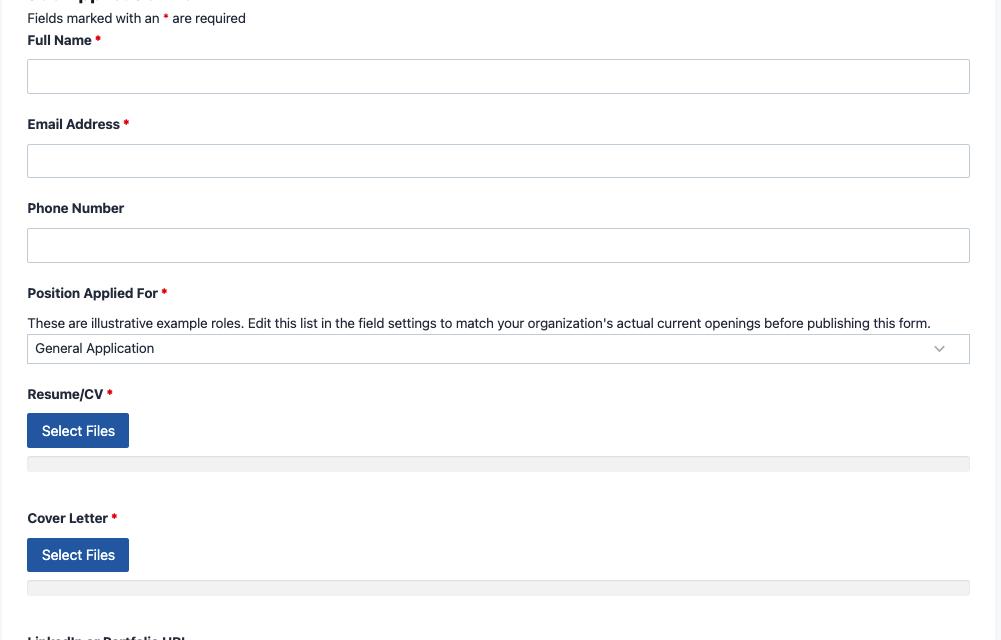
This job application form template gives hiring managers and HR coordinators a simple, structured way to collect applicant details and resumes in a single submission. Instead of sorting through email attachments or paper forms, every application arrives in one place, organized and ready to review. The form covers the essentials, contact information, the position applied for, and a resume upload, while staying easy enough for any applicant to complete in a few minutes on desktop or mobile.
Applicant Information
- Full Name (Single Line Text): Captures the applicant’s first and last name for identification on the job application form submission. Required.
- Email Address (Email): Collects a valid email address so your team can follow up about interview scheduling or next steps. Required.
- Phone Number (Phone): Gives applicants a second way to reach them if a quick call is faster than email. Optional.
Position and Documents
- Position Applied For (Select): A dropdown listing open roles so applications route to the right hiring manager from the start. Ships with a general application option alongside a few illustrative roles you can edit to match your current openings. Required.
- Resume/CV (File Upload): Lets applicants attach their resume directly to the submission using the File Uploads add-on, no email attachments or misplaced PDFs. Required.
- Cover Letter (File Upload): An optional space for applicants to introduce themselves and explain their interest in more depth. Optional.
- LinkedIn or Portfolio URL (Single Line Text): A field for a professional profile or work sample link, useful for roles where a portfolio matters. Optional.
Additional Details
- Availability Date (Date): Asks when the applicant could realistically start, helpful for planning onboarding timelines. Optional.
- Why Are You a Good Fit for This Role? (Paragraph Text): Gives applicants room to make their case in their own words beyond what a resume shows. Optional.
- How Did You Hear About This Opening? (Select): Tracks where candidates are finding your listings, useful for evaluating which job boards or referral sources perform best. Optional.
Spam Protection and Submission
- Spam Check (hCaptcha): Blocks automated bot submissions without adding friction for real applicants.
- Submit (Submit): Finalizes the application and triggers the confirmation email and success message.
Because everything, including the attached resume and cover letter, arrives in the same job application form submission, your team can review applications side by side without asking candidates to resend anything.
Automated Responses and Smart Integrations
This job application form is designed to do more than just collect applications. It works behind the scenes to confirm submissions, keep your hiring team in the loop, and route documents where your team can review them together, no forwarding required.
- Email Notification: Sends a confirmation to the applicant letting them know their application, including their resume, was received, and sends your hiring team a copy with every field and attached document for review.
- Success Message: Displays a clear thank-you message immediately after submission, so applicants know their materials went through.
- Redirect: Optionally sends applicants to a custom page, such as a careers page with more openings or a page describing your hiring timeline.
- Anti-spam Protection: Uses hCaptcha to block bot submissions while keeping the application quick and frustration-free for real candidates.
Enhanced Functionality (Optional)
This template works well with the free version of Ninja Forms, but a few optional add-ons can strengthen how your team tracks applicants after they submit.
- Conditional Logic (Optional): Use Conditional Logic to show the portfolio link only for roles where it matters, or to reveal a follow-up question based on the position selected.
- PDF Form Submission (Optional): Generate a formatted PDF copy of each application with PDF Form Submission, useful for personnel files or sharing with a hiring committee.
- Workflow Automation (Optional): Create a card for every new applicant with Trello, a lightweight way to track candidates through interview stages without a full applicant tracking system. Post instant alerts to your hiring team with Slack, or connect to thousands of other tools with Zapier and Webhooks.
None of these are required to use the template. They are available if your organization wants more structure around reviewing and tracking applicants over time.
Requires Ninja Forms (free) · Import, customize, publish in minutes
How Can the Job Application Form Be Used?
Collecting job applications by email often means resumes get buried in inboxes, cover letters arrive in inconsistent formats, and candidate details end up scattered across multiple threads. A job application form solves this by giving every candidate the same structured intake: contact details, the role they are applying for, and their resume, all captured in one submission your team can review together. For small businesses, nonprofits, and schools that are not running a dedicated hiring platform, this creates a professional experience for applicants and an organized process for the people reviewing applications. Moving from paper intake to an online job application also makes it easier to search, sort, and archive past candidates. Explore a few of the most common ways organizations put this template to work:
Nonprofit Hiring Coordinators: Centralize Volunteer and Staff Applications
Nonprofits often juggle both paid roles and volunteer positions with a small HR team, sometimes just one person handling recruitment alongside other duties. This job application form gives every applicant, whether they are applying for a coordinator role or a volunteer opening, the same clear intake process. The Position Applied For dropdown routes each submission clearly, while the Resume/CV upload means supporting documents arrive with the application instead of a separate email. Pair it with a Volunteer Application Form for roles that do not require a resume, or link candidates over from your Nonprofit Donation Form page to grow your base of supporters.
Small Business Owners: Build a Simple Hiring Pipeline
Small businesses hiring for a handful of open roles need a straightforward way to collect applications without investing in an enterprise applicant tracking system. This job application form lets candidates apply directly from a careers page, attach a resume, and share their availability, all without the back-and-forth of email attachments. The built-in confirmation email reassures applicants their materials were received, which helps small teams present a professional image even without dedicated HR staff. Once someone is hired, move them straight into an Employee Onboarding Form, or keep a Contact Form nearby for general inquiries.
Schools and Educational Organizations: Streamline Staff and Program Applications
Educational organizations frequently field applications for teaching assistants, program coordinators, and seasonal staff, often across multiple departments. This job application form standardizes the intake so every application, regardless of position, includes the same core details and a resume upload. The How Did You Hear About This Opening field helps administrators see which job boards or referral channels bring in strong candidates, informing where to invest recruiting effort next. Pair it with an Internship Application Form for student roles, or an Event Registration Form for hiring fairs and info sessions.
Frequently Asked Questions About the Job Application Form
Is the job application form template free?
Yes. The job application form template is free to download and use with Ninja Forms, which has a free core plugin as well. You only pay if you choose optional add-ons, such as PDF Form Submission or Trello, for extra functionality. See Ninja Forms pricing for details on paid add-ons.
Do I need coding skills to customize this template?
No coding is required. Import this job application form template into Ninja Forms using the steps in our guide to importing templates, then use the drag-and-drop builder to relabel fields, adjust the Position Applied For list, or add new fields. Most customization takes a few minutes.
Will this job application form work on mobile devices?
Yes. Every field, including the resume upload, is fully responsive and works on phones and tablets, so applicants can apply from wherever they find your job listing.
Can applicants attach a resume and cover letter?
Yes. The template includes a Resume/CV upload field and an optional Cover Letter upload, both powered by the File Uploads add-on, so documents arrive attached to the submission instead of a separate email.
Can I add or change the list of open positions?
Yes. The Position Applied For dropdown ships with a general application option plus a few example roles. Open the field settings in Ninja Forms to rename, add, or remove positions so the list matches whatever roles you currently have open.
Can I connect this form to a CRM or hiring tool?
This template does not include CRM integration by default, since applicant tracking is a different workflow than customer relationship management. If you want lightweight tracking without a full hiring platform, Trello or Zapier can route new applications into a board or spreadsheet automatically.
What happens to the applications after they are submitted?
Submitted applications, including uploaded files, are stored in your WordPress database and viewable from the Ninja Forms submissions dashboard. Your team also receives an email copy, and you control how long files and data are retained.
Does this template work with page builders like Elementor or Divi?
Yes. Because Ninja Forms works as a standard WordPress plugin, this template displays correctly inside Elementor, Divi, the block editor, and most other page builders using a block or shortcode.
Can I use this template for more than one open position at a time?
Yes. Many organizations use a single job application form for all current openings, relying on the Position Applied For dropdown to sort applicants by role. If your roles have very different requirements, you can also duplicate the form and customize each copy for a specific position.
Make it your template
Every template is ready to go live and fully customizable. Tweak a few things or renovate from the ground up. Ninja Forms gives you the tools either way.