How to Pay Per Lead on WordPress with Siren Affiliates
A partner sends you ten consultation requests through your Ninja Forms this month. Good ones, the kind that actually turn into work. At the end of the month they ask how they did, and you don’t have a real answer. Your Submissions screen shows ten people filled out the form. It doesn’t say which ones came from that partner, and it doesn’t put a dollar figure on any of them.
So you guess. You cross reference timestamps, eyeball which requests feel like theirs, and pay out on a hunch. The whole partner side of your business ends up living in a spreadsheet, tracked on trust, which is another way of saying it isn’t really tracked at all.
Most affiliate tools don’t fix this either. They only count a commission when an order goes through, and your actual sale might close weeks later on a phone call, or somewhere off your site entirely. A consultation request or an application isn’t a sale, but it’s absolutely worth paying a partner for. Closing that gap is exactly what a pay per lead WordPress setup is built for.
How does Siren Affiliates connect to Ninja Forms?
Siren Affiliates is a partner and affiliate program plugin whose Ninja Forms integration is built and maintained by Siren, runs on the same WordPress site as your forms, and needs no API keys or external account to activate. Its core idea is different from a typical affiliate plugin: a form submission itself, not just a completed sale, can be the event you pay a partner for. Siren offers a free Lite tier to start with, and paid tiers that add prebuilt payout programs on top of it.
What you’ll need
Running an actual pay per lead program, where a partner earns a set amount for every qualified lead they send you, requires a paid Siren Affiliates subscription: Siren Essentials, priced at $229 per year per site. That is the tier that turns an attributed lead into a payout, and it is the setup this article is about. The Ninja Forms integration page spells out exactly which capabilities require which tier.
The Ninja Forms side is free. You’ll need Ninja Forms and Siren Affiliates from WordPress.org, and the free Siren Lite tier is enough to install the integration, connect a lead form, and prove attribution end to end before you commit to Essentials. Lite also covers some related use cases on its own: recruiting partners through an application form, and paying referral commissions on forms that already take a payment. Both are covered further down.
Install Siren Affiliates and build your lead form
Install Siren Affiliates from WordPress.org alongside Ninja Forms, then build or reuse a lead capture form with no payment action attached. Nothing else needs configuring for Siren to notice it.
From your WordPress dashboard, go to Plugins, then Add New Plugin, and search for Siren Affiliates. The WordPress.org listing describes it mainly as a WooCommerce affiliate tool, since that’s its original audience, but the Ninja Forms integration is fully real and active. Install and activate it. No license key or separate setup screen stands between you and a working connection.
There is no “connect this form to Siren” switch to flip anywhere in the builder. Every Ninja Forms submission on the site is evaluated automatically the moment both plugins are active. Whether a submission counts as a lead or a sale depends on one thing: whether the form has an active payment action attached. A form with no payment action, like a quote or consultation request, is treated as a lead. A form with an active Stripe, PayPal, or Collect Payment action and a real payment total is treated as a sale.
How Siren knows which partner sent you the lead
Attribution runs on a tracking link, not on anything you configure inside the form. Give each partner a link to your form’s page with their referral code appended, like yoursite.com/consultation/?ref=CODE. The moment someone visits that link, Siren sets a cookie tying that visitor to the partner and creates what Siren calls an Engagement, before the visitor has filled out anything. When that same visitor later submits your form, Siren checks the cookie and attributes the submission to the right partner automatically.
No hidden field and no form configuration is required for this to work. It runs entirely through Siren’s own cookie system, independent of anything you build in Ninja Forms.
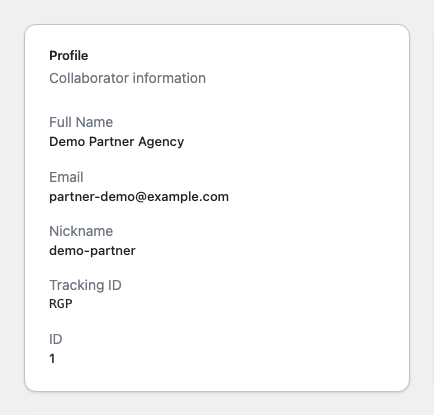
In Siren’s own dashboard, that partner and their Tracking ID (the code you append to the link) live under Collaborators.
Optional: show the partner’s code right in your submissions
Add a hidden field to your form with its Default Value set to a merge tag that pulls straight from the referral link’s query string, and the partner’s code shows up in your Submissions table and email notifications without ever opening Siren’s dashboard.
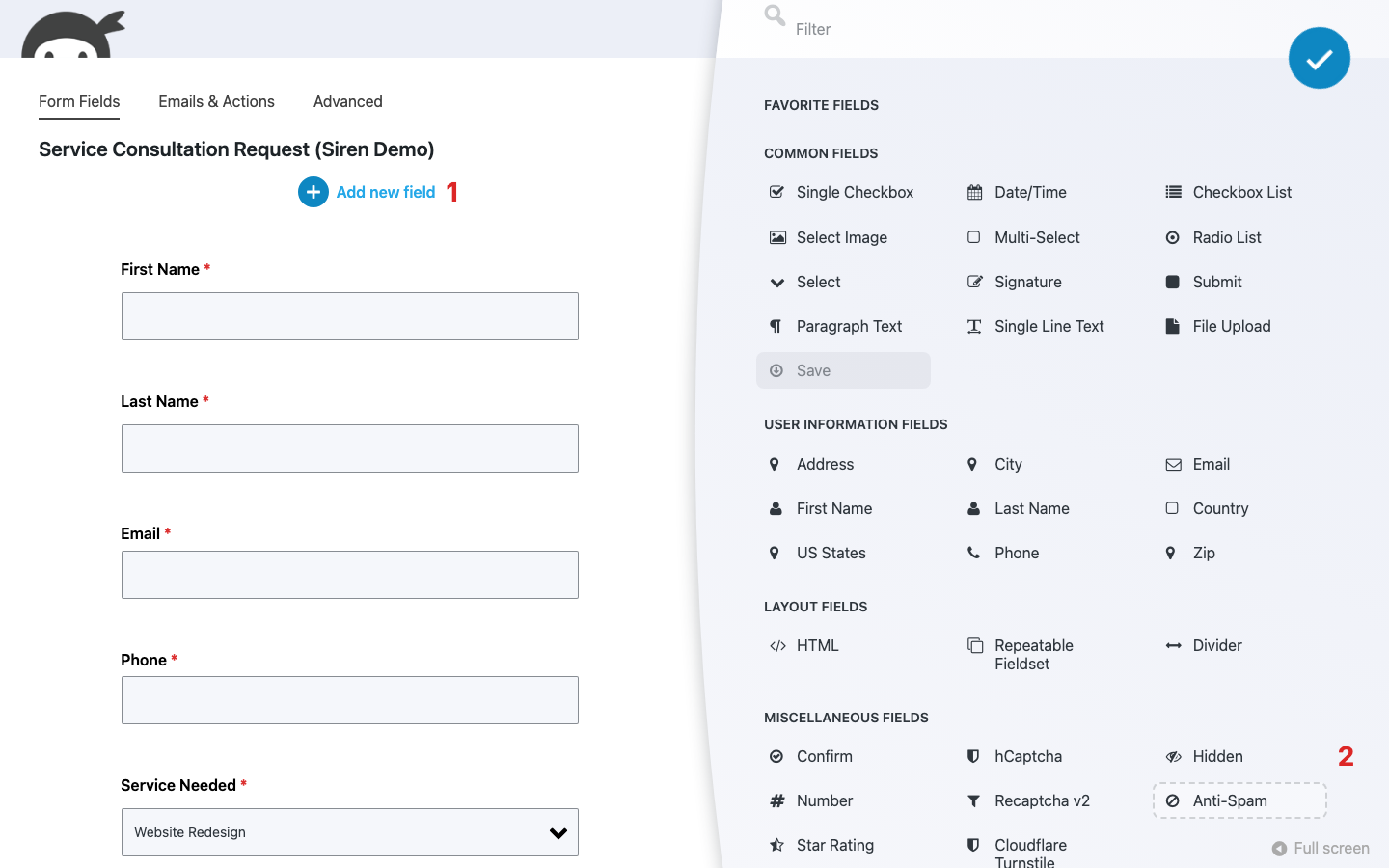
- Open your form in the builder. With the Form Fields tab active, click the blue (+) icon to open the Fields window.
- Under Miscellaneous Fields, click Hidden to add it to your form.
- Click the new field to open its settings window and set Default Value to {querystring:ref}.
Ninja Forms fills that value in from the ref parameter on the URL automatically. This step is a convenience for you, the site owner. It isn’t required for Siren’s own attribution or payout tracking, which happens independently through the cookie described above.

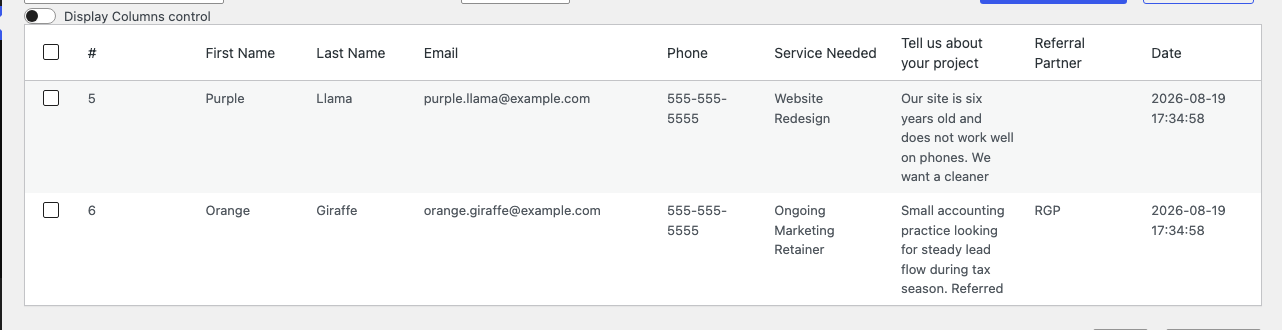
With this field in place, a Submissions table for the same form shows the difference plainly: one entry with the field blank, another with a partner’s code sitting right in the row.
Turning an attributed lead into an actual payout
Attribution alone doesn’t pay anyone. Converting a qualified lead into a dollar amount you owe a partner requires Siren Essentials, at $229 per year per site, and one of its prebuilt lead payout programs.
On the free Lite tier, the attribution record exists (you can see exactly which partner sent a visitor), but there’s no program type built for turning that into money owed. Essentials adds programs built for exactly this: a Cost-Per-Lead Campaign pays out on last-touch attribution, while the Pay-Per-Lead Affiliate Program credits whichever partner made first contact instead. Either one applies a flat bounty per qualified lead once you choose it from Siren’s recipe catalog.
If a full payout program is more than you need right now, the next section covers what the free tier already does for you: reviewing what came in before anything owes anyone anything.
Nothing pays out until you say so
A raw submission, even an attributed one, never automatically becomes money owed. Every lead or sale Siren counts starts as a pending Conversion that a person has to approve before anything moves toward a payout.
In Siren’s dashboard, that review happens under Conversions. A submission sits there until you mark it approved or rejected. Only an approved conversion turns into an Obligation, and only obligations get scheduled for a Fulfillment, the actual payout step. A bot submission, a tire kicker, or a lead that turns out to be junk never quietly turns into a bounty you owe, because nothing pays until a person says it should.
Turn your partner application form into a recruitment pipeline
A submission can create a partner, not just a lead. Add the Siren Collaborator Signup action to an application form, and a completed submission automatically becomes a new affiliate record in Siren, free on the Lite tier.
Open your application form in the builder and click into the Emails & Actions tab, then click the blue (+) icon to open the Actions window and select Siren Collaborator Signup.
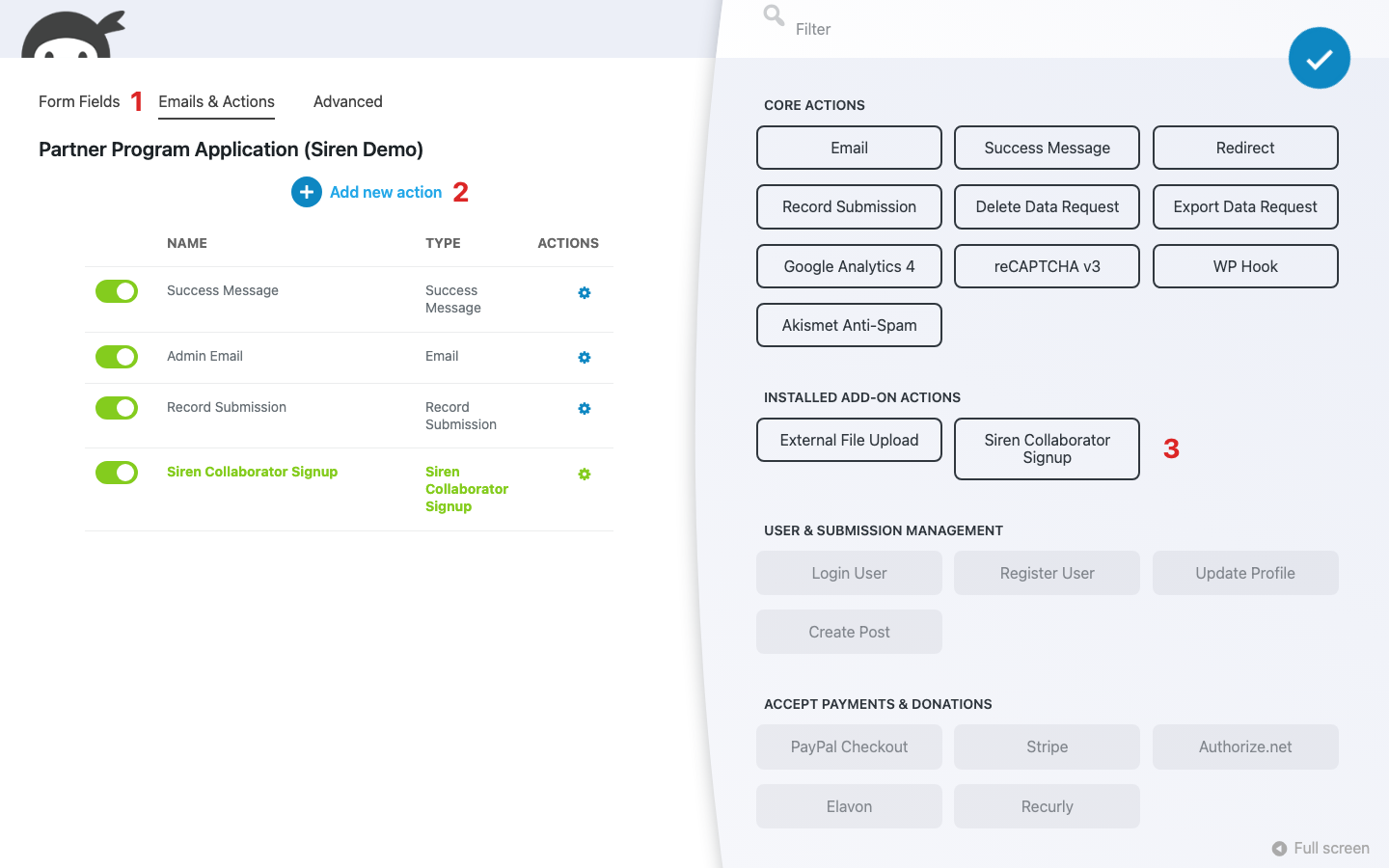
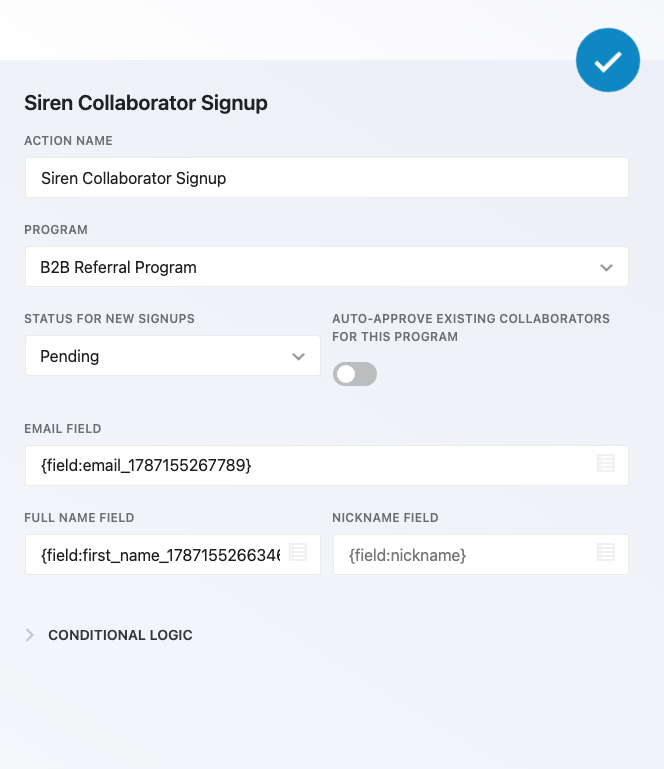
Inside the action, map an Email field, usually a merge tag like {field:email} pointing at the form’s own email field, so Siren knows who to register. You can also choose which Siren program to enroll the new partner into, and whether new signups start Pending or go straight to Active. Pending is the safer default: it gives you a review step before someone can start earning, the same qualify first pattern that governs payouts.
If part of your program closes right inside a form, such as a referred customer checking out through a connected Stripe or PayPal action, that payment can also feed a commission on the free tier through a sales referral recipe like the B2B Referral Program. It’s a real capability, but it’s the secondary story here. The integration page covers the specifics if form-based sales matter more to your program than leads do.
Build on it with the rest of Ninja Forms
Once the basic loop works, Ninja Forms’ own add-ons cover the parts of a partner program a lead form alone doesn’t: routing applicants, collecting documents, breaking up long applications, and keeping bad actors out.
- Conditional Logic can route an applicant to the right Siren program based on their answers, useful once you’re running more than one partner tier.
- File Uploads collects onboarding paperwork, like a signed agreement or a media kit, as part of the same application.
- Multi-Step Forms breaks a longer partner application into steps instead of one long page.
- User Management can create a WordPress account for a new partner as part of their signup.
- Ninja Forms’ built-in antispam protections and hCaptcha keep bot submissions from reaching your lead or application forms in the first place, which matters more once a submission can be worth real money.
None of these are required to run a Siren program. They’re there for when a plain lead or application form stops being enough.
From spreadsheet guesswork to an actual partner program
You now have the pieces: a lead form Siren can attribute automatically, an optional hidden field that surfaces the partner’s code in your own Submissions table, a recruitment path through your application form, and the tier where a qualified lead turns into a real bounty. Start free to prove partners are actually sending you attributable leads, then move to Essentials when you’re ready to put a dollar figure on each one.
Try Ninja Forms Today
Always free, with premium features available through our memberships.