What’s Included
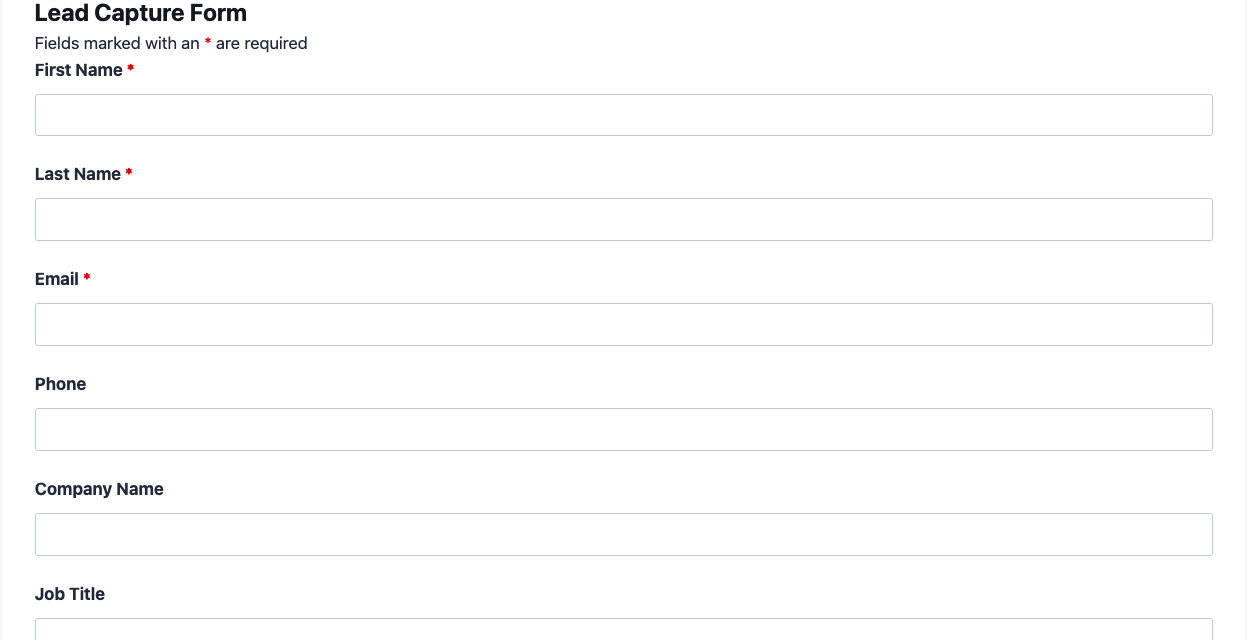
This lead capture form gives your website a fast, focused way to turn visitors into qualified leads. It pairs a short set of contact fields with lead qualification questions, so your sales team knows exactly who they are talking to before the first call. Built for business owners and marketing teams who want pipeline growth without extra developer work, this lead generation form connects directly to Salesforce so every submission becomes an actionable Salesforce lead form record automatically.
Contact Information Fields
- First Name (First Name): Captures the lead’s first name for personalized follow-up emails and calls. Required.
- Last Name (Last Name): Completes the contact record so it maps cleanly to a Salesforce lead or contact object. Required.
- Email (Email): The primary channel for confirmation messages and sales follow-up. Required.
- Phone (Phone): Gives sales the option to call instead of email when a lead prefers a faster conversation. Optional.
- Company Name (Single Line Text): Identifies which business the lead represents for account based follow-up. Optional.
- Job Title (Single Line Text): Adds context on the lead’s role for more accurate qualification. Optional.
Lead Qualification Fields
- How Can We Help You? (Select): Lets visitors self identify their reason for reaching out, with options such as Request a Demo, Get Pricing, Explore a Partnership, and General Question. Optional.
- Company Size (Select): A dropdown of employee count ranges (1 to 10, 11 to 50, 51 to 200, 201 to 1000, 1000 plus) that helps sales gauge deal size at a glance. Optional.
- Additional Details (Paragraph Text): An open field for anything the qualification questions do not cover. Optional.
Spam Protection and Submission
- hCaptcha (hCaptcha): Blocks automated bot submissions without frustrating real prospects with confusing puzzles. Never required, per Ninja Forms best practice.
- Submit (Submit): Completes and sends the form.
Automated Responses and Smart Integrations
This lead capture form is designed to do more than just collect information. It works behind the scenes to confirm every inquiry, alert your team immediately, and sync each new lead straight into Salesforce so nothing slips through the cracks.
- Email Notification: Sends a confirmation to the lead acknowledging their inquiry, and a copy to your sales team with the qualification details attached for fast follow-up.
- Success Message: Displays a clear thank you message with next steps, such as expecting a reply within one business day or reviewing helpful resources while they wait.
- Redirect: Optionally sends the lead to a custom page with case studies, pricing details, or a scheduling link, keeping warm leads engaged right after they submit.
- Anti-spam Protection: Uses hCaptcha to block bot submissions while keeping the form quick and frustration free for real prospects.
- Salesforce CRM Sync: Automatically creates or updates a record in Salesforce for every submission, mapping name, email, company, and qualification fields directly to lead or contact objects, so each entry becomes a live Salesforce lead form record the moment it arrives. This is a required add-on for this template.
Enhanced Functionality (Optional): the features below are enhancements, not requirements. This template works fully with only the core plugin and the required Salesforce CRM add-on active.
- Lead Routing with Conditional Logic (Optional): Use Conditional Logic to show or hide fields, such as revealing a budget question only when a lead selects Request a Demo, keeping the form short for everyone else.
- Custom Styling (Optional): Layout and Styles lets you arrange fields into a multi column layout and match the form’s colors and fonts to your brand without touching code.
- Extra Automations (Optional): Connect with Zapier to push new leads into thousands of other apps, or use Webhooks to send submissions to a custom internal system alongside Salesforce.
Together, these automated responses and integrations mean a lead generation form that works around the clock, so no inquiry waits longer than it should for a reply.
Requires Ninja Forms (free) · Import, customize, publish in minutes
How Can the Lead Capture Form Be Used?
Many businesses lose potential customers simply because their website contact form asks too much, too soon, or never makes it into the right hands. A dedicated lead capture form solves this by keeping the fields short while still gathering the qualification details your sales team actually needs, then routing everything into Salesforce automatically. That means less manual data entry, faster follow-up, and a clearer picture of which inquiries are ready for a conversation today. Because the form is built on Ninja Forms, it works the same way whether you run a small consultancy or a growing marketing team, and it fits naturally into an existing WordPress site without a developer’s help. Explore the most common ways this template helps different teams turn visitors into pipeline.
Marketing Teams: Qualify and Route Inbound Leads
Marketing teams running paid campaigns or content offers need every landing page to capture leads consistently and pass qualification details along without extra steps. This lead capture form asks visitors to self identify their reason for reaching out and company size, so marketers can gauge interest before handing leads to sales. Because every submission syncs to Salesforce automatically, campaign performance is easy to track against actual pipeline instead of raw form fills. Pair the template with a webinar registration form for events or a newsletter signup form for lower intent visitors, and use Conditional Logic to reveal extra questions only when a lead requests a demo, keeping the initial ask light for everyone else.
Small Business Owners: Turn Website Visitors into Sales Conversations
Small business owners often handle marketing, sales, and support all at once, so a lead capture form needs to do the qualifying work automatically. This template collects just enough detail, name, email, company, and what the visitor needs help with, to let an owner prioritize which inquiries to call back first. Paired with an email notification and a Salesforce sync, new leads land directly in an existing pipeline instead of an inbox that is easy to lose track of. Owners who want a lighter starting point can compare this template to a simple contact form, then move up to a dedicated lead generation form once follow-up volume grows.
Sales Teams: Keep the Salesforce Pipeline Current Automatically
Sales teams lose time reconciling spreadsheets, inbox forwards, and manual CRM entry when a website lead form does not connect to Salesforce directly. This template closes that gap: every submission becomes a Salesforce lead or contact the moment the form is submitted, complete with company size and inquiry type already mapped to the right fields. That means reps spend their time on outreach and qualified conversations instead of data entry. Sales leaders can also connect a quote request form for pricing requests that need faster turnaround, keeping every stage of the pipeline flowing into the same Salesforce view.
Agencies and Consultants: Capture Client Inquiries Around the Clock
Agencies and consultants often receive inquiries outside business hours, and a lead capture form that responds instantly helps first impressions land well before anyone picks up the phone. The built in success message and redirect give prospective clients next steps immediately, while the Salesforce sync means nothing waits until Monday morning to reach the right person. Agencies managing multiple client sites can duplicate this template across properties and rely on Conditional Logic to tailor qualification questions per client vertical. It pairs well with a customer feedback form for existing clients who need a separate channel from new business inquiries.
Frequently Asked Questions About the Lead Capture Form
Is the lead capture form template free?
Yes. The lead capture form template itself is free to download, and it runs on the free version of Ninja Forms, available directly from the WordPress plugin directory. Because the Salesforce CRM sync is a required add-on, the paid Salesforce CRM add-on needs to be active for automatic lead syncing, but the form itself, its fields, and its default actions cost nothing to use.
Do I need coding skills to customize this lead capture form?
No coding is required. Every field, label, and email notification can be edited through the Ninja Forms drag and drop builder inside your WordPress dashboard. If you want a multi column layout or custom colors, the optional Layout and Styles add-on handles that visually as well, so the entire form can be customized without touching a single line of code.
Will this lead capture form work on mobile devices?
Yes. Ninja Forms renders every field responsively, so this website lead form automatically adjusts to phones, tablets, and desktops without extra configuration. Since most business inquiries now start on a mobile browser, this ensures visitors can submit their details and reach your Salesforce pipeline no matter what device they are using.
Can I connect this lead capture form to Salesforce automatically?
Yes, that is the core purpose of this template. With the required Salesforce CRM add-on active, every submission automatically becomes a Salesforce lead form entry, with fields mapped to the lead or contact object you choose. No manual export or import step is needed.
Can I use a different CRM instead of Salesforce?
The template ships configured for Salesforce, but Ninja Forms supports other CRM add-ons as well, including HubSpot and Zoho CRM, both visible on the full add-ons directory. Swapping the action means installing the alternate CRM add-on and remapping fields inside the form’s Actions settings.
Can I add additional fields to qualify leads further?
Yes. You can add fields such as budget range, preferred contact time, or referral source directly in the form builder. If you want certain fields to appear only for specific answers, the optional Conditional Logic add-on keeps the form short for most visitors while still collecting deeper detail from higher intent leads.
What happens to the data visitors enter into the form?
Submissions are stored securely in your WordPress database and, once the Salesforce CRM sync is active, mirrored into your Salesforce account as lead or contact records. You control retention and access through your own WordPress and Salesforce permissions, and Ninja Forms includes GDPR-friendly data export and deletion request actions if your audience requires them.
Does this template work with page builders like Elementor or Divi?
Yes. Ninja Forms integrates with Elementor, Divi, Beaver Builder, and the WordPress block editor, so you can drop this website lead form into any page layout using the native Ninja Forms widget or block for that builder, without any custom code.
Can I use this lead capture form on multiple websites?
That depends on your Ninja Forms and add-on licensing. Site limits vary by plan, so check the pricing page for the number of sites included with the Salesforce CRM add-on before deploying the same lead capture form across several properties. Browse the full templates library for related forms you can pair with it.
Make it your template
Every template is ready to go live and fully customizable. Tweak a few things or renovate from the ground up. Ninja Forms gives you the tools either way.