What’s Included
This inquiry form template gives any business, nonprofit, or solo operator a fast way to capture questions from website visitors and route them to the right person. Instead of a bare contact box, it asks each visitor to classify what they need up front, so replies arrive faster and nothing important gets buried in a generic inbox. Because it relies only on Ninja Forms’ free core features, there is nothing extra to buy before this template starts collecting leads.
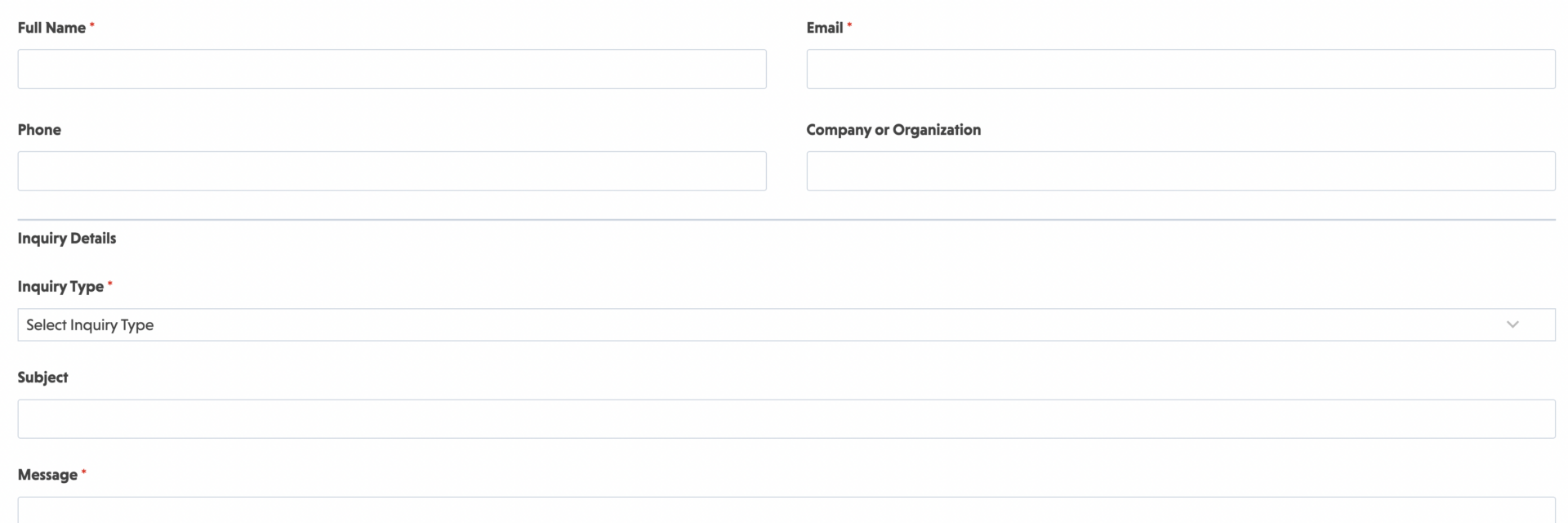
The field set below is intentionally compact. It collects enough detail to act on an inquiry without asking visitors to fill out a long questionnaire, which keeps completion rates high on both desktop and mobile.
Visitor Information
- Full Name (Single Line Text): Captures the name of the person submitting the form so your team knows who to address in a reply. Required.
- Email (Email): Collects a validated email address used to confirm receipt and follow up on the inquiry. Required.
- Phone (Phone): Gives visitors an optional way to share a callback number for inquiries that are easier to resolve by phone. Optional.
- Company or Organization (Single Line Text): Useful on B2B inquiries, where knowing the visitor’s organization helps staff prioritize and personalize a response. Optional.
Inquiry Details
- Inquiry Type (Select): Lets the submitter classify their inquiry (General Question, Sales, Partnership, Support, Other) so it reaches the right team on the first try. Required.
- Subject (Single Line Text): A short summary line that appears in your notification email and helps staff scan incoming inquiries at a glance. Optional.
- Message (Paragraph Text): The main open field where the visitor describes their inquiry in their own words. Required.
- Preferred Contact Method (Radio List): Asks whether the submitter would rather be reached by email or phone, cutting down on back and forth. Optional.
- How Did You Hear About Us (Select): An optional attribution field that helps you understand where inquiries originate, such as search, referral, or social media. Optional.
Spam Protection & Submission
- Spam Check (hCaptcha): Blocks automated bot submissions without adding friction for real visitors. Anti-spam fields are never marked required, but this one stays active on every submission.
- Submit (Submit): Finalizes and sends the inquiry.
That is ten fields total, with only four marked required, which keeps the form quick to complete while still gathering the context needed to route and answer it properly.
Automated Responses and Smart Integrations
This inquiry form is designed to do more than collect a name and a message. It works behind the scenes to confirm receipt, alert the right internal team, and optionally sync new inquiries with the CRM or automation tools your business already relies on for follow-up.
- Email Notification: Sends a confirmation to the submitter acknowledging their inquiry, along with a copy to your team that includes every field from the submission for fast follow-up.
- Success Message: Shows a clear thank-you message with next steps, such as an expected response window or a link to schedule a call.
- Redirect: Optionally sends the visitor to a resources page, FAQ, or scheduling tool after they submit their inquiry.
- Anti-spam Protection: Uses hCaptcha to prevent bot entries while keeping the process quick and friendly for real visitors.
Enhanced Functionality (Optional)
- Conditional Logic (Optional): Show or hide fields based on the selected Inquiry Type, for example revealing the Company field only when a visitor selects Sales or Partnership. Available through the Conditional Logic add-on.
- CRM Integration (Optional): Sync new inquiries straight into your sales pipeline so nothing falls through the cracks. Connect with OnePageCRM to automatically create new leads and set follow-up reminders. Other supported CRMs include HubSpot, Salesforce, Zoho, and Insightly.
- Zapier and Webhooks (Optional): Trigger automations in task tools, calendars, or internal ticketing systems whenever a new submission arrives. Use Zapier to connect with over 4,000 apps or Webhooks to send data to custom applications and services.
- Layout and Styles (Optional): Match this template to your site’s branding with custom colors, spacing, and multi-column layouts using Layout and Styles.
Requires Ninja Forms (free) · Import, customize, publish in minutes
How Can the Inquiry Form Be Used?
Most businesses lose inquiries to a generic contact box that dumps every message into one inbox with no context. An inquiry form solves that by asking the visitor to classify what they need before they hit submit, so staff can triage, prioritize, and reply faster instead of reading every message from scratch. The result is fewer missed leads, quicker response times, and a cleaner record of who asked what and when. Explore the most common ways this template empowers different teams:
Small Business Owners: Centralize Every Question in One Place
A solo operator or small team often fields questions about pricing, availability, and services across email, social media, and a contact page, with no single source of truth. Placing one on the website gives every visitor the same starting point, and the Inquiry Type field lets the owner see at a glance whether a message needs a quick answer or a longer sales conversation. Paired with an email notification, this keeps small teams from missing time-sensitive questions during busy weeks.
Marketing Teams: Qualify Leads Before They Reach Sales
Marketing teams use an inquiry form as a lightweight qualification step, capturing company name and inquiry type before a lead ever reaches a sales rep. If your inquiries are consistently sales-focused, the purpose-built Sales Inquiry Form template adds fields tailored to budget and timeline. This general template works well as the front door, with CRM integration syncing qualified leads directly into the pipeline for faster handoff.
Customer Support Teams: Triage Incoming Questions
Support teams juggle billing questions, account issues, and product feedback, often from the same contact page. The Inquiry Type and Preferred Contact Method fields let a support inbox sort messages automatically, so urgent issues do not sit behind routine ones. Teams that field a high volume of customer-specific questions may prefer the more detailed Customer Enquiry Form template, which is built specifically around that workflow.
Multi-Department Organizations: Route Inquiries to the Right Team
Larger organizations often receive a mix of vendor, partnership, and property-related inquiries through the same website. Conditional Logic can reveal extra fields once a visitor selects a specific Inquiry Type, and Webhooks or Zapier can push submissions into different tools depending on the category selected. If partnership or real estate inquiries make up a meaningful share of your traffic, the dedicated Partner Inquiry Form and Property Inquiry Form templates are built to capture the specific details each of those conversations requires.
Nonprofits and Community Organizations: Manage Public Inquiries
Nonprofits often receive a wide mix of volunteer questions, donor inquiries, and media requests through one contact page. This template, with a clear Inquiry Type field, helps a small staff or volunteer team sort messages without a dedicated support system, and the Success Message can point volunteers toward a sign-up page while directing donor questions to a development staffer.
Frequently Asked Questions About the Inquiry Form
Is the inquiry form template free?
Yes. This template and the core Ninja Forms plugin are both free. Every field and action included in this template works with the free version, and no purchase is required to import or publish it.
Do I need coding skills to customize this template?
No. This template is built with Ninja Forms’ drag-and-drop editor, so you can add, remove, or relabel fields, change the notification email, and edit the success message without writing any code.
Will this inquiry form work on mobile devices?
Yes. The template is fully responsive out of the box, so fields, labels, and the submit button resize automatically for phones and tablets without any extra configuration.
Can I connect the inquiry form to my CRM or email marketing tool?
Yes. This template supports CRM integrations including OnePageCRM, HubSpot, Salesforce, Zoho, and Insightly, plus broader automation through Zapier or Webhooks for tools not covered by a direct integration.
Is there a more specific inquiry form for my industry?
Often, yes. This template is built as a general-purpose inquiry form for any business. If your inquiries are consistently about one topic, a purpose-built version may save setup time: try the Sales Inquiry Form, Partner Inquiry Form, Property Inquiry Form, or Customer Enquiry Form template.
Can I add additional fields to this template?
Yes. The field list included here covers the essentials, but you can add fields like File Upload for attachments or Checkbox List for multi-select options directly in the Ninja Forms editor after importing the template.
What happens to the data users enter?
Submissions are stored in your WordPress database and are visible in the Ninja Forms Submissions tab. You control where notification emails are sent and whether data is also synced to a connected CRM or automation tool.
Does this template work with page builders like Elementor or Divi?
Yes. Ninja Forms works with all major WordPress page builders. Once imported, you can drop this form into a page using the Ninja Forms block, widget, or shortcode, depending on your builder.
Can I use this template on multiple websites?
Yes. Once downloaded, the .nff file can be imported into Ninja Forms on as many WordPress sites as you manage, with no per-site licensing restriction on the free template itself.
How do I get support if I have issues?
Ninja Forms maintains documentation and a support team for setup questions. If you are using paid add-ons like a CRM integration, support for those is included with your add-on license.
Make it your template
Every template is ready to go live and fully customizable. Tweak a few things or renovate from the ground up. Ninja Forms gives you the tools either way.