What’s Included
The Customer Feedback Form template gives you one lightweight, versatile intake for the feedback business owners and marketing coordinators collect most often: how a product performed, how an event went, whether the website was easy to use, and whether a service met expectations. Instead of standing up a dedicated survey platform, you get a simple customer feedback form that captures a rating, an open-ended reaction, and enough contact detail to follow up, with no complex reporting layer required and an easy path to route each response to whoever owns that part of the business.
Feedback Details
- What Is Your Feedback About? (Select): Lets the respondent flag whether their note relates to a product, an event, the website, or a service interaction, so the right team sees it first. Required.
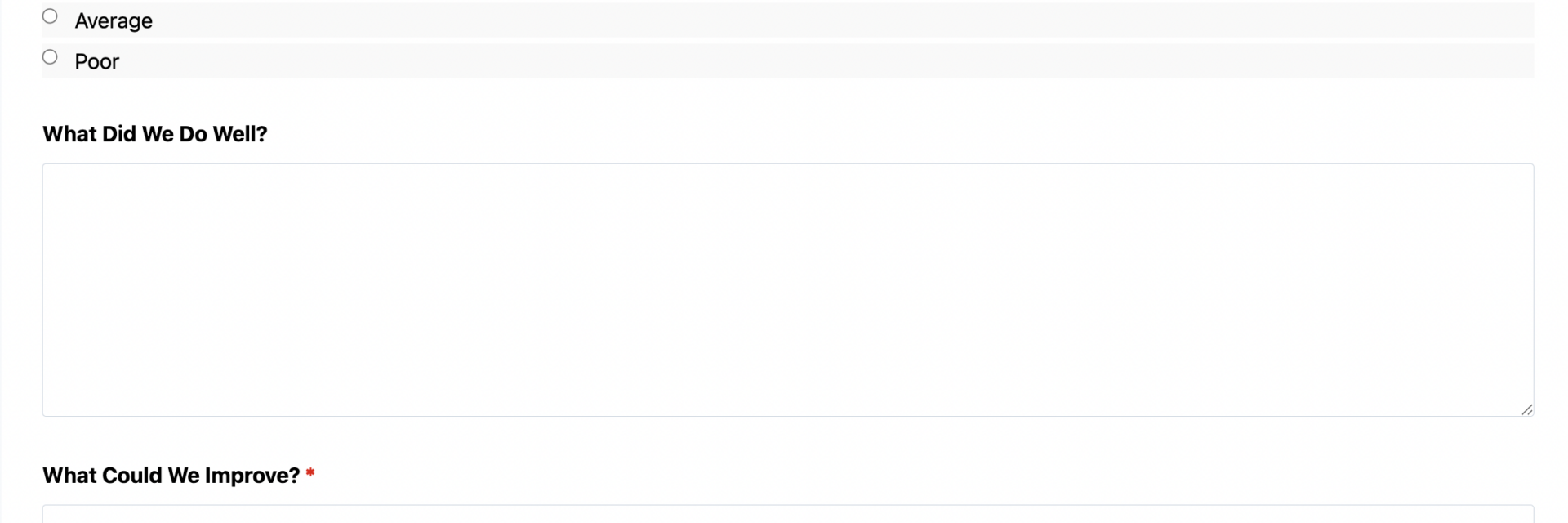
- Overall Rating (Radio List): A simple Excellent, Good, Average, or Poor scale that gives you a quick read on sentiment without a scoring rubric. Required.
- What Did We Do Well? (Paragraph Text): Open space for positive detail your team can reuse in testimonials or training. Optional.
- What Could We Improve? (Paragraph Text): The core ask of the form, where most of the specific, actionable detail shows up. Required.
- Would You Recommend Us to Others? (Radio List): A plain Yes, No, or Not Sure option that flags likely advocates without the weight of a formal recommendation survey. Optional.
Contact & Follow-Up
- Full Name (Single Line Text): Captures who is giving the feedback, useful for personalized replies. Optional.
- Email Address (Email): Collected so your team can close the loop on specific concerns. Optional.
- May We Follow Up With You? (Single Checkbox): Gives respondents control over whether they hear back, and pairs well with Conditional Logic to reveal the email field only when checked. Optional.
Spam Protection & Submission
- Spam Check (hCaptcha): Filters out automated submissions without adding friction for real customers.
- Submit (Submit): Sends the feedback and triggers the form’s notification and routing actions.
Automated Responses and Smart Integrations
This form is built to do more than land in an inbox. It confirms receipt, gives your team an immediate signal on sentiment, and can route each response to whoever should act on it next, whether that is a product manager, an event coordinator, or a service lead.
- Email Notification: Sends a confirmation to the respondent and a copy of the full submission, including their rating and comments, to your team for follow-up.
- Success Message: Displays a short thank-you message confirming the feedback was received and, where relevant, what happens next.
- Redirect: Optionally sends the respondent to a related resource, such as a help center article or a scheduling page, after they submit.
- Anti-spam Protection: Uses hCaptcha to keep automated entries out of your feedback data without slowing down real customers.
Enhanced Functionality (Optional)
- Conditional Logic (Optional): Route each submission based on the “What Is Your Feedback About?” answer, so product feedback reaches the product team’s inbox and service feedback reaches the service lead, and reveal the email field only when a respondent opts in to follow-up. Get it from Conditional Logic.
- Team Notifications (Optional): Post new feedback into a shared channel the moment it arrives with Slack, so the right team sees low ratings and urgent comments right away.
- CRM Integration (Optional): Log feedback against the right customer record so follow-up history is not scattered across inboxes. Connect with OnePageCRM to automatically create a follow-up task, or use HubSpot, Salesforce CRM, Zoho CRM, or Insightly CRM.
- Layout and Styles (Optional): Adjust spacing, columns, and styling so the form matches your site’s design with Layout and Styles.
None of these are required to publish the form. The default setup already collects, confirms, and stores every response.
Requires Ninja Forms (free) · Import, customize, publish in minutes
How Can the Customer Feedback Form Be Used?
Feedback tends to arrive scattered: a comment on an invoice, a reply-all email, a note passed along after a phone call. Without a consistent intake, it is easy to make decisions on gut feel instead of on what customers actually say. A single customer feedback form gives every team the same structured intake, whether the topic is a product, an event, the website, or a service, so responses land in one place instead of a dozen inboxes. Because it is built on a lightweight form plugin rather than a dedicated survey platform, there is no reporting dashboard to configure: you get a rating, an open-ended comment, and enough context to act, then route it wherever it needs to go. Explore a few of the most common ways teams put this template to work:
Business Owners and Marketing Coordinators: Close the Loop After Every Purchase
After a sale, a service call, or a support ticket, this customer feedback form gives you a quick, low-friction way to ask how it went. Instead of guessing why repeat orders slow down or a promotion underperforms, you get direct comments tied to a rating you can scan in seconds. As a feedback form for small businesses that do not run a dedicated survey platform, it pairs the Overall Rating field with an Email Notification so the owner or coordinator sees new feedback the same day, and use the What Could We Improve field to catch small problems, like confusing checkout steps or slow replies, before they turn into lost customers. Because the form stays simple, response rates tend to stay higher than with a long survey.
E-Commerce and Retail Teams: Route Feedback Straight to Product Decisions
Selecting “Product” in the What Is Your Feedback About field flags a response as relevant to merchandising or quality control, and Conditional Logic can send that email straight to a product manager instead of a general inbox. For teams that want a purpose-built intake focused only on products, purchase context, and quality ratings, the Product Feedback Form template offers a more specialized structure. Either way, structured comments replace scattered reviews and one-off emails, giving the team a consistent record to act on when deciding what to restock, discontinue, or fix.
Event Organizers: Capture Reactions While They Are Still Fresh
Sending this form right after a workshop, webinar, or conference session catches attendee impressions while the details are still top of mind. The Overall Rating and Would You Recommend Us to Others fields give organizers a fast read on whether the session landed, while the open comment field surfaces specifics about pacing, content, or logistics. Teams running recurring events and wanting a dedicated intake built around sessions, speakers, and venue details can start from the Event Feedback Form template instead, then fall back to this generic form for smaller, one-off gatherings.
Service Businesses: Track Satisfaction After Every Appointment or Project
Consultants, agencies, contractors, and other service providers can send this customer feedback form after an appointment, milestone, or project wraps to see whether expectations were met. Selecting “Service” in the category field lets Conditional Logic route the response to whoever manages that client relationship, so a disappointing rating turns into a same-day phone call instead of a missed signal. For complaints that need a more formal paper trail, the Complaint Form template is a useful companion, and for ongoing satisfaction tracking over time, the Customer Satisfaction Survey template adds a repeatable measurement structure.
Frequently Asked Questions About the Customer Feedback Form
Is the customer feedback form template free?
Yes. The template is free to download and works with the free version of Ninja Forms. Every field and action described above, including hCaptcha spam protection and the built-in email notifications, runs without a paid add-on. The optional integrations mentioned, such as Conditional Logic or a CRM connection, are enhancements, not requirements.
Do I need coding skills to customize this template?
No. This customer feedback form uses Ninja Forms’ drag-and-drop builder, so you can add, remove, or relabel fields, change the rating options, and edit the confirmation email entirely through the WordPress dashboard. No PHP, HTML, or CSS knowledge is required to get the form live.
Will this feedback form work on mobile devices?
Yes. As an online feedback form, it is responsive by default, so the rating options, text fields, and submit button resize automatically for phones and tablets. Since a large share of post-purchase and post-event feedback gets submitted from a phone, this matters for response rates.
Can I integrate the form with my CRM or email marketing tool?
Yes. With the optional CRM add-ons, submissions can create or update records in OnePageCRM, HubSpot, Salesforce, and other supported platforms, so feedback attaches to the right customer history automatically instead of living only in an inbox.
How is this different from the Event, Product, Website, and Service Feedback Form templates?
This template is the generic, all-purpose version: one form that covers product, event, website, and service feedback through a single category field. The Event Feedback Form and Product Feedback Form templates are purpose-built with fields specific to those situations, such as session details or purchase context. Start here if you want one flexible intake, or use a niche template if you need a more focused structure for a single use case.
Can I add additional fields?
Yes. You can add fields like Phone or a File Upload for screenshots if your feedback process needs them. Keep in mind that longer forms tend to see lower completion rates, so it is worth weighing any addition against the simplicity that makes a customer feedback form effective.
What happens to the data users enter?
Submissions are stored in your WordPress database, under your control, not on a third-party server. You can review, export, or delete entries directly from the Ninja Forms dashboard, and the form supports GDPR-related data export and deletion requests if you need them.
Does this template work with page builders like Elementor or Divi?
Yes. Ninja Forms embeds through a shortcode, block, or widget, so it works inside Elementor, Divi, the WordPress block editor, and most other page builders without additional configuration.
Can I use this template on multiple websites?
Yes. Once you have downloaded the .nff file, you can import this customer feedback form into Ninja Forms on as many WordPress sites as you manage, then customize each copy independently.
Make it your template
Every template is ready to go live and fully customizable. Tweak a few things or renovate from the ground up. Ninja Forms gives you the tools either way.