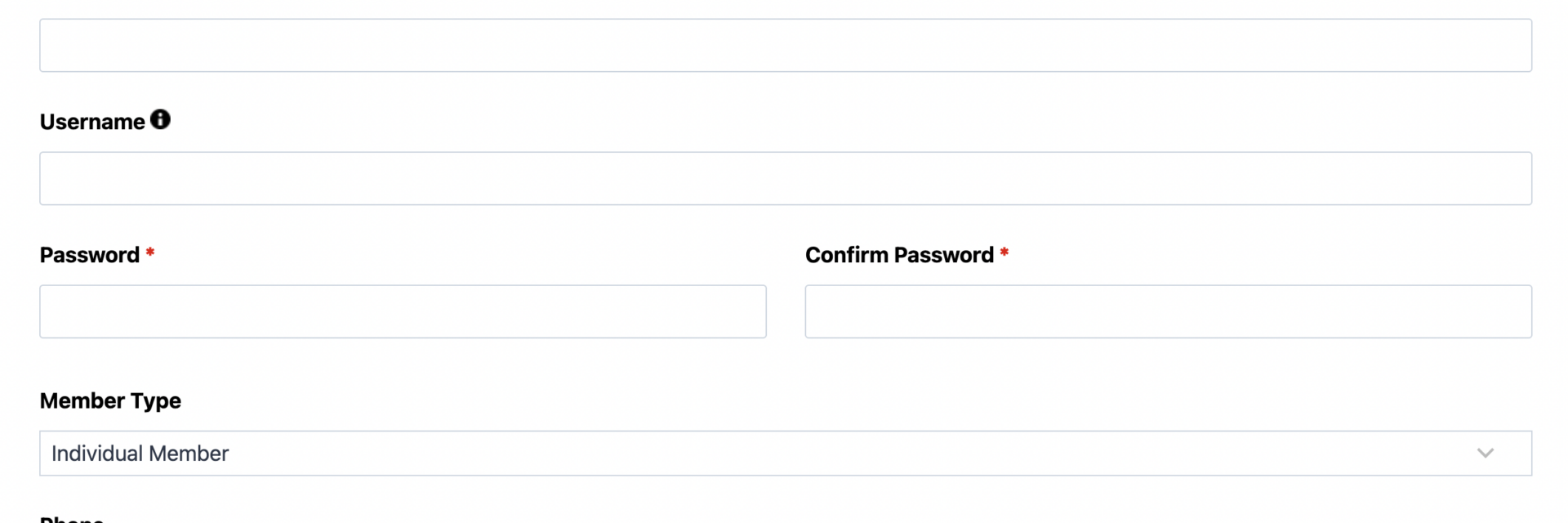
What’s Included
This user registration form template turns website visitors into logged-in WordPress members without any manual account setup on your end. Built with nonprofit membership managers, educational administrators, and community group leaders in mind, it pairs a clean intake experience with the User Management add-on, so every submission becomes a real WordPress user account, ready for gated content, a member directory, or a course portal. The eleven fields below are grouped by purpose, followed by the automated actions that handle account creation, welcome emails, and optional integrations.
Account and Login Fields
- First Name (First Name): Captures the new member’s first name for personalized welcome emails and their WordPress profile. Optional.
- Last Name (Last Name): Completes the member’s full name for the WordPress profile and any member directory listing. Optional.
- Email (Email): Serves as the account’s primary contact address and, when Username is left blank, doubles as the WordPress login. Required.
- Username (Single Line Text): Lets registrants choose a login name separate from their email address. If left blank, User Management assigns the email as the login automatically. Optional.
- Password (Single Line Text): Mapped through the User Management field settings as a masked password entry that becomes the account’s WordPress password. Required.
- Confirm Password (Confirm): Validates that the password was typed correctly before the account is created. Required.
Membership Details
- Member Type (Select): Lets registrants identify as an Individual Member, Student, Educator or Staff, Alumni, or Organization Representative, which can drive role assignment and conditional fields. Optional.
- Organization or Institution Name (Single Line Text): Captures the school, nonprofit, or association a registrant is affiliated with. Pairs well with Conditional Logic to appear only for organizational sign-ups. Optional.
- Phone (Phone): Gives your team a secondary way to reach members about renewals, events, or account issues. Optional.
Membership Agreement and Spam Protection
- Membership Agreement (Single Checkbox): Confirms the registrant has read and accepted your membership terms or code of conduct before an account is created. Required.
- hCaptcha (hCaptcha): Blocks automated bot registrations without adding friction for real members. Anti-spam fields are never marked required.
Automated Responses and Smart Integrations
This registration form does more than collect signups. It works behind the scenes to create the WordPress account, send a welcome confirmation, and route new members toward the right area of your site, so your team never has to manually add a single user.
- Register User: Part of the User Management add-on, this action creates a new WordPress user account directly from the submission, mapping Email, Username, Password, First Name, and Last Name to the matching WordPress profile fields and assigning a default role such as Subscriber or a custom Member role.
- Email Notification: Sends a welcome confirmation to the new member with their login details, plus a copy to your admin team with the full submission for your records.
- Success Message: Displays a clear thank-you message confirming the account was created, with guidance on where to log in.
- Redirect: Optionally sends new members straight to your login page or member dashboard after registration.
- Anti-spam Protection: Uses hCaptcha to block bot registrations while keeping the sign-up experience friction free for real members.
Enhanced Functionality (Optional)
- Conditional Logic (Optional): Conditional Logic can show the Organization or Institution Name field only when a registrant selects Organization Representative, and route different Member Type choices toward different WordPress roles so students, alumni, and staff land in the right group automatically.
- File Uploads (Optional): File Uploads lets registrants attach a student ID, proof of employment, or membership verification document during sign-up, useful for course portals and associations that confirm eligibility before granting access.
- Layout and Styles (Optional): Layout and Styles arranges the account and membership fields into a clean two-column layout that matches your member portal’s branding.
Requires Ninja Forms (free) · Import, customize, publish in minutes
How Can the Registration Form Be Used?
Manually onboarding new members or students, tracking signups in a spreadsheet, then creating WordPress accounts one by one, wastes hours your team could spend on programming or outreach. A registration form connected to User Management closes that gap: the moment someone submits, WordPress creates their account, so login access to your gated content or member area is ready the same day. Because the form captures member type up front, you can route students, alumni, and staff to different areas of your site without extra admin work. Explore the most common ways organizations put this registration form to work.
Nonprofit Membership Managers: Build a Self-Service Member Database
Nonprofits juggling dues, renewals, and volunteer coordination often rely on spreadsheets that fall out of date the moment someone moves or changes their email. This registration form lets supporters create their own member account, so your organization always has a current, self-maintained record tied to a real WordPress login. Pair it with Conditional Logic to show a volunteer interest field only when someone selects that membership tier, and consider a companion donation form for dues collection. The result is a member database that updates itself with every signup, instead of one your staff rebuilds by hand each quarter.
Educational Administrators: Power Course and Program Portals
Schools, training programs, and continuing education departments need a fast way to turn interested students into logged-in portal users without looping in IT for every new cohort. This registration form creates the WordPress account the moment someone signs up, so students can log in to course materials, schedules, or a learning management area the same day. The Member Type field separates students from instructors so each group lands with the right access level, and pairing it with a Course Enrollment Form keeps program details and account creation working together.
Alumni Relations Teams: Maintain a Living Alumni Directory
Alumni offices often lose touch with graduates because updating contact records depends on someone remembering to email in changes. A self-service registration form flips that: alumni create their own account, choose Alumni as their member type, and immediately gain access to a private directory or networking area. Combine it with an Alumni Update Form for returning graduates who want to refresh their details, giving your office a directory that stays current because alumni maintain their own listing.
Community and Association Leaders: Gate Access to Member-Only Resources
Associations and community groups that publish member-only guides, templates, or discussion boards need a reliable way to confirm someone belongs before granting access. Because every submission through this registration form becomes a verified WordPress account, you can restrict entire pages or categories to logged-in members without maintaining a separate access list. The Membership Agreement checkbox keeps a record that each new member accepted your terms, and a linked Membership Application Form works well for groups that review applications before approval.
Frequently Asked Questions About the Registration Form
Is the user registration form template free?
Yes. The template itself is a free download and runs on the free core version of Ninja Forms. The one requirement is the User Management add-on, which turns form submissions into WordPress user accounts. See current pricing for add-on options.
Do I need coding skills to customize this registration form?
No. Every field, label, and action is editable through the Ninja Forms drag-and-drop builder. You can rename fields, add a Member Type option, or adjust the welcome email without touching a line of code.
Does submitting the form automatically create a WordPress user account?
Yes. The Register User action, part of the User Management add-on, creates the account the moment a visitor submits the form, mapping the Email, Username, and Password fields directly to WordPress so no manual account setup is needed on your end.
Can I assign different membership roles or access levels to new registrants?
Yes. You can set a default WordPress role for everyone who registers, or use the Conditional Logic add-on to route different Member Type selections, such as Student, Alumni, or Organization Representative, toward different roles and content access.
Will this registration form work on mobile devices?
Yes. The template is fully responsive, so fields, dropdowns, and the submit button resize automatically for phones and tablets without any extra configuration.
Can I add a document upload for membership verification?
Yes. Drag in a File Upload field, which requires the File Uploads add-on, if you want registrants to attach a student ID, proof of employment, or another verification document during sign-up.
What happens to the data users enter?
Submission data is stored in your own WordPress database, not a third-party server, and account details are handled through WordPress’s standard user system. You control retention, export, and deletion from your dashboard.
Does this template work with page builders like Elementor or Divi?
Yes. Ninja Forms embeds into any page builder using a block, shortcode, or widget, so you can place the registration form inside an Elementor, Divi, or Gutenberg layout without conflicts.
How do I get support if I have issues?
Ninja Forms offers documentation and tutorials for every user, and add-on customers get direct access to priority support for setup questions. You can also browse the full template library for related forms.
Make it your template
Every template is ready to go live and fully customizable. Tweak a few things or renovate from the ground up. Ninja Forms gives you the tools either way.