What’s Included
This order form template gives customers everything they need to pick what they want, enter a quantity, and pay on the spot, all in one submission. As an online order form built for small business owners and independent sellers, it works for physical products, digital downloads, or service packages, so you are not locked into one type of business. Built with Ninja Forms’ free core features plus the PayPal Checkout add-on, a completed order form means a paid order, not just a message you still have to invoice.
Customer Information
- Full Name (Single Line Text): Captures who is placing the order, used to personalize the confirmation email and payment receipt. Required.
- Email (Email): Collects the customer’s email address so the order confirmation and PayPal receipt have somewhere to go. Required.
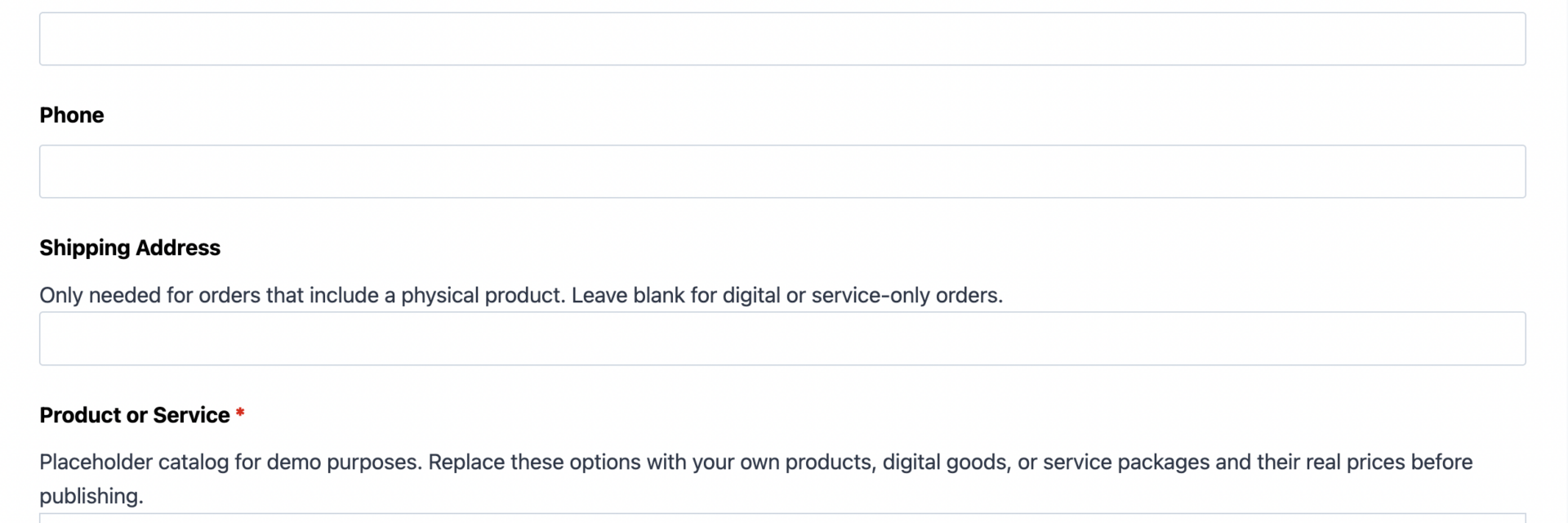
- Phone (Phone): Gives you a quick way to reach a customer with questions about their order. Optional.
- Shipping Address (Address): Collects a delivery address for orders tied to a physical product. Hide or remove this field if you only sell digital goods or services. Optional.
Order Details
- Product or Service (Select): A dropdown of what is available to order, whether that means physical products, digital downloads, or service packages. Set a price on each option before publishing so Calculations can total the order automatically. Required.
- Quantity (Number): How many of the selected item the customer wants. Defaults to 1 and updates the order total the moment it changes. Optional.
- Preferred Delivery or Fulfillment Date (Date): Lets a customer request a delivery window, pickup time, or service date. Useful for catering, rentals, or scheduled work; remove it if timing does not apply to what you sell. Optional.
- Order Total (HTML): A read-only field that shows the calculated order total and updates live as the customer changes their product selection or quantity. Automatically calculated.
- Order Notes (Paragraph Text): An open space for customization requests, gift messages, or special instructions. Optional.
Payment and Submission
The fields below turn browsing into a completed order form the moment PayPal approves payment.
- Payment (field added by the PayPal Checkout add-on): Presents PayPal’s secure, hosted checkout at submission and charges the calculated Order Total. Customers can pay with a PayPal balance, credit or debit card, Venmo, PayPal Credit, Pay Later, Apple Pay, or Google Pay, all without leaving your site. Required.
- Spam Check (hCaptcha): Blocks automated bot submissions without adding friction for real customers. Never marked required, but always active.
- Submit (Submit): Finalizes the order and triggers payment processing.
This order form uses Ninja Forms’ free built-in Calculations feature to multiply the selected item’s price by the quantity entered, keeping the Order Total field accurate in real time with no manual math and no extra plugin required.
Automated Responses and Smart Integrations
This order form is designed to do more than record a request. It confirms the transaction the moment PayPal approves payment, sends a receipt to both you and the customer, and can connect to the tools you already use to manage orders and follow up with buyers, so your order form does real work.
- Email Notification: Sends the customer a receipt with their order details and total, and sends your team a copy with everything needed to fulfill the order.
- Success Message: Displays an on screen thank you confirming payment went through, with next steps such as expected delivery or service timing.
- Redirect: Optionally sends customers to a dedicated order confirmation page with tracking information, related products, or a scheduling link.
- Anti-spam Protection: Uses hCaptcha to block bot orders while keeping checkout quick for real customers.
- Payment Processing: Every order routes through PayPal Checkout, Ninja Forms’ preferred payment partner, so a completed submission means a paid order rather than an inquiry you still have to invoice separately.
Enhanced Functionality (Optional)
- Conditional Logic (Optional): Use the Conditional Logic add-on to show the Shipping Address field only when a physical product is selected, or reveal the Delivery Date field only for items that need scheduling.
- Layout and Styles (Optional): Arrange fields into a clean two column layout matching your branding with the Layout and Styles add-on, no designer required.
- PDF Form Submission (Optional): Automatically generate a PDF receipt or packing slip from every order with the PDF Form Submission add-on, for your records or as an email attachment.
- Zapier and Webhooks (Optional): Push new orders into an inventory spreadsheet, task manager, or fulfillment tool the moment payment clears. Use Zapier to connect with over 4,000 apps or Webhooks for a custom integration.
Together, these actions turn a simple order form into a working checkout, so you can start taking paid orders today without setting up a full e-commerce platform.
Requires Ninja Forms (free) · Import, customize, publish in minutes
How Can the Order Form Be Used?
Taking orders through email threads, direct messages, or a stack of paper notes makes it easy to lose track of what a customer wants, and even easier to forget to collect payment upfront. An order form solves both problems at once: the customer picks an item, enters a quantity, and pays through PayPal in a single submission, so nothing slips through the cracks. The total updates automatically through Ninja Forms’ free Calculations feature, with payment confirmed before you send an invoice. This online order form template works well for almost any small business owner or solo seller, but if you want a page tuned to one product type, see our Product Order Form, T-Shirt Order Form, or Catering Order Form templates. Otherwise, here are a few common ways sellers put this order form to work.
Independent Sellers: Take Orders and Get Paid in One Step
Makers, crafters, and side hustle sellers rarely need a full online store, they just need a way to list what they sell and collect payment without chasing customers afterward. This order form lets an independent seller list handmade goods, bundles, or one off items in the Product or Service dropdown, let the customer set a quantity, and take payment through PayPal Checkout the moment the order lands. There is no shopping cart to build and no invoice to send later; the order and payment arrive together, ready to fulfill.
Service Providers: Package Sessions and Collect Payment Upfront
Coaches, consultants, cleaning crews, and photographers often sell packages rather than physical goods. This order form template lets a service provider list session bundles or tiers as selectable options, use the Preferred Delivery or Fulfillment Date field to capture a requested appointment, and add the Order Notes field for scheduling details. Because payment runs through PayPal Checkout at submission, providers can require payment before a session is booked, cutting down on no shows and last minute cancellations.
Digital Product Creators: Sell Downloads Without a Storefront
Ebooks, templates, presets, and online courses do not need shipping, so a creator can simply hide the Shipping Address field on this order form template and keep the form focused on the product list, quantity, and payment. Once PayPal confirms the charge, the Success Message or Redirect action can point the buyer straight to a download page or delivery link. It is a lightweight way to sell digital goods without a dedicated storefront platform.
Small Teams: Centralize Order Intake Without New Software
Retail counters, restaurant side windows, and nonprofit gift shops often collect orders across phone calls, texts, and walk ins, which makes totals hard to track. Publishing this order form on a website gives a small team one place to receive every order, with Calculations keeping totals accurate and PayPal Checkout confirming payment on arrival. Pair it with the optional Zapier or Webhooks integration to route each paid order into a shared spreadsheet or fulfillment tool automatically. Whether you call it a small business order form or a simple checkout page, giving customers one place to order and pay keeps operations organized.
Frequently Asked Questions About the Order Form
Is the order form template free?
Yes. This order form template is free to download and use, built on Ninja Forms’ free core plugin, including the Calculations feature. Accepting payment requires the PayPal Checkout add-on; see the Ninja Forms pricing page for current rates.
Do I need coding skills to customize this order form template?
No. Every field, price, and label can be edited through the Ninja Forms drag and drop builder. You can add or remove products, change quantities, or adjust the layout without touching a line of code.
Will the order form work on mobile devices?
Yes. Ninja Forms templates are responsive by default, so customers can browse the product list, adjust quantity, and complete PayPal Checkout from a phone, tablet, or desktop, making this a reliable online order form for on the go customers.
Do I need PayPal to accept payments on this order form?
PayPal Checkout is the required add-on for this template because it is what turns a submission into a paid order rather than just a request. It supports PayPal balances, credit and debit cards, Venmo, PayPal Credit, Pay Later, Apple Pay, and Google Pay in one hosted checkout.
Can I use this order form template for digital products or services, not just physical goods?
Yes. The Product or Service field and Order Total calculation work the same way whether you are selling a physical item, a digital download, or a service package. Just hide the Shipping Address field for anything that does not need delivery.
Can I add or remove fields, like shipping address or delivery date?
Absolutely. Every field, including Shipping Address and Preferred Delivery or Fulfillment Date, can be removed, made required, or hidden with the Conditional Logic add-on so it only appears when relevant.
What happens to the order data customers submit?
Submissions are stored in your WordPress database by default and can be reviewed anytime from the Ninja Forms dashboard. Payment details are handled directly by PayPal’s secure checkout and never pass through your server, and you control how long order records are kept.
Does this order form template work with page builders like Elementor or Divi?
Yes. Ninja Forms embeds using a block, shortcode, or widget, so it works inside Elementor, Divi, and most other WordPress page builders without any special configuration.
Can I use this order form template on multiple websites?
Yes. Once imported, you can export the form and reuse it on as many WordPress sites as you manage. Browse the full Ninja Forms templates library if you need a starting point for other business types.
How do I get support if I run into an issue?
Free users can reference the Ninja Forms documentation for setup and troubleshooting help, and paid add-ons like PayPal Checkout include access to the support team through the Ninja Forms contact page.
Make it your template
Every template is ready to go live and fully customizable. Tweak a few things or renovate from the ground up. Ninja Forms gives you the tools either way.