What’s Included
This consent form template gives you a straightforward way to collect a signed record of consent from clients, patients, guardians, or program participants, and turn every submission into a PDF you can file, share, or archive alongside the related record. The layout keeps the input side simple: a short set of identification fields, an editable consent statement, and a clear agreement step, so people can complete the consent form in under two minutes on any device.
User Information
- Full Name (Single Line Text): Captures the full legal name of the person giving consent. Required.
- Email (Email): Used to send the submitter a copy of their completed consent form. Required.
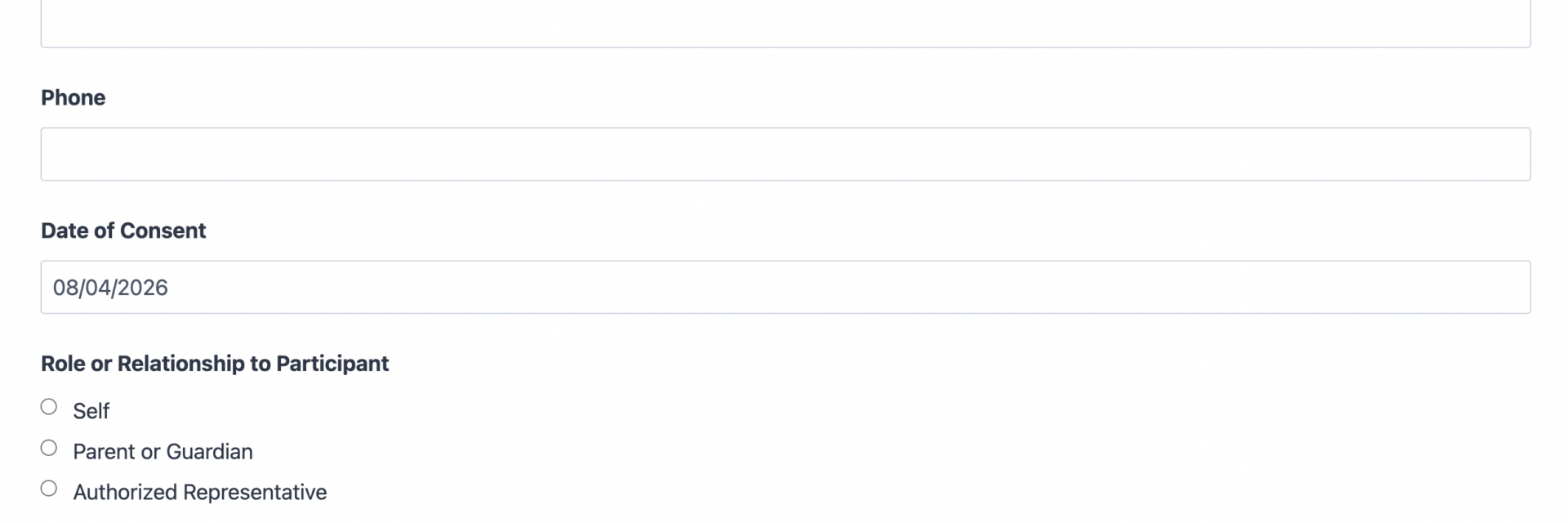
- Phone (Phone): Optional contact number for follow-up questions about the consent on file. Optional.
- Date of Consent (Date): Records the date consent was given. Defaults to the current date and stays editable. Optional.
- Role or Relationship to Participant (Radio List): Lets the signer identify whether they are consenting for themselves, as a parent or guardian, or as an authorized representative. Useful for parental consent and guardian-signed forms. Optional.
Consent Details
- Consent Statement (HTML): An editable content block where you paste the exact consent language, treatment description, media use terms, or program rules specific to your organization. This is where you customize the form to your use case.
- Purpose or Details of Consent (Paragraph Text): Gives the signer space to note specifics, such as the procedure, event, or activity the consent covers. Optional.
- Supporting Document Upload (File Upload): Lets the signer attach a related document, such as an ID or referral letter, when your process requires one. Optional.
Agreement and Signature
- Divider (Divider): Visually separates the consent details from the signature step.
- I Have Read and Agree to the Terms Above (Single Checkbox): The core agreement step. The signer checks this box to confirm they understand and consent to the terms described above. Required.
- Typed Signature (Single Line Text): Captures the signer’s typed name as their signature on the record. Required.
Spam Protection and Submission
- Spam Check (hCaptcha): Blocks automated submissions without adding friction for real signers. Never marked required.
- Submit (Submit): Finalizes the submission and triggers the confirmation email and PDF generation.
This template does not use calculations. Every field above is available in the free core version of Ninja Forms except where an add-on is noted below.
Automated Responses and Smart Integrations
This form is designed to do more than store a checkbox in a database. It turns every submission into a dated, signed record you can hand to a client, file with a patient chart, or attach to a program roster, then keeps your team looped in automatically.
- Email Notification: Sends a confirmation to the submitter with a copy of their signed consent, and a copy to your team with the full submission for filing.
- Success Message: Confirms the consent was recorded and lets the signer know a copy is on its way to their inbox.
- Redirect: Optionally sends the signer to a thank-you page with next steps, such as scheduling information or a program handbook.
- Anti-spam Protection: Uses hCaptcha to block bot submissions while keeping the consent form quick to complete.
- PDF Form Submission (Required): This is the feature that makes the template useful for record-keeping. It converts each completed consent form into a formatted PDF automatically, generating a document you can attach to a patient chart, student file, client contract, or event roster instead of leaving the record as a database row. Learn more about PDF Form Submission.
Enhanced Functionality (Optional)
- File Uploads (Optional): Enables the Supporting Document Upload field so signers can attach an ID, referral letter, or other supporting document alongside their consent. See File Uploads.
- Conditional Logic (Optional): Show or hide fields based on the Role or Relationship answer, for example revealing a guardian’s contact details only when someone selects Parent or Guardian. See Conditional Logic.
- Layout and Styles (Optional): Arrange the identification fields into a clean two-column layout and style the consent statement block to match your organization’s branding. See Layout and Styles.
- Save Progress (Optional): Useful when your consent statement is long or the signer needs to review attached documentation before agreeing; lets them save and return to finish later. See Save Progress.
Requires Ninja Forms (free) · Import, customize, publish in minutes
How Can the Consent Form Be Used?
Collecting consent on paper or through email creates a filing problem the moment someone asks for proof: where is the signed copy, and does it match what the person actually agreed to. A consent form built on Ninja Forms solves that by pairing a clear, editable statement with a signature step, then generating a dated PDF the moment it is submitted, so the record exists in a consistent format from day one. Organizations that handle consent regularly, not just once, benefit most from having every submission land in the same structure, searchable and ready to attach to the file it belongs with. Explore the most common ways this template supports different organizations:
Healthcare Practices: Document Treatment Consent
Clinics, therapists, and wellness practices use a consent form to confirm a patient understands a treatment, procedure, or privacy policy before care begins. Because the PDF Form Submission add-on turns each submission into a formatted document, the signed consent can be attached directly to the patient’s chart instead of living only as a database entry. Practices that handle consent more often, such as intake for a specific procedure, may prefer the Medical Consent Form template, which is already tailored to clinical language and treatment-specific fields. Either way, the record stays consistent: name, date, the statement the patient agreed to, and a signature, filed the same way every time.
Schools and Youth Programs: Capture Parental Permission
Field trips, after-school activities, and youth sports all require a parent or guardian to sign off before a student can participate. The Role or Relationship field lets a guardian identify themselves clearly on the record, and the generated PDF gives administrators a document they can file with the student’s permission paperwork for the year. Programs that run trip-specific permission slips regularly may prefer the Field Trip Permission Form template, which builds trip details directly into the form.
Photographers and Event Producers: Secure Photo and Media Releases
Photographers, event producers, and marketing teams use a consent form to document that a subject agreed to have their photo or likeness used publicly. Because the Consent Statement block is fully editable, you can drop in your exact media release language, and the PDF output gives you a dated release on file for every subject you photograph. For a version built specifically around photo and media use, see the Photo Release Form template.
Legal and Professional Service Providers: Standardize Client Intake Authorization
Law offices, consultants, and other professional service providers often need a client’s authorization before starting work, sharing records with a third party, or beginning a billing arrangement. This template gives them a repeatable intake authorization step: the client reads the statement, checks the agreement box, types a signature, and receives a PDF copy for their own files while the practice keeps a matching record on hand.
Nonprofits and Community Organizations: Formalize Program Participation Consent
Nonprofits running volunteer programs, workshops, or community events use a consent form to document that participants understand program risks, data use, or code of conduct expectations. The optional Conditional Logic add-on lets organizers reveal additional questions only when relevant, such as emergency contact details for in-person events, without cluttering the form for online-only programs.
Frequently Asked Questions About the Consent Form
Is the consent form template free?
Yes. The template itself is free to download and use. It is built for Ninja Forms, which is also free to install from the WordPress plugin directory. The PDF Form Submission add-on used to generate the downloadable consent record is a paid add-on; you can review pricing on the Ninja Forms add-ons page.
Do I need coding skills to customize this template?
No. Every field, label, and the consent statement text can be edited through the Ninja Forms drag-and-drop builder. You can rewrite the consent language, add or remove fields, or change the confirmation email without touching any code.
Will this consent form work on mobile devices?
Yes. Ninja Forms is responsive by default, so the consent form displays correctly on phones and tablets. This matters for consent captured in person, such as at an event or a clinic front desk, where signers are often using a tablet rather than a desktop.
Does this template generate a PDF I can keep on file?
Yes, when the required PDF Form Submission add-on is active. Every submission is converted into a formatted PDF automatically, giving you a document you can attach to a patient chart, student file, or client record instead of relying on a database entry alone. Learn more on the PDF Form Submission page.
Can I use this template for medical, photo release, or parental consent specifically?
You can, by editing the Consent Statement block and Role field to match your use case, but Ninja Forms also maintains purpose-built versions for common scenarios: the Medical Consent Form, Photo Release Form, and Field Trip Permission Form templates already include language and fields tailored to those situations.
Can I integrate the consent form with my CRM or email marketing tool?
Yes, if that fits your workflow. Ninja Forms supports CRM integrations such as OnePageCRM, HubSpot, and Salesforce, though many organizations use this template purely for record-keeping without connecting it to a CRM at all.
What happens to the data users enter?
Submissions are stored in your WordPress database using Record Submission, and, with the PDF Form Submission add-on active, a PDF copy is generated for each one. You control where that data lives; nothing is sent to a third party unless you add an integration such as Webhooks or Zapier.
Does this template work with page builders like Elementor or Divi?
Yes. Ninja Forms embeds using a shortcode or block, so it works inside Elementor, Divi, the WordPress block editor, and most other page builders without special configuration.
Can I use this template on multiple websites?
Yes. Once you import the .nff file into a site’s Ninja Forms installation, you can export and reimport it to as many WordPress sites as you manage.
How do I get support if I have issues?
Ninja Forms offers documentation at ninjaforms.com/docs and a support team reachable through the contact page for account or add-on specific questions.
Make it your template
Every template is ready to go live and fully customizable. Tweak a few things or renovate from the ground up. Ninja Forms gives you the tools either way.