What’s Included
This loan application form template gives site owners and administrators a ready to use way to collect applicant details, loan information, and supporting documents in one organized submission. Built with Ninja Forms’ free core plugin, the form asks only the questions a lending or intake team actually needs, so applicants are not stuck re-entering information twice. Because the template includes a dedicated upload field, applicants can attach income verification, identification, and other requested paperwork directly to their loan application form, so nothing arrives as a separate email attachment.
Applicant Information
- Full Name (Single Line Text): Captures the applicant’s legal name for the loan application. Required.
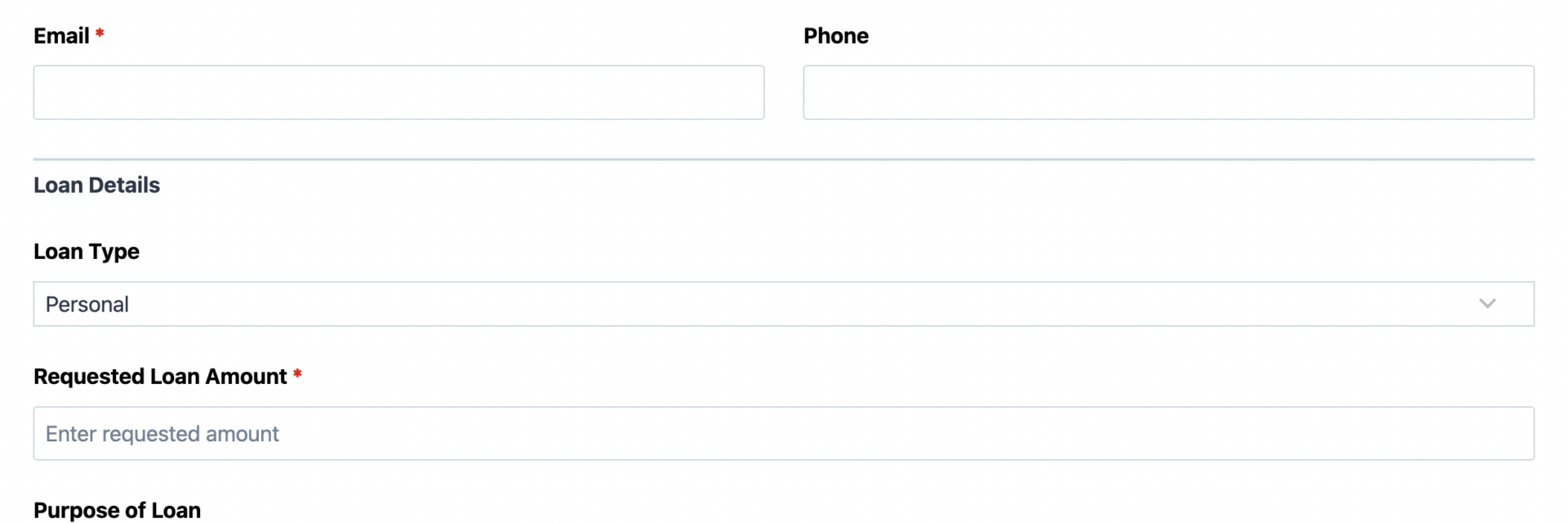
- Email (Email): Collects a valid email address so you can confirm receipt and follow up on the application. Required.
- Phone (Phone): Gives your team a fast way to reach applicants with questions about their submission. Optional.
Loan Details
- Loan Type (Select): Lets applicants choose the type of loan they are requesting, such as personal, business, auto, or mortgage. Optional.
- Requested Loan Amount (Number): Records how much funding the applicant is seeking. Required.
- Purpose of Loan (Paragraph Text): Gives applicants space to describe how they plan to use the funds. Optional.
- Employment Status (Select): Notes whether the applicant is employed, self-employed, retired, a student, or currently unemployed. Optional.
- Annual Income Range (Select): Asks applicants to choose an income bracket rather than typing an exact figure, keeping the intake process simple while still giving your team useful context. Optional.
Supporting Documents
- Supporting Documents (File Upload): Lets applicants attach income verification, identification, or other requested paperwork directly to their application submission. Multiple files accepted. Required.
Submission
- Authorization to Submit (Single Checkbox): Confirms the applicant agrees the information provided is accurate before submitting. Optional (many teams choose to make this required once the form is live).
- Spam Check (hCaptcha): Blocks automated bot submissions without adding friction for real applicants.
- Submit (Submit): Sends the completed loan application form to your team.
Automated Responses and Smart Integrations
This form is designed to do more than just collect information. It works behind the scenes to confirm receipt with applicants, notify your team the moment a new application arrives, and keep every supporting document attached and organized in one place.
- Email Notification: Sends a confirmation to the applicant letting them know their application was received, and a copy to your team with all submission details and attached documents for review.
- Success Message: Displays a clear thank you message after submission, letting applicants know what happens next, such as a follow-up call or review timeline.
- Redirect: Optionally sends applicants to a resources page or scheduling tool after they submit their application.
- Anti-spam Protection: Uses hCaptcha to block bot submissions while keeping the intake process friendly for real applicants.
Enhanced Functionality (Optional)
- Conditional Logic (Optional): Show or hide fields based on loan type or employment status, so applicants only see the questions that apply to them. Available through the Conditional Logic add-on.
- Multi-Step Forms (Optional): Break a longer loan application form into a few short steps with a progress bar, which can reduce abandonment on applications that ask for more detail. Learn more about Multi Step Forms.
- PDF Form Submission (Optional): Automatically generate a PDF copy of each completed application, useful for compliance records and internal file sharing. See PDF Form Submission.
- CRM Integration (Optional): Sync applicants into your CRM to track their status through the review process. Connect with OnePageCRM to automatically create new leads and set follow-up reminders. Other supported CRMs include HubSpot, Salesforce CRM, Zoho CRM, and Insightly CRM.
- Layout and Styles (Optional): Arrange fields into a two-column layout and match your form styling to your site’s branding. See Layout and Styles.
Together, these automations turn a simple intake page into an organized, document-ready application pipeline your team can rely on.
Requires Ninja Forms (free) · Import, customize, publish in minutes
How Can the Loan Application Form Be Used?
Collecting loan applications through email or paper forms usually means chasing down missing documents, retyping information by hand, and losing track of who submitted what. A loan application form solves this by giving applicants one place to enter their details and attach supporting paperwork, while your team receives a complete, organized submission the moment it arrives. Because the form works on any device, applicants can apply from a desktop, tablet, or phone without losing formatting or data. Explore the most common ways this template supports different organizations:
Community Lenders and Credit Unions: Centralize Applications
Community lenders and credit unions often manage applications from members who expect a straightforward process. This loan application form template lets members submit personal information, loan details, and identification documents in a single visit, instead of mailing paperwork or scheduling an in-branch appointment. Staff receive a complete submission by email, including any attached income verification, so review can start right away. Pairing the form with Conditional Logic lets you tailor questions to the loan type a member selects, keeping the online loan application form short and relevant. Lenders managing higher volume can also connect the form to a CRM to track each application from intake through decision, and can pair it with a Line of Credit Application template for members requesting revolving credit instead of a fixed loan.
Small Business Lenders: Streamline Document Collection
Small business lending programs typically need more supporting paperwork than a consumer loan, and gathering it by email quickly turns into a scattered trail of attachments. This loan application form with document upload gives applicants one upload field for everything from income verification to business documentation, so nothing gets lost in a separate thread. Your team receives each submission with attachments already organized and ready for review. Adding PDF Form Submission creates a record of every completed application automatically, which many lending teams keep for their files alongside a Business Loan Application template for larger requests.
Nonprofits and Grant Administrators: Simplify Intake
Nonprofits that offer emergency loans, microloans, or similar assistance programs need an intake process that feels approachable rather than bureaucratic. This template keeps the loan application form short, asking only for the details a review committee actually needs, while still giving applicants a secure way to attach identification or income documentation. Because the form is mobile-friendly, applicants without reliable computer access can still apply from a phone. Optional Multi Step Forms can break the process into a few short screens for applicants who might otherwise feel overwhelmed by a single long page, and a companion Grant Application Form template works well for programs that award funds instead of loans.
Property Managers and Landlords: Collect Applications with Supporting Paperwork
Property managers use loan and financing style application forms for tenant financing programs, rent-to-own arrangements, and similar agreements that require supporting documents. This template lets applicants submit their information along with income verification or identification in one step, keeping submissions organized in the Ninja Forms dashboard instead of a shared inbox. Teams that want a centralized record of every applicant can connect the form to HubSpot or another supported CRM to track follow-ups, and can pair it with a Rental Application Form template for standard tenant screening that does not involve financing.
Frequently Asked Questions About the Loan Application Form
Is the loan application form template free?
Yes. This template is free to download, and it works with the free version of Ninja Forms. The only requirement is the File Uploads add-on, which lets applicants attach supporting documents to their submission.
Do I need coding skills to customize this template?
No coding is required. Every field, label, and email notification in this form can be edited through the Ninja Forms drag-and-drop builder. If you want a two-column layout or styling that matches your site, the optional Layout and Styles add-on makes that adjustable without touching code.
Will this loan application form work on mobile devices?
Yes. The template is responsive by default, so applicants can complete the form and upload documents from a phone, tablet, or desktop without any extra setup on your part.
Can I integrate the loan application form with my CRM or email marketing tool?
Yes. Ninja Forms supports CRM integrations including OnePageCRM, HubSpot, Salesforce CRM, and others, so applicant records can flow directly into the system your team already uses to manage follow-ups.
Can I add additional fields to this loan application form template?
Yes. You can add, remove, or reorder fields at any time through the Ninja Forms builder. Many teams add fields specific to their loan program, such as a co-applicant name or preferred branch location, once the base template is imported. If your program requires deeper verification, a companion Credit Reference Form template can collect additional references separately.
What happens to the documents and data applicants submit?
Submissions, including any uploaded documents, are stored in your WordPress database and visible in the Ninja Forms Submissions dashboard. Because you control where files are stored, it is worth reviewing your site’s security settings, especially for an application that collects identification and income documents.
Does this template work with page builders like Elementor or Divi?
Yes. Ninja Forms embeds into any page built with Elementor, Divi, the WordPress block editor, or most other page builders using a shortcode or block, so this template fits into your existing site design.
Can I use this loan application form template on multiple websites?
Yes. Once you import the .nff file into Ninja Forms, you can export and reuse the same template across any number of sites you manage.
How do I get support if I run into an issue?
Ninja Forms offers documentation at ninjaforms.com/docs, along with support channels for both free and paid users. If you are using the File Uploads add-on, dedicated support is included with your subscription.
Make it your template
Every template is ready to go live and fully customizable. Tweak a few things or renovate from the ground up. Ninja Forms gives you the tools either way.