What’s Included
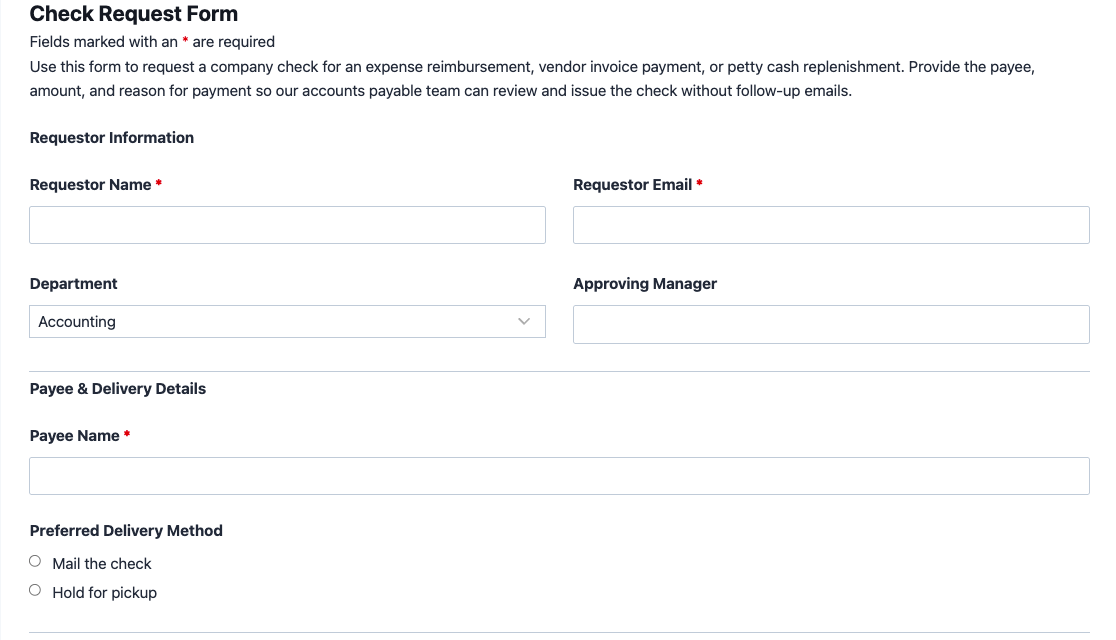
This check request form gives your accounts payable, finance, or HR team one consistent way to collect everything needed to issue a check, from the payee’s details to the reason for payment and any supporting receipts. It replaces scattered emails and paper request slips with a single intake process, so approvers and payroll staff review the same information every time. The template includes 13 fields organized into requestor details, payee and payment details, and supporting documentation, so nothing about a check request gets lost between departments.
Requestor and Approval Details
- Requestor Name (Single Line Text): Captures the employee or department representative submitting the check request form. Required.
- Requestor Email (Email): Used to send a confirmation copy of the submitted request and any status updates. Required.
- Department (Select): Lets the requestor identify which department, such as Accounting, Marketing, Operations, HR, Sales, or IT, the expense belongs to for internal coding. Optional.
- Approving Manager (Single Line Text): Records the name of the manager who authorized the expense, giving your finance team a quick reference during review. Optional.
Payee and Payment Details
- Payee Name (Single Line Text): The individual or vendor the check should be made out to. Required.
- Payee Mailing Address (Address): Collects the mailing address for the payee when a check needs to be mailed rather than picked up. Conditional: only displays when “Mail the check” is selected as the delivery method.
- Amount Requested (Number): The dollar amount to be issued on the check. Required.
- Expense Category (Select): Classifies the request as a reimbursement, vendor invoice payment, petty cash replenishment, or other, so accounting can route it correctly. Optional.
- Date Needed By (Date): Lets the requestor flag a deadline, such as a vendor due date, so urgent requests do not get buried in the queue. Optional.
- Preferred Delivery Method (Radio List): Lets the requestor choose between “Mail the check” and “Hold for pickup,” which also determines whether the mailing address field displays. Optional.
Supporting Details and Submission
- Reason for Payment (Paragraph Text): A short description of what the check covers, such as an invoice number or project name, giving approvers context at a glance. Required.
- Supporting Documentation (File Upload): Lets the requestor attach a receipt, invoice, or approval email as backup for the request. Optional.
- hCaptcha (hCaptcha): Blocks automated spam submissions without adding friction for real requestors. Never marked as required, per Ninja Forms best practice.
Automated Responses and Smart Integrations
This check request form is designed to do more than collect a request. It automates the confirmation, keeps requestors informed, and can sync with the tools your finance or HR team already uses so nothing falls through the cracks.
- Email Notification: Sends the requestor a confirmation copy of their submitted check request form and sends your accounts payable team a full copy with the payee, amount, and reason for payment for processing.
- Success Message: Displays a clear thank-you message confirming the request was received and noting the expected turnaround time for check issuance.
- Redirect: Optionally redirects the requestor to an internal resources page, such as your expense policy or reimbursement timeline.
- Anti-spam Protection: Uses hCaptcha to keep automated submissions out of your accounts payable queue without slowing down legitimate requestors.
Enhanced Functionality (Optional)
The following optional add-ons extend what the check request form can do without adding cost to the free plugin:
- Conditional Logic (Optional): Automatically shows the Payee Mailing Address field only when “Mail the check” is selected as the delivery method, keeping the form short for pickup requests. Learn more about Conditional Logic.
- PDF Form Submission (Optional): Generates a PDF copy of each check request form submission automatically, giving your finance team a clean paper trail for audits and month-end reconciliation. See PDF Form Submission for setup details.
- Slack (Optional): Sends a real-time Slack notification to your accounting channel the moment a new check request form is submitted, so approvers can respond faster. Connect with Slack.
- Zapier and Webhooks (Optional): Trigger automations in your accounting software or task manager. Use Zapier to connect with over 4,000 apps or Webhooks to send data directly to custom applications and services.
Every action here runs automatically once the template is imported, so your team spends less time chasing approvals and more time closing the books.
Requires Ninja Forms (free) · Import, customize, publish in minutes
How Can the Check Request Form Be Used?
Manually tracking check requests through email threads and sticky notes creates delays and makes it easy to lose track of who approved what. A structured check request form gives your team one place to submit, approve, and process check request form submissions, whether that means reimbursing an employee, paying a vendor invoice, or replenishing petty cash. Because the form captures the payee, amount, reason, and any supporting documentation upfront, your accounts payable team can process requests faster with fewer follow-up questions. Explore the most common ways this template supports different teams:
Accounts Payable Teams: Standardize Vendor Payment Requests
Accounts payable staff often juggle check request form submissions in inconsistent formats: some by email, some verbally, some on paper. This check request form template gives every department the same fields to fill out, so AP staff always receive the payee name, amount, invoice reference, and supporting documentation together. Pairing the form with PDF Form Submission creates an automatic paper trail for every request, which simplifies month-end reconciliation and audit prep. For multi-line invoices, pair this template with the {{TEMPLATE:purchase-order-request-form}} to track item-level detail before a check is issued.
HR Teams: Process Employee Reimbursement Requests
When an employee pays out of pocket for supplies, travel, or a work-related purchase, HR needs a fast way to route that reimbursement to accounting. This template lets employees submit their name, the amount spent, and a receipt through the Supporting Documentation field, so HR can forward a complete request instead of chasing down missing information. For travel-related expenses, direct employees to the {{TEMPLATE:travel-reimbursement-form}} instead, which is built for mileage and per diem tracking, or combine both with the {{TEMPLATE:employee-expense-report}} for itemized reimbursements.
Small Business Owners: Manage Petty Cash Replenishment
Businesses that keep a petty cash drawer need a paper trail every time it gets refilled. Staff select “Petty Cash Replenishment” from the Expense Category field, note the amount and reason, and attach receipts for the purchases the cash covered. Owners or office managers get a documented request instead of a verbal ask, which keeps petty cash spending accountable without adding a complicated approval workflow. This pairs well with the {{TEMPLATE:petty-cash-request-form}} for larger organizations with formal cash-handling policies.
Nonprofits and Office Managers: Approve Vendor and Contractor Payments
Nonprofits and small offices frequently pay contractors, vendors, or service providers by check rather than card. This template gives office managers a consistent intake form for any check request, complete with a Preferred Delivery Method field so the check can be mailed directly to the payee or held for pickup. Conditional Logic keeps the mailing address field hidden until it is actually needed, keeping the check request form quick to fill out. Use it alongside the {{TEMPLATE:vendor-payment-request-form}} for recurring vendor relationships.
Finance Managers: Monitor Departmental Spending in Real Time
Finance managers overseeing multiple departments need visibility into check request form submissions as they come in, not just at month-end. Connecting this check request form to Slack sends an instant notification the moment a request is submitted, tagged with the requesting department. That real-time visibility helps finance managers catch budget overruns early and flag unusual requests before a check goes out. Reviewing submissions in the Ninja Forms dashboard also makes it easy to spot department-level spending trends without exporting to a spreadsheet.
Frequently Asked Questions About the Check Request Form
Is the check request form template free?
Yes. This check request form template is free to download and use with the free version of Ninja Forms. You only pay if you choose optional add-ons like Conditional Logic or PDF Form Submission for extra functionality, but the core template works fully on the free plugin.
Do I need coding skills to customize this check request form?
No coding is required. Ninja Forms uses a drag-and-drop builder, so you can rename fields, add new ones, or change which fields are required directly from the visual editor after importing the template.
Will this check request form work on mobile devices?
Yes. Every Ninja Forms template, including this check request form, is fully responsive, so requestors can submit payee details, amounts, and receipt uploads from a phone or tablet just as easily as from a desktop.
Can I integrate the check request form with Slack or other tools?
Yes. With the optional Slack add-on, you can post a notification to your accounting channel the moment a request is submitted. Zapier and Webhooks connect the form to accounting software and thousands of other apps.
Can I add additional fields to the check request form?
Yes. The template ships with 13 fields covering the essentials, but you can add fields like a cost center code, project number, or additional approval step directly in the Ninja Forms builder to match your internal process.
What happens to the data submitted through the check request form?
Check request form submissions are stored locally in your WordPress database, giving you full control over payee and payment data. You can review, export, or delete submissions at any time from the Ninja Forms dashboard, and built-in GDPR tools let you handle data requests if needed.
Does this template work with page builders like Elementor or Divi?
Yes. Ninja Forms embeds into any page built with Elementor, Divi, the WordPress block editor, or most other page builders using a simple shortcode or block, so the check request form fits into your existing site design.
Can I use this check request form template on multiple websites?
Yes. Once you download the .nff file, you can import it into Ninja Forms on any number of WordPress sites you manage, making it easy to standardize check requests across multiple properties or client sites.
How do I get support if I have issues with the template?
Ninja Forms offers documentation, video tutorials, and a support team for both free and paid users. If you get stuck importing or customizing the check request form, start with the Ninja Forms documentation or reach out through the contact page.