WordPress Donation Plugin or Form Plugin? Which You Need
You just want people to be able to give on your website. So you search for the best WordPress donation plugin, and every list you find has already made the call for you: install a donation plugin, here are ten of them. Nobody stopped to ask what your giving actually looks like.
And the answers that do slow down just hand you more questions. One-time or monthly, registered nonprofit or small group, set amounts or whatever the donor feels like giving? You don’t know which of those matter, and somewhere in the back of your mind sits the worry of paying for a whole fundraising platform when all you wanted was a simple way to take a gift.
Yes, it’s a lot of questions. But only three of them decide it. Answer three plain questions about your giving below, and by the end you’ll know which side you’re on and exactly where to start.
Three questions decide whether you need a WordPress donation plugin
Every way of taking gifts online sorts out along the same three lines. Read them in order and stop at the first one that sounds like you.
- Are your gifts one-time, in whatever amount the donor chooses?
- Do you want monthly gifts, and will a few set amounts do?
- Do you need to keep track of each donor, beyond the gift itself?
Each question has its own section below, with the next step waiting at the end of it.
Taking one-time gifts in any amount? A form plugin already does it
Then you have it easy. Free Ninja Forms takes one-time gifts through PayPal with no add-on to buy, and your donors can pay with PayPal, a credit or debit card, or Pay Later.
The donor types the amount they want to give. You can set a minimum gift, and the form flags anything below it as they type.
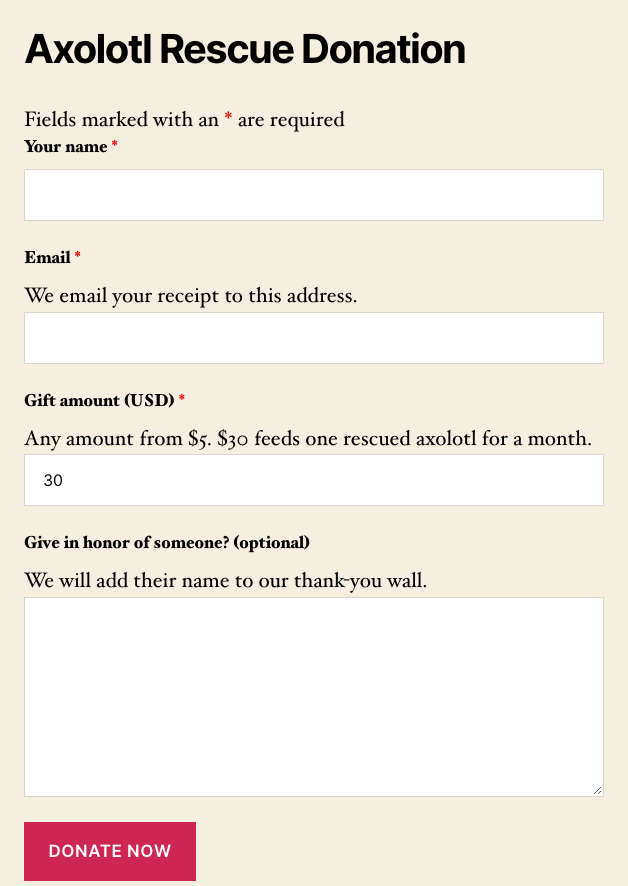
Once they’ve given, the form sends them an email receipt with their amount, and every gift is saved as an entry with the donor’s name, email, amount and payment status, so you always have a list to look back on. Want a PDF copy of the gift attached to that receipt? The optional PDF Form Submission add-on ($49 a year) handles it.
And the cost? You can take PayPal payments with nothing up front. There’s a 1.9% fee per payment plus PayPal’s own fee, and nothing else to pay, no license and no monthly cost.
For one-time giving, that’s the whole job. There’s very little reason to set up a fundraising platform before your first gift has even come in.
Ready to go? Build your donation form step by step, start from a ready donation form, or open a church giving form if you’re taking gifts for a congregation.
Want monthly gifts at a few set amounts? Add Stripe to your form
Monthly giving is where your form needs one more piece. In Ninja Forms, the route to recurring gifts is the Stripe add-on, at $29 a year. Neither PayPal option, free or paid, takes recurring gifts.
Think of it like a menu with a few fixed items. You create each monthly level once in your Stripe account (say $10, $25 and $50 a month), and donors pick from those levels on your form. They don’t type their own monthly amount.
Your monthly donors come to you to change or cancel a gift, and you take care of it in Stripe. They can’t change or cancel it from your site.
The same add-on takes one-time gifts on the same form, with no Ninja Forms fee on top. If a handful of set levels is how you’d run monthly giving anyway, a form keeps it simple. Our guide to accepting payments with Stripe walks you through the setup.
Need donor histories, annual receipts or campaign goals? Shortlist a donation platform
This is where a dedicated WordPress donation plugin earns its place. A donation platform keeps one record per donor with their whole giving history. It can give donors a place to see their own gifts, send annual receipts and track a campaign toward a goal.
A form doesn’t do those things. Ninja Forms keeps one entry per gift, and it has no donor profiles, no per-donor totals, no donor login, no annual receipts and no campaign goal bar.
If that list describes what you need, two of the leading platforms make a good shortlist. Both have a free version, and both free versions add a fee to gifts made through Stripe.
GiveWP includes a donor list and campaigns with goals in its free plugin. The free version adds 2% to Stripe gifts and nothing to gifts through its PayPal gateway. Recurring gifts come with the paid version, sold as a one-site bundle at $350 a year.
Charitable takes one-time gifts through Stripe, PayPal and Square in its free version, which adds 3% to Stripe gifts. Recurring gifts start on the Plus plan, $99 the first year and then $199 a year. Donor management comes with its paid plans.
Two platforms, two real prices. That’s a shortlist you can decide from.
Give Ninja Forms a try today!
Ninja Forms is free! Optional premium features available with any membership.
What does each route cost in fees and plans?
All three take one-time gifts on a free version, and recurring gifts cost money on every route. Here’s how the fees and plans line up, listed alphabetically. Prices and fees were read in November 2026.
| One-time gifts | Recurring gifts | Added fee, free version | Recurring costs | |
|---|---|---|---|---|
| Charitable | Free | Paid plan | 3% (Stripe) | $99 first year, then $199/yr |
| GiveWP | Free | Paid plan | 2% (Stripe) | $350/yr (bundle) |
| Ninja Forms | Free | Paid add-on | 1.9% (PayPal) | $29/yr (Stripe add-on) |
Each added fee applies to one payment method on the free version only, and it goes away on the paid path. On our side, the Stripe add-on and the PayPal Checkout add-on both take gifts with no Ninja Forms fee.
PayPal Checkout costs $29 a year and takes one-time gifts only. Once you’re taking about $1,526 a year in gifts, it pays for itself.
Start with the simplest route that covers your giving today
Like we said at the top, three questions decide it. One-time gifts mean a form already does the job, a few set monthly levels mean adding Stripe, and donor histories or campaign goals mean shortlisting a platform.
Here’s our take. If your giving is one-time or a handful of fixed monthly levels, and a list of entries plus an email receipt is all the record-keeping you need, a form is the lighter, cheaper choice. Once you need donor histories, a donor login or annual receipts, a WordPress donation plugin earns its place.
You don’t need the biggest tool. You need the one that fits the gifts you’re taking right now. Pick your route above, start free today, and take your first gift this week.
Try Ninja Forms Today
Always free, with premium features available through our memberships.