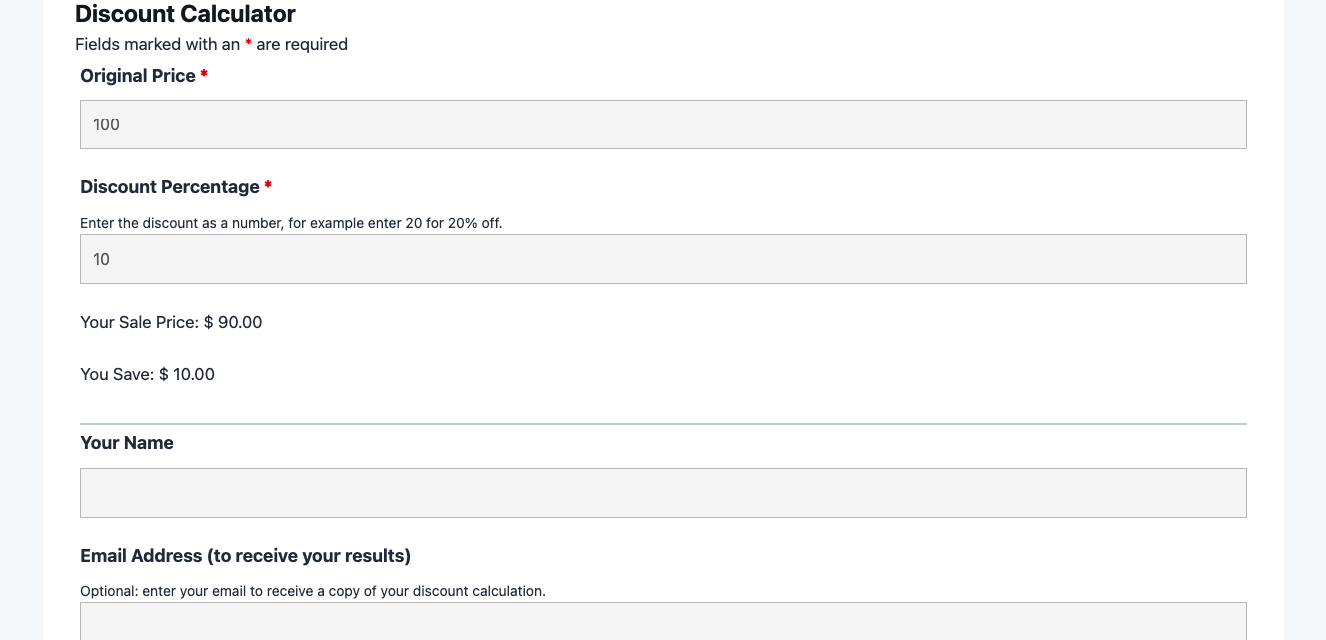
What’s Included
This template is intentionally lean, focusing on the inputs and outputs that matter most for a smooth discount calculation experience. All fields are pre-configured with clear labels and helpful placeholder text so users understand exactly what to enter. The form uses Ninja Forms’ free built-in Calculations feature to compute the sale price and dollar savings automatically the moment a user fills in the required values. Below is a complete breakdown of every field included in the template.
Calculation Inputs
- Original Price (Number): The full, pre-discount price of the item or service. Required. Accepts decimal values so users can enter amounts like 24.99 or 199.00. This field drives the core discount calculation formula.
- Discount Percentage (Number): The percentage off to apply, entered as a number between 0 and 100 (for example, 20 for a 20% discount). Required. This field feeds directly into the calculation alongside the original price.
Calculation Outputs
- Sale Price (HTML): Displays the computed discounted price using a Ninja Forms merge tag. Read-only output field showing the final price the customer pays. Uses the formula: Original Price minus (Original Price multiplied by Discount Percentage divided by 100).
- You Save (HTML): Displays the dollar amount saved using a second Ninja Forms merge tag. Shows the difference between the original price and the sale price so users can see their exact savings at a glance.
Contact Information
- Name (Single Line Text): The user’s full name, captured so the results confirmation email can be personalized. Optional.
- Email Address (Email): The user’s email address for sending a copy of their calculation results. Optional. When provided, a confirmation email delivers the sale price, savings amount, and any additional context your team wants to include.
Spam Protection and Submission
- hCaptcha (hCaptcha): Ninja Forms’ preferred spam protection partner. Blocks automated bot submissions while remaining invisible to legitimate users in most cases, protecting your submission data without creating friction.
- Calculate My Savings (Submit): The submission button. Default label is “Calculate My Savings” – easily changed to “Get Discount,” “Show Sale Price,” or any label that fits your brand.
This template uses Ninja Forms’ free built-in Calculations feature to compute both the sale price and the dollar savings automatically from the values a user enters, with no paid add-ons required.
Automated Responses and Smart Integrations
This form is designed to do more than just display a calculated number. Working behind the scenes, it automates result delivery, protects against spam, and can connect to external tools to help you capture and follow up with leads who show high purchase intent by engaging with your discount calculator.
Core Actions (always active):
- Email Notification: When a user provides their email address, they receive a personalized confirmation showing their original price, discount percentage, computed sale price, and total savings. Your team receives a copy of all submission details for tracking promotional interest and following up with high-value prospects.
- Success Message: Immediately after submission, a clear thank-you message appears on the page displaying the results and encouraging the user’s next step, such as visiting your store, completing a purchase, or requesting a custom quote.
- Redirect: Optionally redirect users to a custom thank-you page, a product page, or a checkout flow after they see their discount results. This is a natural handoff point for driving conversions after the calculator confirms the savings.
- Anti-spam Protection: hCaptcha blocks bot submissions while maintaining a low-friction experience for real users, keeping your submission data clean and your team’s inbox free of junk.
Enhanced Functionality (Optional):
- Layout and Styles (Optional): The Layout and Styles add-on lets you display the Original Price and Discount Percentage fields side by side in a two-column layout, keeping the calculator compact and visually appealing without writing any CSS. You can also apply custom styling that matches your brand’s colors, fonts, and button design.
- PDF Form Submission (Optional): With the PDF Form Submission add-on, every calculation result can be exported as a branded PDF, which is particularly useful for wholesale businesses, sales teams, or B2B scenarios where the buyer needs a formal record of the quoted price.
- Conditional Logic (Optional): The Conditional Logic add-on enables you to extend the template with adaptive behavior, such as showing a “Request a Quote” field when the discount exceeds a certain threshold, or revealing a bulk-pricing note when the original price is above a set amount. This turns the simple discount calculator into a dynamic, decision-based tool.
How Can the Discount Calculator Be Used?
Manually answering “how much will this cost after the discount?” is a friction point in almost every sales environment. Customers hesitate when they have to do the math themselves, and that hesitation often leads to abandoned carts, delayed decisions, or lost deals. A well-placed discount calculator removes that friction entirely, giving visitors an instant, trustworthy answer that accelerates the path to purchase. Beyond the transactional benefit, the calculator doubles as a lead capture tool: when users enter their email to receive their results, you collect the contact information of people who have already demonstrated buying intent. Explore the most common ways this template empowers different users:
E-Commerce Store Owners: Reduce Cart Abandonment with Transparent Pricing
Online shoppers frequently abandon carts when they are unsure whether a coupon code or promotional discount has been applied correctly. Embedding a discount calculator on product pages or in a dedicated promotions section lets shoppers verify their savings before clicking “Add to Cart.” When they can see that a $149.99 jacket drops to $112.49 at 25% off, they proceed with confidence. Store owners can customize the submit button to link directly to the product page or checkout, creating a seamless journey from calculator to conversion. This approach is particularly effective for seasonal sales, flash promotions, and loyalty program discounts.
Wholesale and B2B Businesses: Quote Bulk Pricing Instantly
Wholesale suppliers and B2B vendors often offer tiered discounts based on order volume, but communicating those tiers clearly can be a challenge. A percentage off calculator embedded on the pricing or ordering page lets buyers enter any original price and apply their negotiated discount rate to confirm the per-unit or total cost before placing an order. Paired with the optional PDF Form Submission add-on, the result can be exported as a formal quotation document, eliminating back-and-forth emails and accelerating the procurement process. This use case is common in food service, construction supply, and wholesale clothing.
Retail and Brick-and-Mortar Stores: In-Store Promotion Transparency
Retail staff and customers alike benefit from a quick sale price calculator that eliminates price confusion during in-store promotions. Embed the form on your store’s website so shoppers can check clearance prices from home before making the trip, or display it on a tablet at the point of sale for staff to use when processing promotional discounts. The form’s clean, minimal design works well on touch screens and loads quickly even on slower in-store Wi-Fi. Adding the optional Conditional Logic add-on lets you show a “Loyalty Member Extra 5% Off” field only when a customer indicates they have a membership, keeping the experience relevant and personalized.
Marketing Teams: Promote Sales Events and Track Engagement
Marketing managers running seasonal campaigns – back-to-school sales, Black Friday promotions, or end-of-quarter clearances – can embed a discount calculator directly on campaign landing pages to demonstrate the value of the sale in concrete dollar terms. When a visitor sees that a $200 item costs only $140 during a 30% off event, the call to action becomes far more compelling than a generic “Save big this weekend” headline. The optional email capture field turns the calculator into a lead generation asset: visitors who want their results emailed receive personalized follow-up, and your marketing team gets a list of warm, high-intent contacts to target with retargeting campaigns or promotional emails.
Financial Educators and Bloggers: Teach Percentage Concepts Interactively
Personal finance bloggers, educators, and financial literacy organizations can use this percent off calculator as an interactive learning tool. Rather than asking readers to work through a percentage-off formula manually, embed the calculator in an article about budgeting, smart shopping, or comparing sale prices across retailers. Readers engage more deeply with interactive tools than with static text, increasing time on page and reducing bounce rates. The simple two-input design requires no explanation and works for audiences of all ages and math comfort levels, making it an ideal teaching aid for topics like discount shopping, coupon strategies, and comparing promotional deals.
Frequently Asked Questions About the Discount Calculator
Is the discount calculator template free?
Yes, the discount calculator template is completely free to download and use. It is built on the free Ninja Forms plugin and uses the free built-in Calculations feature, so you can have a fully functional discount calculator running on your WordPress site at no cost. Optional add-ons like Conditional Logic or PDF Form Submission are available for purchase if you want enhanced functionality, but the core calculator works without them.
Do I need coding skills to customize this template?
No coding is required. Ninja Forms uses a visual drag-and-drop builder that lets you modify field labels, default values, button text, success messages, and email notifications through a point-and-click interface. If you want to change the calculation formula or add new output fields, you can do so using the built-in Calculations editor without writing any code. The Layout and Styles add-on gives you even more visual control over the form’s appearance.
Will the discount calculator work on mobile devices?
Yes. Ninja Forms templates are mobile-responsive by default, meaning the discount calculator automatically adjusts its layout and font sizes to fit any screen size, from large desktop monitors to small smartphone screens. The number input fields are optimized to trigger a numeric keyboard on mobile devices, making it easy for users to enter prices and percentages without switching keyboard modes.
How accurate is the discount calculation?
The calculation is mathematically precise. The sale price is calculated using the standard formula: Original Price minus (Original Price multiplied by Discount Percentage divided by 100). The savings amount is simply the difference between the original price and the sale price. Ninja Forms’ Calculations feature applies standard order of operations, so results are reliable for any price and percentage combination. You can review the Calculations documentation if you want to modify the formula for more advanced scenarios like stacked discounts or fixed-amount-off promotions.
Can I add additional fields to this template?
Absolutely. The template is a starting point that you can expand using the Ninja Forms drag-and-drop builder. Common additions include a product name field so users can label their calculation, a quantity field to compute bulk savings, or a notes field for special requests. If you add the optional Conditional Logic add-on, you can show or hide additional fields based on the values users enter, keeping the form clean for simple use cases while supporting more complex scenarios when needed.
What happens to the data users enter?
All submission data is stored on your own WordPress server in the Ninja Forms submissions database. No data is transmitted to third parties unless you explicitly configure an integration with an external service. You have full control over what data is stored, and Ninja Forms includes built-in GDPR tools for exporting or deleting individual user records on request. Fields that collect personally identifiable information, such as the Name and Email fields, can be flagged as PII within Ninja Forms settings for compliance purposes.
Does this template work with page builders like Elementor or Divi?
Yes. Ninja Forms is compatible with all major WordPress page builders. In Elementor, you can drag a Ninja Forms widget into any section of your layout. In Divi, add a Ninja Forms module to your page. For the WordPress block editor (Gutenberg), use the dedicated Ninja Forms block available in the block inserter. The form inherits your theme’s base styling and can be further customized with the Layout and Styles add-on to match your site’s design perfectly.
Can I use this template to calculate both percentage-off and fixed-amount-off discounts?
The template as downloaded is configured for percentage-off calculations. To support fixed-amount-off discounts, you can modify the calculation formula in the Ninja Forms builder – simply change the formula to Original Price minus Discount Amount and update the field labels accordingly. If you want to offer users a choice between percentage off and fixed amount off, the Conditional Logic add-on lets you show the appropriate input field based on whichever discount type the user selects from a dropdown.
Can I use this template on multiple websites?
Yes. Ninja Forms templates can be exported and imported to as many WordPress sites as you like. Simply download the .nff file once and import it on each site where you need a sale price calculator. If you need the template on sites that also use premium Ninja Forms add-ons, ensure those add-ons are active on each installation for the enhanced features to work. There are no per-site license restrictions on the template file itself.
How do I get support if I have issues?
Ninja Forms provides documentation, tutorials, and a dedicated support team to help you get up and running. Start with the Ninja Forms documentation for step-by-step guides on importing templates, configuring calculations, and setting up email notifications. If you need personalized help, visit the Ninja Forms support page to submit a ticket. The community forum and help articles cover the most common setup questions for calculator-type templates.
Make it your template
Every template is ready to go live and fully customizable. Tweak a few things or renovate from the ground up. Ninja Forms gives you the tools either way.