What’s Included
This survey form is built around one idea: not every respondent should see the same questions. A short branching logic layer, powered by Conditional Logic, routes each person to the follow-up questions that actually apply to them, whether they are a student, an employee, a program member, or a community participant. The result is a shorter, more relevant experience that respects respondents’ time while still giving you structured, comparable data to work with.
Branching and Respondent Fields
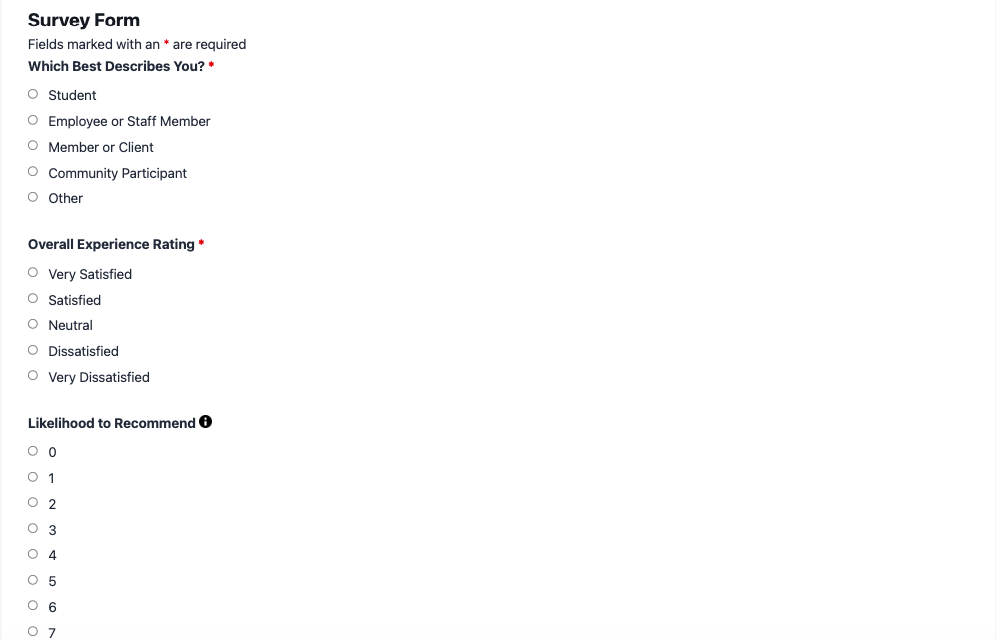
- Which Best Describes You? (Radio List): Lets each respondent self-identify (Student, Employee or Staff Member, Member or Client, Community Participant, Other) so the survey form can branch to the right follow-up questions later. Required.
- Overall Experience Rating (Radio List): A five-point scale from Very Satisfied to Very Dissatisfied that determines which feedback question appears next. Required.
Adaptive Feedback Fields
- What Did You Enjoy Most? (Paragraph Text): Appears only when a respondent selects Satisfied or Very Satisfied, so positive detail is captured without cluttering the form for critical respondents. Conditional, Optional.
- What Could We Improve? (Paragraph Text): Appears only when a respondent selects Neutral, Dissatisfied, or Very Dissatisfied, so improvement feedback reaches your team without getting buried under praise. Conditional, Optional.
- Program or Course Name (Single Line Text): Appears only when the respondent identifies as a Student, giving course evaluators the context they need. Conditional, Optional.
- Department or Team (Single Line Text): Appears only when the respondent identifies as an Employee or Staff Member, useful for routing employee pulse check results to the right manager. Conditional, Optional.
Optional Context and Contact Fields
- Likelihood to Recommend (Radio List): A zero to ten recommendation scale respondents can use to indicate how likely they are to recommend the program, course, or organization to others. Optional.
- Additional Comments (Paragraph Text): An open field for anything the structured questions above did not capture. Optional.
- Name (Single Line Text): Collects the respondent’s name for organizations that want to follow up individually. Optional.
- Email (Email): Collects an email address for organizations that want to close the loop with respondents. Validated. Optional.
Spam Protection and Submission
- hCaptcha (hCaptcha): Blocks automated spam submissions without adding friction for real respondents.
- Submit (Submit): Finalizes the submission and triggers the confirmation and notification actions below.
Automated Responses and Smart Integrations
This template is built to do more than collect answers. It works behind the scenes to confirm submissions, route feedback to the right person on your team, and keep everyone informed the moment a respondent finishes.
- Email Notification: Sends a confirmation to the respondent and a copy to your team with the complete set of answers, including whichever conditional fields that respondent’s path triggered.
- Success Message: Shows a clear thank-you message immediately after submission, letting respondents know their feedback was received.
- Redirect: Optionally sends respondents to a resources page, a related survey, or a scheduling page after they finish.
- Anti-spam Protection: Uses hCaptcha to prevent bot entries while keeping the experience quick and frictionless for genuine respondents.
- Conditional Routing: The same Conditional Logic rules that adapt the questions can also route the admin notification itself, so an Employee pulse check response reaches HR while a Student course evaluation reaches the relevant instructor, automatically.
Enhanced Functionality (Optional):
- Multi-Step Forms (Optional): Breaks a longer survey form into logical pages, one per topic in a needs assessment, for example, complete with progress bars and breadcrumb navigation so long institutional surveys never feel overwhelming. See Multi-Step Forms.
- Save Progress (Optional): Lets respondents save a partially completed survey and return later, useful for detailed course evaluations or annual community needs assessments that take more than a few minutes. See Save Progress.
- Excel Export (Optional): Exports every submission to a spreadsheet on demand, so program managers can analyze satisfaction trends without manually compiling responses. See Excel Export.
- Layout and Styles (Optional): Adjusts columns, spacing, and styling so the form matches your organization’s branding. See Layout and Styles.
Requires Ninja Forms (free) · Import, customize, publish in minutes
How Can the Survey Form Be Used?
A static list of questions asks the same thing of every respondent, whether or not it applies to them. That mismatch costs you data quality: long surveys with irrelevant questions see higher abandonment, and respondents who skip past questions meant for someone else often skip the ones meant for them too. A survey form built with Conditional Logic solves this by adapting in real time. Members see member questions, students see course questions, and everyone reaches the finish line faster because they are never stuck answering something written for a different audience. Explore some of the most common ways organizations put this template to work.
Nonprofit Program Administrators: Member Feedback Without the Guesswork
Nonprofits running member or program satisfaction surveys often serve people with very different relationships to the organization: long-time donors, first-time volunteers, and program participants. This survey form lets a single respondent-type question branch the rest of the form, so a volunteer sees volunteer-relevant follow-up while a participant sees participant-relevant follow-up. Pair it with Save Progress for longer annual surveys, and route each response’s admin email by respondent type so the right staff member sees the feedback first. One form replaces three, with cleaner data for your next community needs assessment.
Educators: Course Evaluations That Adapt to the Class
Course evaluations usually ask a mix of questions: some apply to every class, others only make sense for labs, seminars, or online sections. With this template, the Program or Course Name field and any section-specific follow-up appear only when relevant, keeping the evaluation short enough that students actually finish it. Instructors can review results directly, or use the admin notification routing above to send each course evaluation straight to the instructor of record instead of a shared inbox.
HR and People Teams: Pulse Checks That Reach the Right Manager
Employee pulse checks work best when feedback lands with someone who can act on it. This template’s Department or Team field appears only for respondents who identify as staff, and the same branching logic can direct that feedback to the department lead automatically. Compare results over time using Excel Export, and consider an employee satisfaction survey as a companion form for a deeper annual check-in.
Community and Government Programs: Needs Assessments That Respect Residents’ Time
Needs assessments often try to cover housing, transportation, health, and education in one document, which can overwhelm a resident who only has input on one or two of those areas. Conditional Logic lets this form show follow-up questions only for the topics a resident indicates are relevant to them, shortening the experience without shortening the data. Multi-Step Forms pairs well here, breaking a longer assessment into clearly labeled sections.
Customer Experience and Research Teams: Structured Product Feedback
Any team gathering structured feedback, not just institutions, can use this same template to separate new customers from long-term users, or to route a low satisfaction rating straight to a support follow-up while routing a high rating toward a review request. It works equally well as a standalone customer feedback form or paired with an event registration form for post-event follow-up, or as a lightweight Net Promoter Score survey when you only need the recommendation question.
Frequently Asked Questions About the Survey Form
Is the survey form template free?
The template itself and the core Ninja Forms plugin are completely free. The branching behavior described above relies on the Conditional Logic add-on, which is part of a paid Ninja Forms plan. Without it, the form still works as a standard, non-branching form. See Ninja Forms pricing for current plan options.
Do I need coding skills to customize this survey form?
No. Every field, question, and conditional rule in this template is configured through the Ninja Forms drag-and-drop builder. You can add questions, change wording, or adjust which answers trigger which follow-up questions without touching any code.
Will this survey form work on mobile devices?
Yes. Ninja Forms is responsive by default, and this template was designed with mobile respondents in mind, including radio lists and text fields that remain easy to tap and read on small screens.
How does Conditional Logic make this different from a plain survey form?
A plain survey form shows every question to every respondent. This one uses Conditional Logic to show or hide questions and route notification emails based on earlier answers, so respondents only see what applies to them and your team only sees relevant, well-organized submissions.
Can I add or remove questions?
Yes. The field list above is a starting point, not a fixed structure. Add new questions, remove ones you don’t need, or create additional branches for respondent types specific to your organization using the same Conditional Logic rules.
What happens to the data respondents enter?
Submissions are stored in your own WordPress database, not on a third-party server. You control access, retention, and export. If you need bulk analysis, the optional Excel Export add-on lets you pull all responses into a spreadsheet on demand.
Does this template work with page builders like Elementor or Divi?
Yes. Ninja Forms integrates with major WordPress page builders, so you can embed this template using a block, shortcode, or widget inside Elementor, Divi, or the WordPress block editor.
Can I use this survey form template on multiple websites?
Yes. Once imported, you can export the completed form and import it into as many WordPress sites running Ninja Forms as you need.
How do I get support if I have issues?
Start with the Ninja Forms documentation, including guides on importing a template and setting up conditional logic. Paid plans include direct support access for anything the docs don’t cover.
Make it your template
Every template is ready to go live and fully customizable. Tweak a few things or renovate from the ground up. Ninja Forms gives you the tools either way.