What’s Included
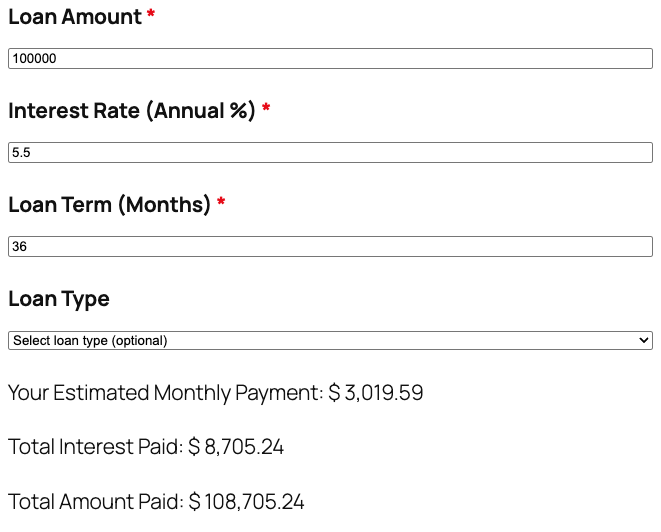
The Loan Calculator template gives visitors an instant, accurate way to estimate loan payments without emailing a spreadsheet back and forth. Built on Ninja Forms’ free core plugin, this loan calculator asks for the loan amount, interest rate, and term, then displays the estimated monthly payment, total interest paid, and total amount paid in real time. A short contact section turns each completed calculation into a qualified lead, so lenders, brokers, and dealerships can follow up while the numbers are still fresh in a borrower’s mind.
Loan Details
- Loan Amount (Number): Captures the total amount the borrower wants to finance. Used as the principal in every downstream calculation. Required.
- Interest Rate (Annual %) (Number): Collects the yearly interest rate as a percentage, for example 6.5. This value converts to a monthly rate automatically. Required.
- Loan Term (Months) (Number): Sets the repayment period in months, for example 360 for a 30 year mortgage or 60 for a 5 year auto loan. Required.
- Loan Type (Select): An optional dropdown with the placeholder “Select loan type (optional)” and choices such as Personal Loan, Auto Loan, Mortgage or Home Loan, Student Loan, Business Loan, and Debt Consolidation. Lets you segment leads by loan type without slowing down the form. Optional.
Your Results
- Your Estimated Monthly Payment (HTML): Displays the calculated monthly payment using Ninja Forms’ free built-in Calculations feature, updating as the borrower fills out the form. Read-only.
- Total Interest Paid (HTML): Shows the total interest owed across the full loan term, so borrowers can see the true cost of financing at a glance. Read-only.
- Total Amount Paid (HTML): Displays the sum of principal and interest over the life of the loan. Read-only.
Contact Information
- Full Name (Single Line Text): Identifies who ran the calculator so you know who to follow up with. Required.
- Email Address (Email): Captures a validated email for sending a copy of the results and any follow-up offers. Required.
- Phone Number (Phone): An optional field for borrowers who are comfortable with a callback. Optional.
Spam Protection and Submission
- Spam Protection (hCaptcha): Blocks automated bot submissions without adding friction for real borrowers. Not marked required, matching Ninja Forms best practice for anti-spam fields.
- Submit (Submit): Labeled “Calculate My Loan Payment” to match the action borrowers expect when running the numbers.
This template uses Ninja Forms’ free built-in Calculations feature to convert the annual interest rate into a monthly rate and run the standard loan amortization formula, so no external loan payment calculator service or paid add-on is required to get accurate, real-time results.
Automated Responses and Smart Integrations
This loan calculator is designed to do more than display a number. It works behind the scenes to confirm results for the borrower, notify your team of a new lead, and sync with the tools you already use for follow-up and relationship building.
- Email Notification: Sends the submitter a copy of their monthly payment, total interest paid, and total amount paid, plus a copy to your team with the borrower’s contact details for follow-up.
- Success Message: Shows a clear thank-you message confirming the results were sent, with a prompt to check email or schedule a call.
- Redirect: Optionally redirects to a custom page with financing options, rate comparisons, or a scheduling tool.
- Anti-spam Protection: Uses hCaptcha to block bot entries while keeping the form quick and friendly to complete.
Enhanced Functionality (Optional)
- Conditional Logic (Optional): Show or hide follow-up questions based on the selected Loan Type using the Conditional Logic add-on, for example revealing a down payment prompt only when Mortgage or Home Loan is selected.
- CRM Integration (Optional): Sync every completed submission to your CRM. Connect with OnePageCRM to automatically create a new lead and set a follow-up reminder. Other supported CRMs include HubSpot, Salesforce, Zoho, and Insightly.
- PDF Form Submission (Optional): Generate a branded PDF loan estimate from each submission using PDF Form Submission, ideal for lenders and brokers who want a shareable, printable summary of the borrower’s numbers.
- Layout and Styles (Optional): Arrange the loan amount, interest rate, and term fields into a clean multi-column layout that matches your site’s branding using Layout and Styles.
Requires Ninja Forms (free) · Import, customize, publish in minutes
How Can the Loan Calculator Be Used?
Borrowers often abandon a financing page when they cannot tell what a loan will actually cost each month. A loan calculator solves that by turning loan amount, interest rate, and term into an instant monthly payment, without back and forth emails or phone calls to get a number. Because the math runs automatically through Ninja Forms Calculations, the results stay accurate even when a borrower changes the loan amount or term halfway through filling out the form. Explore the most common ways this template empowers different users:
Loan Officers and Mortgage Brokers: Pre-Qualify Borrowers Before the First Call
Loan officers embed the loan calculator on their site so prospects can run their own numbers before ever picking up the phone. A borrower enters a loan amount, interest rate, and term, sees the estimated monthly payment, and submits their name and email to get a copy. The broker’s team receives a notification with every result, so the first call starts with a pre-qualified lead who already understands the payment range instead of a cold inquiry. Pairing this template with OnePageCRM keeps every submission organized in one pipeline.
Auto Dealerships: Show Real-Time Financing Estimates on the Lot or Online
Dealerships use a monthly loan payment calculator to help shoppers compare financing terms on different vehicles without walking to a finance manager’s desk. Selecting Auto Loan from the Loan Type dropdown keeps the results relevant, and the estimated monthly payment updates the moment a shopper adjusts the loan term or down payment amount. Because no add-ons are required, this template works out of the box on any WordPress dealership site running the free Ninja Forms plugin.
Personal Finance Sites and Advisors: Turn Loan Math Into Interactive Content
Bloggers and financial advisors embed this loan interest calculator inside articles about debt payoff, refinancing, or first time borrowing to keep readers engaged longer than static text ever could. Visitors test different loan amounts and terms, see the total interest paid change instantly, and walk away with a clearer sense of what a lender might quote them. Capturing an email address alongside the results also builds a warm list for future newsletters or consultations.
Small Business Owners: Compare Financing Options Before Signing
Business owners shopping for equipment financing or a working capital loan use this loan payment calculator to model a few scenarios before contacting a lender. Selecting Business Loan from the Loan Type field and comparing total amount paid across different terms helps an owner decide whether a shorter, higher payment term or a longer, lower payment term fits their cash flow. The result is a faster, more confident conversation once they do reach out to a bank or lender.
Frequently Asked Questions About the Loan Calculator
Is the loan calculator template free?
Yes. The template itself is free to download, and it runs entirely on the free version of Ninja Forms. The monthly payment, total interest, and total amount paid all calculate using Ninja Forms’ free built-in Calculations feature, so no paid add-on is required to use the core template.
Do I need coding skills to customize this template?
No coding is required. Ninja Forms uses a drag and drop builder, so you can relabel fields, adjust the Loan Type dropdown options, or change the email notification text directly in the WordPress dashboard. Anyone comfortable editing a WordPress page can customize this template in a few minutes.
Will the loan calculator work on mobile devices?
Yes. Ninja Forms forms are responsive by default, so the loan amount, interest rate, and term fields, along with the calculated results, resize cleanly on phones and tablets. Borrowers can run the calculator and submit their contact details from any device without pinching or zooming.
Can I integrate this template with my CRM or email marketing tool?
Yes. Connect the loan calculator to OnePageCRM, HubSpot, Salesforce, Zoho, or Insightly to send new leads directly into your pipeline, or use Mailchimp and other supported platforms to add submitters to an email list. These integrations are optional add-ons, not requirements to run the base template.
How accurate are the calculated results?
The loan calculator uses the standard amortization formula lenders rely on, based on the loan amount, annual interest rate, and term in months you enter. Results are an estimate for planning purposes and may differ slightly from a lender’s final offer, which can include fees, taxes, or insurance not captured by this estimate.
Can I add additional fields to the form?
Yes. You can add fields such as a down payment amount, trade in value, or property address directly in the Ninja Forms builder. If you add a down payment field, remember to adjust the Loan Amount calculation so this loan calculator reflects the financed balance rather than the full purchase price.
What happens to the data borrowers enter into the form?
Submissions are stored in your own WordPress database using Ninja Forms’ Record Submission action, giving you full control over borrower data. Nothing is sent to a third party unless you connect an optional integration such as a CRM or email marketing add-on, and you can export or delete records at any time from your dashboard.
Does this template work with page builders like Elementor or Divi?
Yes. Ninja Forms forms embed using a shortcode or block, so this template drops into pages built with Elementor, Divi, the WordPress block editor, or most other page builders without any special configuration.
Can I use this loan calculator template on multiple websites?
Yes. Once you download the .nff file, you can import it into Ninja Forms on as many WordPress sites as you manage. Each site needs its own active installation of the free Ninja Forms plugin.
Make it your template
Every template is ready to go live and fully customizable. Tweak a few things or renovate from the ground up. Ninja Forms gives you the tools either way.