What’s Included
A food order form gives customers a simple way to browse your menu, choose items and quantities, and pay before they ever pick up the phone. This template pairs familiar Ninja Forms fields with the free Calculations feature so the order total updates automatically as customers make selections, while PayPal Checkout handles payment right at submission. No spreadsheets, no manual invoicing, and no back and forth with the customer over pricing.
The form is built to stay short enough that customers finish an online food ordering form in under two minutes, while still capturing everything you need to prepare, package, and hand off the order correctly. Whether you run a single counter or a growing catering business, an online food ordering form keeps every order organized in one place.
Customer Information
- Full Name (Single Line Text): Captures who the order is for so you can confirm pickup or match it to a delivery. Required.
- Email (Email): Used to send the order confirmation and receipt. Required.
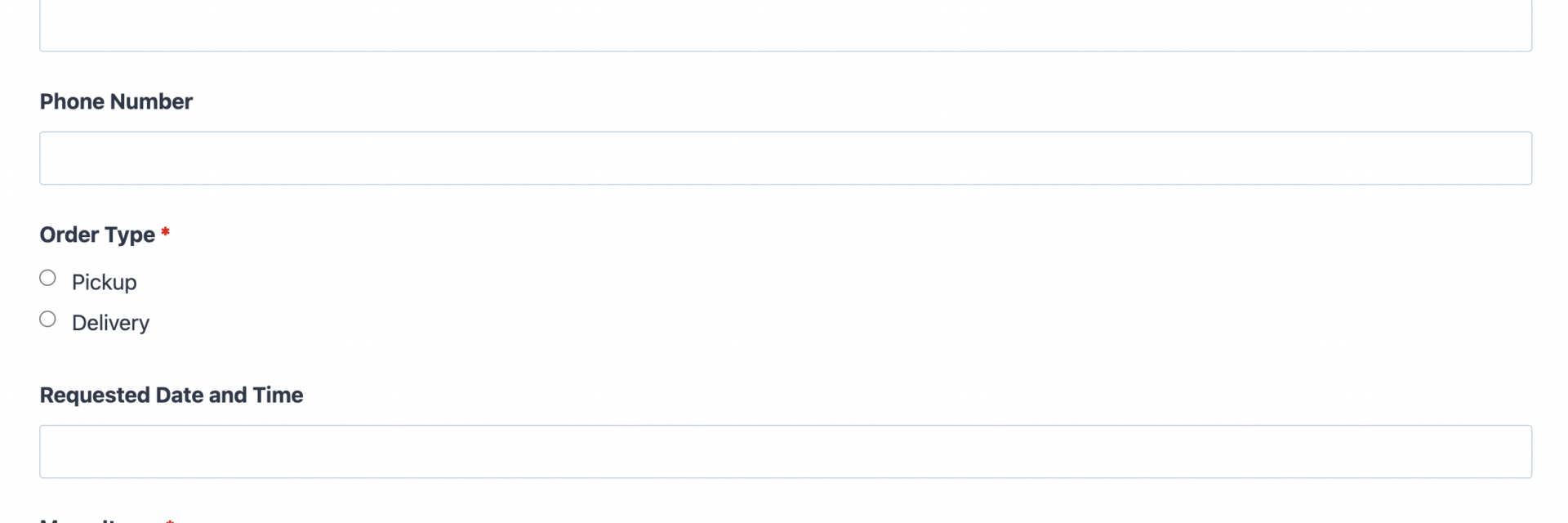
- Phone Number (Phone): Lets your team reach the customer quickly if there is a question about the order. Optional.
Order Details
- Order Type (Radio List): Customer chooses Pickup or Delivery, which determines whether the delivery address field appears. Required.
- Delivery Address (Single Line Text): Only shown when Delivery is selected, using Conditional Logic to keep the form short for pickup customers. Conditional, Optional.
- Requested Date and Time (Date): Lets the customer choose when they want the order ready or delivered. Optional.
- Menu Items (Checkbox List): Lists your menu with a price assigned to each option, so customers can select as many dishes as they want. Required.
- Quantity (Number): Applies to the selected items and feeds directly into the order total calculation. Optional, defaults to 1.
- Special Instructions (Paragraph Text): Space for allergies, substitutions, or delivery notes. Optional.
Order Summary and Payment
- Order Total (Single Line Text): Displays the calculated total automatically, combining item prices and quantity. Read-only, populated by Calculations.
- Spam Check (hCaptcha): Blocks automated bot submissions without adding friction for real customers. Required.
- Submit (Submit): Sends the order and triggers PayPal Checkout for payment.
This template uses Ninja Forms’ free built-in Calculations feature to total the order automatically as customers add or change menu selections, so nobody has to do the math by hand, not the customer and not you.
Automated Responses and Smart Integrations
A food order form should do more than collect an order. It should confirm it, calculate it, and get it paid, all without you touching a spreadsheet. This template handles that automatically, from the moment a customer submits through the moment payment clears.
- Email Notification: Sends the customer a confirmation with their full order and total, and sends your team a copy with everything needed to start preparing the order. You can review how to customize each message in the notification settings.
- Success Message: Shows a clear thank-you message confirming the order was received and payment was processed, with a note on when to expect pickup or delivery.
- Redirect: Optionally sends customers to a page with directions, hours, or a link to place another order.
- Anti-spam Protection: Uses hCaptcha to keep bot submissions out without slowing down real customers at checkout.
- Payment Processing: Collects payment through PayPal Checkout, our preferred payment partner, charging the calculated order total the moment the form is submitted. PayPal Checkout supports PayPal balance, credit and debit cards, Venmo, and Pay Later, so customers can pay however they prefer without leaving your site.
Enhanced Functionality (Optional)
A handful of optional add-ons make this food order form template even more useful as your ordering volume grows. Browse the full Ninja Forms add-ons library any time you want to see what else is available.
- Conditional Logic (Optional): Already used to show the delivery address only when needed, Conditional Logic can also hide or reveal menu sections based on order type, such as showing catering packages only for large orders.
- Layout and Styles (Optional): Use Layout and Styles to arrange your menu into multiple columns or match the form’s colors and fonts to your restaurant’s branding.
- PDF Form Submission (Optional): Generate a printable order ticket automatically with PDF Form Submission, useful for kitchen staff who need a physical copy of each order.
This template works fully with the free version of Ninja Forms plus PayPal Checkout for payment. The optional add-ons above simply give you more control as your food ordering needs grow.
Requires Ninja Forms (free) · Import, customize, publish in minutes
How Can the Food Order Form Be Used?
Taking food orders over the phone or through email eats up time and invites mistakes: a misheard item, a forgotten quantity, a price quoted wrong. A food order form fixes that by letting customers place and pay for their own order directly on your website, with the total calculated automatically and confirmed before anyone hits submit. That means fewer errors in the kitchen and fewer awkward calls asking a customer to repeat their order.
Because the form validates entries and calculates the total in real time, customers see exactly what they are paying for before they check out, and your team receives a clean, itemized order instead of a voicemail. Explore the most common ways this template gets put to work:
Restaurants: Take Pickup and Delivery Orders Without a Phone Line
Independent restaurants and small chains use this restaurant order form template to let customers order directly from their website instead of calling in or relying entirely on third party delivery apps. Customers choose their dishes, set a quantity, and pay through PayPal Checkout in one pass. The Order Type field routes pickup orders straight through while delivery orders reveal the address field, so the kitchen always knows where the order is headed and when to expect it. Many restaurants pair this restaurant order form template with a Restaurant Reservation Form for guests who prefer to dine in.
Caterers: Collect Detailed Event Orders in One Pass
Catering businesses use this template as a straightforward catering order form for the Menu Items and Special Instructions fields, capturing event orders with multiple dishes, larger quantities, and specific notes about allergies or serving times. Because Conditional Logic can reveal additional fields for larger orders, caterers can gather the extra detail a wedding or corporate event needs without cluttering the form for a simple weekday order. Some caterers prefer a dedicated catering order form built around per-guest pricing for large events, and use this template for everyday orders.
Bakeries and Specialty Food Shops: Take Custom Orders Online
Bakeries, meal prep businesses, and specialty food shops use the form to let customers order ahead for pickup on a specific date, using the Requested Date and Time field to plan production. Combined with automatic Calculations for the order total, this removes the guesswork of quoting custom orders by phone or message.
Food Trucks and Pop-Up Vendors: Simplify Pre-Orders
Mobile food businesses use a lightweight version of this food order form to take pre-orders ahead of an event or scheduled stop, so customers can pay in advance through PayPal Checkout and skip the line when they arrive. The short field count keeps the form fast to fill out on a phone, which matters since most food truck traffic comes from mobile visitors. Vendors selling at scheduled events sometimes link this form from an Event Registration Form for the event itself.
Nonprofits and Community Groups: Run Fundraiser Meal Sales
Community groups and nonprofits use this template for fundraiser dinners, bake sales, and meal drives where supporters order and pay for a meal in advance. The same fields that work for a restaurant order (menu selection, quantity, pickup or delivery, payment) apply just as well to a spaghetti dinner fundraiser or a holiday meal sale. Groups running a broader fundraising campaign alongside the meal sale often pair this form with a Donation Form to collect extra contributions at the same time.
Frequently Asked Questions About the Food Order Form
Is the food order form template free?
Yes, the template itself is free to download and use. It requires the free Ninja Forms plugin plus the PayPal Checkout add-on to process payments, since collecting money through a form always needs a payment processor rather than a raw card field.
Do I need coding skills to customize this template?
No. Every field, label, price, and email notification can be edited directly in the Ninja Forms drag-and-drop builder. You can add menu items, change prices, or adjust the confirmation message without writing any code.
Will this food order form work on mobile devices?
Yes. The form is fully responsive and adjusts to phone and tablet screens automatically, which matters since a large share of food orders come from customers browsing on their phones.
Can I integrate the food order form with my CRM or email marketing tool?
Yes. While this template ships focused on order capture and payment, Ninja Forms supports Zapier and Webhooks if you want to send order data into another tool for marketing or record keeping.
How accurate is the order total calculation?
The Order Total field uses Ninja Forms’ free Calculations feature, which recalculates instantly whenever a customer changes their menu selection or quantity, using the exact prices you set for each item. Because you control every price in the field settings, the total is only as accurate as the values you enter.
Can I add additional fields to the food order form?
Yes. You can add fields for a tip amount, curbside pickup instructions, or a loyalty program number. Just keep in mind that shorter forms tend to convert better, so add only what you truly need at checkout.
What happens to the data customers enter?
All submission data is stored on your own WordPress database by default, giving you full control over customer information. You can review, export, or delete submissions at any time from the Ninja Forms dashboard.
Does this template work with page builders like Elementor or Divi?
Yes. Ninja Forms works inside Elementor, Divi, the WordPress block editor, and most other major page builders using a simple shortcode or block, so you can drop the food order form anywhere on your site.
Can I use this template on multiple websites?
Yes. Once downloaded, you can import the .nff file into as many Ninja Forms installations as you need, whether that means multiple restaurant locations or separate sites for different brands.
How do I get support if I run into issues?
Ninja Forms offers documentation, an active support forum, and premium support for add-on customers. If you get stuck setting up Calculations or PayPal Checkout, the Ninja Forms documentation walks through both step by step.
Make it your template
Every template is ready to go live and fully customizable. Tweak a few things or renovate from the ground up. Ninja Forms gives you the tools either way.