Best WordPress File Upload Plugins for Forms, Compared
You need people to send you files through a form, whether that’s job applications, photos or signed paperwork. You know plenty of form plugins can take an upload, and a name or two probably comes to mind already. The tricky part is knowing whether you’ve looked at enough of them, and know enough about each one, to pick the one that fits.
That’s what this look at the best WordPress file upload plugins is for. In November 2026 we compared the leading WordPress form plugins on what matters most when you’re collecting files through a form. Everything you’ll read below comes from testing each plugin ourselves or from its own technical documentation.
Yes, one of them is ours. We’re not here to crown a winner, though. The right plugin is the one that fits what you need, so we laid out what each one offers and left the call to you.
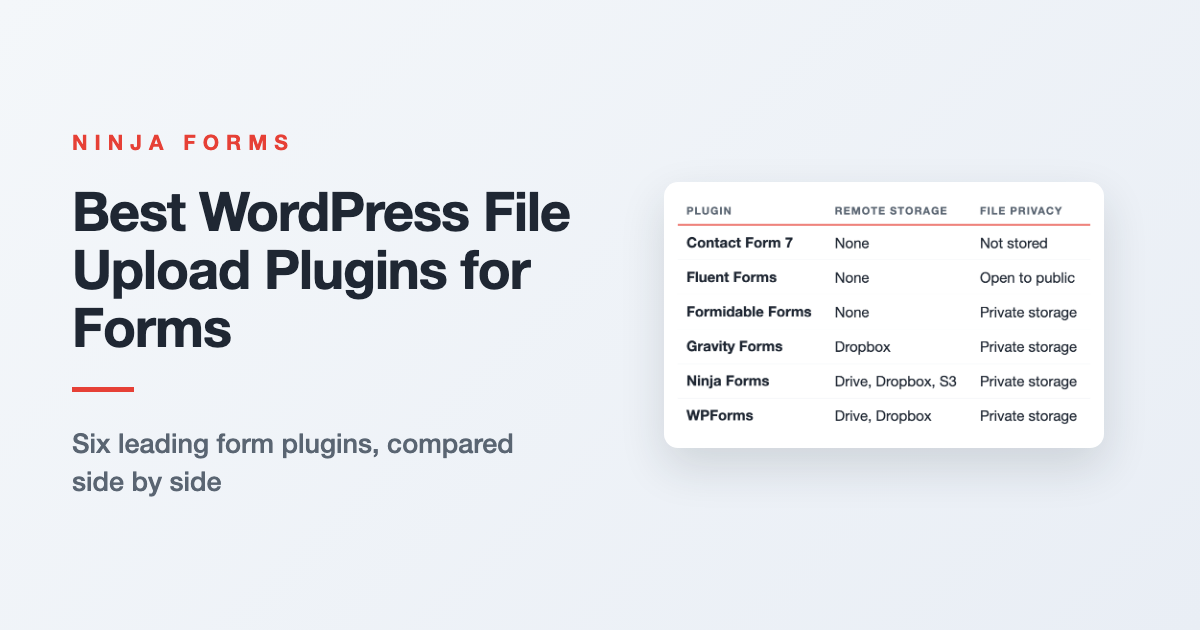
The best WordPress file upload plugins, side by side
We compared six of the best WordPress file upload plugins on what people most need to know when collecting files through a form: what it costs, how easy it is to set up, where files can be sent and who can open them. They’re listed alphabetically, and a full review of each one sits below. Click a name in the table to jump straight to it.
| Plugin | Purchase Cost | Renewal Cost | Ease of use | Remote Storage | File Privacy |
|---|---|---|---|---|---|
| Contact Form 7 | Free | Free | Low Code | None | Not stored |
| Fluent Forms | $79 | $79/yr | No Code | None | Open to public |
| Formidable Forms | $39.50 | $79/yr | No Code | None | Private storage available |
| Gravity Forms | $59-$159 | $59-$159/yr | No Code | Dropbox | Private storage available |
| Ninja Forms | $49 | $49/yr | No Code | Drive, Dropbox, S3 | Private storage available |
| WPForms | $49.50-$199.50 | $99-$399/yr | No Code | Drive, Dropbox | Private storage available |
“Remote Storage” names the cloud services a plugin can deliver uploads to using its maker’s own add-ons. “File Privacy” is about who can open a file once it’s uploaded.
By default, WordPress lets anyone who has a file’s address open it, so “Private storage available” means the plugin can lock files or move them off your site, and “Not stored” means files are emailed to you and never kept. Every plugin here lets you limit file types, and out of the box none takes a file bigger than your web host’s upload limit.
What each plugin does with file uploads
Shopping for a WordPress form plugin with file upload? Each review below walks through the same points as the table, in the same order, and adds the details a table cell has no room for.
Contact Form 7 file uploads
A good fit if you want files emailed to you and nothing kept on your site.
Contact Form 7 is free to get and there’s nothing to renew, with file uploads built into the plugin itself. It’s the one plugin here that asks you to work in code. Forms are built from tags you type by hand, and that’s also where you set which file types you’ll take and how big a file can be.
There’s no remote storage, because files reach you as attachments on the email you get. Once that email goes out, the file is deleted from your site, so nothing is stored there at all.
Fluent Forms file uploads
Upload functionality is part of Fluent Forms Pro, which is $79 a year to buy and renews at the same $79 a year. You set up the upload field in Fluent’s visual builder along with the rest of your form, and there’s no code to write.
There’s no remote storage with Fluent Forms, so every file a visitor uploads is kept on your site. The WordPress uploads folder is publicly accessible and Fluent Forms has no setting that restricts access, so keeping uploads private would take custom code.
Formidable Forms file uploads
A good fit if you want a form setting that blocks direct links to uploaded files and keeps them on your site.
Upload functionality starts on the Basic plan, which is $39.50 the first year and $79 a year after that. Setup happens in the form and field settings, no code. There’s no remote storage, so your files stay put on your site.
Out of the box, anyone with a link to an uploaded file can open it. Formidable’s documentation describes a form setting that blocks those direct links and serves files only to people with permission, which you can narrow down by user role.
Gravity Forms file uploads
Uploads come with every Gravity Forms license, starting with Basic at $59 a year, which renews at that same price. Setup is all settings screens, no code.
Dropbox uploads are restricted to the Pro license at $159 a year to buy and to renew. Once a transfer is confirmed, the copy on your site is deleted, so nothing is left sitting in your uploads folder.
Ninja Forms file uploads
A good fit if you want files sent on to Google Drive, Dropbox or Amazon S3 with no copy left on your site, for one add-on price.
Ninja Forms itself is free. Uploads come with the File Uploads add-on, at $49 a year to buy and to renew. Setup happens in settings screens, no code.
That same add-on sends files on to Google Drive, Dropbox and Amazon S3. You can have the copy on your site deleted once a file reaches your cloud service.
WPForms file uploads
Upload functionality starts on the WPForms Basic plan, at $49.50 the first year and $99 a year after that. Everything is set up in the builder, no code.
Google Drive and Dropbox uploads come only with the Pro plan, which is $199.50 the first year, then $399 a year. WPForms can then remove the copy on your site once a file reaches the cloud, so nothing is left sitting in your uploads folder.
Give Ninja Forms a try today!
Ninja Forms is free! Optional premium features available with any membership.
How do you keep uploaded files private and secure?
Start with who can open them. In WordPress, an uploaded file kept on your site opens for anyone who has its address, no login needed, unless the plugin locks it or sends it somewhere private and removes the copy on your site. That’s why the File Privacy column above is worth a second look.
Then control what can come in. Accept only the file types you need, cap the file size and the number of files, and keep your form plugin updated. Here’s how to secure WordPress file uploads, step by step.
Pick the upload plugin that fits what you need
Like we said at the top, we’re not crowning a winner. The table and reviews above give you the facts, and the right pick comes down to which of those points matters most to you.
When you want visitors’ files sent on to Google Drive, Dropbox or Amazon S3, with no copy left sitting on your site, Ninja Forms is the one we’d reach for. All three services and the private route come with one add-on at $49/yr.
Pick up the File Uploads add-on and your next batch of applications, photos and paperwork can land right where you want it.
Try Ninja Forms Today
Always free, with premium features available through our memberships.