The Best Multi-Step Form Builders for WordPress, Compared
Your form has gotten long, and somewhere around the ninth question people just… leave. So you go looking for a multi-step form builder to break it into friendlier steps, and every WordPress form plugin out there says it does multi-step. Which ones can skip a step that doesn’t apply to someone, show a real progress bar, or let a visitor save and finish later, and what does each of them cost?
The search results don’t help much. Every “best of” list looks like the last one, every pricing page leads with a first-year discount, and the free version you just installed shows you a Page Break button that opens an upgrade prompt the second you click it. Now you’re three plugins deep and still not sure what you’d be paying for.
Yes, it’s a lot of comparing. But it gets a lot simpler once you know what to look at. We installed the free versions of four popular builders, read the docs and pricing for everything that costs money, and put it all in one place, so you can pick the multi-step form builder that fits your form and get back to building it.
What should a multi-step form builder do for you?
A good multi-step form builder splits one long form into short steps without any code and shows visitors how far they have to go. Those two are the heart of it. Some forms also call for an extra or two: skipping a step that doesn’t apply to someone, or letting them save and finish later.
Here’s what we checked in every builder, essentials first:
- Steps without code. Can you add a new step right in the builder, and is that in the free version?
- A progress display. A bar, numbered steps, or a list of step names, so visitors always know where they are.
- Extra: skipping a whole step. Someone coming on their own shouldn’t have to click through a “group details” step. Look for one rule that hides the entire step.
- Extra: save and continue. A way for someone to leave and pick up where they left off, and a clear answer on where those saved answers are kept.
While you’re at it, think about everyone who’ll fill the form out. The friendliest multi-step forms say up front how many steps there are, keep the step names visible on every step, make optional steps easy to spot and skip, never ask for the same answer twice, and never put a step on a timer. The W3C has a short guide to multi-page forms if you want more ideas.
Is there a free multi-step form builder for WordPress?
Not among the ones we tested. We installed the free versions of WPForms, Fluent Forms, Formidable Forms and Everest Forms, and every one of them shows a multi-step control in the builder and blocks it with an upgrade prompt. Gravity Forms has no free version, and Ninja Forms sells multi-step as an add-on, so multi-step costs something in every plugin here.
No shame in that. Splitting a form into steps is a premium feature across the board, which makes the better question what you get for your money and what the extras cost.
Most of these vendors advertise a first-year discount. The prices below are the regular yearly prices for one site that their pricing pages say you renew at, read in October 2026.
The Ninja Forms row comes from our own testing. Every other builder’s multi-step features are paid, so their rows come from each vendor’s docs and pricing page.
| Builder | Multi-step, lowest regular price | Progress display | Skip a whole step (extra) | Save and continue (extra) |
|---|---|---|---|---|
| Ninja Forms | Multi Step Forms add-on, $29/year, or any membership | Progress bar and clickable step names, each on or off | Optional: pairs with the Conditional Logic add-on | Optional: pairs with the Save Progress add-on |
| Gravity Forms | Basic, $59/year; no free version | Progress bar or steps | Page conditional logic | Save and Continue form setting |
| Fluent Forms | Single Site, $79/year, every feature included | Progress bar, steps or tabs | A step is skipped when every field in it is hidden | Save & Resume in paid plans |
| Everest Forms | Personal, $69/year, every feature and add-on included | Progress indicator, theme and color | Conditional logic on a part | Save and Continue in paid plans |
| Formidable Forms | Basic, $79/year | Progress bar or rootline | Conditional page breaks | Logged-out saves need Business, $399/year |
| WPForms | Basic, $99/year | Progress bar, circles or connector | Unclear from their docs | Save and Resume in Pro, $399/year |
One standout from the free versions: Fluent Forms is the only one we tested where conditional logic itself is free. It shows and hides single fields, and multi-step still needs its paid version.
Here’s the short read on each builder
The table gives you the facts at a glance. Below is what we saw in each builder, and what you’d be signing up for.
Gravity Forms: multi-step in every license, no free version
Gravity Forms has no free version, so everything here comes from their documentation and pricing page. Per their docs, the Page field in the core plugin splits a form into pages, with a progress bar, a steps display, or neither. Page conditional logic can show or hide a whole page based on earlier answers.
Their docs also describe Save and Continue as a setting in the core plugin, with a resume link that lasts 30 days. Basic is $59 a year for one site, and the Partial Entries add-on, which captures answers before someone submits, comes with Elite at $259. If you want steps, page skipping and save-and-continue all described as core features, Gravity Forms is a strong pick.
Fluent Forms: free conditional logic, multi-step in the paid version
Fluent Forms earns real credit for its free version. Conditional logic works there, and we watched a field show and hide on the front end without paying a cent. Multi-step is another story: clicking Form Step in the free builder gets you “Form Step is not available with the free version.”
Per their docs, the paid version adds a progress bar, steps or tabs, plus an option to save answers step by step as visitors go. There’s no rule for hiding a whole step, but a step is skipped automatically when every field in it is hidden. Single Site is $79 a year, and every paid plan includes every feature.
Everest Forms: every feature in every paid plan
Everest Forms keeps pricing simple. Personal is $69 a year for one site, and every paid plan includes all features and add-ons, which makes it the lowest-priced all-features plan in this roundup. In the free version, Multi Part and Save and Continue both sit in the settings behind a “PRO Feature” prompt.
Per their docs, the paid version adds a progress indicator with a theme and color you choose, and conditional logic on a part can show or hide that whole part. Save and Continue sends a resume link, and an offline form option keeps entered data for 48 hours even if someone closes the tab.
Formidable Forms: multi-page in Basic, saving for logged-out visitors in Business
Formidable Forms Lite shows a Page Break field with an upgrade prompt, and conditional logic is locked too. Per their pricing page, Basic at $79 a year adds multi-page forms and conditional logic. Their docs describe a progress bar or a “rootline” of steps, plus conditional page breaks that skip a page.
Saving for later is where the price climbs. Their docs put saving for logged-out visitors in the Form Abandonment add-on, which needs the Business license at $399 a year, and drafts for logged-in users are a paid feature too.
WPForms: multi-page in Basic, Save and Resume in Pro
WPForms Lite shows a Page Break field, and clicking it opens “Page Break Field is a Pro Feature.” Their pricing page lists multi-page forms and conditional logic in Basic, $99 a year for one site, so the upgrade prompt and the pricing page name different plans.
Per their docs, the paid version offers a progress bar, circles or a connector, with “Step 1 of 3” style text. Save and Resume is in the Pro tier at $399 a year. Skipping a whole page is less clear: their docs mention skipping empty pages, but we couldn’t find the guide they point to.
Ninja Forms: complete multi-step on its own, with optional pairings
The Multi Step Forms add-on is $29 a year for one site, or included with any membership, and it’s a complete multi-step builder on its own: steps you add right in the builder, a progress bar that fills as each step is completed, clickable step names across the top, and an option to check each step is filled in before anyone moves on.
If your form calls for more, two add-ons pair well with it. Conditional Logic can hide a whole step someone doesn’t need, and Save Progress lets visitors save and finish later. Each works on its own on any form, and paired with Multi Step Forms you get more out of all of them.
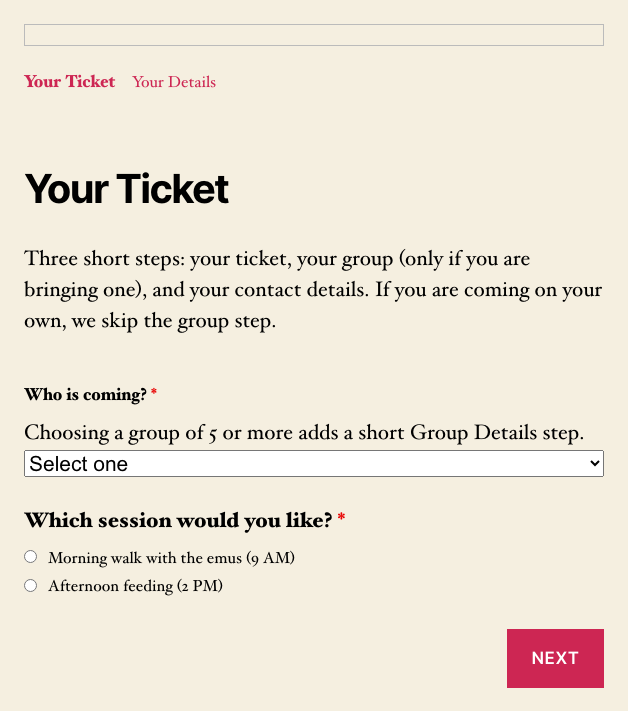
Here’s what a visitor sees on the first step of a Ninja Forms multi-step form, with the step names and progress bar across the top.
Want to see how it comes together? Our guide to building a WordPress multi page form walks through every setting, step by step.
Which multi-step form builder should you pick?
It depends on whether your form needs the extras, and whether you already run one of these plugins. If your current plugin has a paid plan with multi-step, staying put is usually the cheaper move, since switching means rebuilding your forms.
- Want steps, page skipping and save-and-continue all as core features, and don’t need a free version? Look at Gravity Forms.
- Want free conditional logic while you decide, and one price for everything later? Fluent Forms.
- Want every feature in the cheapest all-in plan of the bunch? Everest Forms.
- Already on WPForms or Formidable Forms? Multi-page is in both Basic plans, and saving for later costs $399 a year in each.
- Want a complete multi-step builder at the lowest price here, with the option to add step skipping or saving later? Ninja Forms.
Here’s our take. On most long forms, short steps and clear step names do the heavy lifting. Save-and-continue earns its price on forms that take more than one sitting, like a long application, so don’t pay for it on a ten-question registration form.
Building a lead form? Here’s how to build a multi-step lead form people finish.
Pick your builder and turn that long form into short steps
If you’ve read through the comparison above, you know multi-step costs something in every builder here, so the smart move is paying only for the features your form needs. For most long forms that’s short steps and clear step names, and the extras can wait until your form calls for them.
If Ninja Forms is your pick, pick up the Multi Step Forms add-on and give your visitors a long form they’ll finish.
Try Ninja Forms Today
Always free, with premium features available through our memberships.