What’s Included
This form is designed to do more than just collect email addresses — it simplifies your list-building process by connecting to major email marketing platforms and delivering automated responses to your subscribers.
-
Email Notification: Sends a confirmation email to the subscriber and notifies your admin team.
-
Success Message: Displays a brief thank-you message upon submission.
-
Redirect: Optionally send users to a custom thank-you or confirmation page.
-
Zapier/Webhooks: Trigger custom automations such as Slack notifications, calendar events, or task creation.
-
Email Marketing Integration: Works with Mailchimp, ActiveCampaign, ConvertKit, AWeber, Constant Contact, EmailOctopus, MailPoet, and others.
A smart newsletter form like this one helps ensure you never miss an opportunity to connect with your audience. It simplifies automation, improves organization, and offers a professional experience from the very first touchpoint.
💡 Get started today and grow your mailing list with a customizable, integration-ready form that works for any industry, any platform, and any audience.
How Can the Newsletter Signup Form Be Used?
Many site owners struggle to grow their mailing lists because of clunky, unattractive forms or limited integration options. The newsletter signup form template helps you quickly collect subscriber information and connect it with your marketing tools — without coding. Whether you’re promoting a product, running a blog, or sending regular updates, this form provides a smooth and welcoming user experience. It also ensures submissions are stored safely and follow best practices for email list management.
1. Download and Import the Template – Upload the form via the Ninja Forms import tool and adjust field list options as needed.
2. Connect Email Marketing – Connect to your preferred email marketing service using one of our supported add-ons.
3. Confirm Email Notifications – Set custom confirmation messages using merge tags to personalize communication for subscribers and admins.
5. Publish & Share – Embed the form on landing pages, blog sidebars, or in your site footer to increase visibility and signups.
⚠ This template is compatible with all Ninja Forms email marketing add-ons including Mailchimp, AWeber, Constant Contact, ActiveCampaign, ConvertKit, and more. If you don’t plan to use an integration, you can still collect emails for manual processing.
What’s Available on the Newsletter Form Template?
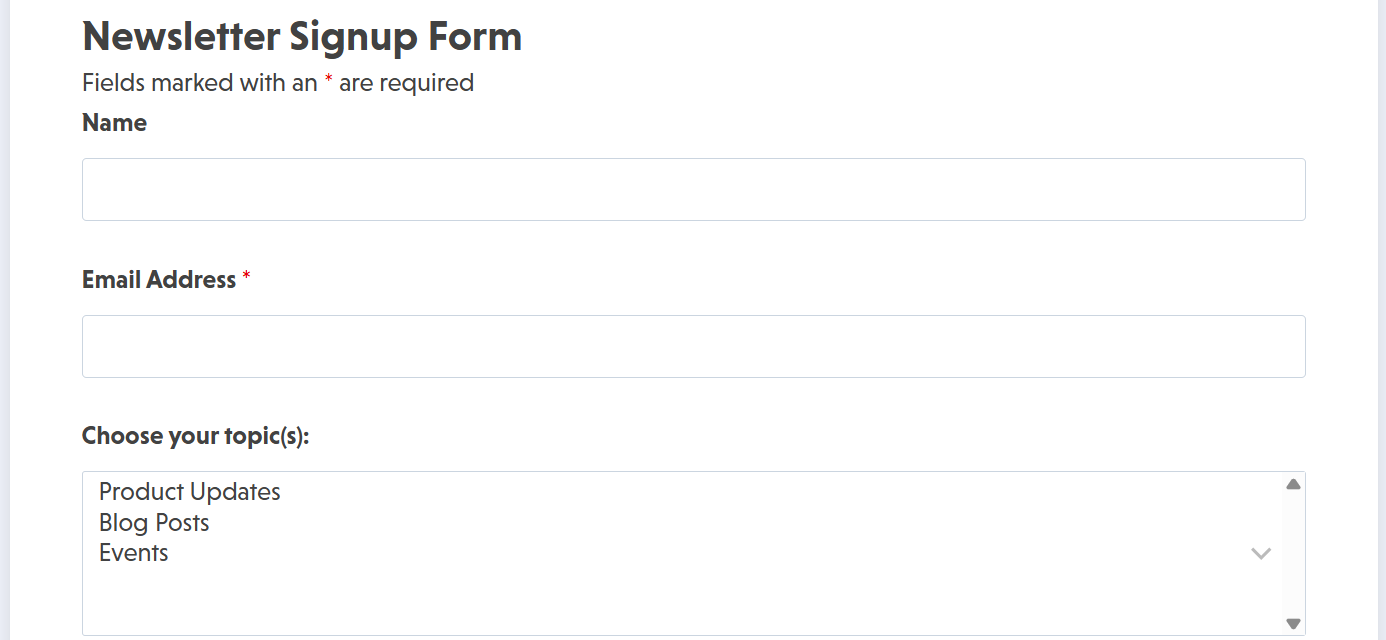
This form is designed with simplicity and lead capture efficiency in mind. It includes key fields for collecting subscriber information and a clear call-to-action to boost conversion rates.
Form Fields
- Subscriber Details
- Name (Single Line Text – Optional)
- Email Address (Email – Validation Enabled, Required)
- Preferences (Optional)
- Newsletter Topics (Multi-Select List – Optional; e.g., Product Updates, Blog Posts, Events)
- Frequency Preference (Radio List – Optional; e.g., Weekly, Monthly, Quarterly)
- Consent & Security
- Consent Checkbox (Single Checkbox – Required; e.g., “I agree to receive email updates.”)
- reCAPTCHA (Recaptcha v3 – Optional for spam prevention)
- Subscribe Button (Submit – Required to complete form)
Make it your template
Every template is ready to go live and fully customizable. Tweak a few things or renovate from the ground up. Ninja Forms gives you the tools either way.