What’s Included
This online booking form gives service businesses, spas, consultants, studios, and hospitality teams everything they need to let a customer pick a service, choose a date, and pay right then, all in one visit. Built with Ninja Forms’ free core features and the PayPal Checkout add-on, this booking form collects the details you need to confirm an appointment and takes payment at the moment of booking, so a reservation becomes a paid commitment instead of a placeholder on your calendar. Ten straightforward fields keep the form fast to complete on any device.
Your Information
- Full Name (Single Line Text): Captures who is booking, used to personalize the confirmation email and PayPal receipt. Required.
- Email Address (Email): Collects a validated address for the booking confirmation and payment receipt. Required.
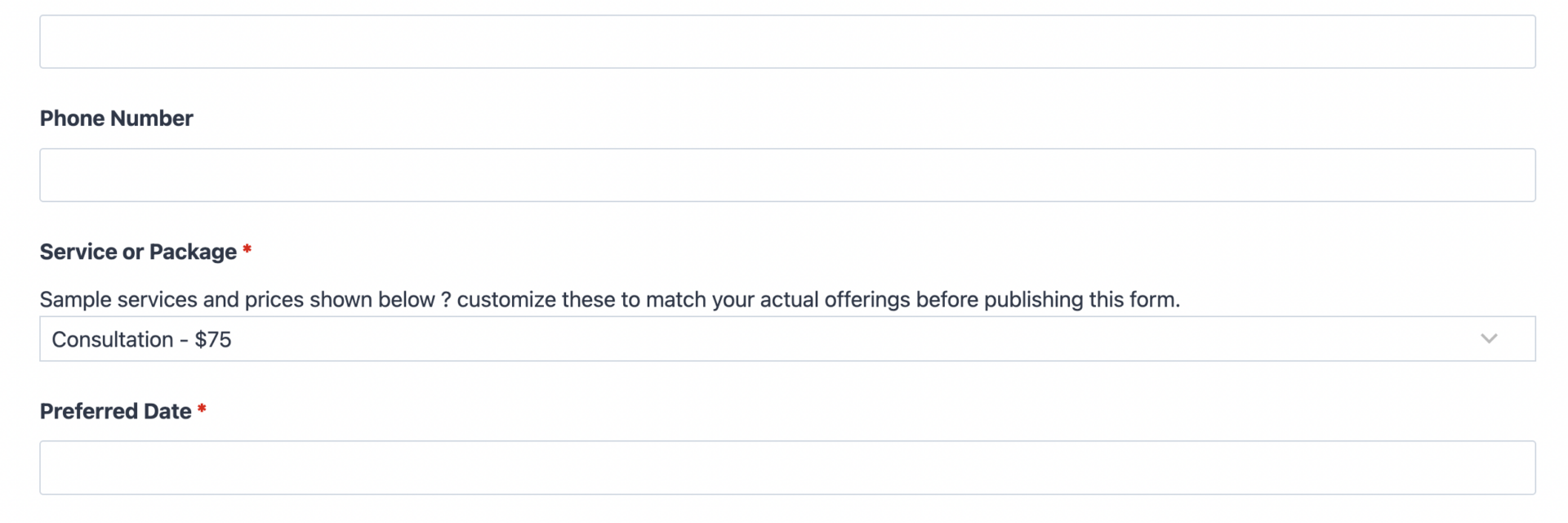
- Phone Number (Phone): Gives you a fast way to reach a customer about a schedule change or reminder. Optional.
Booking Details
- Service or Package (Select): Lists the services or packages a customer can book, each with a listed price, so the total is clear before they pay. Required.
- Preferred Date (Date): Uses Ninja Forms’ built-in date picker so customers choose an available day without typing. Required.
- Preferred Time (Select): Offers a short list of time slots you define, such as morning, afternoon, or evening blocks. Optional.
- Number of Guests (Number): Useful for group sessions, classes, or reservations that seat more than one person. Optional.
- Special Requests or Notes (Paragraph Text): Lets a customer flag accessibility needs, allergies, or scheduling preferences before you confirm. Optional.
Payment & Confirmation
- Estimated Total (Single Line Text): Displays the calculated price the moment a service and guest count are chosen, so nothing is a surprise at checkout. Optional, auto-calculated and read-only.
- Spam Check (hCaptcha): Blocks automated submissions without adding friction for real customers. Never marked required, always active.
- Submit (Submit): Sends the customer into PayPal Checkout to complete payment and finalize the booking.
This booking form uses Ninja Forms’ free built-in Calculations feature to multiply the selected service price by the number of guests, producing the Estimated Total shown before payment. Because calculations are a core part of Ninja Forms, there is nothing extra to buy to make the math work; only the payment step itself calls on an add-on.
Automated Responses and Smart Integrations
A booking form should do more than collect information. It should confirm the appointment, take payment, and keep your team in the loop without anyone lifting a finger. This template handles the confirmation and payment sequence automatically, then connects to the tools you already use for follow-up.
- Email Notification: Sends the customer a confirmation with their booked service, date, time, and payment receipt, plus a copy to your team with every submission detail.
- Success Message: Displays an on-screen thank-you once payment clears, confirming the appointment is locked in.
- Redirect: Optionally sends customers to a confirmation page with directions, prep instructions, or a calendar download.
- Payment Processing (Required): Uses PayPal Checkout to collect payment at the moment of booking, the step that turns a request into a confirmed, paid reservation and cuts down on no-shows. PayPal is Ninja Forms’ preferred payment partner and supports cards, Venmo, and Pay Later at checkout.
- Anti-spam Protection: Uses hCaptcha to keep bot submissions out while staying invisible to real customers.
Enhanced Functionality (Optional)
None of the following are required to use this booking form, but each one solves a common scheduling headache for growing service businesses.
- Flexible Scheduling (Optional): Add the Advanced Datepicker add-on to block out already-booked slots, limit submissions per time slot, and stop two customers from claiming the same appointment.
- Dynamic Fields (Optional): Add Conditional Logic to show the Number of Guests field only for group-friendly services, or to reveal Special Requests only after a service is selected.
- Custom Styling (Optional): Add Layout and Styles to arrange the Preferred Date and Preferred Time fields side by side and match the form to your brand.
- CRM Integration (Optional): Sync every booking to your customer records so repeat clients are easy to recognize. Connect with OnePageCRM to automatically create a new contact and set a follow-up reminder after each booking. Other supported CRMs include HubSpot, Salesforce, and Zoho CRM.
Add only what your business actually needs. Every one of these enhancements layers cleanly onto the base booking form without touching the fields or payment flow already in place.
Requires Ninja Forms (free) · Import, customize, publish in minutes
How Can the Booking Form Be Used?
Phone tag, missed calls, and half-filled calendars cost service businesses real money. A booking form solves this by letting a customer choose a service, pick a date, and pay in a single visit to your site, so a confirmed reservation replaces a maybe. Because the payment step happens at booking rather than after, you spend less time chasing deposits and fewer people fail to show. Explore the most common ways this template supports different service businesses:
Spas and Salons: Fill Every Chair, Get Paid Up Front
A spa or salon can list each treatment in the Service or Package field with its price attached, so a client sees the cost of a facial or a color service before they commit. Preferred Date and Preferred Time let clients self-select an opening, cutting down on front-desk phone calls. Because PayPal Checkout collects payment the moment the booking form is submitted, a slot on the schedule is a paid appointment, not a tentative hold that might get canceled at the last minute.
Consultants and Coaches: Turn Inquiries into Paid Sessions
Consultants can use the Service or Package field to offer a single strategy call or a multi-session package, with Special Requests or Notes capturing what the client wants to cover. This appointment booking form removes the back-and-forth of proposing times over email; a client submits once, pays once, and both sides have a confirmed slot. It pairs naturally with a Consultation Booking Form if you want a template built specifically around discovery calls and intake questions.
Fitness Studios and Class Instructors: Reserve a Seat, Reduce No-Shows
Studios can use Number of Guests to handle a family or friend group booking a session together, while the Estimated Total updates automatically as guest count changes. Requiring payment at signup is one of the simplest ways to reduce no-shows for a class with limited spots. For a template tuned specifically to recurring class schedules and per-seat pricing, see the Class Booking Form.
Hospitality and Event Venues: Confirm the Booking, Collect the Deposit
Small venues, bed and breakfasts, and event spaces can adapt the Service or Package field to list room types or event packages, with Preferred Date capturing the requested stay or event date. Collecting payment through PayPal Checkout at the time of booking functions like a deposit, giving the business confidence the date is truly held. For guest-heavy hospitality bookings with room-specific details, the Hotel Booking Form template builds on this same foundation.
Frequently Asked Questions About the Booking Form
Is the booking form template free?
Yes. The booking form template itself is a free download, and it runs on the free version of Ninja Forms. The only cost to be aware of is the PayPal Checkout add-on required to collect payment, and PayPal itself only charges its standard per-transaction processing fee, never a subscription.
Do I need coding skills to customize this booking form?
No coding is required. Every field, label, and price in this booking form can be edited through the Ninja Forms drag-and-drop builder. You can rename services, change prices, add a field, or adjust the confirmation email entirely through point-and-click settings.
Will this booking form work on mobile devices?
Yes. The form is built to be fully responsive, so customers can pick a service, choose a date, and complete PayPal Checkout from a phone, tablet, or desktop without any layout issues.
Can I collect payment when someone submits the booking form?
Yes, that is the core design of this template. The PayPal Checkout add-on is required and processes payment for the Estimated Total the moment a customer submits their booking, so you are paid before the appointment happens rather than chasing payment afterward.
Can I integrate the booking form with my CRM or email marketing tool?
Yes. This template supports CRM add-ons including OnePageCRM, HubSpot, Salesforce, and Zoho CRM, letting you sync every booking to a customer record automatically. Browse the full Ninja Forms add-ons library for additional integration options.
Can I prevent two customers from booking the same time slot?
The base template collects a preferred date and time as simple fields, so overlap prevention is not automatic out of the box. Adding the Advanced Datepicker add-on lets you block out unavailable slots and cap submissions per time slot, which stops double-booking without adding complexity for the customer.
Can I add or remove fields from the booking form?
Yes. The field list is a starting point, not a fixed structure. Add a field for a specific intake question, remove one you don’t need, or use Conditional Logic to show certain fields only for certain services.
What happens to the data customers enter?
Submissions are stored securely in your WordPress database through Ninja Forms’ Record Submission action, viewable in your dashboard. Only add fields for information you are prepared to store responsibly, and never collect sensitive data like payment card numbers directly on the form since PayPal Checkout handles that securely on its own hosted page.
Is there a booking form template for my specific industry?
This page covers the general-purpose booking form, but Ninja Forms also offers templates built for specific booking scenarios: the Hotel Booking Form for hospitality stays, the Consultation Booking Form for discovery calls and client intake, and the Class Booking Form for recurring classes and sessions.
Does this template work with page builders like Elementor or Divi?
Yes. Ninja Forms embeds through a shortcode, block, or widget, so this booking form drops into Elementor, Divi, the WordPress block editor, or any other page builder without any special setup.
Make it your template
Every template is ready to go live and fully customizable. Tweak a few things or renovate from the ground up. Ninja Forms gives you the tools either way.