What’s Included
This event registration form template gives attendees one place to sign up and pay, so your nonprofit gala, fundraising dinner, community workshop, or class registration runs itself. Attendees pick their event or session, enter their details, and complete payment through PayPal Checkout in a single step. You get a clean, exportable list of confirmed registrants with payment already collected, instead of reconciling a sign-up sheet against a separate PayPal account by hand. The layout stays simple: enough fields to capture what you need, not so many that people abandon the form halfway through.
Attendee Information
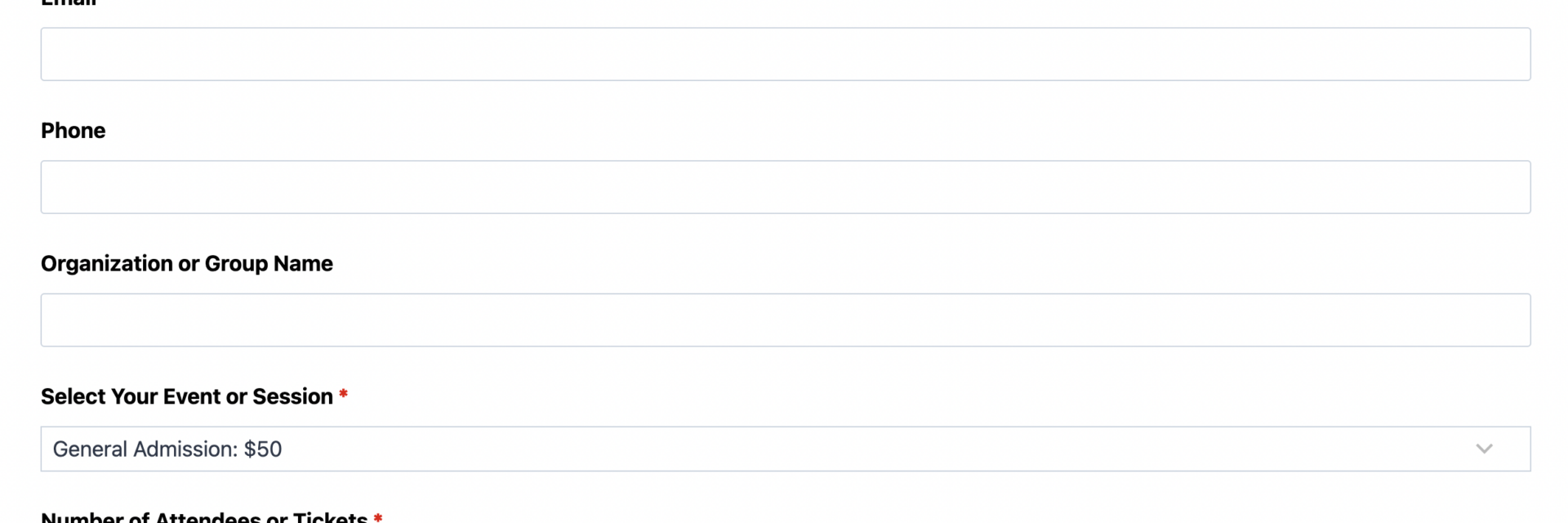
- Attendee Name (Single Line Text): Captures the full name of the person registering. Required.
- Email (Email): Used to send the registration confirmation and payment receipt. Required.
- Phone (Phone): Optional contact number for day-of-event questions or last-minute changes. Optional.
- Organization or Group Name (Single Line Text): Lets nonprofits, schools, and community groups note which organization or class a registrant represents, useful for group billing or attendance tracking. Optional.
Event and Payment Details
- Select Your Event or Session (Select): A dropdown listing available events, sessions, or ticket types, each with an associated price used in the total calculation. Required.
- Number of Attendees or Tickets (Number): Collects how many spots the registrant is reserving. Required.
- Total Amount Due (Single Line Text): Automatically calculated and displayed before payment, so registrants always see an accurate total. Read-only.
Additional Details
- Dietary Restrictions or Special Requests (Paragraph Text): Gives event coordinators advance notice of allergies, accessibility needs, or seating requests. Optional.
Spam Protection & Submission
- Spam Check (hCaptcha): Blocks automated bot submissions without adding friction for real attendees.
- Submit (Submit): Finalizes the registration and triggers payment processing.
This template uses Ninja Forms’ free built-in Calculations feature to calculate the Total Amount Due by multiplying the price attached to the selected event or session by the Number of Attendees or Tickets entered, so registrants see an accurate total before they pay.
Automated Responses and Smart Integrations
This event registration form does more than collect names and payments. It confirms every registration automatically, delivers a payment receipt, and can sync attendee data with the tools your organization already uses to follow up and stay organized.
- Email Notification: Sends the registrant a confirmation with their event details, ticket count, and payment amount, plus a copy to your team with full submission details for check-in and follow-up.
- Success Message: Displays a clear thank-you message confirming the registration and payment, with next steps like adding the event to a calendar or contacting the organizer.
- Redirect: Optionally redirects registrants to a custom thank-you page with event details, directions, or a link to share the event with others.
- Anti-spam Protection: Uses hCaptcha to prevent bot entries while keeping registration quick and friction-free for real attendees.
- Payment Processing (Required): Collects registration payment through PayPal Checkout, Ninja Forms’ preferred payment partner, supporting PayPal balance, credit and debit cards, Venmo, and Pay Later at checkout so attendees can pay however they prefer.
Enhanced Functionality (Optional)
- Conditional Logic (Optional): Show or hide fields based on ticket type. For example, display the dietary restrictions field only for in-person sessions, or reveal a group discount note once attendee count passes a threshold. Requires Conditional Logic.
- CRM Integration (Optional): Keep a running record of who has registered for your programs over time. Connect with OnePageCRM to log new registrants and set follow-up reminders ahead of your next event. Other supported CRMs include HubSpot, Salesforce CRM, and Zoho CRM.
- PDF Form Submission (Optional): Automatically generate a printable registration confirmation or ticket for each attendee. Requires PDF Form Submission.
Together, these responses turn a simple sign-up form into a complete registration and payment system, so you spend less time reconciling spreadsheets and more time planning the event.
Requires Ninja Forms (free) · Import, customize, publish in minutes
How Can the Event Registration Form Be Used?
Coordinating a paid event often means juggling two separate processes: a sign-up form to know who is coming, and a separate payment link or invoice to collect money. That gap creates extra manual work, reconciling a spreadsheet against PayPal deposits and following up with registrants who signed up but never paid. An event registration form that combines registration and payment in one step closes that gap. Attendees choose their event, pay in the same session, and coordinators end up with one clean list of confirmed, paid registrants instead of two mismatched ones. Explore the most common ways this template supports different organizers:
Nonprofit Event Coordinators: Galas and Fundraising Dinners
Nonprofits running an annual gala or fundraising dinner need an exact headcount for catering while also collecting ticket payments up front. This nonprofit event registration form lets supporters select their table or ticket type, note dietary restrictions, and pay through PayPal Checkout in one visit, so your team receives a finalized guest list with payment already confirmed. Pairing the form with CRM Integration keeps a record of who attended for next year’s outreach. There is no chasing down unpaid registrations days before the event, just a clean list ready for check-in.
Educational Program Managers: Paid Workshops and Class Registrations
Schools, tutoring centers, and community education programs use this event registration form template to open registration for paid workshops, continuing education classes, or seasonal programs. Parents or students select a session, enter attendee details, and pay tuition or a materials fee directly through the form. The Number of Attendees field supports registering multiple children or seats at once, and the calculated Total Amount Due keeps pricing transparent before payment. Program managers get an accurate roster and confirmed payment without switching between a sign-up sheet and a separate billing tool.
Community Organizers: Conference Sessions and Multi-Track Events
Community groups hosting a one-day conference or multi-session event use the Select Your Event or Session field to let attendees choose which track or session they are registering for, each with its own price. Combined with Conditional Logic, organizers can reveal session-specific questions only when relevant, keeping the registration form short for every attendee regardless of which track they pick. Registrants pay their session fee immediately, and organizers receive one consolidated attendee list instead of separate lists per track.
Membership Groups: Recurring Program Sign-Ups
Membership organizations and recreation programs use this template for recurring registrations, such as monthly workshops, club meetings with a cover charge, or seasonal class series. Because the form captures organization or group name alongside attendee details, coordinators can track which group or department a registrant belongs to for reporting. A PDF Form Submission confirmation gives each registrant a printable receipt and event summary, reducing support requests asking whether a payment went through.
Frequently Asked Questions About the Event Registration Form
Is the event registration form template free?
Yes. This online event registration form template is free to download and use. It is built for Ninja Forms, which is also free to install from the WordPress plugin directory. Accepting payments requires the PayPal Checkout add-on, Ninja Forms’ preferred payment partner, which connects to your own PayPal Business account so funds go directly to you.
Do I need coding skills to customize this template?
No coding is required. Import the .nff file into Ninja Forms and use the drag-and-drop builder to edit field labels, add or remove ticket options, and adjust email notifications. Most organizers can update the event name, dates, and pricing in a few minutes.
Can attendees pay for tickets directly through the form?
Yes. This is an event registration form with payment built in, so attendees select their event or session, see the calculated total, and pay by PayPal balance, credit or debit card, Venmo, or Pay Later without leaving the registration form.
Will this event registration form work on mobile devices?
Yes. Ninja Forms builds every template to be fully responsive, so the registration and payment steps display correctly on phones and tablets. This matters for events promoted through email or social media, where many registrants sign up from a mobile device.
Can I add multiple ticket types or event sessions?
Yes. The Select Your Event or Session field supports multiple options, each with its own price used in the Total Amount Due calculation. You can list separate sessions, ticket tiers, or class dates within the same event registration form.
Can I integrate the form with my CRM or email marketing tool?
Yes. Optional add-ons let you connect registrations to your CRM, including OnePageCRM, HubSpot, Salesforce CRM, and others, so registrant records carry forward to future outreach and follow-up.
What happens to the data attendees submit?
Submission data is stored securely in your WordPress database, not on a third-party server, giving you full control. You can view, export, or delete records from the Ninja Forms dashboard, and configure GDPR-compliant data export or deletion requests if needed.
Does this template work with page builders like Elementor or Divi?
Yes. Ninja Forms embeds using a standard shortcode or block, so this event registration form works inside Elementor, Divi, the WordPress block editor, and most other page builders without extra configuration.
Can I use this template for multiple events or on multiple websites?
Yes. There is no limit on how many times you use the template. Duplicate the form for each new event, or reuse a single form across recurring sessions by updating the Select Your Event or Session options.
Make it your template
Every template is ready to go live and fully customizable. Tweak a few things or renovate from the ground up. Ninja Forms gives you the tools either way.