Content from Your Visitors
Accept user-submitted posts and pages from any WordPress form, without giving contributors dashboard access.
Risk-Free 14 Day Guarantee
You'll love it or we'll refund you fully. No questions asked.
Your visitors shouldn’t need access to the WordPress dashboard to contribute content to your site. The Front-End Posting add-on for Ninja Forms bridges that gap, turning any form into a post submission tool that creates real WordPress content directly from the front end.
Whether you’re running a community blog, a directory site, or a member portal that accepts user-submitted posts, your contributors get a clean form experience while you stay in full control of what gets published.
With Front-End Posting, you can:
Key Features
Create Posts from Forms
Map form fields to post title, content, and excerpt with a single action configuration.
No Dashboard Access
Contributors submit content from the front end of your site. They never see the WordPress admin.
Post Status Control
Route submissions to Draft, Pending Review, Private, or Published. Full editorial control over every submission.
Pages & Custom Post Types
Works with standard posts, pages, and any registered custom post type on your site.
Categories & Tags
Set default taxonomies automatically or let users choose from existing categories and tags via form fields.
Custom Post Meta
Map any form field to a custom meta key. Add as many meta mappings as your post type requires.
Author Attribution
Attribute submitted posts to the logged-in user or to any registered user on your site.
And Much More…
Post excerpt mapping, custom taxonomy support, and the full power of the Ninja Forms builder alongside every submission.
Key Features of Front-End Posting
Create WordPress posts from any form
Add a single Create Post action to any Ninja Forms form and map your fields directly to post title, content, and excerpt. Your contributors fill out the form; WordPress receives a fully formed post. No shortcodes to wrestle with, no theme customization required, and no coding knowledge needed to get started.
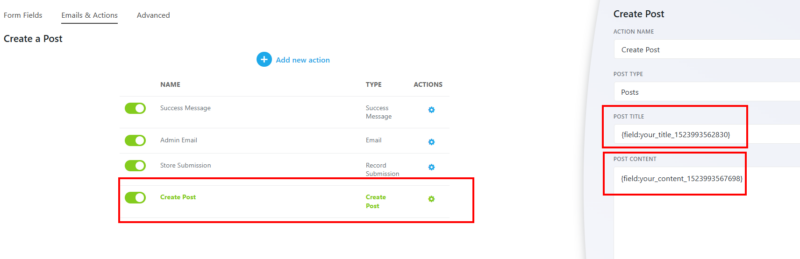
No admin access required
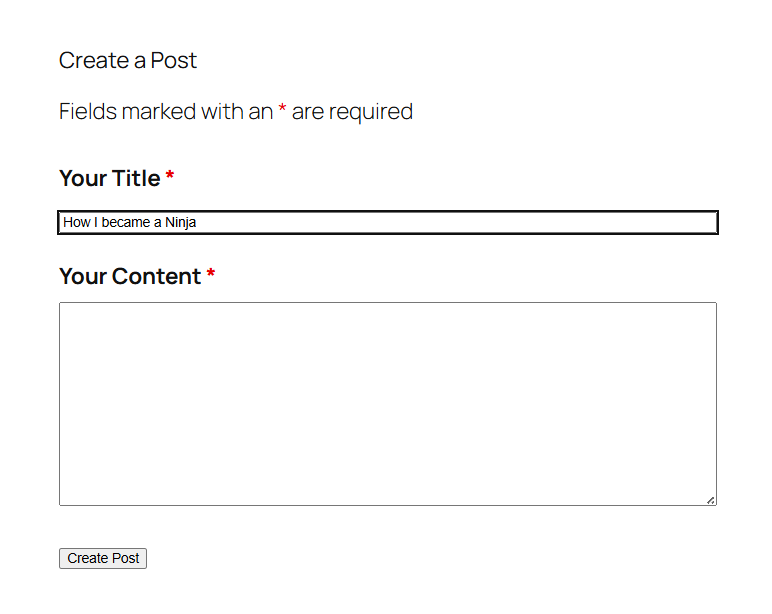
Users submit content from a form on the front end of your site. They never see the WordPress dashboard, the post editor, or any admin panel. For sites that depend on user-submitted posts, this is the difference between a workflow that works and one that creates risk. Contributors get exactly what they need and nothing more.
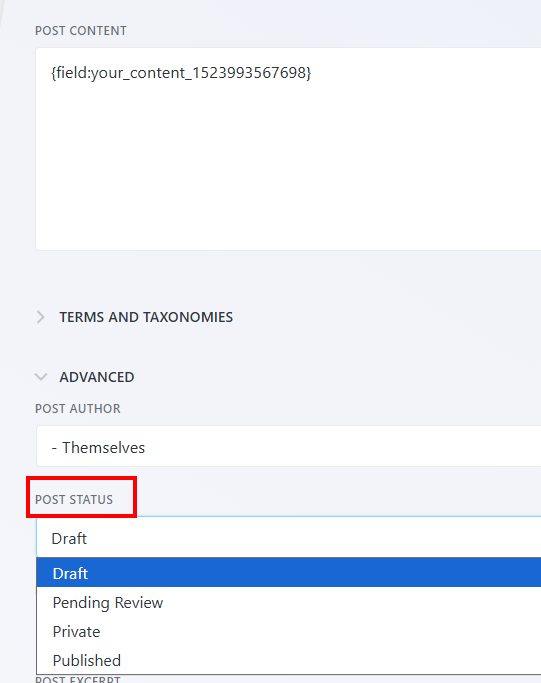
Post status control for editorial review
Set submitted content to Draft, Pending Review, Private, or Published. If your site needs editorial approval before anything goes live, route all submissions through Draft or Pending Review and use standard WordPress review tools to approve or reject. You decide when and whether content appears on your site. This is the content moderation workflow many community and multi-author sites need but rarely find in a front-end posting plugin.
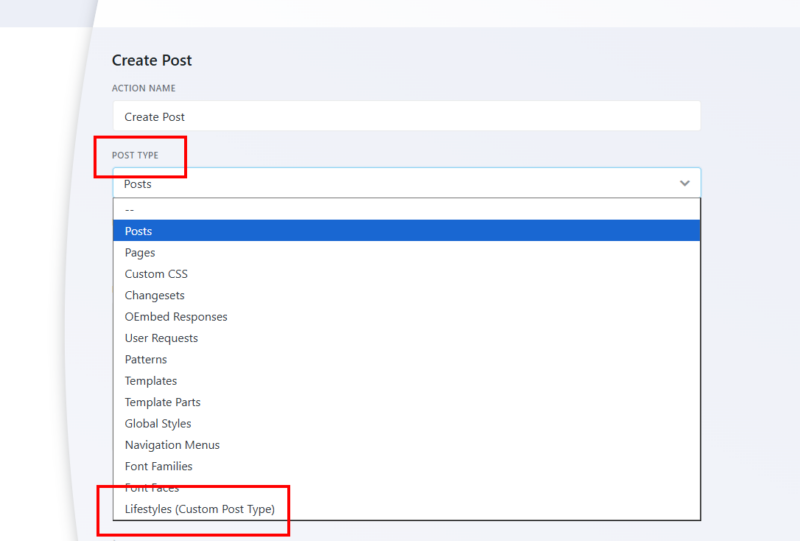
Pages and custom post types
Front-End Posting works with any registered post type, not just standard posts. Create pages, custom post types added by your theme or a third-party plugin, or any CPT your site uses. Directory listings, property submissions, event entries, classified ads, and job postings are all straightforward use cases once you select the target post type from the action configuration.
Category and tag support
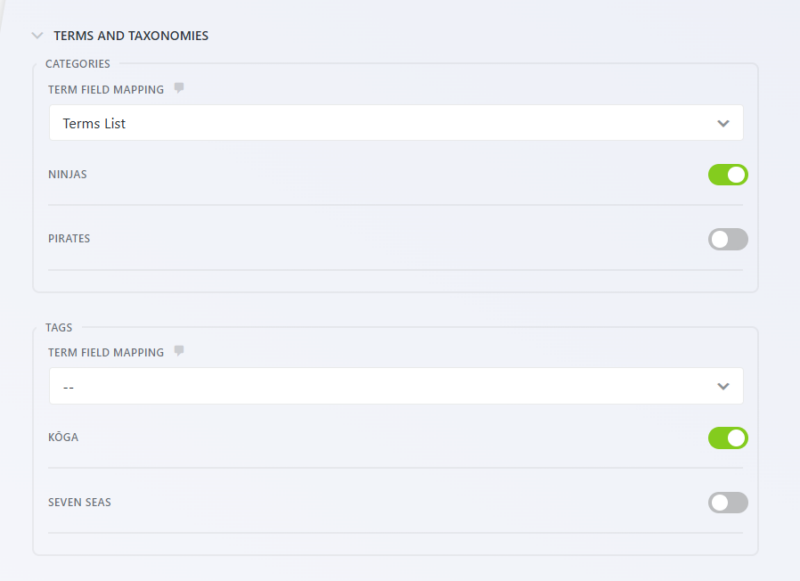
Set default categories and tags automatically, or let users choose from your existing taxonomy terms via form fields. Custom taxonomies are supported as well. If you want contributors to self-categorize their submissions, add a Terms field to the form and map it to the appropriate taxonomy. If you want to assign categories silently on every submission, set the defaults in the action and users never see it.
Custom post meta
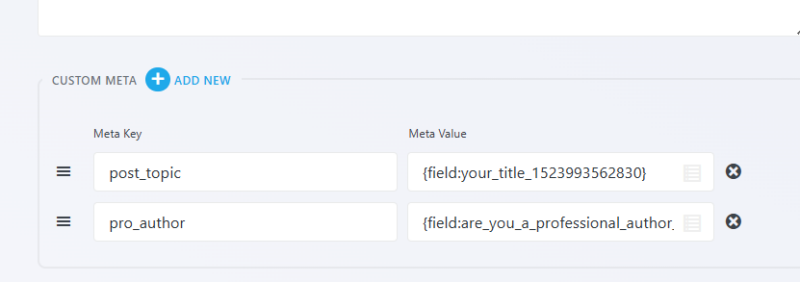
Map any form field to a custom post meta key. Set the meta key manually, then use the merge tag picker to assign the field value. You can add as many meta mappings as your post type requires. This is what makes Front-End Posting practical for directory-style sites and classified listings, where structured data like price, location, or contact info needs to be stored alongside the post.
Post author attribution
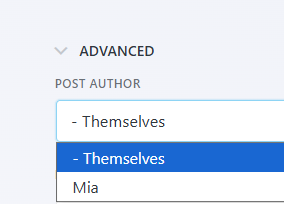
Attribute submitted content to the logged-in user automatically, so posts appear under each contributor’s author profile on your site. You can also assign posts to any specific registered user if a fixed attribution makes more sense for your workflow. For sites with registered contributors, this means every user-submitted post is properly credited without any manual editing after the fact.
Collect posts without opening your backend
Turn any form into a portal where people submit articles, listings, or updates that publish to your site, with no WordPress login required. Add it to your cart and open a submission portal on your site.
Backed by priority email support and a 14-day money-back guarantee.
The Right Tool for User-Submitted Posts on WordPress
Most WordPress front-end post submission plugins ask you to choose between flexibility and control. Either you give contributors too much access, or you lock things down so tightly that the submission experience becomes friction. Front-End Posting takes a different approach: the form handles the contributor experience, WordPress handles the content, and you set the rules for how the two connect.
Because it runs as a Ninja Forms action, you get the full power of the Ninja Forms builder alongside it. Add conditional logic to show or hide fields based on post type. Use the HTML field to give contributors a rich text editor for post content. Combine with the File Uploads add-on to let users attach images or documents to their submissions. The add-on does the posting; the builder handles everything else.
Content Moderation Built Into the Submission Workflow
One of the most common problems with user-generated content is the gap between submission and review. If content auto-publishes, you lose control. If the review process is complicated, you lose contributors. Front-End Posting keeps both sides manageable.
Set the default post status to Pending Review on the action. Every submission lands in the WordPress review queue automatically, visible to editors and administrators but not to the public. Pair the form with an email notification action and your editorial team gets an alert the moment a new submission arrives. Approve it, edit it, or discard it, all through the standard WordPress workflow your team already knows.
Common Use Cases
- Accept guest post submissions without inbox management: Replace a contact form or email address with a structured submission form. Submissions go straight into WordPress as draft posts, ready for editorial review. Start with a pre-built guest submission template or build your own.
- Run a community blog with registered contributors: Let members submit posts under their own author profile without any dashboard access. User-submitted posts appear attributed correctly the moment you approve them.
- Build a directory or listings site on custom post types: Map form fields to a custom post type, assign custom meta for structured data like price or location, and let users add their own listings directly from the front end.
- Manage event submissions for a calendar or events site: Accept event entries from organizers, store event details in custom meta fields, and route all submissions through Pending Review before they appear on the calendar.
- Collect classified ads or job postings without a plugin suite: Use a single form mapped to a custom post type with relevant meta fields. No specialized classifieds plugin required.
- Moderate member-generated content on a membership site: Combine with a membership plugin to gate the submission form, then use post status control to approve content before it appears to other members.
Let your members post, not into your dashboard
Give a class, a membership, or a community a form-based way to contribute content, posts, listings, directory entries, without handing anyone backend access. Add it to your cart and let your group post on their own.
Priority email support and a 14-day money-back guarantee included.
Frequently Asked Questions
-
Install the Front-End Posting add-on for Ninja Forms, then add a Create Post action to any form. Map your form fields to post title, content, and excerpt using merge tags. When a visitor submits the form, WordPress creates the post automatically. No dashboard access is needed for contributors.
-
The Front-End Posting add-on for Ninja Forms is a flexible option for WordPress sites that need user-submitted posts without giving contributors admin access. It supports posts, pages, and custom post types, includes post status control for editorial review, and connects to the full Ninja Forms builder for conditional logic and multi-field forms.
-
Yes. With the Front-End Posting add-on, contributors submit content through a standard form on the front end of your site. They never see the WordPress admin panel or post editor. The form submission triggers post creation in the background.
-
Add the Front-End Posting add-on to Ninja Forms and build a submission form with fields for post title and content. Set the post status to Pending Review so every submission requires editorial approval before publishing. Pair the form with an email notification action so your team knows when a new submission arrives.
-
Yes. The add-on works with any registered post type on your site, including custom post types added by your theme or a plugin. Select the target post type from the action configuration, and submissions will create content in that post type automatically.
-
Yes. You can set default categories and tags in the action configuration so every submission is automatically assigned the terms you choose. You can also add a Terms field to the form and let contributors select from your existing taxonomy terms themselves. Custom taxonomies are supported as well.
-
In the Create Post action settings, set the Post Status to Draft or Pending Review. Submitted content will appear in the WordPress editorial queue but will not be publicly visible until an editor or administrator approves it. This keeps you in control of everything that appears on your site.
-
Licenses are subscription based and will auto-renew each year unless cancelled. If cancelled, you may still use your extensions but will no longer receive important updates or support once the license expires.
-
We don't have a demo or trial version of our add-ons, but we do offer a 14-day full refund policy for any reason whatsoever.
-
Licenses are subscription based and will auto-renew each year unless cancelled. If cancelled, you may still use your extensions but will no longer receive important updates or support once the license expires.